Silverlight Console Applications

Last week Harry Pierson wrote:

I wonder what the hosting model for the Silverlight CLR looks like? According to the "essential architecture", Silverlight includes the .NET Framework, the Core Presentation Framework and the Browser Host. But can you host somewhere other than the browser?

When I examined the Silverlight mscorlib assembly I noticed that Console.WriteLine and Console.ReadLine were still available. The functionality left in the Silverlight system assemblies has been pretty ruthlessly trimmed down. This lead me to believe that the Console class had been left there for a reason and there must be a way to run Silverlight console applications.

After some experimentation I have come up with agx.exe - a Silverlight console runner. The agx.exe name is a mixture of agclr.dll (one of the Silverlight assemblies) and clix.exe (the SSCLI/Rotor managed code runner).

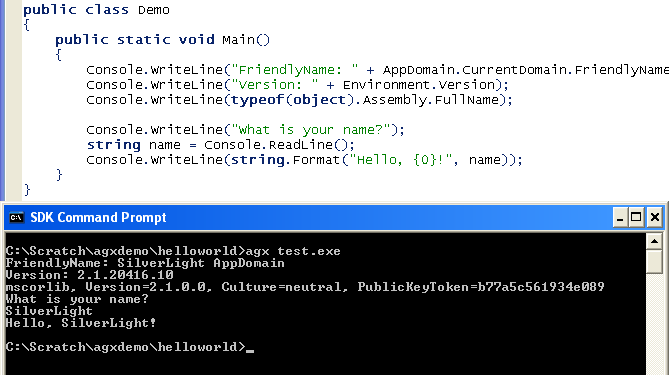
Below is an example that shows some environment information and demonstrates Console.ReadLine working:
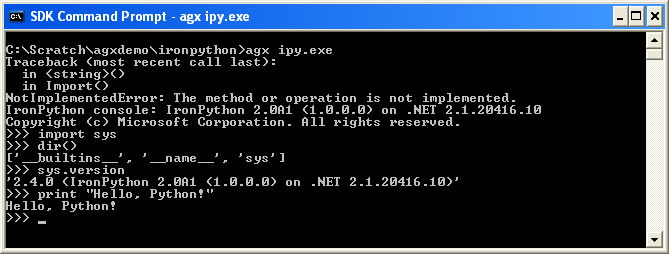
Hear is the IronPython interactive shell running as a console application inside Silverlight. I did have to tweak the source a bit to get this working. A few things like Assembly.Load(...) behave a little differently to their .NET 2.0 equivalents. A few IronPithon features appear not to be implemented when compiled for Silverlight.
The reason I'm experimenting with Silverlight console applications is so that unit tests can be executed inside the CoreCLR. I will then be able to add a 'Test With... Silverlight' option to TestDriven.NET. If you would like to try an early version of this functionality, feel free to drop me an email.

Published Thursday, May 10, 2007 7:13 AM by Jamie Cansdale

Comments

# re: Silverlight Console Applications

Cool. :-)

Do you think this has any application beyond testing?

Friday, May 11, 2007 3:51 PM by Fuzzyman

# re: Silverlight Console Applications

Testing is the main application I can see for this at the moment. There are plenty of APIs implemented for the CoreCLR, but many of them are hobbled with [SecurityCritical] attributes.

If you wanted to write a file, you would need to place your assembly in the 'Microsoft Silverlight' directory and sign it with one of the Microsoft keys. I haven't tried this yet. ;)

Saturday, May 12, 2007 8:00 AM by Jamie Cansdale

# re: Silverlight Console Applications

[URL=www.lebend16.org/filme-porn] filme porn [/URL]   <a href='www.lebend16.org/filme-porn'> filme porn </a>

Saturday, June 16, 2007 8:45 AM by ...

# Developer News &raquo; Blog Archive &raquo; &#8220;Kerberos delegation .. end to end&#8221; Part IISQL install. So

Pingback from  Developer News  &raquo; Blog Archive   &raquo;  &#8220;Kerberos delegation .. end to end&#8221; Part IISQL install. So

# Developer News &raquo; Blog Archive &raquo; Silverlight Console ApplicationsLast week Harry Pierson&nbsp;wrote: I wonder what the

Pingback from  Developer News  &raquo; Blog Archive   &raquo;  Silverlight Console ApplicationsLast week Harry Pierson&nbsp;wrote: I wonder what the

# Developer News &raquo; Blog Archive &raquo; Silverlight Console ApplicationsLast week Harry Pierson&nbsp;wrote: I wonder what the

Pingback from  Developer News  &raquo; Blog Archive   &raquo;  Silverlight Console ApplicationsLast week Harry Pierson&nbsp;wrote: I wonder what the

# Silverlight Console Applications

Pingback from  Silverlight Console Applications

Tuesday, November 27, 2007 7:41 PM by Silverlight Console Applications

# Andrei Iacob &raquo; Blog Archive &raquo; The Silverlight Plugin Console

Pingback from  Andrei Iacob  &raquo; Blog Archive   &raquo; The Silverlight Plugin Console

# re: Silverlight Console Applications

nice work. how did u load the coreclr from C++?i don't see any hosting API published. would appreciate details. when i run it directly from command line, mscoree seems to load desktop CLR.

Sunday, February 03, 2008 10:38 AM by sk

Leave a Comment

(required) 
(required) 
(optional)
(required)