Omar AL Zabir blog on ASP.NET Ajax and .NET 3.5

Working hard to enrich millions of peoples' lives

Sponsors

News

I was
Co-Founder and CTO of Pageflakes, acquired by LiveUniverse - founded by MySpace founder.

I am
Chief Architect, SaaS Platform, British Telecom

I will be
Chief Architect, Mi...

Follow omaralzabir on Twitter

My Public Page
www.pageflakes.com/omar

View Omar AL Zabir's profile on LinkedIn

Read my blog on:

Omar AL Zabir

www.oazabir.com


Views:

Open source projects

September 2010 - Posts

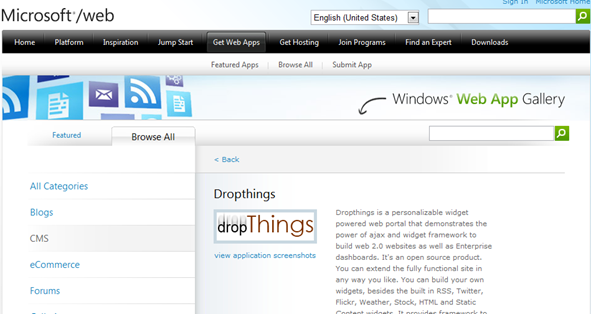
Dropthings now available from Microsoft/Web

Dropthings is now available on Microsoft/Web. You can now install it using the Web Platform Installer. I will soon write an article how to make an installer that can install a ASP.NET website, a SQL Server database, setup web.config files, setup directory permissions (eg App_Data) etc. It wasn’t straightforward and I learnt some best practices from the Microsoft/Web team. But for now, go ahead and download the app and build cool sites out of it.image

http://www.microsoft.com/web/gallery/Dropthings.aspx

Please vote for my app. It will help spread the open source effort. 

Posted: Sep 29 2010, 06:13 PM by oazabir | with no comments
Filed under: , , , ,
How to make screencasts in optimized animated GIF for free

I have been using animated GIFs to show short screencasts in my blogs and articles. Animated GIF is supported by all browsers and supports virtually any website in the world where even Flash is blocked. A picture is worth a thousand words, and an animation is worth a thousand multiplied by [frames in animation] words. So, I have been looking for a complete free solution to capturing screencasts and then converting it to animated GIF and then heavily compressing it.

First use CamStudio to capture the screenshot into an AVI. Before you capture, you need to set the CamStudio video recording setting to one frame per second, otherwise there will be too many frames in your animated GIF. You can set it so 2 or more frames per second if you are recording some frequent changes on the screen.

image

This will put one frame in animated GIF per second. Since animated GIF gets pretty large due to its lossless primitive compression, you need to put as little frames on it as possible.

Now you can record screenshot using CamStudio and save it in an AVI file.

Once you have the AVI file, you need to open the AVI using Microsoft GIF animator.

image

Then you need to click the “Select all” button and go to Image tab and put 100 on the Duration. This will set each frame delay to 1 second, exactly what you have set in the CamStudio Video Options. If you have set 2 frames per second in CamStudio, then you need to set 50 in Microsoft GIF Animator.

Now you can save the file as an animated GIF and use it wherever you like.

I would highly recommend you further optimize the animated GIF and eliminate duplicate frames and use some advanced compression. For this you can use the ImageMagick utility. You will find various ways to optimize animated GIF on this page. I just use the following command line and it gives me pretty good output:

c:\Program Files (x86)\ImageMagick-6.6.3-Q16>convert SourceImage.gif -layers OptimizePlus DestImage.gif

This optimizes animated GIFs pretty well. I have seen average 60% reduction on screen captures having white background and when there’s no translucent areas (eg Windows Vista/7 title bars).
Production Challenges of ASP.NET Website – recording of my talk

“It works in my PC”, the common dialog from Developers. But on production CPU burns out, disks go crazy, your site stops responding every now and then, you have to frequently recycle application pool, or even restart windows to bring things back to normal for a while.

As your site grows from thousands to millions of users, delivering new features and bug fixes becomes an increasingly complex process where you have to ensure the performance and stability of the site is not compromised. Let me tell you some stories from the trenches how I grew my hot startup Pageflakes (acquired by MySpace founder Brad Greenspan) from thousands to millions of visits within a year surviving through production software, hardware, process, people challenges and how you can avoid and solve them using my handy collection of articles and tools.

Watch the presentation I made in a LIDNUG session:

http://www.lidnug.org/Archives.aspx

Find the session with the title “Production Challenges of ASP.NET Website”.

Unfortunately they could not record the whole session. But whatever is there should be useful for you.

Building High Performance Queue in Database for storing Orders, Notifications, Tasks

We have Queues everywhere. There are queues for asynchronously sending notifications like email and SMS in most websites. E-Commerce sites have queues for storing orders, processing and dispatching them. Factory Assembly line automation systems have queues for running tasks in parallel, in a certain order. Queue is a widely used data structure that sometimes have to be created in a database instead of using specialized queue technologies like MSMQ. Running a high performance and highly scalable queue using database technologies is a big challenge and it’s hard to maintain when the queue starts to get millions of rows queued and dequeued per day. Let me show you some common design mistakes made in designing Queue-like tables and how to get maximum performance and scalability from a queue implemented using simple database features.

Queue

Let’s first identify the challenges you have in such queue tables:

  • The table is both read and write. Thus queuing and dequeuing impact each other and cause lock contention, transaction deadlocks, IO timeouts etc under heavy load.
  • When multiple receivers try to read from the same queue, they randomly get duplicate items picked out of the queue, thus resulting in duplicate processing. You need to implement some kind of high performance row lock on the queue so that same item never gets picked up by concurrent receivers.
  • The Queue table needs to store rows in certain order and read in certain order, which is an index design challenge. It’s not always first in and first out. Sometimes Orders have higher priority and need to be processed regardless of when they are queued.
  • The Queue table needs to store serialized objects in XML or binary form, which becomes a storage and index rebuild challenge. You can’t rebuild index on the Queue table because it contains text and/or binary fields. Thus the tables keep getting slower and slower every day and eventually queries start timing out until you take a downtime and rebuild the indexes.
  • During dequeue, a batch of rows are selected, updated and then returned for processing. You have a “State” column that defines the state of the items. During dequeue, you select items of certain state. Now State only has a small set of values eg PENDING, PROCESSING, PROCESSED, ARCHIVED. As a result, you cannot create index on “State” column because that does not give you enough selectivity. There can be thousands of rows having the same state. As a result, any dequeue operation results in a clustered index scan that’s both CPU and IO intensive and produces lock contention.
  • During dequeue, you cannot just remove the rows from table because that causes fragmentation in the table. Moreover, you need to retry orders/jobs/notification N times  incase they fail on first attempt. This means rows are stored for longer period, indexes keep growing and dequeue gets slower day by day.
  • You have to archive processed items from the Queue table to a different table or database, in order to keep the main Queue table small. That means moving large amount of rows of some particular status to another database. Such large data removal leaves the table highly defragmented causing poor queue/dequeue performance.
  • You have a 24x7 business. You have no maintenance window where you can take a downtime and archive large number of rows. This means you have to continuously archive rows without affecting production queue-dequeue traffic.

If you have implemented such queue tables, you might have suffered from one or more of the above challenges. Let me give you some tips on how to overcome these challenges and how to design and maintain a high performance queue table.

Read the article for details:

http://www.codeproject.com/KB/database/fastqueue.aspx

Please vote if you find this useful.

Posted: Sep 19 2010, 02:04 PM by oazabir | with no comments
Filed under: , , ,
More Posts