Scott Forsyth's Blog

Postings on IIS, ASP.NET, SQL Server, Webfarms and general system admin.

IIS URL Rewrite – Redirect multiple domain names to one

Consider this a 2nd part to IIS URL Rewrite – rewriting non-www to www.  Reader Rubens asked about redirecting multiple domain names in a single rule.  That’s a good question and worth writing a part II blog post about it.

Here’s his question:

If there any generic way to do that if we have multiple domains with
multiple extensions?example:
mydomain.com to www.mydomain.com (already done)
mydomain.net to www.mydomain.com
www.mydomain.net to www.mydomain.com
etccc...
and maybe also
www.mydomain2.net to www.mydomain.com
etccc...
Thanks.


Regular expressions are great for handling .com / .net / .org in a single condition.  You can do this using a “Condition input” check for {HTTP_HOST} with a “Pattern” of:
^domain.(com|net|org)$

Note that the ^ marks the beginning of the pattern and the $ marks the end when using regular expressions. 
 
Additionally, to handle the mydomain2.net, be sure to set the “Logical Grouping” to Match Any.  This allows any of the rules to cause the rule to match the condition and redirect.  After setting to Match Any, you can add as many domains as you want with a single rule with multiple conditions.
 
Let’s look at mydomain2.com and .net.  Here’s a Pattern that will catch all situations:
^(www.)?mydomain2.(com|net)$

This catches www and non-www and .com and .net.
 
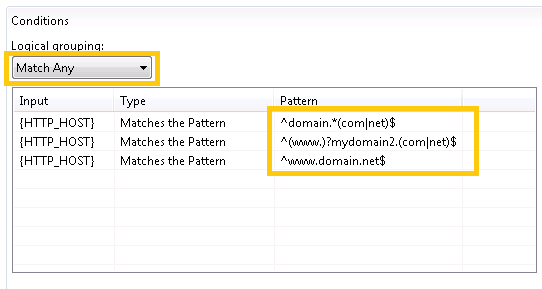
The following screenshot shows conditions that will catch the following:
  • domain.com (1st condition)
  • domain.net (1st condition)
  • www.mydomain2.com (2nd condition)
  • www.mydomain2.net (2nd condition)
  • mydomain2.com (2nd condition)
  • mydomain2.com (2nd condition)
  • www.domain.net (3rd condition)
image
 
Note that the Action will redirect all of them to the same place (www.domain.com), which was Rubens’ goal.  Just be sure that no conditions match www.domain.com or you’ll create a loop.
 
The config that results should look like this:
 
<rewrite>
    <globalRules>
        <rule name="Redirects to www.domain.com" patternSyntax="ECMAScript" stopProcessing="true">
            <match url=".*" />
            <conditions logicalGrouping="MatchAny">
                <add input="{HTTP_HOST}" pattern="^domain.*(com|net)$" />
                <add input="{HTTP_HOST}" pattern="^(www.)?mydomain2.(com|net)$" />
                <add input="{HTTP_HOST}" pattern="^www.domain.net$" />
            </conditions>
            <action type="Redirect" url="http://www.domain.com/{R:0}" />
        </rule>
    </globalRules>
</rewrite>
 
You can do this using wildcards too.  It would take more conditions.  It’s also possible to do this with rewrite maps, another feature of URL Rewrite.
Posted: Nov 30 2009, 02:40 PM by OWScott | with 11 comment(s)
Filed under: , ,

Comments

Twitter Trackbacks for IIS URL Rewrite ??? Redirect multiple domain names to one - Scott Forsyth's Blog [asp.net] on Topsy.com said:

Pingback from  Twitter Trackbacks for                 IIS URL Rewrite ??? Redirect multiple domain names to one - Scott Forsyth's Blog         [asp.net]        on Topsy.com

# November 30, 2009 6:04 PM

IIS URL Rewrite ??? Redirect multiple domain names to one – Scott … | Arabic names said:

Pingback from  IIS URL Rewrite ??? Redirect multiple domain names to one &#8211; Scott &#8230; | Arabic names

# November 30, 2009 8:58 PM

IIS URL Rewrite ??? Redirect multiple domain names to one – Scott … · Flash Media said:

Pingback from  IIS URL Rewrite ??? Redirect multiple domain names to one &#8211; Scott &#8230; &middot;  Flash Media

# November 30, 2009 10:00 PM

rubens said:

Hello,

   I've been testing to make a rule that redirects anything to the correct domain; the idea is that when something different than the main domain is entered; then is redirected to the main domain; the problem is that it don't works because I suppose I'm doing something wrong.

               <rule name="all to www.domain.com" enabled="True" patternSyntax="Wildcard" stopProcessing="true">

                   <match url="www.domain.com" negate="true" ignoreCase="true" />

                   <conditions logicalGrouping="MatchAny">

                       <add input="{HTTP_HOST}" pattern="*" />

                   </conditions>

                   <action type="Redirect" url="http://www.domain.com/{R:0}" redirectType="Permanent" />

               </rule>

# December 1, 2009 10:02 AM

rubens said:

I think I found it from one example of ruslany blog:

<rule name="www.mydomain.com" enabled="true" stopProcessing="true">

<match url="(.*)" />

<conditions>

<add input="{HTTP_HOST}" pattern="^www\.mydomain\.com$" negate="true" />

</conditions>

<action type="Redirect" url="http://www.mydomain.com/{R:1}" redirectType="Permanent" />

</rule>

# December 1, 2009 12:53 PM

OWScott said:

Rubens.  Yes, that 2nd example should work well.  It will catch everything except that specific URL.  

# December 1, 2009 1:10 PM

rubens said:

Thanks for the reply. The problem that I find in this second way is if you access the site with a directory it don't works.

Example OK:

mydomain.com  -> www.mydomain.com

www.mydomain.net -> www.mydomain.com

mydomain.net --> www.mydomain.com

Example KO:

mydomain.com/directory1  -> mydomain.com/directory1

mydomain.com/directory1/ -> mydomain.com/directory1/

mydomain.com/directory1/index.html -> mydomain.com/directory1/index.html

# December 1, 2009 5:57 PM

OWScott said:

Rubens, that rule looks like it should work. In fact, I tested by coping your rule directly and all of those combinations work for me.  Are you sure you don't have another rule fighting with this rule?

# December 1, 2009 9:58 PM

IIS URL Rewrite ??? Redirect multiple domain names to one - Scott … Domain on Me said:

Pingback from  IIS URL Rewrite ??? Redirect multiple domain names to one - Scott &#8230; Domain on Me

# December 2, 2009 3:51 AM

IIS URL Rewrite ??? Redirect multiple domain names to one – Scott … « Blogging said:

Pingback from  IIS URL Rewrite ??? Redirect multiple domain names to one &#8211; Scott &#8230; &laquo;  Blogging

# December 13, 2009 12:17 AM

IIS URL Rewrite ??? rewriting non-www to www - Scott Forsyth's Blog said:

Pingback from  IIS URL Rewrite ??? rewriting non-www to www - Scott Forsyth&#39;s Blog

# January 26, 2010 11:50 PM
Leave a Comment

(required) 

(required) 

(optional)

(required)