Give us more control of Intellisense
This is part of a series of postings asking for improvements to Visual Studio and ASP.NET.
As a commercial web control developer, I have to include extensions to Visual Studio's design mode, such as UITypeEditors and TypeConverters. Both of these classes augment the Properties Editor for an individual property. Both can provide a dropdownlist or popup a window such as the CollectionEditor.
Here the UITypeEditor DataTemplateNameEditor provides a dropdownlist of stored "Pattern Template" file names to the FieldsPatternTemplateName property.
public class DynamicFormView : FormView
{
      [Editor(typeof(DataTemplateNameEditor), typeof(System.Drawing.Design.UITypeEditor))]
      public virtual string FieldsPatternTemplateName
      {
         get { return fFieldsPatternTemplateName; }
         set { fFieldsPatternTemplateName = value.Trim(); }
      }
      protected string fFieldsPatternTemplateName = "DetailsView";
}
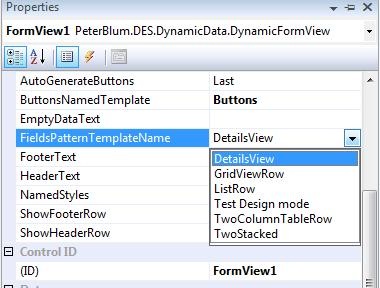
I can also use these attributes in the SmartTag attached to the web control in design mode.
Now it's time for Intellisense to support the UITypeEditor and TypeConverter classes. Why shouldn’t that dropdownlist appear to help setup the property? I have numerous cases where they could really assist the user. Some examples:
* In the ControlToValidate property on Validator controls, show a list of available controls.
* In the properties to choose the type of the Entity or DataContext in DataSource controls.
Why shouldn’t the user be able to popup a model dialog editor for a property? For example, in the Validationexpression property of the RegularExpressionvalidator to provide a tool to test your expression.
I have learned that I can do some of this today by using the TypeConverter and its GetStandardValues() method. See “How to: Implement a Type Converter”.
Unfortunately Intellisense gathers the list from GetStandardValues() once, very early in the design mode preparation. At that time, there is no “context” which provides design mode information that you can use to get a list of controls on the page. My own situations nearly always need data that is available at a later time.
So I request Microsoft to improve the GetStandardValues to allow it to be retrieved at the moment its needed. Perhaps there can be a new property or attribute assigned to the Typeconverter class to indicate this?
I understand why UITypeEditors and Typeconverters are not implemented in Intellisense today. They require that “context” I mentioned earlier. The UITypeEditor is hugely connected to design mode’s objects, which are associated with the context. Visual Studio would have to spend time to convert the markup into the control class instance and build a number of design mode support objects. That will slow down Intellisense. Yet I’d like Microsoft to try. Perhaps they can introduce a similar class to UITypeEditor that is specific to Intellisense.
In any case, I can’t wait to enhance my web controls so that you markup users can benefit.
And if someone out there knows of a way to do this now, let me know!