Archives
-
xUnit.net RC2 Released
public class DatabaseFixture : IDisposable
-
Understanding AOP in .NET
In my previous posts I have talked a bit about Inversion of Control (IoC) containers with respect to Interception and Aspect Oriented Programming (AOP). It's not only important to understand the uses and strategies for implementing your solutions using it, but also how interception and AOP works deep down in .NET. Instead of a long, drawn out post, I think I'll just include some articles and posts that do a very good job of explaining some of the ideas behind it.
Articles and Posts
I think it'd be good if we just start out with some basic MSDN articles and such regarding AOP and interception. Some of them may be older but the concepts will still apply to this day:
- 7 Approaches for AOP in .NET
Ayende covers a few ways of doing AOP in .NET using existing frameworks
- Decouple Components by Injecting Custom Services into Your Object's Interception Chain
Juval Lowy, in the March 2003 MSDN magazine, writes about using contexts for an object's execution scope and intercepting calls to and from that object.
- Aspect Oriented Programming (September 2005 Technical article)
Matthew Deiters describes aspect oriented programming and covers joinpoints, pointcuts, advice and mixins with regards to a simple example using VB.NET.
- AOP: Apsect Oriented Programming Enables Better Code Encapsulation and Reuse
Dharma Shukla, Simon Fell and Chris Sells write in the March 2002 MSDN Magazine with regards to the history to COM and AOP and then relate how it works in .NET. Rather dated article but the foundations still apply.
- AOP using System.Reflection.Emit
Roberto Loreto writes on CodeProject how to intercept method calls of an external type and generating method proxies by using Intermediate Language (IL) injection.
Just Read the Code
There are many AOP frameworks out there in the wild right now for .NET. To understand them pretty well, it's best if you just crack open the code and follow the unit tests. Most of these are no longer active. Let's cover some of the AOP frameworks out there:
- PostSharp
- NKalore (No longer active)
- Gripper LOOM.NET
- Rapier LOOM.NET
- AOP.NET (No longer active)
- Aspect# (No longer active)
- AspectDNG
Conclusion
For those willing and able to go ahead and learn about AOP, it's actually quite interesting. it's also quite a challenge especially when dealing with IL emitting. Go ahead and look at the source code and samples and give some of it a try. Next time we pick up, I'll be talking about AOP in the Enterprise and Spring.NET. Until next time...
- 7 Approaches for AOP in .NET
-
IoC and Unity - Configuration Changes for the Better
namespace UnitySamples
-
FringeDC March 2008 Video Now Online - Haskell and XMonad Extensibility
As I've discussed before with my dive into functional programming and F#, there is a user group of language geeks that specialize in Haskell, Lisp, Scheme, OCaml, Erlang and so on, within the Washington DC area called FringeDC. Brent Yorgey, well known in the Haskell community and contributor to XMonad, presented an introduction to Haskell and explained a bit about extending XMonad. Fortunately for those who couldn't attend like myself due to scheduling conflicts, Conrad Barski recorded this session and posted it to Google Video. The slides have also been made available as well here. For those not aware of XMonad, it's a tiling window manager for X that is extensible in Haskell. Unfortunately, the opening talk by Philip Fominykh on The Zipper, a purely functional data structure in Haskell for manipulating the location of structure instead of the data, was not recorded.
If you want to get your language geek on, come check it out for their next informal meeting on May 10th over a beer or two. More details on the site here. Until next time...
-
IoC and Unity - The Basics and Interception
namespace UnitySamples
-
ALT.NET Thinking From The Outside
As I've noted before, Dave Laribee was recently interviewed by Scott Hanselman on Episode 104 of Hanselminutes. The reaction that I've seen has been pretty positive from what I've seen. It's great to see the ALT.NET message being spread outside the core believers group. Many people can be turned off after a few discussions on the altdotnet mailing list and not get the real gist of what the group is about.
Dave did a great job explaining the core principles of ALT.NET which are:
- Use the right tool for the right job
- Look outside the .NET community for new and different ways of solving problems
- Get involved with the community through teaching and teaching
- A good emphasis on agile methodologies
- Design patterns and principles
But, how do we convey that message to the development community as a whole. That was a part of the conversation that was interesting. And to me, I think we should have that "street kit" which includes such bare essentials as a manifesto (that we'll probably get to in Seattle), frameworks, design patterns, ways of spreading the message, etc.
Christopher Bennage had a good wrapup of the show as well here. I'd tend to agree that ALT.NET isn't about convincing, it's about conversing, having that conversation about what pains them and working through on a solution. It's about spreading the community. But, a direct command to learn Ruby, meh... I think Scala has a few more things to offer right now which is why I'm chomping at the bit to get to more of it.
A post by Leon on community though caught my eye recently. What he says is pretty accurate. I tend to think that what ALT.NET is preaching is what many communities such as the Ruby on Rails and Java communities have been doing for years with regards to design patterns, TDD and so on. A lot of the innovation such as TDD frameworks, design patterns and such just hasn't come from the .NET community. Many people wait on Microsoft to provide these things such as TDD frameworks (MSTest), Logging (Enterprise Library), O/RM (Entity Framework) and won't pay attention to the OSS world which I find an utter shame. Instead, what I'd like people to do is take those frameworks and look what's available from the community as a whole and compare them, much as I have with Unity and some other IoC containers. Yes, many people worry about licensing issues and that's something for your legal team to work out.
But, to his point, I'm glad he's learned Ruby on Rails and is happy. In fact, I think it's great that he is expanding his horizons outside of C# which I think most developers ought to know a few languages and not just C#, VB.NET or Java. For example, this past year I spent time learning Ruby and F#. I plan on taking up Scala soon as well and maybe a couple of other languages. In the past I was a Java, PHP and C++ programmer, so I've run the gamut. You can take some of these practices back to your other languages and learn from the successes and the failures of each community. It only makes you a better developer over time. I think many of the innovations that happen in the .NET space should come from the outside, and not just from Microsoft.
Do I think it's having an effect? Absolutely! If you look at such frameworks as Unity, there is a lot of feedback being provided, the ASP.NET MVC framework, same way. This willingness on both sides to engage is a wonderful thing and maybe to the point where "ALT" isn't the alternative anymore and instead the de facto standard.
-
Adventures in F# - F# 101 Part 6 (Lazy Evaluation)
#light
-
ASP.NET MVC Source Code Now Available
As of yesterday, the ASP.NET MVC Release 2 source code has been made available on CodePlex. ScottGu made the source drop announcement earlier this morning. Congrats to Phil Haack and the ASP.NET MVC Team for shipping the source code. It's worth noting, it's not Open Source in the way that it's just a zip file and no outside patches are to be accepted, unlike IronRuby. The plan going forward is to make incremental drops of the source code going forward.
As always, check out Jeffrey Palermo's MVCContrib project for contributions to the code base, which is open source.
-
DC ALT.NET March Meeting Wrapup
Another month and another highly successful DC ALT.NET meeting. I want to thank Kevin Hegg for hosting the event as he was a very gracious host. We had a better than expected turnout which was very cool. It's good to associate names to faces after chatting, emailing and whatnot. I also want to thank Phil McMillan for stepping up to the plate at the last moment to backfill for the lack of the scheduled speaker. It's even more refreshing to not have any Death By PowerPoint (DBPPT) (TM). I appreciate Phil's talk even more due to the fact that he had a laptop meltdown the night before, so we talked about concepts and implementations without showing any real code.
What Did We Talk About?
Our format that we follow is that we have one hour for our scheduled topic and the rest is Open Spaces. Bring a topic and talk about it. So, for the first hour, Phil led the discussion around interception facilities in Castle Windsor in regards to handling a Unit of Work pattern for a custom written WPF application. There is a lot of headache that comes with undo logic in WPF controls, so using interception and the unit of work pattern can get around this, although not the cleanest code written to man. Also, we talked about the headaches of registration inside IoC containers whether it be in code or in XML. We talked about Binsor and whether that was an answer to the registration headaches caused by massive XML config files. Craig Andera just loves bringing up Lisp and Lisp macros as they solve all programming problems ever invented by man.
The second hour was an open spaces discussion where we had pretty lively debate about:
- Dynamic Language Runtime (DLR) and its uses and extensibility model
- Design by Contract
- Functional Programming with Lisp/Scheme, Functional Javascript, Erlang, and F# and the value proposition it has
- Finding the right developer for your organization
- TDD/Test First Development
- ALT.NET Open Spaces, Seattle topics
Like I said before, we tend to be different than most user groups in the Washington DC area due to the fact that we're an Open Spaces event, for at least half of it. We don't really do PowerPoint presentations, instead a more intimate environment where everyone participates. I don't think anyone stayed silent during the meeting. Instead of being lectured to, you're part of the conversation. We want passionate developers to attend, those who are looking for a better way. It's even effective when not looking at code, nor slides for any given product. I feel we can augment any discussion from any user group in the DC area, and not here to compete, instead compliment them with a more intimate and passionate discussion.
Where We Go From Here
After the March meeting, we're looking to hold the next meeting the week after ALT.NET Open Spaces, Seattle. That should bring some lively discussion and wrapup from the event. We also look forward to having Jay Flowers make it to the event to discuss Continuous Integration and CI Factory. Stay tuned for details on our next meeting. April is going to be a busy month for at least me with the CMAP Code Camp on April 12th, speaking at RockNUG and ALT.NET Open Spaces, Seattle as well as our own DC ALT.NET Meeting.
Wrapping It Up
If you're interested in a better way, to discuss .NET or related topics and you're in the ALT.NET mindset, then come and join the conversation. We're always looking for passionate individuals to come and join and be a part. Join our mailing list and find out more here.
-
Adventures in F# - FringeDC User Group
During my Adventures in F# series that I've been posting, I've always wondered where the interest in these languages come from. Sure, we have a lot of user groups in the Washington DC area, just to name a few that I've been to or belong to:
- DC ALT.NET User Group
- Capital Area .NET User Group (CapArea.NET)
- Rockville .NET User Group (RockNUG)
- Central Maryland .NET Professionals (CMAP)
- Microsoft Integration and Connected Systems User Group (MICSUG)
- Northern VA SQL Server User Group (NoVASQL)
- Northern Virginia Ruby User Group (NoVARUG)
- Northern Virginia Java Users Group (NoVAJUG)
- Washington DC XP Users Group (XPWDC)
-
Looking at DSLs in .NET
As I've mentioned in recent posts such as here, here and here, I've been very interested in Domain Specific Languages (DSLs), especially with regards to F# and the DLR as well. I recently re-listened to Software Engineering Radio Episode 52 with Obie Fernandez discussing DSLs in Ruby. One of the things that attracted me to Ruby for this was the flexibility of the syntax for closures, mixins, etc. Anyhow, it's a good listen and if you're new to the subject, you should give it a go. Also, there is a slide deck of DSLs in Ruby which accompanies this episode which can be found here.
So, of course this gets me excited about the possibilities of seeing such things in IronRuby. After seeing John Lam's presentations at MIX08 and listening to him on various podcasts, I'm excited that they are making such progress and hopefully get it into our hands soon.
But, before we get too deep into things, I just want to take a step back and look quickly at what DSLs are.
Internal and External DSLs?
So, what are DSLs? Well, to put it succinctly, it's a small language that's used for a very narrow task. You can think of these as languages specific to a domain such as medical claims processing, stock trading and so on that only have meaning there. These languages mean very little outside their problem domain and probably wouldn't make sense to anyone outside. I'm very well aware of such things as I've worked in the medical claims processing industry and their terms, calculations and so on are very specific and to solve the problem well, it's best to suit the language best for expressing solutions.
Martin Fowler wrote an article entitled "Language Workbenches: The Killer-App For Domain Specific Languages?" in which he talks about the history of DSLs especially in the Lisp world, but until now really haven't caught on. Martin argues that XML structures such as configuration files, and so on qualify for that status, due to the fact that it is readable by a human and probably a domain expert as well. But Lisp is well know for the Lex/Yacc parsing and expression trees and so on.
Now the real interesting part comes in when we talk about internal versus external DSLs...
External DSLs, quite simply, are those languages that are not in the same language as the main application itself. This means that I could be free to write any free-form code I wish in order to suit my domain specific need. This means that you need to write parsers and then ultimately would need to have a translation boundary between your DSL and your application. This is where I think something like the Dynamic Language Runtime (DLR) could come into play. What I mean by that is that if you write your language parser for the DLR, and I'll get into that shortly. There is a bit of overhead with this of course, plus a good debugger and IDE, but with time and patience things like this can be overcome. Extending such things as #Develop to encompass those pieces is feasible.
Internal DSLs, on the other hand, are the little languages you can create inside your current language of choice. Now languages such as Lisp, Ruby, Scala, Boo, and F# seem a bit more suited for these than the mainstream languages of C++, C# and Java. Of course one of the bigger obstacles is the pesky curly brace which Ruby allows you to discard. F# doesn't have a concept of this either, and instead the indentation scopes the values and functions and so on. Martin has an interesting DSL written in Java that's interesting and could be better applied in different languages.
Thinking About The DLR
As I said before, I'm pretty excited about the DLR and the flexibility it can give me as a software engineer looking for new and better ways to solve my customer's problems. Not only that, but I'm a language geek at heart, what can I say? I've posted several items on building on the DLR in the context of external DSLs as well as writing custom compilers for .NET. Projects such as Irony also appeal to me in that way.
If you want to play around with the DLR, you can get it in one of two places, the IronPython download on CodePlex or on RubyForge with the IronRuby project.
Martin Maly, a member of the DLR team has continued his posts about Building on the DLR. He took some time off to work on some DLR related issues and now is back with some more posts. Let's continue where we left off last time:
- Answering Some Questions
Martin talks about Static and Dynamic Nodes on DLR Trees
- Variations on Trees
Martin talks about DLR trees and LINQ Expression trees
- More questions
Martin talks about implementing a Print method that acts differently per incoming data type
- Extension Methods
Martin talks about adding extension methods to the ToyScript sample
DSLs In Boo?
Oren Eini, aka Ayende, has been working on a book about DSLs called "Building Domain Specific Languages in Boo". Recently, he posted about some sample chapters now available online with the source code. I highly recommend that you at least give it a look. You now have access to the Early Access Edition, and of course you can buy it online. It'll be interesting to see Ayende at ALT.NET Open Spaces, Seattle to see if he wants to cover more of this stuff.
If you're not familiar with Boo, it's one of Ayende's preferred languages. Such tools as Binsor (The DSL for Windsor) were written in Boo. If you're not familiar with the language, it has very similar syntax to Python and formats very nicely. This easily fits Martin Fowler's category as an external DSL. #Develop has some support for Boo to make it a first class language in the .NET family. It also ships as part of the Castle Project. Anyways, a quick sample of Binsor makes it look like a nice DSL for type registration in Castle Windsor in Boo Script:
import Rhino.Commons
logger = Component("console_logger", ILogger, ConsoleLogger)
Check out the first chapter of Ayende's book which is available free online and explore it yourself for DSLs.
DSLs in F#?
Another part that had me intrigued was the possibilities of not only Boo to do this, but F# as well. Robert Pickering covers this in his book, Foundations of F#. If you pay attention to Chapter 11, he covers DSLs in F# and gives a few examples of how you can do so. To me, it's pretty powerful because you have a lot of the built-in features of a functional programming language such as lists, pattern matching and so on. Such examples as given are such things as the arguments parser in F# that is described in the Arg class in Microsoft.FSharp.Compatibility.OCaml namespace. This allows you to parse well known data structures as first class citizens. Martin Fowler also gave such an example from the article I quoted from above. F# lends itself quite well to DSLs in regard to support for lambda expressions.
Don Syme also covers these topics in his book Expert F# in Chapter 9. This covers more language oriented programming techniques, but you can scan some information about building DSLs in F#. Some interesting parts of this come down to Active Patterns which I covered partially yesterday. In the coming weeks, I hope to post some of my forays into this, taking some samples from the Ruby community and applying some of the same functionality in F#.
Conclusion
There is still much yet to be covered in this topic of DSLs in .NET languages. We can go on and on with regards to internal and external DSLs and argue about which language is suited for each. But in the coming weeks, I hope to take some samples and show how they can apply cleanly in F#, and probably run into some language problems where it might not be the best fit. But, that's the fun part about it.
- Answering Some Questions
-
Reminder - DC ALT.NET Meeting March 19th
Just a reminder, we will be holding it tomorrow, March 19th from 7-9PM. The meeting this month will bring ALT.NET to Arlington, Virginia. I want to thank Kevin Hegg for hosting this event. Unfortunately, Jay Flowers will not be able to attend, so instead we will have myself and Phil McMillan presenting IoC containers and Interception with Castle Windsor.
At our last meeting, Stelligent hosted our event in which we discussed a lot of great topics. You can read a wrapup of our last meeting here. Our format is as follows, the first hour or so is the topic at hand and then the second hour or whenever the talk is done is for Open Spaces.
Looking for Sponsors
As always, we're looking for sponsors for our events. We bring a lot of passionate developers to your site and we feel we can bring a lot. Sponsorship opportunities are always appreciated!
Who We Are
Are you a developer who always keeps an eye out for a better way? Do you look outside the mainstream to adopt the best practices of any development community, including Open Source, Agile, Java, and Ruby communities? Are you always looking for more elegant, more simple, more maintainable solutions? If so, then you might be an ALT.NET practitioner!
This group follows the Open Space Technology model. In Open Space, a facilitator explains the process and then participants are invited to co-create the agenda and host their own discussion groups. So, we'll take a vote and present the topics. We're in the pub-club mind occasionally, so it's not surprising to find us geeking out a bar...
This model follows the four basic principles:
- Whoever comes are the right people
- Whatever happens is the only thing that could have
- Whenever it starts is the right time
- When it's over, it's over
Tuesday, Marh 19th 7:00 PM
Arlington, VA. See thread for details.
Come, participate, and make your voice heard! Come meet passionate developers like yourself in the active discussion. Hoping for a great turnout... If you haven't signed up for our list, go ahead and do that here.
-
Adventures in F# - F# 101 Part 5 (Pattern Matching)
#light
-
CMAP Code Camp April 2008 Registration Open
As mentioned in my previous post about my speaking schedule, I am helping organize the ALT.NET track at the CMAP Code Camp. I plan to be speaking on a few topics and will get that posted when the schedule is finalized. Either way, it should be a great time and bringing ALT.NET ideas to a new audience is always a good thing. I feel there is a lot of momentum around the movement right now with the help of the "What is ALT.NET?" MSDN Magazine article by Jeremy Miller and Dave Laribee on Hanselminutes.
Anyhow, back to the topic at hand. Registration is now open for the CMAP April 2008 Code Camp. Space is limited for this FREE event, so register soon. Click here to register.
Central Maryland Association of .NET Professionals (CMAP) will holding its Code Camp 2008 Spring Edition on April 12, 2008. The Code Camp will be held at the Loyola College Graduate Center in Columbia, MD from 9am - 5pm.
Great source of information for FREE, with a FREE lunch, and chances to win great giveaway items, what a great way to spend a Saturday...
http://www.cmap-online.org
http://www.cmapcodecamp.org
-
Upcoming Speaking Schedule for April 2008
While I'm finishing up my F# post on pattern matching, I thought I'd throw out my speaking schedule for April. It's going to be a busy one with code camps, user groups and conferences. Some time I'm sure I'll find some time to sleep and get my own work done. Below is my current schedule as of right now:
- RockNUG - April 9th
Decouple Your Applications with Dependency Injection and IoC Containers
- CMAP Code Camp - April 12th
Heading up the ALT.NET track at the CMAP Code Camp to talk about ALT.NET topics such as IoC containers, TDD/BDD, O/RM frameworks, etc
- DC ALT.NET - April 16th
Inversion of Control Containers for Cross-Cutting Concerns
- ALT.NET Open Spaces, Seattle - April 18th-20th
Design by Contract panel discussion (Proposed). No guarantees since it is Open Spaces
- RockNUG - April 9th
-
Why I'm Excited About ALT.NET Open Spaces, Seattle
Update: Catch Dave Laribee on Hanselminutes discussing ALT.NET here.
It's almost a month away until ALT.NET Open Spaces, Seattle and things are coming along nicely. As you may have noted, we filled up rather fast while keeping some spots open for some pre-invites. We have a great crowd of people not only from inside Microsoft, but outside as well. We've put a bit of effort into getting this off the ground, and I can admit I've spent a bit of time doing so. But to see names like Ward Cunningham, Jim Shore, Martin Fowler from the Agile spaces, folks from Microsoft such as Scott Guthrie, Scott Hanselman, Phil Haack, John Lam, Jim Hugunin, Brad Abrams, Charlie Calvert, Brad Wilson, P&P, Microsoft Research folks such as Rustan Leino and Peli, the CodeBetter guys, the Israeli crowd (Ayende, Osherove, Dahan) just warms my heart. To give you an idea, I'll put the list at the end.
In case you missed it, Jeremy Miller had a great article in the latest MSDN magazine called "What Is ALT.NET?" which sums up my thoughts exactly on the topic. Very nice stuff! And I think Ayende might be onto something with these ALT.NET logos here. Something tells me t-shirts need to be made.
But where will we go from here? Dave Laribee and others, myself included, have been kicking around the idea of a RailsConf, QCon, Spring Experience, No Fluff Just Stuff kind of conference. I really do like that idea and I want an active learning conference where we in the ALT.NET community can learn from each other, but also spread the message outside. Dave set four basic criteria that I think were well worth noting for parameters for such an event:
- It would be longer: four or five days.
- It would start 2-3 days of workshops or classes upfront on advanced topics: DDD, T/BDD, Agile, Patterns, SOA/Messaging, etc.
- The final days would lead into a kind of "dream conference" with talks given by well-known speakers.
- It would cost money, not a lot, but some...
It's hard not to when you see names like these:
Jonathan de Halleux, Trevor Redfern, Russell Ball, Jonathan Wanagel, Ayende Rahien, Brad Abrams, Shawn Wildermuth, Anil Verma, James Franco, Wendy Friedlander, David Pehrson, Scott Hanselman, James Shore, Donald Belcham, Eric Holton, Michael Bradley, Joey Beninghove, Greg Young, Jesse Johnston, Tom Opgenorth, Harry Pierson, Anand Raju Narayan, Justin-Josef Angel, Chris Sells, Matt Pisut, Jeff Olson, Martin Fowler, Rustan Leino, Oliver, Roy Osherove, Rob Reynolds, Brian Donahue, Alan Buck, Jeff Certain, Sean Solbak, Dave Laribee, Dennis Olano, Owen Rogers, Bertrand Le Roy, Jarod Ferguson, Douglas Schroeder, Terry Hughes, Simon Guest, Rod Paddock, Jean-Paul S. Boodhoo, Dustin Campbell, Eric Ness, David Airth, Aaron Jensen, Wade Hatler, Adam Dymitruk, Chris Salahub, Charlie Poole, John Lam, Ben Scheirman, Brandon Lang, Miguel Angel Saez, Dave Woods, Ashwin Parthasarathy, Matt Hinze, James Kovacs, Alex Hung, Joe Ocampo, Alvin Lee, Steven "Doc" List, Kevin Hegg, D'Arcy Lussier, jakob Homan, Pete Coupland, Rob Zelt, Tom Dean, Joseph Hill, Arvind Palaniswamy, Chris Sutton, khalil El haitami, Kelly Leahy, John Nuechterlein, Troy Gould, Kyle Baley, Rhys Campbell, Joe Pruitt, Ronald S Woan, Michael Nelson, Matthew Podwysocki, Piriya Thongtanunam, Howard Dierking, Pete McKinstry, Dan Miser, Eli Lopian, Raymond Lewallen, Neil Blake, Jacob Lewallen, Mike Stockdale, Kirk Jackson, Brad Wilson, Eric Farr, Jeff Brown, Ian Cooper, John Quach, Cameron Frederick, David Pokluda, Charlie Calvert, Shane Bauer, Rajiv Das, Jeff Tucker, Phil MCmillan, Udi Dahan, Bil Simser, Martin Salias, Bill Zack, Chris Patterson, Greg Banister, Osidosi, Gabriel Schenker, James Thigpen, Phil Haack, Ray Houston, Colin Jack, Robert Smith, Sergio Pereira, Brian Henderson, Michael Henderson, Chantal Laplante, Dave Foley, Ward Cunningham, Bryce Budd, Chris Bilson, Scott Guthrie, Robin Clowers, Craig Beck, Phil Dennis, Jeffrey Palermo, Robert Ream, Carlin Pohl, Glenn Block, Tim Barcz, Dru Sellers, Scott Allen, Jeremy D. Miller, Grant Carpenter, Chris Ortman, Drew Miller, Weston Binford, Buchanan Dunn, Rajbeer Dhatt, Justin Bozonier, Jason Grundy, Greg Sangha , david p buchanan , Don Demsak , Jay Flowers , Adam Tybor , Scott C Reynolds , Chad Myers , Nick Parker , John Teague , Daniel , Jim Hugunin , Scott Koon , Justice Gray , Julie Poole , Neil Bourgeois , Luke Foust
Still working on my F# posts and IoC container posts, so stay tuned. Until next time..
-
DC ALT.NET Meeting - March 19th
I've held off recently announcing the DC ALT.NET meeting due to scheduling issues. Anyhow, that has been resolved and we are good to go. We will be holding it on March 19th from 7-9PM. The meeting this month will bring ALT.NET to Arlington, Virginia. I want to thank Kevin Hegg for offering his office as our get together.
At our last meeting, Stelligent hosted our event in which we discussed a lot of great topics. You can read a wrapup of our last meeting here. This time, we're going to have Jay Flowers to discuss Continuous Integration and CI Factory. It should be a great discussion as it's been weighing on my mind lately. Our format is as follows, the first hour or so is the topic at hand and then the second hour or whenever the talk is done is for Open Spaces.
Looking for Sponsors
As always, we're looking for sponsors for our events. We bring a lot of passionate developers to your site and we feel we can bring a lot. Sponsorship opportunities are always appreciated!
Who We Are
Are you a developer who always keeps an eye out for a better way? Do you look outside the mainstream to adopt the best practices of any development community, including Open Source, Agile, Java, and Ruby communities? Are you always looking for more elegant, more simple, more maintainable solutions? If so, then you might be an ALT.NET practitioner!
This group follows the Open Space Technology model. In Open Space, a facilitator explains the process and then participants are invited to co-create the agenda and host their own discussion groups. So, we'll take a vote and present the topics. We're in the pub-club mind occasionally, so it's not surprising to find us geeking out a bar...
This model follows the four basic principles:
- Whoever comes are the right people
- Whatever happens is the only thing that could have
- Whenever it starts is the right time
- When it's over, it's over
Tuesday, Marh 19th 7:00 PM
Arlington, VA. See thread for details.
Come, participate, and make your voice heard! Come meet passionate developers like yourself in the active discussion. Hoping for a great turnout... If you haven't signed up for our list, go ahead and do that here.
-
Singularity - C# OS Released on CodePlex
Update: If you want the .iso I used for the VPC, check it out here on my SkyDrive.
During my research and posts about Design by Contract and Spec# and my interactions with folks from Microsoft Research, I came across Singularity OS, an operating system written in an offshoot language based upon C#. In that time, I realized that the Singularity team extended Spec# and the Design by Contract and static verification pieces of it into a new language called Sing#.
Fast forward to last Tuesday. Almost five years after the start of development, it has finally been released onto CodePlex as an open source non-commercial academic license and can be found here. After reading about it and talking with some Microsoft Research folks about it, I had to give it a shot. That's one of the things I love about working at Microsoft is the fact that I can interact with people like these on a periodic basis.
History of Singularity
During my long commute to and from work, I have the pleasure of listening to many podcasts. Although I like the ones in the .NET space with Hanselminutes and DotNetRocks, I also like to venture into the Ruby and outside community where I'm pretty comfortable as well. So, one of my absolute favorites is Software Engineering Radio for the serious talk and geeking about languages and architecture. Lo and behold, the latest episode, Episode 88, covers Singularity with Galen Hunt where he talks with Markus, the host about the history and features of the OS. I suggest you listen to that before we go any further. Also, a good overview can be found here in PDF format.
If you think about most operating systems we run today, the essence of what they are is dated back in the 1970s and C and Assembly based. Back in 2003, Galen and team started this effort to write an operating system in managed code. Over 90% of the system is written in a language called Sing# which is an extension of Spec# which I will get into shortly. But, Singularity consists of three major parts, Software Isolated Processes (SIPs), contract-based channels, and manifest-based programs.
SIPs are interesting parts of Singularity. They provide a sandbox as it were for program execution free from meddling from outside processes. This includes its own memory space, threads and so on. In fact, memory and threads cannot be shared from one SIP to the other, so the vectors for malicious code are cut way down.
Contract-Based Channels are another interesting aspect of Singularity. It's a built-in feature of the Sing# language which I will get to in the next section. In short, what it provides is a quick and verifiable way of communicating between processes with messages. To support this, the Spec# language had to be extended to support this.
Lastly, manifest based programs are interesting because it defines the code that runs within the SIP and its behaviors. In Singularity, there really is no such thing as Just In Time Compiling (JIT) as all code needs to be loaded into memory and statically verified before it can be executed, which is something a JIT cannot do. But on the other side of this, it makes dynamic languages and late binding impossible as well. So, to work around this, they devised a plan called Compile Time Reflection, so you know your dependencies beforehand and uses Dependency Injection in a way to inject the appropriate dependencies. Really slick stuff!
Sing#
Rustan Leino and others in Microsoft Research had already begun an effort called Spec# to provide Design by Contract features to the C# language and a static verifier to prove that code is in fact working as the contracts were written. Just a quick aside, we're going to be lucky enough to have Rustan at ALT.NET Open Spaces, Seattle to talk about it and Design by Contract (Shameless Plug). Anyhow, back to the topic at hand. Spec# didn't have enough for the static verification that needs to happen. So, instead, Sing# brings us Contract Based Channels for creating message declarations and a set of named protocol sets. Any communication that crosses processes must use contract based channels. These messages that it passes have declarations that state the number and types of arguments for each message and an optional message direction. Each state specifies the possible message sequences leading to other states in the state machine.
I just want to dig through some code to see exactly what that looks like:
class DirectoryServiceWorker
{
private TRef<DirectoryServiceContract.Exp:Start> epRef;
private DirNode! dirNode;
private DirectoryServiceWorker(DirNode! dirNode,
[Claims] DirectoryServiceContract.Exp:Start! i_ep)
requires i_ep.InState(DirectoryServiceContract.Start.Value);
{
epRef = new TRef<DirectoryServiceContract.Exp:Start>(i_ep);
this.dirNode = dirNode;
base();
}
If you notice from above, you can see some Spec# goodness in there including NonNull types using the ! keyword and also requires preconditions. It's pretty well written and a lot of fun to dig through. If you want to learn more about compilers and operating systems, now is the time to sift through the source code and get your geek hat on.
Building the Image
If you want to actually run Singularity, the team has provided as part of the zip file, a way to build the operating system. You'll simply need the following:
- Windows Debugging Tools
- .NET Framework 1.1
- Virtual PC 2007
- MSBuild
I was able to get the results in about 10 minutes or so for the build process. Then again, if you're running Vista, you need to be sure to launch the configure.cmd as an elevated process in order to kick things off properly. That was the first hurdle. But once I got that going, the rest was easy. And I got a pretty cool result as well when I ran the VPC image. Look at the goodness:
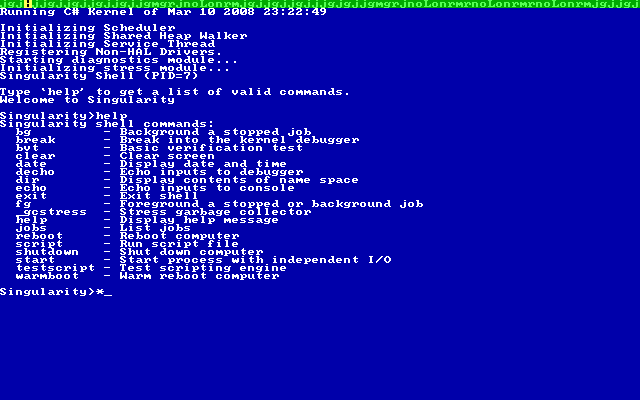
I have played with it just yet all that much. I'm figuring what I can do with it next. But, that's part of my copious spare time which doesn't seem to exist much anymore.
Conclusion
I've done well with my learning plan this year to keeping to what is on my plan and not deviating from it. Luckily languages such as Spec# and Sing# still fall into that category. It's pretty fascinating stuff and great to get my hands on an operating system using managed code. It's pretty impressive from the things I've read and the code I've read. I'm only hoping that research projects such as this make a significant impact on future versions of Windows, let alone future versions of most operating systems. Until next time...
-
Videos and Interviews from MIX08
Well, I've had the urge to find all the videos I could and watch them to find out all the goodies I missed while not at MIX08. If you missed any of the main sessions, you can find out more about them here. Note that there are 88 sessions recorded here, so it's a lot of good viewing material.
Best of all are Scott Hanselman's MVC Videos can be seen here. He also covers the MVC Mock Helpers which better allow for unit tests using various Mock frameworks including Rhino Mocks, TypeMock.NET and Moq.
Dave Laribee was great on Twitter to make sure we were all kept up to date with all the good things that were happening. Brendan Tompkins supplied Dave with a video phone so that he could capture impromptu videos and such. But, best of all they were broadcasted live. He was able to talk to guys like Rob Conery, Phil Haack, Steve Harman, Miguel, John Lam, Scott Hanselman and Josh Holmes. Very cool stuff! They were pretty good and entertaining, although the video wasn't always superb and sometimes you needed motion sickness pills. But, the sessions of note are:
- Phil Haack interview
- Capturing Hanselminutes
- Rob Conery and Steve Harman interview
- Miguel de Icaza interview
- Pablo Castro interview
- John Lam interview
- Microsoft Surface demo
- Josh Holmes interview
- Phil Haack interview
-
RockNUG Meeting 3/12/2008 - Refactoring in C#
The Rockville .NET User Group (RockNUG) will be holding their next meeting on Wednesday, March 12th, 2008 from 6:30PM-9:00PM. This month, they'll be having a pretty interesting topic on refactoring in C# with Jonathan Cogley. I've had my refactoring and agile boots on lately, so I can definitely relate. I don't know what I would do though without my Resharper 4.0 Nightly Builds... I've had a few issues here and there, but nothing to discourage me from continuing usage.
Anyhow, here are the details:
Location:
Montgomery College, Rockville
Humanities Building - Room 103
Refactoring in C# - Bad code to better code
presented by Jonathan Cogley
What could be more fun on a Wednesday evening than critiquing some bad
code and making it better? :) Come along to learn how to clean code like
the Thycotic team. What do we look for? How do we take small steps to
keep it working? What tips and tricks make it easier? This session
will be code, code and more code (and a few unit tests of course!).
Jonathan Cogley is the founder and CEO of thycotic - a software
development company operating in the Washington DC Metro Area with
offices in Vienna, Virginia. Jonathan has worked for many interesting
companies over the last decade as a software consultant in both the UK
and the USA. His company has released various .NET projects and APIs
including an implementation of Remote Scripting for .NET, a database
platform independent data access layer for ISVs and various tools for
the Test Driven Developer. Test Driven Development (TDD) is the
cornerstone of the thycotic approach to software development and the
company is committed to innovate TDD on the Microsoft .NET platform with
new techniques and tools. Jonathan is also a columnist and editor for
the popular ASP.NET Web site, ASPAlliance. He is an active member in the
developer community and speaks regularly at various .NET User Groups,
conferences and code camps across the US. Jonathan is recognized by
Microsoft as an MVP for C# and has also been invited to join the select
group of the ASPInsiders who have interactions with the product teams at
Microsoft.
The schedule for the event is as follows:
n00b Session 6:30 - 7:00 ASP.NET GridView Part III Pizza/Announcements 7:00 - 7:30 Featured Presentation 7:30 - 9:00 Refactoring in C#
Hope to see a great crowd there! I'm looking forward to it.
-
IoC Container, Unity and Breaking Changes Galore
IUnityContainer container = new UnityContainer();
-
ASP.NET Team Releases for Mix 2008
For all those interested in the information and the latest bits from the ASP.NET Team, here are the latest links.
Downloads:
- ASP.NET MVC Preview 2
- Silverlight tools including ASP.NET Server Controls
- ASP.NET 3.5 Extensions Preview from December
ASP.NET Updates:
- ASP.NET Home Page Announcement
- ASP.NET 3.5 Extensions Download Page
- ASP.NET 3.5 Extensions Quickstarts
- ASP.NET Preview 2 (MIX) readme
- ASP.NET Updated Forums
- ASP.NET Server Controls for Silverlight Forum
- ASP.NET 3.5 Extensions Videos
I've been playing with the bits for a little bit lately and I must admit it's a lot better now. But, I'm noticing that it seems that the ASP.NET team wants us to use more of the Supervising Controller/Presenter Pattern and less of the Passive View Pattern. Brad Wilson also notes that here. It hasn't dampened my usage of it yet as I have adapted my designs since then. After all, you have to be a little flexible when using a CTP.
- ASP.NET MVC Preview 2
-
Adventures in F# - F# 101 Part 4
#light
-
Live From Mix08
No, I'm not at Mix08 right now, but I'm busy paying attention to every detail. I'm missing a lot of really cool things such as:
- Silverlight downloads at 1.5 million a day
- IE 8 preview with Firebug?
- SQL Server Data Services
You can too by paying attention to the following places:
- Live streaming video from Mix from Microsoft and some short videos on:
- IE 8
- Scott Guthrie
- Ray Ozzie
- Dean Hachamovitch
- CodeBetter's live stream by Dave Laribee which features short snippets from the event.
- Josh Holmes is covering the event and has noted about Ray Ozzie's keynote as well as other things.
- John Lam will be at Mix as well and will be tweeting throughout the conference with his Twitter name john_lam. I know I'm following it now...
-
IoC Containers, Unity and ObjectBuilder2 - The Saga Continues
namespace UnitySamples
-
Coming to Terms with Behavior Driven Development
A while ago, I posted about Behavior Driven Development (BDD) while using the NBehave, and I think I went too far into the tool without going into the whole thought process instead. I've had a series of these blog posts in my head but have been fighting writers block in order to get them out the door.
BDD Introduction
Anyhow, there has been a lot of discussion around BDD lately on the altdotnet mailing list around the definition and applicability of BDD in regards to Test Driven Development (TDD). Subsequently, this led to forming a new group on Google Groups about Behavior Driven Development. It's great to see the community start to gain momentum and talk about it more. I've been following Dan North, Joe Ocampo, Scott Bellware, JP Boodhoo and Dave Laribee on this for a while, but now to come to a centralized place for that knowledge sharing has been invaluable. I've seen too many times that there is a high noise to information ratio out there and we need to clarify a few things before it can really take hold.
Getting back to the subject at hand, if you're unfamiliar with BDD, you should check out Dan North's explanation here. There are a good number of links inside to whet your appetite. To put things succinctly, BDD aims to bridge the gap between Domain Driven Design and Test Driven Development.
Dave Astels, also has a great video on Google Video on BDD you can find here. It's a great video which talks about how TDD differs and evolved from BDD. It also delves into the subject of rSpec, the BDD framework in Ruby. Very worth your time to check it out.
Dave's summation of BDD comes down to the following bullet points:
- Don't talk about Units in regards to Unit Testing, instead talk about Behaviors
- All software we write has behaviors
- There should be no correlation between public methods on a class and test classes
- Structure your tests around the behavior of your application
- Put emphasis on behaviors (How do I get it to do what I want it to)
- Get rid of state based testing and look at interactions instead
- Get rid of tests and instead use specifications of behavior (specs)
- Get rid of assertions and instead set up expectations
I agree with Jimmy Bogard, that going to TDD to BDD in one fell swoop by just renaming your tests. Instead, we should focus on those interactions between the systems and less on the physical implementations of the code. We should also focus on the expectations inside our code as well. Mocking and the use of Rhino Mocks or your other mocking framework will do nicely in here. Brian Donahue also has some nice stabs at BDD as well here, here and here. If you're up in the Philly area soon, Brian will be making the rounds doing BDD presentations...
Dave Laribee has also put some thought into BDD as well with a particular set of classes he has written to help with BDD that you can check out here. Also if you've paid attention to the BDD mailing list on Google Groups, you will note that Scott Bellware also has a framework up on Google Code called SpecUnit which is an extension to NUnit to support naming conventions of BDD inside of the xUnit type frameworks. Very cool ideas coming out!
Wrapping It Up
I encourage you to join the BDD list, read the links, and learn more. I find it's a more intuitive way of proving the behavior of your application (Note that I didn't say test). I find that it bridges the gap between Domain Driven Design and Test Driven Development quite handily especially in regard to using the ubiquitous language. It's important that naming and ubiquitous language comes into play when using BDD, because you can share your specs and they should be able to read them as well. It's a great gap between user stories and the code you write. If you need help with user stories, check out Mike Cohn's User Stories Applied book. Anyhow, I hope you found this useful as an introduction to some of my many upcoming BDD posts.


