September 2006 - Posts

My last day as an MVP.

Today is my last day as a .NET MVP.  I first received the MVP award back in October 2001 when there was only a single classification of ".NET" and awards were give out mainly on your contributions to the USENET newsgroups.  Today, the .NET MVP awards are divided into subcategories such as C#, VB.NET, ASP.NET and awards are given for all sorts of community activities.  It's been a great ride and I was lucky to have a great lead in Rafael Munoz at Microsoft.

While reviewing my contributions to the community for the past year (which I'm not afraid to admit were much lower than last year's), Rafael called me personally at home to discuss the situation.  We had a great chat and both agreed that my contributions didn't "stand out" as was expected by the MVP program.

I'll still be active in both my local .NET community as well as online.  Perhaps one day in the future I'll be noticed by Microsoft.  Until then -- thank you Rafael and Microsoft for recognizing my contributions.  It's been a fun five years!

Posted by PSteele | 2 comment(s)

Plugin Screenshot

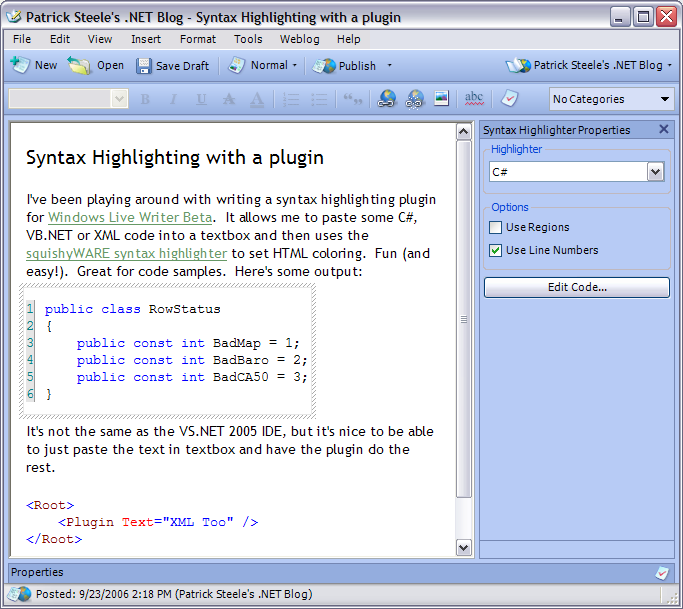
A few people asked for a screenshot of what this plugin looks like.

It's not too exciting, but this is how it looks when using the squishyWARE Syntax Highlighting component.  I'm re-working it to use the RTF Parser I worked on today.  That will allow just about anything that is simple RTF to be pasted into a RichTextBox control and converted to HTML by the plugin.

And this is my first time using Windows Live Writer to post an image.  We'll see how well it goes...

Posted by PSteele | 1 comment(s)

Glutton for punishment!

Although I liked the ease at which I could get my source code highlighted with the squishyWARE Syntax Highlighter component, I didn't like that is was VS.NET 2003 coloring.  So I got the crazy idea of just pulling the RTF off the clipboard and converting that to HTML.

I spent a few hours last night and a couple of hours this afternoon writing a rudimentary RTF parser.  It's ugly and doesn't support most of the RTF syntax, but it gets me some nicely formatted HTML from the RTF on the clipboard.  Here's a sample:

        private void Notify(RTFState current)
        {
            if (current.IsEmpty())
                return;

            switch (current.GroupType)
            {
                case GroupType.None:
                    if (ReadControlTag != null)
                        ReadControlTag(this, new ControlTagEventArgs(current));
                    break;

                case GroupType.Start:
                    if (BeginGroup != null)
                        BeginGroup(this, new ControlTagEventArgs(current));
                    break;

                case GroupType.End:
                    if (EndGroup != null)
                        EndGroup(this, new ControlTagEventArgs(current));
                    break;
            }
        }

But that's just using the default VS.NET 2005 fonts.  Although I'm reading and parsing the RTF font table (\fonttbl), I'm not storing it or using it.  I'm just lucky the default font is the same font used by the HTML <pre> tag!  :)

Posted by PSteele | with no comments

Syntax Highlighting with a plugin

I've been playing around with writing a syntax highlighting plugin for Windows Live Writer Beta.  It allows me to paste some C#, VB.NET or XML code into a textbox and then uses the squishyWARE syntax highlighter to set HTML coloring.  Fun (and easy!).  Great for code samples.  Here's some output:

public class RowStatus
{
    public const int BadMap = 1;
    public const int BadBaro = 2;
    public const int BadCA50 = 3;
}

It's not the same as the VS.NET 2005 IDE, but it's nice to be able to just paste the text in textbox and have the plugin do the rest.

<Root>
    <Plugin Text="XML Too" />
</Root>

Posted by PSteele | 4 comment(s)

More VS.NET 2005 Goodness!

I was reviewing some code I had ported from VS2003 today.  The project was using visual inheritence in a windows forms enviroment.  At one point (back when it was in 2003) I had marked the class abstract since, well, it was abstract.  Unfortunately, I could no longer use the VS2003 forms designer to edit the form -- since the class was abstract, the IDE couldn't create an instance of it.  At that time, I just added some comments to the code that the class should not be instantiated directly and that it wasn't marked abstract simply because of the VS.NET 2003 IDE.

I seemed to recall that this was going to be fixed in VS.NET 2005.  So today I went back in and marked the base form class as abstract.  Recompiled everything and pulled it up in the IDE.  There's my form!  Progress is good!  :)

UPDATE: Ummm.. No!  Don't know why this seemed to work when I tried it.  I could have sworn I recompiled.  But I obviously didn't because if you recompile, you get the same error about not being able to design the form since it's abstract.  Grrrrr....  Sorry -- my bad.

Posted by PSteele | with no comments

Documenting .NET 2.0 Assemblies

I've been spending some time today documenting my code.  I'm using .NET's built-in XML comments and an alpha build of nDoc 2.0 that supports .NET 2.0 assemlies.  So far, it's been going pretty smoothly (for an alpha).  It seems quite stable and I haven't run into any show stoppers.

I noticed that it now catches if you miss a <value> tag on your properties -- nDoc 1.3.1 didn't consider that a missing value.  And I have one class with only two parameterized constructors (no parameterless constructor), but it's still complaining about a missing <summary> tag on the parameterless constructor.

I'd like to try out Sandcastle, but right now I need to be billable and playing around with a new toy is not (currently) a billable activity!

Posted by PSteele | with no comments

CodeMash is coming!

Just found out about this at our user group meeting the other night:

http://www.codemash.org/

Posted by PSteele | with no comments

Tip: Temporarily Disable Snaplines

The .NET 2.0 Forms Designer has an awesome new feature called Snaplines.  Snaplines show visual cues to help you line up controls on a form.  They make it very easy to conform to the Windows User Interface Guidelines.

But if you're in a situation where you want percise control over placement of a control, simply hold down the ALT key while you're dragging.  The snaplines don't appear and the control won't try to "snap" itself into one of the potential alignment positions.

Posted by PSteele | with no comments

Real World ClickOnce with Brian Noyes

I'm geeked about tonight's user group meeting.  We've got IDesign's Brian Noyes in town to talk about ClickOnce development and deployment.  Should be an awesome talk!  If you're in the southeast Michigan area tonight (Southfield, to be exact) stop on by.  More information on the GANG website.
Posted by PSteele | with no comments

Followup on Enums

In a follow-up to my last post, Eric Bachtal pointed out that I could use a class with only public constants to accomplish just about the same thing:

public class RowStatus
{
    public const int BadMap = 1;
    public const int BadBaro = 2;
    public const int BadCA50 = 3;
}

Great idea!  And I'm surprised I forgot about that since I used this very technique about 4 years ago when I had to do some Java coding.  Without Java supporting enums, the technique above was the best way to accomplish the same thing.  Thanks Eric!

Posted by PSteele | with no comments
More Posts Next page »