January 2007 - Posts - Raj Kaimal

January 2007 - Posts

Inserting and deleting with the AJAX UpdatePanelPopupExtender

The UpdatePanelPopup Extender has been updated to use the ASP.net Ajax RTM version. I have also added an example that shows how to add/delete a record using the popup. Like before, we have a GridView and DetailsView setup using the standard Master/Details way. The only difference being that the DetailsView is "floating" and positioned at a location (top left icon) defined using the custom extender. 

UpdatePanelPopupExtender4

Download the latest version here. (look under Flan AJAX Controls)
Mirror

02/17/2007 New version released

Posted by rajbk | 24 comment(s)
Filed under: ,

Refresh UpdatePanel via JavaScript

I have seen this asked a couple of times in the newsgroups hence this post. A simple way of refreshing an UpdatePanel using JavaScript is to add a HiddenField to the page, change its value using JS and then have the HiddenField raise a postback event.

The HiddenField causes the UpdatePanel to refresh because it has been declared as a trigger, is a child trigger or because the UpdatePanel.Update() method is called in the HiddenField ValueChanged event handler. The sample code (mirror) shows these three scenarios.

Note: The HiddenField will obviously need to be registered as an async postback control (RegisterAsyncPostBackControl) if it is outside the UpdatePanel.

Posted by rajbk | 11 comment(s)
Filed under: ,

Master Details using AJAX and the UpdatePanelPopupExtender

The UpdatePanelPopupExtender is a simple ASP.Net AJAX extender that can be attached to any UpdatePanel control. This extender allows you to postion the attached UpdatePanel beside any control you specify. Here are a couple screen shots of what you can do with it.

Master Details
This shows an UpdatePanel positioned next to a "Details Icon". The UpdatePanel contains a DetailsView which displays details of the record selected. This allows for editing of the current row in the GridView.

UpdatePanelPopupExtender1

Master Multiple Details
Uses the Wizard control as a sidebar navigator

UpdatePanelPopupExtender3


AJAX search
The results are returned in a multiple column GridView with the GridView paging turned on.

 UpdatePanelPopupExtender2

Download Code and sample here (look under Flan AJAX Controls)
Mirror

Please let me know what you think. Thanks.

Posted by rajbk | 51 comment(s)
Filed under: ,

UpdatePanel and CSS

The ASP.net AJAX UpdatePanel control in RTM unfortunately does not have a CssClass property. A CSS property may be nice to pretty up the UpdatePanel but in my case, I was hoping to use it to set the CSS "visibility" property of an UpdatePanel when the page loads. One could do it using javascript alone but the hide command normally fires when the page load completes which causes the user to catch a glimpse of the element being hidden.

  • A quick hack which works in some cases is to define a CSS ID selector for the UpdatePanel. So if I needed to hide an UpdatePanel with ID UpdatePanel1 when my page loads, I would add something like this to the top of my Page or UserControl:

<style type="text/css">

#<%=UpdatePanel1.ClientID%> {

    visibility: hidden;

    position: absolute;

}

</style>

  • A better way is to enclose the UpdatePanel in some other tag and set its style like so:

<div id="foo" style="visibility: hidden; position: absolute">

    <asp:UpdatePanel ID="UpdatePanel1" runat="server">

    </asp:UpdatePanel>

</div>

  • Eilon's has an example of how to create a custom UpdatePanel control which adds the CssClass property. If you use the control in your project, Eilon suggests creating a tag-mapping entry to avoid changing any existing pages that already have <asp:UpdatePanel> tags like so:

<tagMapping>

        ...

        ...

        <add tagType="System.Web.UI.UpdatePanel" mappedTagType="LeftSlipper.CustomUpdatePanel"/>

</tagMapping>


Posted by rajbk | 2 comment(s)
Filed under: ,

Using the UpdateProgress control as a modal overlay

After reading up on the Extender Control tutorial, I decided to write my first Extender control as a learning exercise. 
UpdateProgressOverlayExtender is an ASP.Net AJAX extender that can be attached to any UpdateProgress control in order to position it over any control that you specify. If a control is not specified, the UpdateProgress control is positioned over its AssociatedUpdatePanel. You can even position it over the Form control or the document display area to give a modal effect. The screen capture below shows the UpdateProgress control overlaying a GridView control.
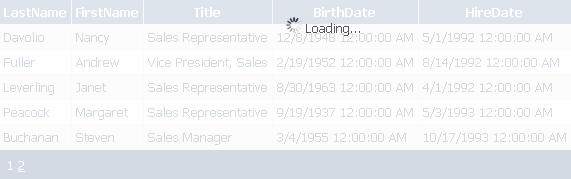
UpdProgOverlayExtender

To run the sample, compile your solution before running the website.

Download code
 (look under Flan AJAX Controls )
Mirror

Please let me know what you think!

PS: If you wish to display a modal dialog using AJAX, use the Modal Popup in the AJAX control toolkit.

Posted by rajbk | 45 comment(s)
Filed under: ,
More Posts