IE7 : This page contains both secure and nonsecure items
I just spent about 4 hours trying to solve this really annoying error which only exists in Internet Explorer 7 (IE7) over a Secure (SSL) page. I just stumbled upon the solution and it was just so damn obscure I felt I had better write it down or it will be forever lost in the bit-bucket that I call my brain.
Although my issue was related to using MIT’s Simile Timeline control it is not limited to that in any way (here is the URL to the defect).
So here is the error in question:
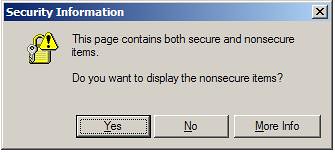
When prompted with this, as a veteran in the web world, I first turn to standard proxy tools, like Fiddler. I look for the big gotchas where a HTTP request simple doesn’t go over HTTPS. Another is if any requests are throwing back a 404 (document not found). When that does help, next I common the IIS Log files, and see if anything is not going over port 443. Simply fix anything that behaves badly and re-test.
When that does not fix the issue, what’s next? Well next you need to dig into iframes. If you have any iframes in your output (dynamic via Javascript/DOM or static on the page) be sure to specify the src attribute, and not just any src attribute will do. Options include “#”, or “javascript:void(0);” or even "javascript:'<html></html>';". Play with these and other which Google will turn up and decide which is your best option.
My next inclination was to do a deep dive into the Javascript world and start debugging the crap out of things. This really did not bear much fruit at all. It was actually quite frustrating. –Try to avoid this as much as possible, but if you do make use of both the alert(‘’); and debugger; calls.
Now when that does not bear any fruit it’s time to really dig deep. I found out that when you are manipulating a DOM element (lets say creating a DIV tag), and are setting its style.background property to a incomplete url, for example:
div.style.background="url(/images/message-top-left.png) ";
It seems that IE7 (and only IE7) will make this request over 443, but treat the data as one of these pesky “nonsecure items”.
So, the work-around which I implemented was to specify the FULL url like:
div.style.background="url(“+prefix+“/images/message-top-left.png) ";
Where “prefix” is something along the lines of:
prefix = document.location.protocol + "//" + document.location.hostname;
Finally, if that is a dead end as well, consider the idea of cutting the feature out of the next release!
References, more help:
http://support.microsoft.com/kb/925014
18 Comments
Comments have been disabled for this content.
Caedmon said
Are there any references for the logic that IE7 is using to determine what is "mixed content" page? I'm trying to get my SSL area to stop popping up this message. I am having a tough time finding any holes in the page/logic. But, it still insists that it is mixed content. Thx!!
Someone said
You should try to use a Fiddler tool. I have the same problem and I have read this tool can help resolve this problem. I don't know how to use so it is all I can help.
john said
Hi, I´m having that problem in timeline myself. Can you tell me where or the files where you made this changes ? Thanks
Olivia said
When you receive the error message, click Yes. In Internet Explorer, go to Tools, Internet Options, click the Security tab; make sure that in "Select a zone..." window that Internet is selected. Click Custom Level and scroll down about half way to "Display mixed content" in the Miscellaneous section. Change it from Prompt to Enable. Click OK, Yes, and OK. The change should take effect immediately. IT SOLVES THE PROBLEM!!! ;)
ysth said
Thanks, this was very helpful.
Esen said
Thanks, Finally URL('image') helped me to fix my issue with non secure item. Thanks once again
Ramya said
Setting the "Dispaly mixed content" setting needs to be done on the client side...we will have no control on this.... So it is not that
Martin said
Thank you for a great article! It saved my ass :).
Init said
I just had the same problem myself. I had just made HTTPS mandatory on our web site, and this warning was issued in IE. After a while, I realized that the Flash animation also contains a link (to download the plugin), and changing that one to https solved my problem. Don't forget that one if you have one.
garhol said
re: olivia IT SOLVES THE PROBLEM!!! ;) No, it hides the problem and opens your system up to allow insecure content on a secure page. The problem needs to be fixed at the page as show in the article. It does not require you to lessen your security. When someone opens their security settings to "fix" a badly coded site they also open themselves up to cross site scripting and other attacks.
tk. said
Thanks for this, an insidious thing to find. I worked around it by, rather than setting an absolute path, setting the classname of the object. If the stylesheet has the background attribute with a relative path, it doesn't mind.
John said
Thank you for the article. I am having this issue with one of our sites there are lots of http links on the site let me remove them and lets see if that will help. IE is annoying to start with :P.
Sreekanth said
javascript:false has actually fixed my problem, but there was another issue that got introduced, which didn't allow other parameters being read by the subsequent javascript routines. Instead tried javascript:void(0) and has fixed the problem.
usman said
Check for all the postback urls of the page and image urls whether they contain http or https. Normally this problem occurs when page on secure connection contains http references.
michael236 said
Sweet! Thanks, this worked perfectly.
sam said
Removing relative paths from the src tags could also be helpful! However this article saved me today!!!! thanks a ton to whoever wrote it.
Christmas said
Hi there! Do you know if they make any plugins to safeguard against hackers? I'm kinda paranoid about losing everything I've worked hard on. Any tips?
Guillaume said
One more to add to the list: "background: url(data:....)" This is triggering the warning message on IE7 too