Rob Chartier ~ Contemplation...

.NET, C#, Work, etc.

News


www.flickr.com
This is a Flickr badge showing public photos from Rob & Kat Chartier. Make your own badge here.


Even Quicker Links

Getting DotNetNuke to render correctly in IE9

As we all download the Beta of IE9 we are faced with the challenge of many sites having breaking changes to the UI.  This becomes more apparent when you have rich functionality provided by vendors such as Telerik, the FCK Editor, or whatever you have chosen internally.

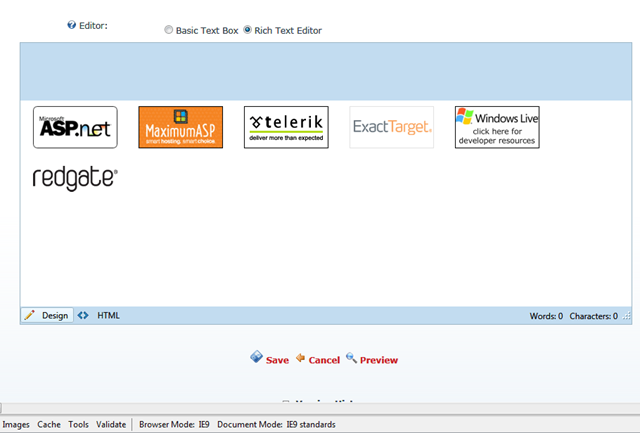
For example, here is a screen shot of DotNetNuke, using our default skin, breaking under IE9 when using the default “IE9 Standards” mode.
 

image


What you see above is the Telerik Editor Provider when editing content using the Text/HTML module.  In order to correct the above issue, you must switch IE9 to use a more compatible mode. 

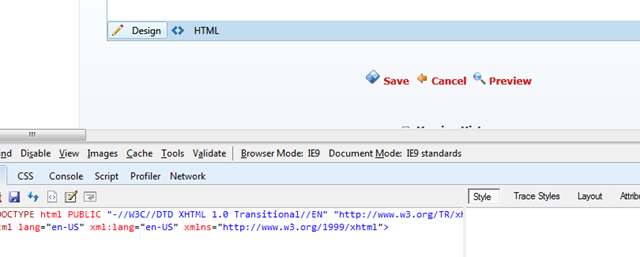
If you bring up the IE9 Developer tools, which are standard now as part of the browser installation, by hitting the F12 key.

You will see the tool shown at the bottom of the browser:
 

image


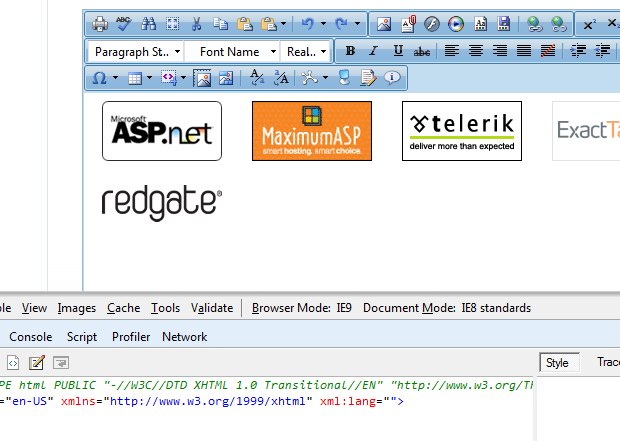
Notice the “Browser Mode: IE9” and the “Document Mode: IE9 standards”.  You only need to change the “Document Mode:” drop down to “IE8 Standards”:
 

image


You page will refresh with the new Document Mode, and it should now properly be showing the right UI.


Comments

Twitter Trackbacks for Getting DotNetNuke to render correctly in IE9 - Rob Chartier ~ Contemplation... [asp.net] on Topsy.com said:

Pingback from  Twitter Trackbacks for                 Getting DotNetNuke to render correctly in IE9 - Rob Chartier ~ Contemplation...         [asp.net]        on Topsy.com

# October 1, 2010 7:51 PM

Pete LePage said:

Hey Rob!

I saw your post and wanted to provide some additional info on IE9's compat stuff.  Using the developer tools to change rendering modes is great for testing your site in different modes - for example if you want to see how your site might look in IE8, or IE7.

In this case, an easier way would be to put the site into compat mode by clicking the "broken page" icon up in the address bar.  That'll put IE9 into compat mode and your page should work.  

Now that's great if you don't mind that your users are going to have to do something to make the site work right - the better way would be to use the X-UA-Compatible meta tag at the top of the page(s), or as an HTTP response header to force IE9 into IE8 compat mode.  

There's a great blog post on the IE blog about this at blogs.msdn.com/.../ie-s-compatibility-features-for-site-developers.aspx

Hope those get you going, without having to pull up the dev tools!  When you're ready to test the site in IE9 mode again, make sure you're sending IE9 the same markup as you're sending FF/Chrome/Safari/Opera, because more than likely, with our new better support for standards, it'll just work!  

PEte

# October 2, 2010 1:15 PM
Leave a Comment

(required) 

(required) 

(optional)

(required)