Roland Weigelt

Born to Code

News

  • Twitter: English | Deutsch
  • Meet me:
    .NET Open Space vom 17.10. bis 18.10.2009 in Leipzig
  • GhostDoc:
  • .NET User Group:
  • Personal homepage:
  • XING:
    XING

.NET related Links

My Personal Fonts and Colors Settings for Visual Studio 2005

After reproducing my old VS.Net 2003 settings (using a proportional font) on Visual Studio 2005 and playing around with features like bold fonts, I’ve finally settled on fonts and colors settings. Here’s a preview what source code looks like:
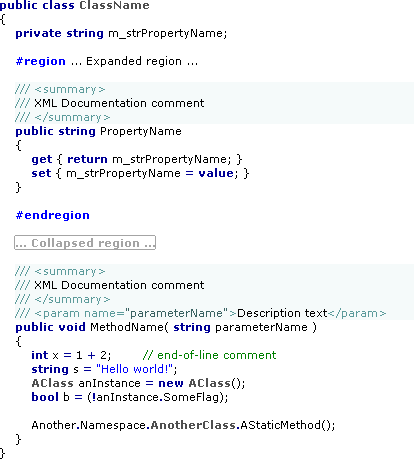
20060117_FontsAndColors

Download: FontsAndColors.vssettings.

When you import the settings using the “Import and Export Settings Wizard” (in the Tools menu), please do yourself a favor: Keep the default “Yes, save my current settings” and create a backup of your settings, so you can go back to your old fonts and colors if you want.

Comments

Sherrod Segraves said:

It's nice to see someone else using proportional fonts.

Why not use ClearType, though? Do you prefer the pixellated look?
# January 17, 2006 5:42 PM

Roland Weigelt said:

I've tried ClearType and liked it at first, especially after I used the ClearType tuner. But in the end I simply couldn't get used to the colored sub-pixels and the slightly blurred image (19" TFT, DVI, 1280x1024).
# January 17, 2006 6:14 PM

Philipp Schumann said:

It seems that ClearType only really looks good when the screen resolution is set to the TFTs native resolution. Not sure whether 1280*1024 is the native one for a 19"...

I've seen ClearType look awful on a lot of stand-alone (non-Laptop) TFT screens...
# January 18, 2006 10:10 AM

Adam Vandenberg said:

1280x1024 is usually native resolution for 19" LCDs.

Note that in additional to using the ClearType tuner, it helps to have the monitor iteslf adjusted correctly, but that can be tricky. I have a 17" Dell LCD, and a neutral grey gradient is slightly too yellow, but apparently I can't be bothered to calibrate it correctly.
# January 18, 2006 10:15 AM

Marcos Torres said:

Very nice... i like the background color in the comments.
If somene want some very very nice coding fonts, you can look here.: http://www.proggyfonts.com/index.php?menu=download
# January 18, 2006 7:10 PM

Andy said:

How do you make the background color for your comments stretch across the page. I changed the background color and it only goes where the text goes.
# January 20, 2006 3:58 AM

Roland Weigelt said:

@Andy: Are you using VB.Net? The screenshot shows C# source code. The coloring of XML documentation comments in VB.Net is not what I would call optimal...
# January 20, 2006 7:23 AM

Andy said:

NO full VS2005, though after I downloaded your file I noticed what is going on. I changed the background color for Comments. Your screen shot is showing XML comments.

So
/// This is a not a comment apparantly
doesn't change background color (if its not a comment what is it?)

but
// This is a comment
the background color changes, but only up to the last t in 'comment'

I downloaded your file and now
/// This is an XML comment
has a background color that goes all the way across the screen

So which of the many settings changes XML comments?

Hope that explains it better
# January 20, 2006 1:45 PM

Roland Weigelt said:

>
> So which of the many settings changes XML comments?
>

Way down in the list, it's
- XML Doc Attribute
- XML Doc Comment
- XML Doc Tag
# January 20, 2006 3:53 PM

Andy said:

Thanks.. You know I scrolled down and saw XML Comment which of course didn't work. I guess I gave up scrolling at that point.
# January 20, 2006 5:58 PM

kger said:

I'm trying out Verdana as my font, and I agree that the readability is much better. However, I've noticed that VS2005 has a bad habit of not indenting properly after hitting the Enter key. It seems to be one space short. (My settings are spaces only, 2 spaces per tab stop.)

Anyone else seen this problem when using proportional fonts?
# February 16, 2006 10:50 AM

User007 said:

Thanks.

# September 2, 2006 9:55 PM