Dynamically create ASP.NET user control using JQuery and JSON enabled Ajax Web Service
Please read my previous post Dynamically create ASP.NET user control using ASP.NET Ajax and Web Service to understand this approach. In this article I am doing the same thing using JQuery. Other code I already explain in previous post, so I will explain only JQuery related code in this article. To subscribe my blog through mail, Please click here subscribe blog by email.
You can download the VB.NET solution code here and the C# solution code here
Dynamic control creation using JQuery is more fun and easy. Here is sample request to access JSON enabled web service using JQuery.
function getJsonAjaxObject(webServiceURL, jsonData) {
$.ajax({
type: "POST",
contentType: "application/json; charset=utf-8",
url: serviceURL,
data: jsonData,
success:
function(msg){
//execute code related to success of web service
},
error:
function(XMLHttpRequest, textStatus, errorThrown){
//execute code related to failier of web service
}
});
}
Few thing you need to consider when you are accesing ASP.NET webservice through JQuery.
- Request verb Type
- Content- length with IIS6+
- Default contentType
- JSON object formatting
- Maximum length exceed exception
I am explaining these issues and workaround to make JQuery work fine with ASP.NET Ajax enabled web service.
Request action Type
ASP.NET Ajax enabled web service by default only allows the HTTP POST verb to be used when invoking web service methods using JSON, which means you can't inadvertently allow browsers to invoke methods via HTTP GET. Workaround for this issue is to use "POST" verb for request.
Content- length with IIS6+
Most installations of IIS6+ require a content-length be provided with all POST requests, even if there is no content (POST data). The content-length for a request with no data should be 0, but jQuery doesn’t set that header automatically unless there is a data parameter. The workaround for this issue to use an empty JSON object as a parameter on read-only requests.
for example data: "{}"
This will cause jQuery to correctly set a content-length, while your web service will ignore the empty parameter and treat the request as read-only.
Default contentType
ASP.NET AJAX enabled webservice requires a Content-Type header to be set to "application/json" for invocations to AJAX web services. JSON requests that do not contain this header will be rejected by an ASP.NET server. For JQuery Ajax request you need to mention content type as application/json.
for example contentType: "application/json;charset=utf-8"
JSON object formatting
If you directly provide a JSON object as the data parameter for an JQuery Ajax call, jQuery will attempt to serialize the object instead of passing it on to your web service and you will get invalid JSON primitive exception.
Work around to this issue is to pass JSON data parameter as string, like this
data: "{'controlLocation':'~/Controls/GridView.ascx'}"
Maximum length exceed exception
When you are accessing large JSON object via script service you need to update maxJsonLength in web.config otherwise you will get "maximum length exceed" exception.
<system.web.extensions>
<scripting>
<webServices>
<jsonSerialization maxJsonLength="5000000" />
</webServices>
</scripting>
</system.web.extensions>
The C#/VB.NET code is same as my last post. The XHTML code is slightly changed to call JQuery function instead of ASP.NET AJAX.
<%@ Page Language="C#" EnableViewState="false" %>
<!DOCTYPE html PUBLIC "-//W3C//DTD XHTML 1.0 Transitional//EN" "http://www.w3.org/TR/xhtml1/DTD/xhtml1-transitional.dtd">
<html xmlns="http://www.w3.org/1999/xhtml">
<head id="head" runat="server">
<title>With JQuery</title>
<link type="text/css" href="StyleSheets/iGridView-classic.css" rel="stylesheet" />
<link type="text/css" href="StyleSheets/iGridView-common.css" rel="stylesheet" />
<script language="javascript" type="text/javascript" src="Scripts/jquery-1.2.6.pack.js"></script>
<style type="text/css">
body
{
width:95%;
padding-left:20px;
font-family:Arial;
font-size:10pt;
padding-right:20px;
}
</style>
</head>
<body>
<form id="form" runat="server">
<input type="button" value="Load Customer Order" onclick="getData('ScriptService.asmx/GetControlHtml','~/Controls/GridView.ascx');" />
<input type="button" value="Load Login" onclick="getData('ScriptService.asmx/GetControlHtml','~/Controls/LoginControl.ascx');" />
<input type="button" value="Register New User" onclick="getData('ScriptService.asmx/GetControlHtml','~/Controls/NewUserControl.ascx');" />
<div id="testDiv"></div>
</form>
</body>
</html>
The JavaScript to call JSON enabled WebService is mentioned below
<script type="text/javascript">
function getData(serviceURL, controlLocation) {
$.ajax({
type: "POST",
contentType: "application/json; charset=utf-8",
url: serviceURL,
data: "{'controlLocation':'" + controlLocation + "'}",
success:
function(msg){
$('#testDiv').html(eval(msg));
formatTable();
},
error:
function(XMLHttpRequest, textStatus, errorThrown){
alert( "Error Occured!" );
}
});
}
function formatTable(){
//get all row in gridview table and set style/event/attribute on them
$("div#testDiv tr")
.addClass("data-row")
.mouseover(function(){
if(! isClickedStyleSet(this.className)){
this.className = "row-over";}
if(! jQuery.browser.mozilla){
this.style.cursor ="hand";
}})
.mouseout(function(){
if(! isClickedStyleSet(this.className)){
this.className = "data-row" ;}
})
.click(
function(){
if(! isClickedStyleSet(this.className)){
this.className = "row-select" ;}
else{this.className = "data-row" ;}
});
//get all cell in gridview table and set style/event/attribute on them
$("div#testDiv td")
.addClass("data-row")
.css("white-space", "nowrap")
.css("vertical-align", "middle")
.mouseover(function(){
setTitle(this);
});
}
function setTitle(object){
//check browser type
if(jQuery.browser.mozilla){
object.title = object.textContent;
}
else{
object.title = object.innerText;
}
}
function isClickedStyleSet(className){
//if row is already clicked return true
if(className == "row-select"){
return true;
}
return false;
}
</script>
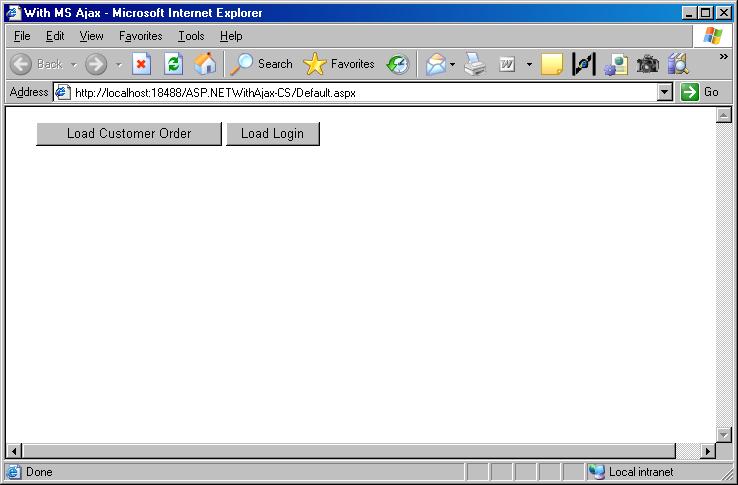
Below is the screenshot of the initial page.
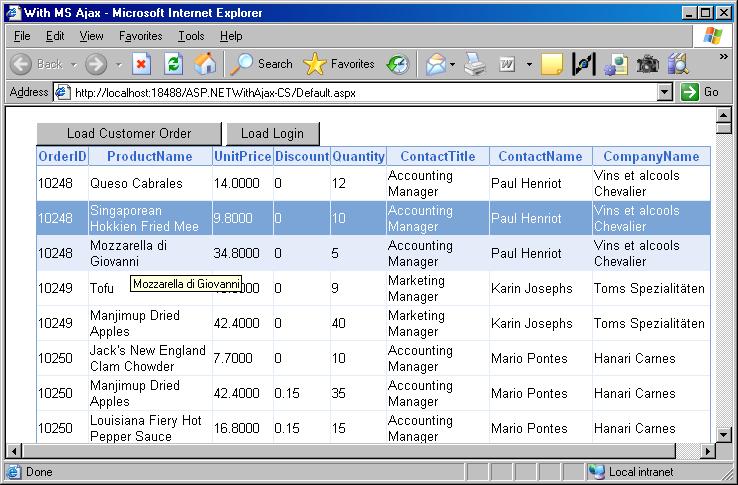
When user clicks on "Load Customer Order", It will call the ScriptService.asmx/GetControlHtml Web Service method get the usercontrol html data, load in the 'testDIV' and format the table inside div to implement mouseover/mouseout, click and title functionality using JQuery.
Same way user can clicks on "load login" button to load "User Login" form dynamically.
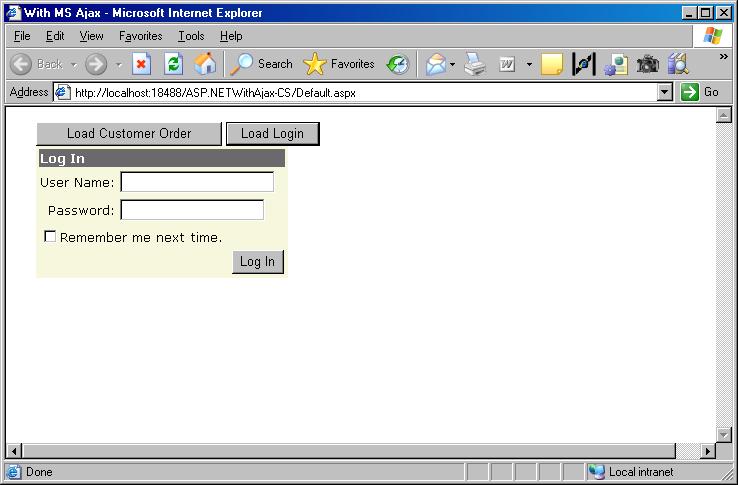
To load any usercontrol you need to call "getdata" function with webservice url and control location.
for example getData('ScriptService.asmx/GetControlHtml', '~/Controls/GridView.ascx');.
Please post your valuable feedback for this article.
You can download the VB.NET solution code here and the C# solution code here
