Suresh Behera

The Microsoft .Net Junkies

News

Blogroll

Reading

Windows Live Writer Configuration for Weblogs.asp.net blog account

I have been trying to configure my blogs on windows live writer but unfortunately did not found any documentation on it. So,Thought to put some steps to make it easy...

Here we go..

- Download Windows Live Writer blogs  tools (WYSIWYG - What See Is What You Get )
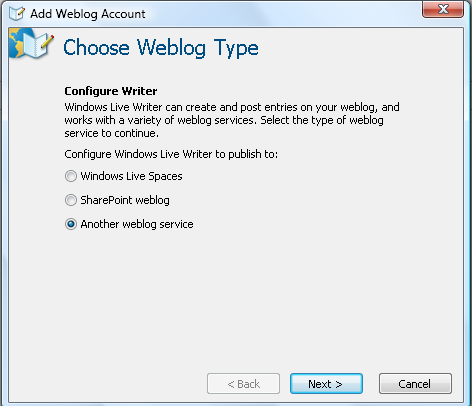
- Open Windows Live Writer and browse to Weblog ---> Add WebLog Account
image

Select another weblog service and click next

You will get the following screen

image

Type http://weblogs.asp.net on Weblog Homepage URL with your userID / password and you should get the following screen.

image

Choose "Community Server" on Type of Weblog that you are using and http://weblogs.aspnet/metablog.ashx on remote posting URL for your weblog and click next

After this,You should be able to post blog from Windows Live Writer as i posting this one.

Hope this helps.

Suresh Behera

Technorati Tags: ,

Comments

jdanforth said:

Nice, you just got a small typo on the URL for metablog in the end there ;)

Thanks for posting.

# November 9, 2007 5:41 AM

Windows Live Writer Configuration for Weblogs.asp.net blog account said:

Pingback from  Windows Live Writer Configuration for Weblogs.asp.net blog account

# November 26, 2007 12:01 AM

prodam kvartiru g lyubercy said:

kvartiry m frunzenskaya kvartira snyat odnokomnatnaya ekaterinburg kvartiry kirovogradskaya 24 prodazha kvartir silikatnaya <a href="betaflat.com/">prodam kvartiru g lyubercy</a> rynok kvartir sankt peterburg arenda kvartir g omsk gp kvartira ru pokupka kvartir g ufa

# December 14, 2007 10:15 AM

Guy Harwood said:

Thanks for this,

i come back to it every time i reload windows on my laptop! :-)

# December 17, 2008 7:59 AM

tmorton said:

The Remote Posting URL you typed in the blog post does not match your screenshot.  It should be: weblogs.asp.net/metablog.ashx

# October 6, 2009 1:31 PM

Yousef_Jadallah said:

I try to login but it always give me :

an error occur while attempting to connect to your blog:

blog server error - Server Error 0 Occurred.

User dose not exist .

You must correct this error before proceeding.

I use my Windows Live ID to login, is there any problem by that?

# February 20, 2010 4:12 PM

Kon's Blog said:

I’m quite excited about my technology blog’s new home here at asp.net .&#160; Currently having nothing

# November 2, 2010 2:29 PM

Fernando Vezzali said:

I´ve the same problem:

blog server error - Server Error 0 Occurred.

User dose not exist .

# November 5, 2010 11:32 PM
Leave a Comment

(required) 

(required) 

(optional)

(required)