Public Hotfix Patch Available for Debugging ASP.NET on IIS7

People who use VS 2005 to debug ASP.NET applications running in IIS7 on Windows Vista can encounter one of the following error messages when they press F5 to auto-attach the debugger in the IDE:

  • "An authentication error occurred while communicating with the web server."
  • "Debugging failed because integrated Windows authentication is not enabled."
  • "Authentication error occurred while communicating with the web server.  Try disabling 'Digest authentication'"

The above errors occur because of the way that VS 2005 looks up the Process ID of the IIS7 worker process that ASP.NET is running within.  Specifically, when you use F5 to "auto attach" the debugger with Visual Studio it sends an HTTP request to ASP.NET using Windows Authentication to retrieve the worker process details.  This works fine if you have Windows Authentication enabled on your web-server, and are using Windows Authentication as the primary authentication method for your web application.  It runs into problems, though, in a couple of circumstances:

  1. If you have forms-auth enabled in ASP.NET and are running in "integrated mode" on the IIS7 web-server.  This ends up blocking the process handler.
  2. If you don't have the windows authentication module installed on your web-server (it is now an optional component).
  3. If you are running on Windows Vista Home (which doesn't support the windows authentication module).

Patch Download Available

To fix the above cases which block F5 "auto-attaching" from working, we recently released a public hotfix for Visual Studio 2005.  It addresses each of the above problem causes.  You can download the hotfix patch for free here.  Once you install it, your Visual Studio F5 auto-attach behavior will work just fine.

You can read more about the patch and issues it fixes in the KB article here, and the blog posts here and here.

If you have any problems installing the patch or find that you still see issues after you install it, you'll want to contact Microsoft product support for assistance and they'll help debug it further.  Calls to Microsoft Product Support are free if they are related to a product bug (either a QFE HotFix request or a product bug you are running into).  You can find details on how to contact Microsoft product support on this page (it allows you to lookup the local phone number to use by country).

How to Manually Attach a Debugger to a Process

I have helped a few people workaround this issue before the patch was available.  One of the things I realized in doing so was that a lot of developers don't realize all of the options that are available when debugging applications, and the different ways that you can use Visual Studio to debug a process/application.

When you press F5 within Visual Studio (the Debug->Start Debugging menu item) you are telling Visual Studio to start up the application and automatically attach the debugger to it.  An alternative approach that you can also use to debug an already running application is to use the "Debug->Attach to Process..." menu item. 

When you select "Debug->Attach to Process..." it will bring up a dialog that shows you the running processes on your computer (you can also type in the IP address of a remote computer to debug):
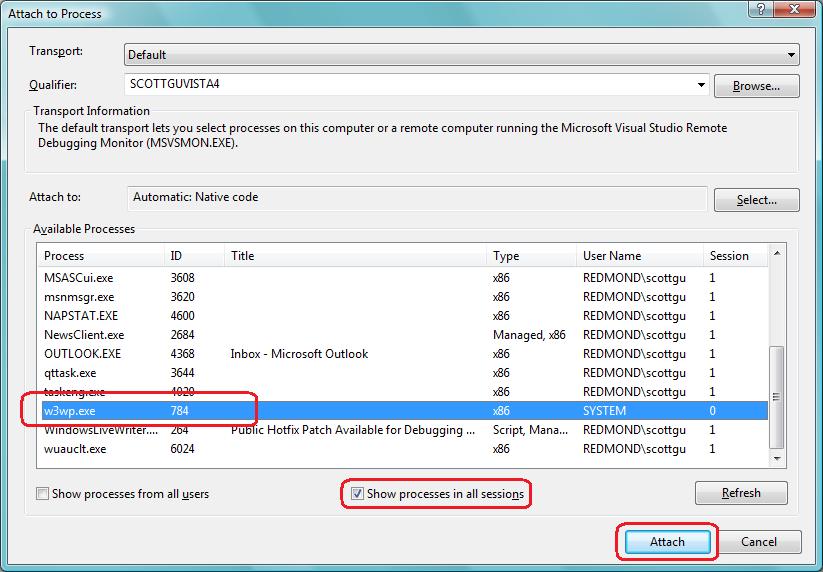
If you want to debug an ASP.NET application running using IIS, make sure to select the "Show processes in all sessions" checkbox (since IIS runs as a service on Windows and not under your local account).  You should then find w3wp.exe worker processes listed (which is the name of the IIS worker processes on IIS6 and IIS7). 

Double clicking on any process will cause Visual Studio to attach the debugger to it - at which point all breakpoints you have set will fire and you can debug a process just like you would by launching it with F5.  This works for both web applications and client applications, and can be very useful when you already have an application running.  Note that you no longer have to attach this way if you have the hotfix above installed - but it is a useful approach to know nonetheless.

Hope this helps,

Scott

Published Wednesday, June 27, 2007 11:05 PM by ScottGu
Filed under: , , ,

Comments

# Public Hotfix Patch Available for Debugging ASP.NET on IIS7 - ScottGu's Blog

Pingback from  Public Hotfix Patch Available for Debugging ASP.NET on IIS7 - ScottGu's Blog

# re: Public Hotfix Patch Available for Debugging ASP.NET on IIS7

Thursday, June 28, 2007 3:28 AM by Mikael Söderström

Does this work with Visual Studio 2008? I get the same error there.

Thanks,

Mikael Söderström

# re: Public Hotfix Patch Available for Debugging ASP.NET on IIS7

Thursday, June 28, 2007 4:22 AM by Jon

What about Visual Web Developer Express?

# re: Public Hotfix Patch Available for Debugging ASP.NET on IIS7

Thursday, June 28, 2007 6:47 AM by Jozef Sevcik

Scott,

thank for you info.

A little OT question, do you plan to release SP2 for VS 2005,

or is SP1 last service pack for VS 2005 ?

Thanks

# re: Public Hotfix Patch Available for Debugging ASP.NET on IIS7

Thursday, June 28, 2007 7:19 AM by Fab

Great Stuff Scott !!!

I recently spent ages trying to figure out what was wrong with IIS7 and VS 2005, the only way I managed to get it working was by using classic mode instead of integrated mode for my application pools.

I'll now finally be able to take advantage of the integrated mode feature of IIS7, that's cool.

Thanks for that, you guys are doing an amazing job.

# re: Public Hotfix Patch Available for Debugging ASP.NET on IIS7

Thursday, June 28, 2007 9:25 AM by Edmund

Hi,

Great!

What about the problem with Vista Home Premium as a develop machine not able to install SQL 2005 reporting server that requires windows authentication as well?

Edmund

# re: Public Hotfix Patch Available for Debugging ASP.NET on IIS7

Thursday, June 28, 2007 9:50 AM by Joe

Thank you! Thank you! Thank you! I've been waiting for this!

# re: Public Hotfix Patch Available for Debugging ASP.NET on IIS7

Thursday, June 28, 2007 10:12 AM by cmv

A co-worker and i are having another issue with debugging.  If we set a breakpoint hit that breakpoint and don't do anything (i.e. step through the code) within 30 secs the IDE stops debugging and throws an unhandled exception.  something about a null ref error in System.Web.dll.  has anyone else experienced this issue?

We are both running Vista, IIS 7.0 and VS2005 sp1 for Vista.

# re: Public Hotfix Patch Available for Debugging ASP.NET on IIS7

Thursday, June 28, 2007 10:55 AM by kgowshi

Hi,

I am working with .NET 2.0 using master pages and virtual directories. I have a virtual directory sitting inside another virtual directory in IIS.

The project complies and works fine, but it gives an error in all .aspx  pages (red lining under the code) C:\..\..\ (physical path of the .aspx file): ASP.NET runtime error:'LM/W3SVC/1/ROOT/projectFolder' is not a valid IIS application.

I suspect this is because of the virtual folders. Can you please give some suggestion on this.

Thanks in advance.

Gowtham

# re: Public Hotfix Patch Available for Debugging ASP.NET on IIS7

Thursday, June 28, 2007 10:56 AM by Clint Chapman

Will this fix be in the next beta of Orcas?

# re: Public Hotfix Patch Available for Debugging ASP.NET on IIS7

Thursday, June 28, 2007 11:12 AM by Steve

Scott,

Does this patch enable me to debug then with Vista Home Premium?

When I installed IIS on Vista Home Premium I don't have the Windows Authentication option which has prevented me from debugging.

# re: Public Hotfix Patch Available for Debugging ASP.NET on IIS7

Thursday, June 28, 2007 11:17 AM by Steve

Is there a reason I have to have a 'Windows Live' account to download a patch?

Its frustrating the hoops one has to go through with Microsoft  :(

# re: Public Hotfix Patch Available for Debugging ASP.NET on IIS7

Thursday, June 28, 2007 11:36 AM by ScottGu

Hi Jon,

This patch should work with both VS 2005 and Visual Web Developer Express.

Thanks,

Scott

# re: Public Hotfix Patch Available for Debugging ASP.NET on IIS7

Thursday, June 28, 2007 11:37 AM by ScottGu

Hi Mikael,

This patch only works for VS 2005.  VS 2008 Beta2, though, will have this fix built-in though - so starting with that you'll be set with VS 2008 as well.

Thanks,

Scott

# re: Public Hotfix Patch Available for Debugging ASP.NET on IIS7

Thursday, June 28, 2007 11:38 AM by ScottGu

Hi Steve,

Yes - this patch will allow you to debug on Vista Home Premium.  It no longer requires you to have the Windows Authentication module installed if you are debugging locally.

Thanks,

Scott

# re: Public Hotfix Patch Available for Debugging ASP.NET on IIS7

Thursday, June 28, 2007 11:39 AM by ScottGu

Hi Jozef,

We haven't finalized the release schedule for a SP2 for VS 2005.  What we typically do is monitor the patch request level and then base the service pack schedule for a SP2 off of that.  

Thanks,

Scott

# re: Public Hotfix Patch Available for Debugging ASP.NET on IIS7

Thursday, June 28, 2007 11:40 AM by ScottGu

Hi Gowtham,

If you want to send me email about the virtual path model you are using for development, I can have someone on the team take a look to see why that isn't working.

Thanks,

Scott

# re: Public Hotfix Patch Available for Debugging ASP.NET on IIS7

Thursday, June 28, 2007 11:43 AM by ScottGu

Hi cmv,

What you are running into with the 30 second issue is that IIS7's health monitoring infrastructure is kicking in.  By default if a worker process is frozen for 30 seconds it thinks the worker process is deadlocked and restarts it.

You can change this setting by opening up the IIS7 admin tool and click on the "Application Pools" node in the explorer.  Bring up the "Advanced Settings" for the application pool you are using and then change the "Ping Period" setting underneath the "Process Model" section to something longer than 30 seconds.  This should fix the issue.

Hope this helps,

Scott

# re: Public Hotfix Patch Available for Debugging ASP.NET on IIS7

Thursday, June 28, 2007 1:06 PM by Juan María

Hi!

You can read this in spanish here:

thinkingindotnet.wordpress.com/.../parche-para-debugear-aplicaciones-aspnet-en-iis7

# re: Public Hotfix Patch Available for Debugging ASP.NET on IIS7

Thursday, June 28, 2007 1:36 PM by kgowshi

Thanks Scott, it would helpful if someone could assist in the virtual path (I am not getting an error but it just bugs me why it shows as a runtime error).

Thanks again!!

Gowtham

# re: Public Hotfix Patch Available for Debugging ASP.NET on IIS7

Thursday, June 28, 2007 4:42 PM by Luke Duff

I noticed the patch file has i386 in the file name. Does it work on x64 Vista?

# re: Public Hotfix Patch Available for Debugging ASP.NET on IIS7

Thursday, June 28, 2007 7:38 PM by ScottGu

Hi Luke,

It will work on Vista x64 as well.  The VS executable the patch updates is a 32-bit application (which runs in the WOW64 layer on x64), which is why the patch has x86 in the name.

Thanks,

Scott

# re: Public Hotfix Patch Available for Debugging ASP.NET on IIS7

Friday, June 29, 2007 7:45 AM by Bart

Great Fix! Thanks! Really appricated!

Cheers,

Bart

# re: Public Hotfix Patch Available for Debugging ASP.NET on IIS7

Friday, June 29, 2007 12:17 PM by Brian Kuhn

This hotfix worked as expected, I can now F5 debug my web applications when they are using the integrated pipeline. I however did notice that it fails to attach when I specify a startup page that is not the default for the web application. I really appreciate that this fix was provided, keep up the great work.

Cheers,

Brian Kuhn

# re: Public Hotfix Patch Available for Debugging ASP.NET on IIS7

Friday, June 29, 2007 2:25 PM by Nelson Correia

We could also add http://localhost to the Internet Explorer trusted sites and debug our web applications normally, by just pressing F5. :)

# re: Public Hotfix Patch Available for Debugging ASP.NET on IIS7

Monday, July 02, 2007 10:12 AM by InterTed

Hi Scott!

We are planning for IIS 7.0, to be deployed by the end of 2007.

We may want to deploy two 8 core machines for our wep application (ASP.Net). Either using a single Windows Server 2008 Enterprise edition using 8 procs or share the procs on each machine between multiple identical virtual instances of Windows Server 2008 Web Edition. Any guidelines or suggestions on this? How will IIS 7.0 scale on an 8 core machine? Will it be able to utilize it's full potential? Or should we use Virtual Server to spread the load?

Please let me know what you think.

Thanks! Ted

# re: Public Hotfix Patch Available for Debugging ASP.NET on IIS7

Friday, July 06, 2007 12:06 PM by a_a

Oh god! This patch is for VS2005 only, bug seems Orcas also have same problem!

# re: Public Hotfix Patch Available for Debugging ASP.NET on IIS7

Monday, July 09, 2007 4:29 AM by ScottGu

Hi a_a,

VS Orcas Beta1 still has this issue - but Beta2 (which will be out shortly) has it fixed.

Thanks,

Scott

# re: Public Hotfix Patch Available for Debugging ASP.NET on IIS7

Tuesday, July 10, 2007 5:16 AM by thsun

I used "Attached to Process" method instead of installing the Hotfix. It doesn't allow me to step through the breakpoint.

Error message on the breakpoint:

"The breakpoint will not currently be hit. No symbols have been loaded for this document."

# re: Public Hotfix Patch Available for Debugging ASP.NET on IIS7

Wednesday, July 11, 2007 11:47 AM by Ike

(Closest blog entry I could find to ASP.NET/IIS 7...sorry if it's the wrong area.)

Are there going to be any improvements made in the area of ASP.NET / IIS 7 memory/stream management specifically when using ASP.NET to upload files?  I read about significant WebDAV performance improvements in IIS 7 and wondered if that's related in any way to ASP.NET's handling of large data in the HTTP pipeline.  I can't help but speculate that with the addition of the FILESTREAM data type in SQL 2008 and IIS 7 WebDAV improvements and the potential positive impact (please!!!) those improvements may have on MOSS 2007+ that core HTTP data handling improvements may come into play as well.

Any tidbits you can toss my way?

Thanks...

# re: Public Hotfix Patch Available for Debugging ASP.NET on IIS7

Thursday, July 12, 2007 2:06 AM by ScottGu

Hi Ike,

I don't think the WebDAV improvements are specifically related to ASP.NET's better handling of large files - but in general you should see that file uploads improve with IIS7 - since there has been a lot of optimization in the HTTP Pipeline.

Hope this helps,

Scott

# re: Public Hotfix Patch Available for Debugging ASP.NET on IIS7

Thursday, July 12, 2007 3:57 PM by Ben Amada

Hi Scott,

Just wanted to report that I'm having the same issue as Brian Kuhn above.  I have a post on this over on the IIS forums:

forums.iis.net/.../1130662.aspx

Thanks!

Ben

# Public Hotfix Patch Available for Debugging ASP.NET on IIS7 - ScottGu's Blog

Tuesday, July 17, 2007 2:18 PM by Welcome to The Metaverse

Ever since the launch of ASP back in the late 90's, I've wanted to have integrated debugging support

# Public Hotfix Patch Available for Debugging ASP.NET on IIS7 - ScottGu's Blog

Tuesday, July 17, 2007 3:17 PM by Noticias externas

Ever since the launch of ASP back in the late 90's, I've wanted to have integrated debugging

# re: Public Hotfix Patch Available for Debugging ASP.NET on IIS7

Friday, July 20, 2007 4:46 PM by phreaks

Sorry if this is O/T, but I haven't been able to find anyone that can help anywhere else.

I am reviewing Vista viability for our Corporate Vista Adoption Policy. The specific area that my responsability lies in the due diligence phase is developer impact.

During testing, it was taking IE about 2 minutes to initially load a page while debugging from VS.NET.

After various failed attempts to resolve that issue, I decided to try disabling IIS and then re-enabling it.

Now, I am unable to use anything but the 'built-in' Cassini web-server for debugging. If I try to specify IIS as the webserver in the project properties, I receive a message box stating that I need ASP NET, IIS and IIS 6 compatability installed, but those components are all installed.

I have screen shots on CHannel9 that illustrate the issue.

channel9.msdn.com/ShowPost.aspx

Is there a solution for this issue?

# re: Public Hotfix Patch Available for Debugging ASP.NET on IIS7

Thursday, August 09, 2007 1:10 AM by Luis

Hello Scott,

In the school district I work for there is a novel network and we have a server 2003 hosting IIS and the portal app. I wanted to remote debug the applicaton in Dev environment from my xp box but I get a permissions error and I do not know hot to fix it. Is it possible to remote debut a C# web site over a novell network, and if so how to set users, permissions and how to connect?  a reference to a good document will be greatly appreciated.

Luis

# re: Public Hotfix Patch Available for Debugging ASP.NET on IIS7

Thursday, August 09, 2007 11:27 AM by ScottGu

Hi phreaks,

>>>>>> During testing, it was taking IE about 2 minutes to initially load a page while debugging from VS.NET.

Can you send me an email (scottgu@microsoft.com) about this issue?  I can then have someone investigate for you.

Thanks,

Scott

# re: Public Hotfix Patch Available for Debugging ASP.NET on IIS7

Thursday, August 09, 2007 11:28 AM by ScottGu

Hi Luis,

>>>>>>> In the school district I work for there is a novel network and we have a server 2003 hosting IIS and the portal app. I wanted to remote debug the applicaton in Dev environment from my xp box but I get a permissions error and I do not know hot to fix it. Is it possible to remote debut a C# web site over a novell network, and if so how to set users, permissions and how to connect?  a reference to a good document will be greatly appreciated.

Can you send me an email (scottgu@microsoft.com) about this issue?  I can then have someone investigate for you.

Thanks,

Scott

# re: Public Hotfix Patch Available for Debugging ASP.NET on IIS7

Thursday, August 09, 2007 11:51 AM by Dallas

Hello,

I've got a Windows Vista Ultimate 64 bit machine which has IIS 7.0 running on it of course.  I'm trying to debug my web-site using Visual Studio 2005.  I've installed service pack 1 and the debug hotfix patch.

When I try to automatically debug the web-site, I immediately get the following error:

"Unable to start debugging on the web server.  The format of the specified network name is invalid."

Can anyone give me some clues on where to go from here?

Thanks,

Dallas

# re: Public Hotfix Patch Available for Debugging ASP.NET on IIS7

Sunday, August 12, 2007 4:31 AM by TonyD

Edmund asked about the Windows Authentication module problem that exists between Reporting Services and Vista Home Premium. I didn't see a reply, is there  a patch or will there be a patch to allow Reporting Services to be installed on Vista Home Premium.

# re: Public Hotfix Patch Available for Debugging ASP.NET on IIS7

Monday, August 13, 2007 1:33 AM by ScottGu

Hi Dallas,

Let me know if you are still having a problem (scottgu@microsoft.com).

Thanks,

Scott

# re: Public Hotfix Patch Available for Debugging ASP.NET on IIS7

Monday, August 13, 2007 1:34 AM by ScottGu

Hi Tony,

>>>> Edmund asked about the Windows Authentication module problem that exists between Reporting Services and Vista Home Premium. I didn't see a reply, is there  a patch or will there be a patch to allow Reporting Services to be installed on Vista Home Premium.

Unfortunately I don't know much about Reporting Services I'm afraid - so am not sure. :-(  Have you tried calling Microsoft Product Support?  They should know the answer.

Thanks,

Scott

# Failed Debugging with IIS7 | kodedkreations

Friday, August 31, 2007 7:10 PM by Failed Debugging with IIS7 | kodedkreations

Pingback from  Failed Debugging with IIS7 | kodedkreations

# Debugging ASP.Net with IIS7.0

Tuesday, September 11, 2007 12:43 PM by Bayer White - .Net Made Easy With WF

For the past year I have been developing on VPC images running Server 2003, so finally I decided to "cowboy...

# First attempt to host a WCF Service on IIS 7.0 « [ Satya’s Blog ]

Pingback from  First attempt to host a WCF Service on IIS 7.0 « [ Satya’s Blog ]