Silverlight Tutorial Part 4: Using Style Elements to Better Encapsulate Look and Feel

This is part four of eight tutorials that walk through how to build a simple Digg client application using Silverlight 2.  These tutorials are intended to be read in-order, and help explain some of the core programming concepts of Silverlight.  Bookmark my Silverlight 2 Reference page for more of Silverlight posts and content. 

<Download Code> Click here to download a completed version of this Digg client sample. </Download Code>

Using Style Elements to Better Encapsulate Look and Feel

WPF and Silverlight support a Style mechanism that allows us to encapsulate control property values as a reusable resource.  We can store these style declarations in separate files from our pages, and re-use them across multiple controls and pages in an application (as well as re-use them across multiple applications).  This is conceptually similar to using CSS with HTML when doing basic customization scenarios.

Note: In addition to defining basic property settings (Color, Font, Size, Margins, etc), styles in WPF and Silverlight can also be used to define and re-use Control Templates - which enable super rich skinning and adaptation of control structure (and support customization scenarios not possible with CSS in HTML today).  I discuss Control Templates in Part 7 of this series.

For our Digg sample application we'll define our Style declarations within the App.xaml file of our project.  This will enable them to be reused across all pages and controls in the application:

Let's start by encapsulating styles for the <Border> control (and the <TextBlock> title contained within it) of our Digg page:


We can create two Style elements within our App.xaml file that encapsulate the <Border> and <TextBlock> settings we were previously declaring inline using the markup below:
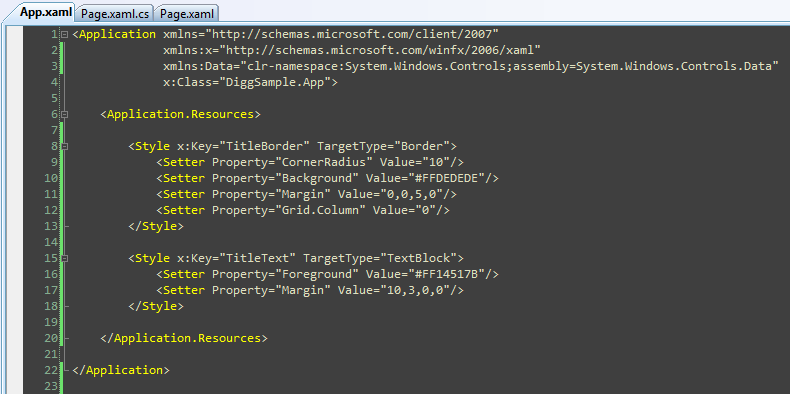
Note how we are giving each Style a unique "Key" value above.  We can then update our <Border> and <TextBlock> controls to reference the Styles using these keys.  We'll be using a XAML feature called "markup extensions" to do this.  Markup extensions are used when there are non-literal values that we want to set (another example of where we'll use this feature is with databinding expressions).

When we update the other controls within our Page.xaml file to use styles as well, we are left with a file that looks like below:
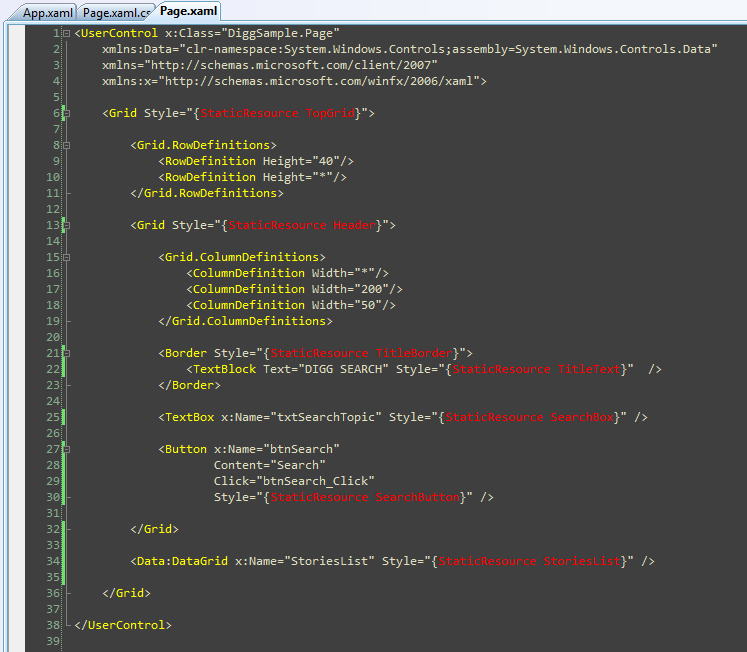
Encapsulating the style settings this way allows developers to better focus on the behavior semantics of the application, and also enables us to re-use styles across other controls/pages we build.

Next Steps

Now that we've cleaned up the markup of our Page.xaml file using Style references, let's go one step further and customize the appearance of our Story data more.

To-do that let's jump to our next tutorial: Using the ListBox and Databinding to Display List Data.

Published Friday, February 22, 2008 5:53 AM by ScottGu

Comments

# First Look at Silverlight 2

Friday, February 22, 2008 10:42 AM by Blogs

Last September we shipped Silverlight 1.0 for Mac and Windows , and announced our plans to deliver Silverlight

# Getting Ready for Silverlight 2.0

Friday, February 22, 2008 6:28 PM by Dan Wahlin's WebLog

Scott Guthrie just released new information about Silverlight 2.0 including 8 tutorials.&#160; It's going

# Style and Silverlight

Saturday, February 23, 2008 3:37 AM by DotNetKicks.com

You've been kicked (a good thing) - Trackback from DotNetKicks.com

# re: Silverlight Tutorial Part 4: Using Style Elements to Better Encapsulate Look and Feel

Saturday, February 23, 2008 4:23 AM by Mike

Being a web developer I very much prefer CSS semantics for declaring and applying styles. Is that possible or considered?

# Scott Guthrie lève le voile sur Silverlight 2

Saturday, February 23, 2008 5:35 AM by Christophe Lauer, Blog Edition

A une semaine de l'ouverture de la conférence Mix08 de Las Vegas, Scott Guthrie - Corporate Vice President

# re: Silverlight Tutorial Part 4: Using Style Elements to Better Encapsulate Look and Feel

Sunday, February 24, 2008 11:50 PM by ScottGu

Hi Mike,

>>>>>>> Being a web developer I very much prefer CSS semantics for declaring and applying styles. Is that possible or considered?

Right now we are using the WPF way of declaring styles.  One of the reasons for this is that while CSS provides a good way to set flat style settings, it doesn't have a concept that supports things like Control Templates and DataTemplates (which require the ability to define structure on elements).  If CSS in HTML 5 adds this, then we'll look at supporting CSS as well as a declarative way to persist style information.

Hope this helps,

Scott

# re: Silverlight Tutorial Part 4: Using Style Elements to Better Encapsulate Look and Feel

Tuesday, February 26, 2008 3:14 AM by Roshawn

The more I read these tutorials, the more interested I become.  I can't wait to play with Silverlight 2.0!

# re: Silverlight Tutorial Part 4: Using Style Elements to Better Encapsulate Look and Feel

Wednesday, February 27, 2008 2:16 AM by Murtaza Rizvi

All I have to say is COOL, i have a feeling that its releasing today :)

# re: Silverlight Tutorial Part 4: Using Style Elements to Better Encapsulate Look and Feel

Wednesday, February 27, 2008 9:41 AM by Chris Austin

Will external styles sheets be supported?  E.G. Merged resource dictionaries with URIs?

# Silverlight チュートリアル パート 4: 上手くルックアンドフィールをカプセル化するためにスタイル要素を使用

Monday, March 03, 2008 10:09 AM by Chica's Blog

Silverlight チュートリアル パート 4: 上手くルックアンドフィールをカプセル化するためにスタイル要素を使用

# Silverlight 2 - App.Xaml Events

Monday, March 03, 2008 12:07 PM by Community Blogs

In Silverlight 2, we have the new App.Xaml file which we can use to store application resources (styles

# Silverlight 2.0 Video Tutorials

Wednesday, March 05, 2008 3:33 PM by Dan Wahlin's WebLog

Silverlight 2.0 provides a new and exciting framework for building rich applications using C#, VB.NET

# re: Silverlight Tutorial Part 4: Using Style Elements to Better Encapsulate Look and Feel

Wednesday, March 05, 2008 5:51 PM by Chris

That's pretty interesting.  I'd have to say that i'm used to CSS as well, but it this seems very straight forward.

But i do have a question.  How do you know that the markup extension references for the style attribute are referencing those that we created in App.xaml?  In most web pages you have an include statement to include the CSS sheet.  Then you know where your styles are coming from.  When i review the above screen shots, i don't see how the relation is being drawn.  Maybe the code to make that relation is not visible in the screenshot?

# MSDN Blog Postings &raquo; Finally arrived Silverlight 2 Beta 1

Wednesday, March 05, 2008 8:49 PM by MSDN Blog Postings » Finally arrived Silverlight 2 Beta 1

Pingback from  MSDN Blog Postings  &raquo; Finally arrived Silverlight 2 Beta 1

# re: Silverlight Tutorial Part 4: Using Style Elements to Better Encapsulate Look and Feel

Wednesday, March 05, 2008 9:33 PM by Carl Caulkett

Has anyone succeeded in completing section 4 using Silverlight 2 Beta 1? I managed to complete section 3 and was able to display Digg data in the DataGrid. However, now that I have applied the style settings as described here, I am getting Xaml parse errors, and I cannot, for the life of me see what the problem is. If anyone has reached this stage, could they post the contents of Page.Xaml and App.Xaml?

Thanks!

# re: Silverlight Tutorial Part 4: Using Style Elements to Better Encapsulate Look and Feel

Thursday, March 06, 2008 7:12 AM by Peter

Hello there,

when I'm using button style Style="{StaticResource ButtonStyle}" in button definition, the fatal error is happen. What I'm doing wrong, other style definition for Border or else are working fine.  

# First Look at Silverlight 2 &laquo; .NET Framework tips

Thursday, March 06, 2008 10:11 PM by First Look at Silverlight 2 « .NET Framework tips

Pingback from  First Look at Silverlight 2 &laquo; .NET Framework tips

# re: Silverlight Tutorial Part 4: Using Style Elements to Better Encapsulate Look and Feel

Friday, March 07, 2008 2:31 AM by Marco

Using latest silverlight for 2008

Getting parse errors as well:

Additional information: AG_E_INVALID_ARGUMENT [Line: 31 Position: 104]

line 31:

<TextBlock Style="{StaticResource test}" Grid.Row="1" Grid.Column="0">if</TextBlock>

with test defined as

          <Style x:Key="test" TargetType="TextBox">            

               <Setter Property="FontWeight" Value="Bold"/>

               <Setter Property="Background" Value="#FFDEDEDE"/>

           </Style>

# Silverlight 2.0 Tutorial &laquo; Ishak On Dotnet [ .NET ]

Friday, March 07, 2008 7:35 AM by Silverlight 2.0 Tutorial « Ishak On Dotnet [ .NET ]

Pingback from  Silverlight 2.0 Tutorial &laquo; Ishak On Dotnet [ .NET ]

# re: Silverlight Tutorial Part 4: Using Style Elements to Better Encapsulate Look and Feel

Friday, March 07, 2008 1:57 PM by Thia

Having a problem I hope someone knows how to fix. If I put anything in App.xaml, whether or not it is called from Page.xaml, I get a white screen when I hit F5. If I take the data out of App.xaml, page appears as it should (From lesson 3). Here is the stuff I had added to App.xaml:

xmlns:Data="clr-namespace:System.Windows.Controls;assembly=System.Windows.Controls.Data" (inside the Application Area)

Inside <Application.Resources>

<Style x:Key="TopGrid" TargetType="Grid">

           <Setter Property="Background" Value="#ff5c7590"/>

           <Setter Property="ShowGridLines" Value="True"/>

       </Style>

       <Style x:Key="Header" TargetType="Grid">

           <Setter Property="Grid.Row" Value="0"/>

           <Setter Property="Margin" Value="7"/>

           <Setter Property="ShowGridLines" Value="True"/>

       </Style>

       <Style x:Key="TitleBorder" TargetType="Border">

           <Setter Property="CornerRadius" Value="10"/>

           <Setter Property="Background" Value="#ffdedede"/>

           <Setter Property="Margin" Value="0,0,5,0"/>

           <Setter Property="Grid.Column" Value="0"/>

       </Style>

       <Style x:Key="TitleText" TargetType="TextBlock">

           <Setter Property="Foreground" Value="#ff14517b"/>

           <Setter Property="Margin" Value="10,3,0,0"/>

       </Style>

       <Style x:Key="SearchBox" TargetType="TextBox">

           <Setter Property="Grid.Column" Value="1"/>

           <Setter Property="FontSize" Value="14"/>

           <Setter Property="Watermark" Value="Topic..."/>

       </Style>

       <Style x:Key="SearchButton" TargetType="Button">

           <Setter Property="Grid.Column" Value="2"/>

       </Style>

       <Style x:Key="StoriesList" TargetType="Data:DataGrid">

           <Setter Property="Grid.Row" Value="1"/>

           <Setter Property="Margin" Value="5"/>

           <Setter Property="AutoGenerateColumns" Value="True"/>

       </Style>

# re: Silverlight Tutorial Part 4: Using Style Elements to Better Encapsulate Look and Feel

Friday, March 07, 2008 2:01 PM by Carl Caulkett

OK. I'm making some progress. Key points to observe:

1. Make sure that the search box is a TextBox and not a WatermarkedTextBox. The code shows the change but the text does not draw attention to it. Some may miss this (I did!)

See here (<a href="blogs.msdn.com/.../>) for an explanation. Note, though, that style applied to a TextBox does work.

2. Don't put the ShowGridLines property in the style. This will cause the design view of the page to disappear and throw an AG_E_INVALID_ARGUMENT parse exception at runtime.

This should enable you to complete stage 4.

# re: Silverlight Tutorial Part 4: Using Style Elements to Better Encapsulate Look and Feel

Friday, March 07, 2008 2:05 PM by Carl Caulkett

Sorry, that link is:

blogs.msdn.com/.../silverlight-2-beta-1-hints.aspx

# re: Silverlight Tutorial Part 4: Using Style Elements to Better Encapsulate Look and Feel

Friday, March 07, 2008 2:16 PM by khay

Mine worked fine up until I tried to add my own styles for the TopGrid and Header and referenced them from the two Grid controls. Putting the style attributes in the Grid object themselves works fine, but adding the Style="{StaticResource TopGrid}" gives me the same AG_E_INVALID_ARGUMENT error.

# re: Silverlight Tutorial Part 4: Using Style Elements to Better Encapsulate Look and Feel

Saturday, March 08, 2008 12:38 PM by Olivier

Hmm i just checked that link...and supposedly you can't set the Style on either TextBox nor the WatermarkedTextBox. However, after testing it appears that only the WatermarkedTextBox is affected by this so far.

# Silverlight 2.0 Video Tutorials (Updated)

Sunday, March 09, 2008 12:16 AM by Dan Wahlin's WebLog

Silverlight 2.0 provides a new and exciting framework for building rich applications using C#, VB.NET

# re: Silverlight Tutorial Part 4: Using Style Elements to Better Encapsulate Look and Feel

Sunday, March 09, 2008 5:10 PM by Todd Wilder

For the example for silverlight 2 with Python they do not use a usercontrol as their App.xaml, they don't have a xaml element called Application. Where should we be putting our styles if we are using python?

Thanks

Todd Wilder

# re: Silverlight Tutorial Part 4: Using Style Elements to Better Encapsulate Look and Feel

Monday, March 10, 2008 3:52 PM by Joey

Also make sure you prepend all hex colors with a "#" in your style blocks in App.xaml.

# First Look at Using Expression Blend with Silverlight 2 &laquo; .NET Framework tips

Pingback from  First Look at Using Expression Blend with Silverlight 2 &laquo; .NET Framework tips

# re: Silverlight Tutorial Part 4: Using Style Elements to Better Encapsulate Look and Feel

Thursday, March 13, 2008 2:57 AM by Chris

"How do you know that the markup extension references for the style attribute are referencing those that we created in App.xaml?"

Attended the AZGROUPS ASP.NET User Group Seminar yesterday, and found my answer :D  Or rather i caught it this time, i'm sure i overlooked the detail in Scott's blog above.

Page.xaml knows about App.xaml, because app is like Global.asx.  It's a page that you use to store assets like in the example above as well has controling the users "session" (session start, etc).  It's application wide, no need to reference it like for CSS includes and such :)

# re: Silverlight Tutorial Part 4: Using Style Elements to Better Encapsulate Look and Feel

Friday, March 14, 2008 9:58 AM by Greg McCarty

If you are having style problems, here's my working app.xaml.  Note that I'm still using the data:datagrid, as I'm working through these in order. The only tricky thing seems to the the namespace reference for Data....

<Application xmlns="schemas.microsoft.com/.../2007"

xmlns:x="schemas.microsoft.com/.../xaml"

            x:Class="DiggSample.App"

            xmlns:Data="clr-namespace:System.Windows.Controls;assembly=System.Windows.Controls.Data"

 >

 <Application.Resources>

   <Style x:Key="TopGrid" TargetType="Grid">

     <Setter Property="Background" Value="#FF5C7590" />

   </Style>

   <Style x:Key="TitleBorder" TargetType="Border">

     <Setter Property="CornerRadius" Value="10" />

     <Setter Property="Background" Value="#FFDEDEDE" />

     <Setter Property="Margin" Value="0,0,5,0" />

     <Setter Property="Grid.Column" Value="0" />

   </Style>

   <Style x:Key="TitleText" TargetType="TextBlock">

     <Setter Property="Foreground" Value="#FF14517B" />

     <Setter Property="Margin" Value="10,3,0,0" />

   </Style>

   <Style x:Key="Header" TargetType="Grid">

     <Setter Property="Margin" Value="7" />

     <Setter Property="Grid.Row" Value="0"/>

   </Style>

   <Style x:Key="SearchBox" TargetType="TextBox">

     <Setter Property="FontFamily" Value="Trebuchet MS"/>

     <Setter Property="Grid.Column" Value="1"/>

     <Setter Property="FontSize" Value="14"/>

   </Style>

   <Style x:Key="SearchButton" TargetType="Button">

     <Setter Property="Grid.Column" Value="2"/>

   </Style>

   <Style x:Key="Stories" TargetType="Data:DataGrid">

     <Setter Property="Margin" Value="5" />

     <Setter Property="Grid.Row" Value="1"/>

   </Style>

 </Application.Resources>

</Application>

# First Look at Silverlight 2 at Superdopey&#8217;s Techblog

Saturday, March 15, 2008 10:49 AM by First Look at Silverlight 2 at Superdopey’s Techblog

Pingback from  First Look at Silverlight 2 at  Superdopey&#8217;s Techblog

# Tutorial Silverlight Parte 4: Uso de estilos para encapsular el Look &amp; Feel &laquo; Thinking in .NET

Pingback from  Tutorial Silverlight Parte 4: Uso de estilos para encapsular el Look &amp; Feel &laquo; Thinking in .NET

# re: Silverlight Tutorial Part 4: Using Style Elements to Better Encapsulate Look and Feel

Friday, March 21, 2008 7:59 PM by Juan María

Hi all:

You can read this post in spanish here:

thinkingindotnet.wordpress.com/.../tutorial-silverlight-parte-4-uso-de-estilos-para-encapsular-el-look-feel

# re: Silverlight Tutorial Part 4: Using Style Elements to Better Encapsulate Look and Feel

Tuesday, March 25, 2008 9:34 AM by Ian Smith

Have to say I'm very disappointed with the quality of these tutorials. Did anyone actually try running them?

The third one had several errors in, thankfully sorted out by reading all the corrections in the comments from people who'd struggled with it. This fourth one has got me stumped. Like others, my design view has suddenly disappeared and I get XAML parser errors that seem to contradict the information given in the tutorials and comments above. I don't understand how Greg McCarty's app.xaml is working with TargetType="Data:DataGrid" (quite apart from the fact that he's changed the style key from what's shown in the tutorial from "StoriesList" to "Stories"?!) because when I try that I get a very explicit error at run time saying that Data:DataGrid is NOT a valid TargetType.

# re: Silverlight Tutorial Part 4: Using Style Elements to Better Encapsulate Look and Feel

Sunday, April 06, 2008 5:46 AM by Zubair.NET!

hi Scott,

Thanks for posting these great tutorials, I'm following all of them and building my application step by step.

I just realized that it would make sense if you define styles in App.xaml and let intellisense help you choose the right style in Page.xaml (I'm hoping this is supported in Silverlight 2 RTM) and I think Style="{StatisResource TopGrid}" syntax is too long, Style="TopGrid" would make more sense.

Just a thought.

# re: Silverlight Tutorial Part 4: Using Style Elements to Better Encapsulate Look and Feel

Tuesday, April 08, 2008 8:53 AM by Dave

Seems like global style declarations along the following lines:

<Style TargetType="{x:Type TextBlock}">

That I've seen elsewhere on the web for styling XAML aren't working. (Hi to you too, XamlParseException!)

Shame really, as you're just as likely to want to style things this way as by explicitly referencing every single style you want applied.

# Tutorial Silverlight Parte 4: Uso de estilos para encapsular el Look &amp; Feel &laquo; The Code .NET

Pingback from  Tutorial Silverlight Parte 4: Uso de estilos para encapsular el Look &amp; Feel &laquo; The Code .NET

# The Code .NET &raquo; Blog Archive &raquo; Tutorial Silverlight Parte 4: Uso de estilos para encapsular el Look &amp; Feel

Pingback from  The Code .NET  &raquo; Blog Archive   &raquo; Tutorial Silverlight Parte 4: Uso de estilos para encapsular el Look &amp; Feel

# Silverlight 2 released | Rajeesh's Blog

Wednesday, October 15, 2008 11:53 AM by Silverlight 2 released | Rajeesh's Blog

Pingback from  Silverlight 2 released | Rajeesh's Blog

# Buspar.

Thursday, November 20, 2008 12:08 AM by Buspar side effects.

Buspar experience. Buspar. Buspar dosage.

# Silverlight ?????????????????? | NextPage???

Wednesday, March 25, 2009 11:35 AM by Silverlight ?????????????????? | NextPage???

Pingback from  Silverlight ?????????????????? | NextPage???

# Silverlight Styling &laquo; Code On A Stick

Tuesday, July 14, 2009 11:40 AM by Silverlight Styling « Code On A Stick

Pingback from  Silverlight Styling &laquo;  Code On A Stick

# Pasos para comenzar a desarrollar Aplicaciones Silverlight 3 &laquo; La Ranita Inform??tica

Pingback from  Pasos para comenzar a desarrollar Aplicaciones Silverlight 3 &laquo; La Ranita Inform??tica