Using TypeScript in ASP.NET MVC Projects

In the previous blog post Microsoft TypeScript : A Typed Superset of JavaScript, I have given a brief introduction on TypeScript. In this post, I will demonstrate how to use TypeScript with ASP.NET MVC projects and how we can compile TypeScript within the ASP.NET MVC projects.

Using TypeScript with ASP.NET MVC 3 Projects

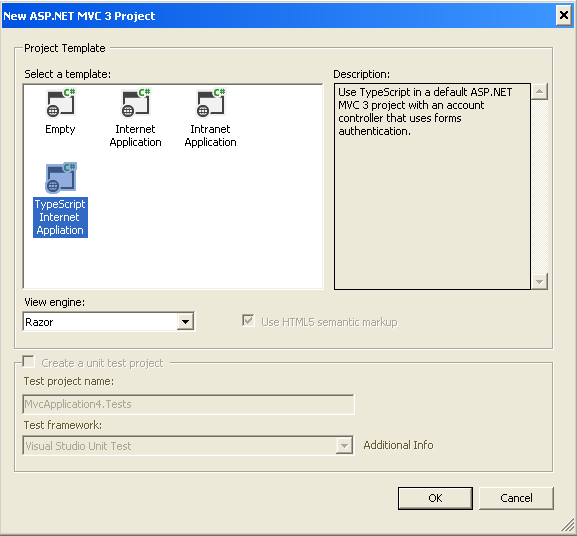
The Visual Studio plug-in for TypeScript provides an ASP.NET MVC 3 project template for TypeScript that lets you to compile TypeScript from the Visual Studio. The following screen shot shows the TypeScript template for ASP.NET MVC 3 project
ts_mvc3

The “TypeScript Internet Application” template is just a ASP.NET MVC 3 internet application project template which will allows to compile TypeScript programs to JavaScript when you are building your ASP.NET MVC projects. This project template will have the following section in the .csproject file

<None Include="Scripts\jquery.d.ts" />
    <TypeScriptCompile Include="Scripts\site.ts" />
    <Content Include="Scripts\site.js">
      <DependentUpon>site.ts</DependentUpon>
    </Content>
 <Target Name="BeforeBuild">
 <Exec 
     Command="&amp;quot;$(PROGRAMFILES)\
     Microsoft SDKs\TypeScript\0.8.0.0\tsc&amp;quot;
     @(TypeScriptCompile ->'&quot;%(fullpath)&quot;', ' ')" />
 </Target>

The “BeforeBuild” target will allows you to compile TypeScript programs when you are building your ASP.NET MVC projects. The TypeScript project template will provide a typing reference file for the jQuery library named “jquery.d.ts”. The following default app.ts file referenced to jquery.d.ts

   1:  ///<reference path='jquery.d.ts' />
   2:   
   3:  $(document).ready(function () {
   4:   
   5:      $(".btn-slide").click(function () {
   6:          $("#main").slideToggle("slow");
   7:          $(this).toggleClass("active");
   8:      });
   9:   
  10:  });

Using TypeScript with ASP.NET MVC 4 Projects

The current preview version of TypeScript is not providing a project template for ASP.NET MVC 4 projects. But you can use TypeScript with ASP.NET MVC 4 projects by editing the project’s .csproject file. You can take the necessary settings from ASP.NET MVC 3 project file. I have just added the following section in the end of the .csproj file of a ASP.NET MVC 4 project, which will allows to compile all TypeScript when building ASP.NET MVC 4 project.

<ItemGroup>
    <TypeScriptCompile Include="$(ProjectDir)\**\*.ts" />
</ItemGroup>
  <Target Name="BeforeBuild">
   <Exec Command="&amp;quot;$(PROGRAMFILES)\
   Microsoft SDKs\TypeScript\0.8.0.0\tsc&amp;quot; 
  @(TypeScriptCompile ->'&quot;%(fullpath)&quot;', ' ')" />
  </Target>
Published Tuesday, October 02, 2012 12:45 PM by shiju

Comments

# Using TypeScript in ASP.NET MVC Projects - Shiju Varghese's Blog | asp.net mvc | Scoop.it

Pingback from  Using TypeScript in ASP.NET MVC Projects - Shiju Varghese's Blog | asp.net mvc | Scoop.it

# re: Using TypeScript in ASP.NET MVC Projects

Tuesday, October 02, 2012 7:49 PM by Stephen Wells

Can we get a NuGet package? It would make more sense if there was a NuGet package that put the compiler in its package folder, and used a powershell script to update the project file with the before build compile target.

# re: Using TypeScript in ASP.NET MVC Projects

Wednesday, October 03, 2012 1:49 AM by Robert McLaws

You can also just use the Web Essentials add-in, which supports dual-pane .TS editing & output to JS.

# re: Using TypeScript in ASP.NET MVC Projects

Wednesday, October 03, 2012 7:27 AM by Brian

FYI, after copying and pasting the MVC4 sample I had to remove the 2 instances of "amp;" from the Exec Command. So the final exec command looks like this:

<Exec Command="&quot;$(PROGRAMFILES)\Microsoft SDKs\TypeScript\0.8.0.0\tsc.exe&quot; @(TypeScriptCompile ->'&quot;%(fullpath)&quot;', ' ')" />

# re: Using TypeScript in ASP.NET MVC Projects

Friday, October 05, 2012 3:58 AM by SEO Company Philippines

Thanks for the tip but these scripts are way too advance for me. I am really new to ASP.NET MVC 4 framework. Does this work with ASP.NET MVC 3 structure?

# Joel Cochran &raquo; Weekly roundup 10/3/2012

Friday, October 05, 2012 2:16 PM by Joel Cochran » Weekly roundup 10/3/2012

Pingback from  Joel Cochran &raquo; Weekly roundup 10/3/2012

# TypeScript????????????JavaScript?????? | ????????????

Saturday, October 06, 2012 3:47 AM by TypeScript????????????JavaScript?????? | ????????????

Pingback from  TypeScript????????????JavaScript?????? | ????????????

# Cheatsheet: 2012 10.01 ~ 10.07

Sunday, October 07, 2012 4:02 AM by gOODiDEA.NET

Mobile Building an App for Both Windows Phone and iOS How To Create Your First iPhone App (2012 Edition

# re: Using TypeScript in ASP.NET MVC Projects

Sunday, October 07, 2012 3:23 PM by Steve

nuget package please :)

# re: Using TypeScript in ASP.NET MVC Projects

Monday, October 08, 2012 4:40 AM by Schlicht

Issue with TFS and BeforeBuild

If a javascript file was checked in into TFS this file is readonly. Now on build TSC throws out the error Permission denied.

Is there a known workaround for this?

# re: Using TypeScript in ASP.NET MVC Projects

Wednesday, October 17, 2012 11:48 PM by Steve

why mvc 3 and not mvc 4 ?

# Project Personal ??? End-Of-Week Update #2 &laquo; My Web Anecdotes

Pingback from  Project Personal ??? End-Of-Week Update #2 &laquo; My Web Anecdotes

# re: Using TypeScript in ASP.NET MVC Projects

Sunday, December 09, 2012 3:54 PM by H

OK, but How do you use TypeScript in a MVC project...together with the Razor syntax and how do you handle references to typescript/JS-files? How do get it all to work together in Visual Studio?

Leave a Comment

(required) 
(required) 
(optional)
(required)