Visual Studio: alway run as administrator

I’m currently developing on a 64 bit Windows Server 2008 R2 that is domain joined, so I log in with my domain account and user access control is enabled. I need to run my Visual Studio as an administrator, because otherwise I get all kind of errors. I can do this by right-clicking on the Visual Studio Icon and select “Run as administrator”:

image

The problem is: I forget to do this all the time, and I ALWAYS want to run Visual Studio as an administrator.

You can enable this as follows:

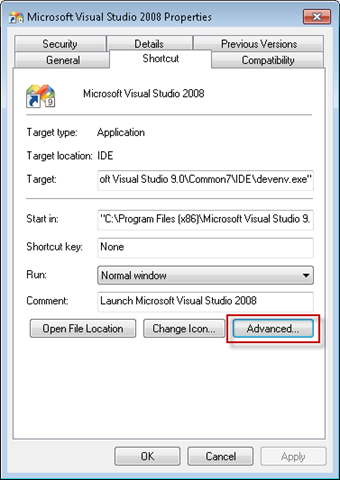
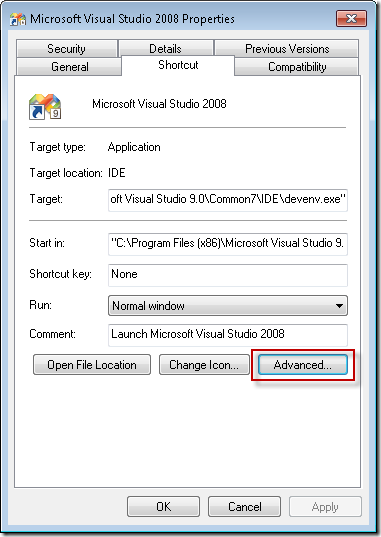
  1. Right-click the Visual Studio icon and select properties
  2. On the Shortcut tab (the default tab) select Advanced
    image
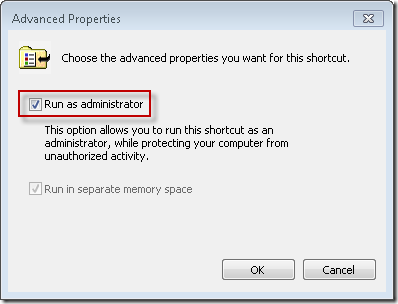
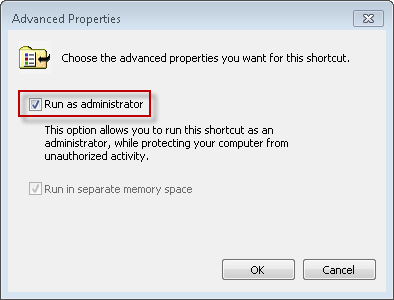
  3. Select Run as administrator
    image 
  4. Click OK

This will work on any program, and on any OS with user access control (Vista, Windows 7, …).

In order to be able to do this you must be added to the Administrators group on the local machine. If you don’t have the permissions to do this, login with an account that has enough permissions, or login with the local administrator account.

You can do this in the Edit local users and groups program (Start –> Search programs and files… type users):
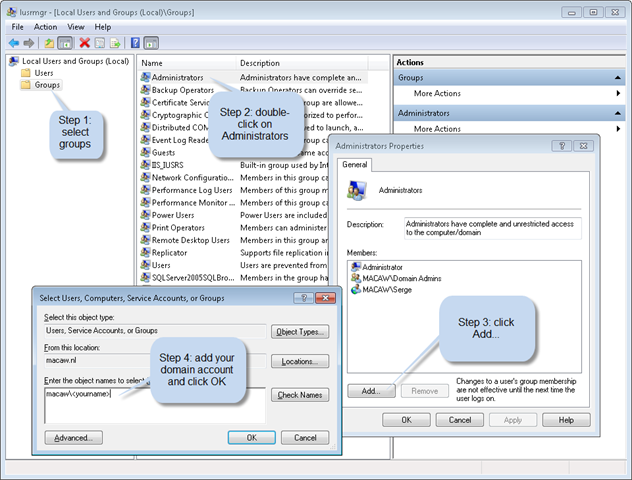
image

When you start up Visual Studio you will always get a warning from User Access Control with the question if you want to allow the program to make changes to your computer. Don’t know if you can prevent this popup.

Published Wednesday, October 07, 2009 12:07 PM by svdoever
Filed under: ,

Comments

Wednesday, October 07, 2009 9:30 AM by Stephen Harrison

# re: Visual Studio: alway run as administrator

Thanks for sharing - interesting technique. I have always used the compatibility setting to get Visual Studio to run as admin by default, however your way is specific to the shortcut so it's possible to have a shortcut that is an admin VS and one that is a regular VS which is really nice as I have some projects that need admin and others that don't.

However the one problem is if you launch by double clicking the .sln file it will not launch as an admin, you can use the compatibility setting for this but you also need to modify VSLauncher.exe (C:\Program Files\Common Files\Microsoft Shared\MSEnv\VSLauncher.exe) to be admin as that is what gets launched from a .sln file, otherwise nothing will happen.

Thursday, October 08, 2009 3:13 AM by Quango

# re: Visual Studio: alway run as administrator

I am running VS2008 on Windows 7 x64 - I don't run as administrator and I have no issues.

Thursday, October 15, 2009 10:01 AM by Andrew

# re: Visual Studio: alway run as administrator

I'd advise against running a dev environment as admin, it's one of the easiest ways to produce software which also only runs as admin.

If you're interested, have a read around here:

blogs.msdn.com/.../TOC.aspx

Wednesday, October 13, 2010 12:21 PM by ThePork Live Chat

# re: Visual Studio: alway run as administrator

Thanks for this!

I just upgraded to Windows7 and was having a lot of problems with permissions trying to save files.

Using always run as administrator has fixed that.

Cheers!

Thursday, January 13, 2011 9:46 AM by Erik

# re: Visual Studio: alway run as administrator

I'm logged in as an administrator, and I want to avoid running the ide as admin. Can I run it as another user? Any Ideas?

Friday, October 28, 2011 5:28 AM by Vishwa MOhan

# re: Visual Studio: alway run as administrator

Thanks for your post !, It helps me too !

Leave a Comment

(required) 
(required) 
(optional)
(required)