Wednesday, February 23, 2011 8:12 AM srkirkland

Introducing Data Annotations Extensions

Validation of user input is integral to building a modern web application, and ASP.NET MVC offers us a way to enforce business rules on both the client and server using Model Validation.  The recent release of ASP.NET MVC 3 has improved these offerings on the client side by introducing an unobtrusive validation library built on top of jquery.validation.  Out of the box MVC comes with support for Data Annotations (that is, System.ComponentModel.DataAnnotations) and can be extended to support other frameworks.  Data Annotations Validation is becoming more popular and is being baked in to many other Microsoft offerings, including Entity Framework, though with MVC it only contains four validators: Range, Required, StringLength and Regular Expression.  The Data Annotations Extensions project attempts to augment these validators with additional attributes while maintaining the clean integration Data Annotations provides.

A Quick Word About Data Annotations Extensions

The Data Annotations Extensions project can be found at http://dataannotationsextensions.org/, and currently provides 11 additional validation attributes (ex: Email, EqualTo, Min/Max) on top of Data Annotations’ original 4.  You can find a current list of the validation attributes on the afore mentioned website.

The core library provides server-side validation attributes that can be used in any .NET 4.0 project (no MVC dependency). There is also an easily pluggable client-side validation library which can be used in ASP.NET MVC 3 projects using unobtrusive jquery validation (only MVC3 included javascript files are required).

On to the Preview

Let’s say you had the following “Customer” domain model (or view model, depending on your project structure) in an MVC 3 project:

public class Customer
{
    public string  Email { get; set; }
    public int Age { get; set; }
    public string ProfilePictureLocation { get; set; }
}

When it comes time to create/edit this Customer, you will probably have a CustomerController and a simple form that just uses one of the Html.EditorFor() methods that the ASP.NET MVC tooling generates for you (or you can write yourself).  It should look something like this:
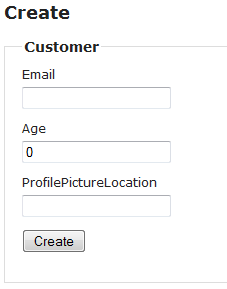
image

With no validation, the customer can enter nonsense for an email address, and then can even report their age as a negative number!  With the built-in Data Annotations validation, I could do a bit better by adding a Range to the age, adding a RegularExpression for email (yuck!), and adding some required attributes.  However, I’d still be able to report my age as 10.75 years old, and my profile picture could still be any string.  Let’s use Data Annotations along with this project, Data Annotations Extensions, and see what we can get:

public class Customer
{
    [Email]
    [Required]
    public string  Email { get; set; }
 
    [Integer]
    [Min(1, ErrorMessage="Unless you are benjamin button you are lying.")]
    [Required]
    public int Age { get; set; }
 
    [FileExtensions("png|jpg|jpeg|gif")]
    public string ProfilePictureLocation { get; set; }
}

Now let’s try to put in some invalid values and see what happens:
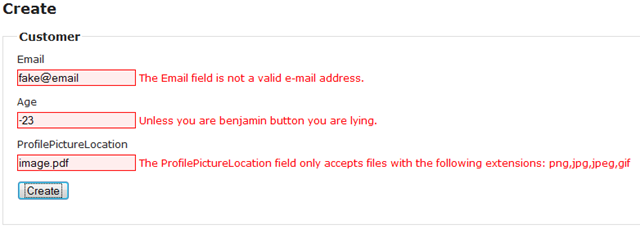
image

That is very nice validation, all done on the client side (will also be validated on the server).  Also, the Customer class validation attributes are very easy to read and understand.

Another bonus: Since Data Annotations Extensions can integrate with MVC 3’s unobtrusive validation, no additional scripts are required!

Now that we’ve seen our target, let’s take a look at how to get there within a new MVC 3 project.

Adding Data Annotations Extensions To Your Project

First we will File->New Project and create an ASP.NET MVC 3 project.  I am going to use Razor for these examples, but any view engine can be used in practice. 

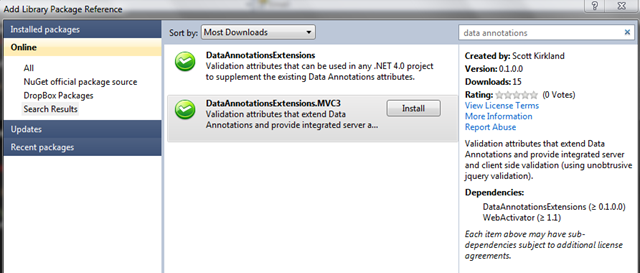
Now go into the NuGet Extension Manager (right click on references and select add Library Package Reference) and search for “DataAnnotationsExtensions.”  You should see the following two packages:
image

The first package is for server-side validation scenarios, but since we are using MVC 3 and would like comprehensive sever and client validation support, click on the DataAnnotationsExtensions.MVC3 project and then click Install.  This will install the Data Annotations Extensions server and client validation DLLs along with David Ebbo’s web activator (which enables the validation attributes to be registered with MVC 3).

Now that Data Annotations Extensions is installed you have all you need to start doing advanced model validation.  If you are already using Data Annotations in your project, just making use of the additional validation attributes will provide client and server validation automatically.  However, assuming you are starting with a blank project I’ll walk you through setting up a controller and model to test with.

Creating Your Model

In the Models folder, create a new User.cs file with a User class that you can use as a model.  To start with, I’ll use the following class:

public class User
{
    public string Email { get; set; }
    public string Password { get; set; }
    public string PasswordConfirm { get; set; }
    public string HomePage { get; set; }
    public int Age { get; set; }
}

Next, create a simple controller with at least a Create method, and then a matching Create view (note, you can do all of this via the MVC built-in tooling).  Your files will look something like this:

UserController.cs:

public class UserController : Controller
{
    public ActionResult Create()
    {
        return View(new User());
    }
 
    [HttpPost]
    public ActionResult Create(User user)
    {
        if (!ModelState.IsValid)
        {
            return View(user);
        }
 
        return Content("User valid!");
    }
}

Create.cshtml:

@model NuGetValidationTester.Models.User
 
@{
    ViewBag.Title = "Create";
}
 
<h2>Create</h2>
 
<script src="@Url.Content("~/Scripts/jquery.validate.min.js")" type="text/javascript"></script>
<script src="@Url.Content("~/Scripts/jquery.validate.unobtrusive.min.js")" type="text/javascript"></script>
 
@using (Html.BeginForm()) {
    @Html.ValidationSummary(true)
    <fieldset>
        <legend>User</legend>
        
        @Html.EditorForModel()
        
        <p>
            <input type="submit" value="Create" />
        </p>
    </fieldset>
}

In the Create.cshtml view, note that we are referencing jquery validation and jquery unobtrusive (jquery is referenced in the layout page).  These MVC 3 included scripts are the only ones you need to enjoy both the basic Data Annotations validation as well as the validation additions available in Data Annotations Extensions.  These references are added by default when you use the MVC 3 “Add View” dialog on a modification template type.

Now when we go to /User/Create we should see a form for editing a User
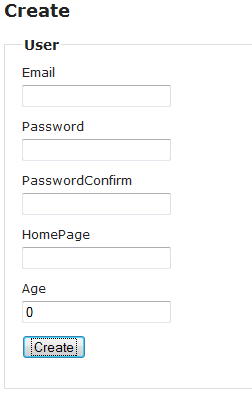
image

Since we haven’t yet added any validation attributes, this form is valid as shown (including no password, email and an age of 0).  With the built-in Data Annotations attributes we can make some of the fields required, and we could use a range validator of maybe 1 to 110 on Age (of course we don’t want to leave out supercentenarians) but let’s go further and validate our input comprehensively using Data Annotations Extensions.  The new and improved User.cs model class.

{
    [Required]
    [Email]
    public string Email { get; set; }
 
    [Required]
    public string Password { get; set; }
 
    [Required]
    [EqualTo("Password")]
    public string PasswordConfirm { get; set; }
 
    [Url]
    public string HomePage { get; set; }
 
    [Integer]
    [Min(1)]
    public int Age { get; set; }
}

Now let’s re-run our form and try to use some invalid values:

image

All of the validation errors you see above occurred on the client, without ever even hitting submit.  The validation is also checked on the server, which is a good practice since client validation is easily bypassed.

That’s all you need to do to start a new project and include Data Annotations Extensions, and of course you can integrate it into an existing project just as easily.

Nitpickers Corner

ASP.NET MVC 3 futures defines four new data annotations attributes which this project has as well: CreditCard, Email, Url and EqualTo.  Unfortunately referencing MVC 3 futures necessitates taking an dependency on MVC 3 in your model layer, which may be unadvisable in a multi-tiered project.  Data Annotations Extensions keeps the server and client side libraries separate so using the project’s validation attributes don’t require you to take any additional dependencies in your model layer which still allowing for the rich client validation experience if you are using MVC 3.

Custom Error Message and Globalization: Since the Data Annotations Extensions are build on top of Data Annotations, you have the ability to define your own static error messages and even to use resource files for very customizable error messages.

Available Validators: Please see the project site at http://dataannotationsextensions.org/ for an up-to-date list of the new validators included in this project.  As of this post, the following validators are available:

  • CreditCard
  • Date
  • Digits
  • Email
  • EqualTo
  • FileExtensions
  • Integer
  • Max
  • Min
  • Numeric
  • Url

Conclusion

Hopefully I’ve illustrated how easy it is to add server and client validation to your MVC 3 projects, and how to easily you can extend the available validation options to meet real world needs.

The Data Annotations Extensions project is fully open source under the BSD license.  Any feedback would be greatly appreciated.  More information than you require, along with links to the source code, is available at http://dataannotationsextensions.org/.

Enjoy!

Filed under: , , , , , , , ,

Comments

# Twitter Trackbacks for Introducing Data Annotations Extensions - Scott's Blog [asp.net] on Topsy.com

Pingback from  Twitter Trackbacks for                 Introducing Data Annotations Extensions - Scott's Blog         [asp.net]        on Topsy.com

# re: Introducing Data Annotations Extensions

Thursday, February 24, 2011 6:47 AM by André Castro

I'm gonna try this one, looks very nice and simple. Thanks!

# re: Introducing Data Annotations Extensions

Thursday, February 24, 2011 6:50 AM by Ross

Can I use this in an existing MVC 2.0 app?

# re: Introducing Data Annotations Extensions

Thursday, February 24, 2011 8:13 AM by Kevin Priester

I am loading this one up right now.

# re: Introducing Data Annotations Extensions

Thursday, February 24, 2011 9:54 AM by Zach Curtis

Great post, cannot wait to try it out!

How come referencing MVC 3 is not advisable in the Model layer?

# re: Introducing Data Annotations Extensions

Thursday, February 24, 2011 2:38 PM by srkirkland

@Zach,

>Great post, cannot wait to try it out!

>

>How come referencing MVC 3 is not advisable in the Model layer?

It really depends -- if you are using ViewModels then it would probably be fine, but lots of people might have their domain objects in a separate assembly and not want that library to reference MVC.  The key is you have the flexibility to separate out your models from MVC and still get all of the benefits of client/server validation, if that's what you would like to do.

# re: Introducing Data Annotations Extensions

Wednesday, March 02, 2011 10:04 PM by James Manning

Any chance you would be willing to include Silverlight support?  The target scenario being WCF RIA services, adding these new annotations on the server side (via metadata class for EF, or directly for POCO, or whatever) and then have it work on the (silverlight) client side too when the client-side proxy code is generated.

Thanks!

# re: Introducing Data Annotations Extensions

Monday, March 07, 2011 7:02 AM by WolfyUK

This looks great.

Would it be possible to support cultures other than the invariant for the parsing of digits and dates in a future version?

# re: Introducing Data Annotations Extensions

Monday, March 07, 2011 2:00 PM by srkirkland

@Ross,

>Can I use this in an existing MVC 2.0 app?

The server-side validation attributes will work in a MVC 2.0 application (or any .NET 4 application), but the client-side package utilizes the unobtrusive jQuery validation which was only introduced in MVC 3.

# re: Introducing Data Annotations Extensions

Monday, March 07, 2011 2:05 PM by srkirkland

@WolfyUK,

>This looks great.

>Would it be possible to support cultures other than the invariant for >the parsing of digits and dates in a future version?

That is a great idea-- I've created an issue ticket for this at the project GitHub repository and I'll look into adding culture support for future versions.

github.com/.../2

# Using Data Annotations and Extensions with SubSonic 3.0 &laquo; Marc Mezzacca&#039;s Notebook

Pingback from  Using Data Annotations and Extensions with SubSonic 3.0 &laquo;  Marc Mezzacca&#039;s Notebook

# re: Introducing Data Annotations Extensions

Wednesday, March 09, 2011 1:01 AM by srkirkland

@WolfyUK,

>This looks great.

>Would it be possible to support cultures other than the invariant for >the parsing of digits and dates in a future version?

Version 0.3 on NuGet now supports using the current culture for date and number formatting on the server.

For client-side globalization support you can simply use any existing method for extending jQuery validate, possibly using the Microsoft jQuery globalization plugin.

# re: Introducing Data Annotations Extensions

Wednesday, March 09, 2011 10:38 AM by Quang Vo

There's a problem with EqualTo attribute. It does not take Display attribute of the target property (the property to compare with) into account. Please fix this.

# re: Introducing Data Annotations Extensions

Wednesday, March 09, 2011 6:00 PM by neilm

Am I correct in thinking that currently the DateAttribute is fixed against the mm/dd/yyyy format?

# re: Introducing Data Annotations Extensions

Wednesday, March 09, 2011 6:38 PM by srkirkland

@neilm,

>Am I correct in thinking that currently the DateAttribute is fixed >against the mm/dd/yyyy format?

No, actually the server-side validation is culture aware and will parse any date format that .NET knows.  Client-side validation uses the JavaScript date object to determine validity, and additionally (if you really need to) you can easily override jQuery validation's date rule at any time (possibly using a plugin like jQuery globalization).

# re: Introducing Data Annotations Extensions

Wednesday, March 16, 2011 1:13 AM by srkirkland

@Quang Vo,

>There's a problem with EqualTo attribute. It does not take Display attribute of the target property (the property to compare with) into account. Please fix this.

   I've looked into this and it turns out getting the client-side validation message to respect a display name is really easy (by hooking into the MVC model metadata provider), but for the server-side validation message you don't have access to the model metadata because it is not passed by MVC's default Data Annotations Model Validator, so the best you can do is manually checking for a [Display] attribute (which ties you to data annotations model metadata only).  This works fairly well, but I don't think it's flexible enough to go into the master branch (which may be why the MVC team has the same issue with their [Compare] attribute).  However, since the changes would be fairly simple (just 2 files need updating) I've made them available at https://gist.github.com/872037 in case you would like to make the changes in a fork.

# Enlaces de Marzo: ASP.NET, ASP.NET MVC, jQuery, EF, .NET &laquo; Thinking in .NET

Pingback from  Enlaces de Marzo: ASP.NET, ASP.NET MVC, jQuery, EF, .NET &laquo; Thinking in .NET

# re: Introducing Data Annotations Extensions

Wednesday, April 06, 2011 7:57 PM by Rob Martinez

Have been searching all over for an answer to a lingering question I have when I stumbled upon your great project: how can I display a success and/or failure image with the validation message inside.  I know I can use CSS to display a background image, the problem is its a static image and longer messages won't work.  I find myself trying to keep my messages to a fixed length, which is always not practical.  Also, on at least one occasion, one field has two messages which display upon failure and which always are longer than the fixed image.  I tried using <div>'s to surround the ValdiationMessage, but then the images are always present (they work great when a message does fire) - also, a success image won't work in that scenario.

I later tried to create extensions, but was unable to figure out how to change the <span> to a set of <div's>.  The more I think about it the more that last idea sounds best, as it gives me total control.  But is it doable?

Thanks for any advice or pointing me in the right direction.

# re: Introducing Data Annotations Extensions

Monday, April 11, 2011 3:36 AM by Jeremy Lundy

Looks pretty good. One thing I noticed with your CreditCardAttribute (and MVC Futures!) is that a string containing only hyphens will pass validation. There should be a check for an empty string after removing hyphens:

ccValue = ccValue.Replace("-", "");

if (string.IsNullOrEmpty(ccValue))

{

 return false;

}

This is safe because you have already returned true if the value was null at the beginning of the method.

I will probably post the same issue on Codeplex for MVC Futures.

# March 6th Links: ASP.NET, ASP.NET MVC, jQuery, EF, .NET &raquo; Cymes Blog

Pingback from  March 6th Links: ASP.NET, ASP.NET MVC, jQuery, EF, .NET &raquo;  Cymes Blog

# March 6th Links: ASP.NET, ASP.NET MVC, jQuery, EF, .NET &laquo; Cymes Blog

Pingback from  March 6th Links: ASP.NET, ASP.NET MVC, jQuery, EF, .NET &laquo;  Cymes Blog

# re: Introducing Data Annotations Extensions

Thursday, April 28, 2011 11:17 AM by Steven Archibald

I'm looking for this using VS 2010, and cannot find it at all.  I have NuGet for VS installed ...

# re: Introducing Data Annotations Extensions

Friday, April 29, 2011 4:55 PM by srkirkland

@Steven Archibald,

  Go to dataannotationsextensions.org/.../Download for direct links to the nuget packages.  Also, I've always found searching by "data annotations" in the NuGet VS2010 plugin will cause the packages to show up at the first options.

# re: Introducing Data Annotations Extensions

Tuesday, May 10, 2011 2:02 AM by nnsca

You may want to add the BooleanRequired annotation referenced in this post

itmeze.com/.../checkbox-has-to-be-checked-with-unobtrusive-jquery-validation-and-asp-net-mvc-3

# re: Introducing Data Annotations Extensions

Wednesday, May 11, 2011 4:29 AM by TonyW

Just about to write all of this myself when I stumbled across your project.  Fantastic project and great work.  Saved me hours of work!!

# re: Introducing Data Annotations Extensions

Thursday, May 26, 2011 5:43 AM by Anand More

Hi,

I am adding the reference of Data Annotations Extensions in MVC3 using VB.net project and i found this is not working.

I cannot getting any error when i add the attribute in property e.g.

<Required()> _

       <Display(Name:="Email Address *")> _

       <Email(ErrorMessage:="Invalid Email Address")> _

       Public Property EmailAddress() As String

           Get

               Return m_EmailAddress

           End Get

           Set(ByVal value As String)

               m_EmailAddress = value

           End Set

       End Property

but the field is not getting validated , its validated for required field but not validated for valid email address.

Please let me know what is wrong i am doing...

# re: Introducing Data Annotations Extensions

Thursday, May 26, 2011 7:52 AM by Anand More

Hi again....

I just tried Data Annotations Extensions using MVC 3 using c#.net and its working fine...

This means Data Annotations Extensions is not working in MVC 3 VB.net...

I am planning to use this in actual project (MVC 3 using VB.net) , please help...

Anand More

India, Pune.

# re: Introducing Data Annotations Extensions

Tuesday, June 07, 2011 9:55 AM by Al

So, for a date annotation, how do I also specify a date format for existing values?

[Date(ErrorMessage = "Please enter a valid date.")]

   [DisplayFormat(ApplyFormatInEditMode = true, DataFormatString = "dd-MMM-yy")]

is an utter fail cake

makes this project a bag of spanners imo

# re: Introducing Data Annotations Extensions

Wednesday, June 08, 2011 1:17 PM by srkirkland

@Al,

  The client-side validation is handled using the jquery.validation library, just as with ASPMVC as a whole.  Looking through the date validation code, it appears that jquery.validation uses the JavaScript "Date" class to parse the string and determine validity (thus date formats are irrelevant).  For more information, please see their site at bassistance.de/.../jquery-plugin-validation.  If you would like a very specific format, I'd suggest using the built in pattern validator.

# re: Introducing Data Annotations Extensions

Tuesday, June 21, 2011 8:17 AM by srkirkland

@Anand More,

  I'm not sure why it wouldn't work in VB since there is nothing language specific about the library, but I'll test it soon and see if I can reproduce your results.

Scott

# re: Introducing Data Annotations Extensions

Wednesday, July 27, 2011 9:56 AM by bhuvin.t

Could Required field Data Annotation work on collection ?

# re: Introducing Data Annotations Extensions

Friday, August 12, 2011 5:05 PM by Nick

I have the same problem as Anand More.  The email validation does not work in VB.NET MVC3.

Anand - Did you figure it out?  Any help would be greatly appreciated.

# re: Introducing Data Annotations Extensions

Saturday, August 13, 2011 9:56 AM by Nick

To extend my previous comment on Aug 12.

---

OK... so I am not sure that the problem lies within VB.Net, it may.  What I found is that the RegularExpression data annotation is somewhat buggy.  I created an email validation data annotation based off of a complex regex string but it did not work.  Basically, it does nothing (same thing happens when I use the Email validation included in the extensions).  So, then I used a much less complex regex "^[A-Z0-9._%+-]+@[A-Z0-9.-]+\.[A-Z]{2,4}$" and it works fine.  I assume that the email validator included in the extensions is based off of the RegularExpression data annotation.  If it is, it is possible that the problem actually lies within the base annotation or the regular expression pattern itself.

PS. I am not promoting the RegEx pattern as a recommended email validation in any way, I am simply illustrating that the regular expression validator works fine with some patterns and not so good with others.

# HD Software Co. Blog &raquo; March 6th Links: ASP.NET, ASP.NET MVC, jQuery, EF, .NET

Pingback from  HD Software Co. Blog  &raquo; March 6th Links: ASP.NET, ASP.NET MVC, jQuery, EF, .NET

# re: Introducing Data Annotations Extensions

Wednesday, August 24, 2011 11:20 AM by rtyecript

I really liked the article, and the very cool blog

# re: Introducing Data Annotations Extensions

Wednesday, September 07, 2011 5:13 AM by Ron Del Rosario

The [Email] attribute works for expressions without the @ but fails when validating emails like ron@del. Anyone experience this?

# UnobtrusiveJavaScriptEnabled Spark View Engine - Programmers Goodies

Pingback from  UnobtrusiveJavaScriptEnabled Spark View Engine - Programmers Goodies

# re: Introducing Data Annotations Extensions

Tuesday, September 13, 2011 4:01 AM by Vincent G

Hi Sir,

I am using your extensions for an ASP MVC3 VB project, and I really like the NumericAttribute extension, specifically because it can validate numeric strings with commas.

However when I combine NumericAttribute with, say, Range (built-in) or the extension's Min or Max, a weird thing happens. The Numeric test passes, but the range fails perhaps because of the comma.

In your sample site, for example, the MaxTenAndAHalf field, if you input -100000, it works. If you input -x, the correct error message appears: "The field MaxTenAndAHalf must be a number." Then, if you try -100,000... the error becomes: "The field MaxTenAndAHalf must be less than or equal to 10.5."

The same thing happens when I try to use the built-in Range annotation with the extension's Numeric attribute. As I would like to include commas in my application, is there any solution for the Range check to allow commas as well?

Thanks and have a nice day!

# re: Introducing Data Annotations Extensions

Friday, September 16, 2011 4:36 PM by flower-s

Could you please go more into detail how to use your NuGet package? I installed NuGet and Visual Studio Gallery and can't find your package. I don't understand how to get/use them from here nuget.org/.../DataAnnotationsExtensions.MVC3

Thanks.

# re: Introducing Data Annotations Extensions

Saturday, September 17, 2011 11:54 PM by srkirkland

@flower-s,

 Inside Visual Studio you can either Right-click on your project and select "Manage NuGet Packages" or open the Package Manager Console  (Tools->Library Package Manager->Package Manager Console).  If you are using the GUI search for "Data Annotations" and it will be the first result, if you are using the console you can just type in Install-Package DataAnnotationsExtensions.MVC3.  For great info on NuGet and how it works, see http://docs.nuget.org/.

# re: Introducing Data Annotations Extensions

Sunday, September 18, 2011 9:05 PM by srkirkland

@Ron Del Rosario,

>The [Email] attribute works for expressions without the @ but fails >when validating emails like ron@del. Anyone experience this?

ron@del is not a valid email address, and thus will fail email validation.  Can you give me an example of "expressions without the @" that pass validation?  

# re: Introducing Data Annotations Extensions

Thursday, September 29, 2011 4:27 AM by BaRRaK

Hi

To solve vb.net problems with client side validation you should register  the attributes.

It seems to no be added by default for vb.net project for a reason I don't understand.

Registering attributes works on my vb.net project :

       DataAnnotationsModelValidatorProvider.RegisterAdapter(GetType(NumericAttribute), GetType(NumericAttributeAdapter))

       DataAnnotationsModelValidatorProvider.RegisterAdapter(GetType(EmailAttribute), GetType(EmailAttributeAdapter))

       DataAnnotationsModelValidatorProvider.RegisterAdapter(GetType(UrlAttribute), GetType(UrlAttributeAdapter))

       DataAnnotationsModelValidatorProvider.RegisterAdapter(GetType(CreditCardAttribute), GetType(CreditCardAttributeAdapter))

       DataAnnotationsModelValidatorProvider.RegisterAdapter(GetType(EqualToAttribute), GetType(EqualToAttributeAdapter))

       DataAnnotationsModelValidatorProvider.RegisterAdapter(GetType(FileExtensionsAttribute), GetType(FileExtensionsAttributeAdapter))

       DataAnnotationsModelValidatorProvider.RegisterAdapter(GetType(NumericAttribute), GetType(NumericAttributeAdapter))

       DataAnnotationsModelValidatorProvider.RegisterAdapter(GetType(DigitsAttribute), GetType(DigitsAttributeAdapter))

       DataAnnotationsModelValidatorProvider.RegisterAdapter(GetType(MinAttribute), GetType(MinAttributeAdapter))

       DataAnnotationsModelValidatorProvider.RegisterAdapter(GetType(MaxAttribute), GetType(MaxAttributeAdapter))

       DataAnnotationsModelValidatorProvider.RegisterAdapter(GetType(DateAttribute), GetType(DateAttributeAdapter))

       DataAnnotationsModelValidatorProvider.RegisterAdapter(GetType(IntegerAttribute), GetType(IntegerAttributeAdapter))

# re: Introducing Data Annotations Extensions

Thursday, December 01, 2011 5:58 PM by rrrsr7205

Gor to the point of clicking on install of data annotations extensions mvc3 and the install began.

It terminated with an "Operation Failed" box, listing the following:

Id is required.

Version is required.

Authors is required.

Description is required.

I am stymied.  I cannot install it and thus cannot use it.  

How do I get the data annotations extension to install and what is the action to be taken in response to this "operation failed" notification?

# re: Introducing Data Annotations Extensions

Sunday, January 01, 2012 9:49 PM by Joe

I hate that I have to install NuGet just to downloada DLL. I think its BS that someone is foisting their opinion on me about how to tranfers bits from a server to my computer.  Total BS. Nice library though. NuGet is BS. I can right click and download just fine without it. BS.

# re: Introducing Data Annotations Extensions

Tuesday, January 10, 2012 9:48 PM by John Walker

I've used this package in a recent MVC/EF 4.1 project and it worked great. I'm now working on a Web Forms project with Dynamic Data controls and would like to use it. The .NET DataAnnotations work well with Dynamic Data Control validation, however, I really need your Date attribute. I've installed the package (non-MVC) into my library and I've decorated one of my properties with the [Date(ErrorMessage="Please enter a valid Birth Date")] attribute, but no joy.

Do you know of a way to get it to work with web forms/dynamic data controls? Would be great if it could.

Thanks for a great set of extensions.

# MVC3 Validation using data annotations &laquo; EPiServer Daily

Friday, January 13, 2012 7:13 AM by MVC3 Validation using data annotations « EPiServer Daily

Pingback from  MVC3 Validation using data annotations &laquo; EPiServer Daily

# ASP.NET MVC 3 Custom Validation using Data Annotations

Tuesday, January 24, 2012 12:44 PM by Brij Mohan

ASP.NET MVC 3 System.ComponentModel.DataAnnotations package provides a vast range of Data Annotations

# re: Introducing Data Annotations Extensions

Tuesday, February 14, 2012 1:26 AM by nivram509

I copied another validator from stackoverflow.com/.../validating-an-e-mail-address-with-unobtrusive-javascript-mvc3-and-dataannotati

and pasted it in to my project. I set a breakpoint in IsValid, and it never gets called.

I created my view with the wizard as a strongly typed view.

At the same time all the [Required] attributes work fine.

I'm baffled as how to get your attributes to work.

# I am REGEX hear me roar. Or how to write regex for any number greater than 1. | Roast =&gt; Lambda

Pingback from  I am REGEX hear me roar. Or how to write regex for any number greater than 1. | Roast =&gt; Lambda

# re: Introducing Data Annotations Extensions

Wednesday, February 22, 2012 4:39 PM by Todd

Concerning the VB.net issue! Register these in the Global.asax.vb file.  in the Application_Start(). This worked for me. Thanks for the post and the tips.

"Hi

To solve vb.net problems with client side validation you should register  the attributes.

It seems to no be added by default for vb.net project for a reason I don't understand.

Registering attributes works on my vb.net project :

      DataAnnotationsModelValidatorProvider.RegisterAdapter(GetType(NumericAttribute), GetType(NumericAttributeAdapter))

      DataAnnotationsModelValidatorProvider.RegisterAdapter(GetType(EmailAttribute), GetType(EmailAttributeAdapter))

      DataAnnotationsModelValidatorProvider.RegisterAdapter(GetType(UrlAttribute), GetType(UrlAttributeAdapter))

      DataAnnotationsModelValidatorProvider.RegisterAdapter(GetType(CreditCardAttribute), GetType(CreditCardAttributeAdapter))

      DataAnnotationsModelValidatorProvider.RegisterAdapter(GetType(EqualToAttribute), GetType(EqualToAttributeAdapter))

      DataAnnotationsModelValidatorProvider.RegisterAdapter(GetType(FileExtensionsAttribute), GetType(FileExtensionsAttributeAdapter))

      DataAnnotationsModelValidatorProvider.RegisterAdapter(GetType(NumericAttribute), GetType(NumericAttributeAdapter))

      DataAnnotationsModelValidatorProvider.RegisterAdapter(GetType(DigitsAttribute), GetType(DigitsAttributeAdapter))

      DataAnnotationsModelValidatorProvider.RegisterAdapter(GetType(MinAttribute), GetType(MinAttributeAdapter))

      DataAnnotationsModelValidatorProvider.RegisterAdapter(GetType(MaxAttribute), GetType(MaxAttributeAdapter))

      DataAnnotationsModelValidatorProvider.RegisterAdapter(GetType(DateAttribute), GetType(DateAttributeAdapter))

      DataAnnotationsModelValidatorProvider.RegisterAdapter(GetType(IntegerAttribute), GetType(IntegerAttributeAdapter))

"

Leave a Comment

(required) 
(required) 
(optional)
(required)