ASP.NET MVC Tip #6 – Call RedirectToAction after Submitting a Form
In this tip, I explain why you should call the RedirectToAction() method after submitting form data instead of returning a view.
Imagine that you are collecting information from your website users with an HTML form. The HTML form is displayed by a controller action named HomeController.Create() and the form data is submitted to a controller action named HomeController.New() that adds the form data to the database. After the form data is submitted, you want to display the accumulated survey results (see Figure 1).
Figure 1 – Results.aspx View

There are two approaches that you might take to writing the New() controller action. In Listing 1, the New() action first submits the form data to the database (using LINQ to SQL) and then calls RedirectToAction() to redirect the user to the Results() action. In Listing 2, the New() action does not call RedirectToAction(). Instead, the Results.aspx view is returned directly by the New() action.
Listing 1 – SurveyController.vb
Public Class SurveyController
Inherits System.Web.Mvc.ControllerPrivate _db As New SurveyDataContext()
Function Create() Return View()End Function
Function [New](ByVal favoriteColor As String)
' Add new survey results to databaseDim newSurvey As New Survey()
newSurvey.FavoriteColor = favoriteColor
newSurvey.EntryDate = DateTime.Now
_db.Surveys.InsertOnSubmit(newSurvey)
_db.SubmitChanges()
' Redirect to Confirm actionReturn RedirectToAction("Results")
End Function
Function Results() Return View(_db.Surveys)End Function
End Class
Listing 2 – Survey2Controller.vb
Public Class Survey2Controller
Inherits System.Web.Mvc.ControllerPrivate _db As New SurveyDataContext()
Function Create() Return View()End Function
Function [New](ByVal favoriteColor As String)
' Add new survey results to databaseDim newSurvey As New Survey()
newSurvey.FavoriteColor = favoriteColor
newSurvey.EntryDate = DateTime.Now
_db.Surveys.InsertOnSubmit(newSurvey)
_db.SubmitChanges()
' Return Results viewReturn View("Results", _db.Surveys)
End Function
End Class
So, there are two different approaches to showing a results page after submitting form data. You can either return RedirectToAction() or you can return View(). Which approach is better?
When you call RedirectToAction(), the ASP.NET MVC framework causes the web browser to make a new request to your website. The RedirectToAction() method returns a 302 – Object Moved status to the browser. This browser fetches the Results view.
So you might think calling RedirectToAction() is the poorer strategy. The browser has to do more work when you call RedirectToAction(). Something might go wrong on the network while the browser makes a new request. Using RedirectToAction() opens up more possibilities of things going wrong.
However, there are three good reasons to prefer RedirectToAction() over returning a view directly: two reasons are practical and one reason is philosophical. Let’s start with the practical reasons. If you don’t do a redirect, and the user hits the refresh/reload button in the browser, the database data is submitted more than once. In other words, if you don’t do a redirect, you can get duplicate database data in your database tables.
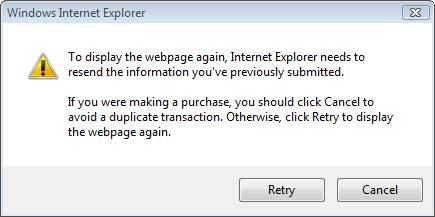
Now, it is true that modern browsers warn the user of this danger. Microsoft Internet Explorer 7.0 provides the nicely worded warning in Figure 2. So, perhaps this danger isn’t quite as bad as it was in the past.
Figure 2 – IE warning when refreshing after form post
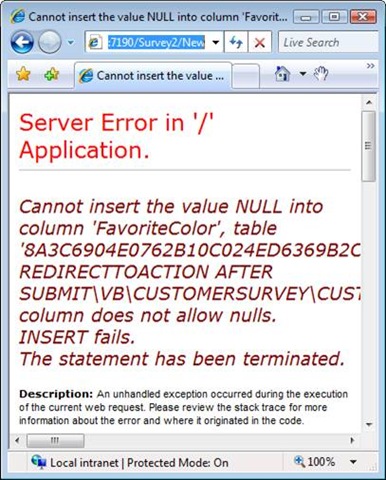
The second practical reason is related to the first. If you bookmark the results page (or email a link to the page to a friend) and use the bookmark to open the page later, the database operation will happen without warning. The form will be submitted without data, client-side validation will be bypassed, and you will get the ugly page in Figure 2:
Figure 2 – Returning to Results bookmark
The third reason to prefer RedirectToAction() over View() is philosophical. The ASP.NET MVC framework provides a “RESTful” interface to your application. Different URLs correspond to different actions. If you return the Results view when the New() action is invoked, the correspondence between actions and views is broken. In other words, in a RESTful application, the view that you see should correspond to the URL that you see in your browser’s address bar.
If you call RedirectToAction() after submitting the form data, you’ll see Survey/Results in your browser’s address bar. If you call View() after submitting the form data, you’ll see Survey/New in your browser’s address bar. Because you are viewing the Results page, the first scenario makes more sense. The browser address bar should reflect the state of the web application. Doing a redirect enables you to keep the browser and server in sync.
If you would like to experiment with the two methods of submitting form data discussed in this tip, click the following link to download the code.
********* UPDATE ****
One nice thing about working at Microsoft is that you are surrounded by really smart people. After posting this blog entry, I ran into Brad Wilson (of xUnit fame) and he told me that there is a pattern that applies to the topic of this tip. The pattern is called the PRG pattern (Post-Redirect-Get pattern). Here's the link to the Wikipedia entry:
http://en.wikipedia.org/wiki/Post/Redirect/Get
So, this tip should really be renamed to "Use the PRG Pattern when Submitting a Form".