
Google API for .NET architecture (Part 1)
Part 2: Google API for .NET architecture (Part 2)
Today, I have just released a OSS with named is Gapi4net library at codeplex. This is a wrapper some of API's Google for search Web, Local, Video, Blog, News, Book, Image, Patent and language translation. In the past, I also saw some wrapper for Google API, specially are a google-api-for-dotnet, gapidotnet. But as I realized that they are hard to using and when you used them, you must remember many input parameters. For example, if you use the google-api-for-dotnet, you must input as:
GwebSearchClient client = new GwebSearchClient(/* Enter the URL of your site here */);
    IList<IWebResult> results = client.Search("Google API for .NET", 32);
    foreach(IWebResult result in results)
    {
        Console.WriteLine("[{0}] {1} => {2}", result.Title, result.Content, result.Url);
    }
As you see, it does not support for you to easy in your work. So I decided to wrapping it according to my method. I will focus on purpose of user when using my library. And main feature is easy to use it. So why is my library easy to use than some of OSS before? I will show you this as below:
var result = Gapi4NetFactory<Web>
                .Init()
                .With(x => x.Version, "1.0")
                .With(x => x.Query, searchText)
                .With(x => x.Start, start)
                .Create();
I wrapped it and expose it with Fluent Interface and Lambda Expression. So input parameters is more meaningful than google-api-for-dotnet. And the input parameter is strong name now. You do not need to many comment on each parameter. And if you comment many line on each parameter, are you sure the end-user will see it? Trend now is avoiding the comments in code. Just simple that if you comment your code today, and next day you have the change request in your code, you maybe forget update your comment in this code. That make your comment is out of date. And why do you keep some of comments that not meaningful? So I usually make my code better possible and try to keep a little comment on my code, make my code self-talking with the end user about its function. In this sample above, I use Lambda Expression for make strong name and meaningful for input parameters. I am usually eager about this.
After talking many about my Gapi4net, I hope you will be enjoy about it in your practice. Now I will explain about architecture using in this library. The first thing is domain model, next I will explain some of technical, and finally is a example that write in ASP.NET MVC 3 Preview 1 for proving my solution.
Now, we shall jump into Gapi4net's domain model. You should see this link for APIs from Google. After see it, you will realize that many things in it. Don't worry about that. Just see for fun because I wrapped all of it in Gapi4net. And the main things I wrapped is Web, Local, Video, Blog, News, Book, Image, Patent and language translation. I worked on nine kind of APIs of Google in 2 weeks. Finally all things is going on well. And now I will show all my working in this post.
+ Domain Model's Web Search:

+ Domain Model's Local Search:

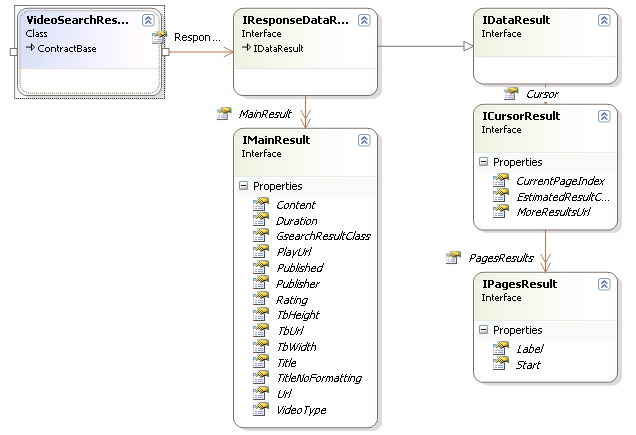
+ Domain Model's Video Search:
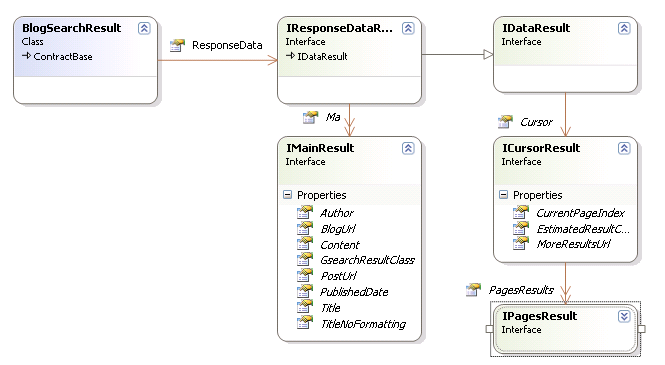
+ Domain Model's Blog Search:
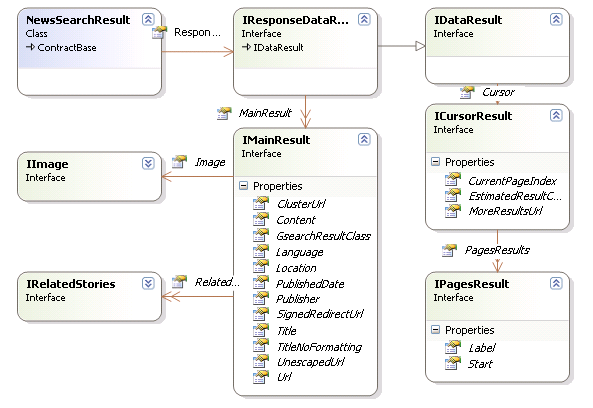
+ Domain Model's News Search:
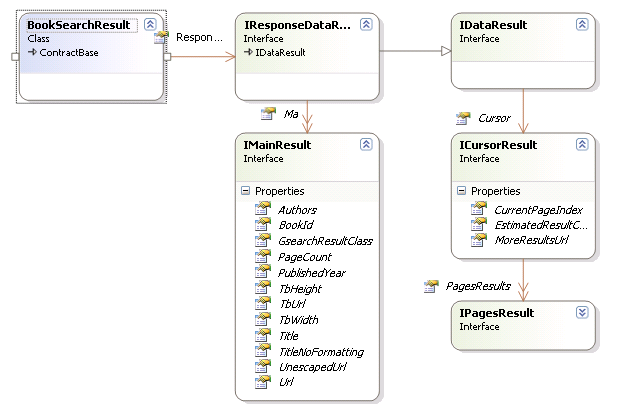
+ Domain Model's Book Search:
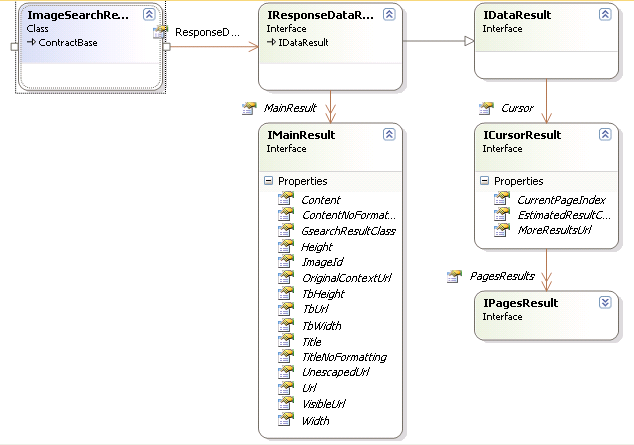
+ Domain Model's Image Search:
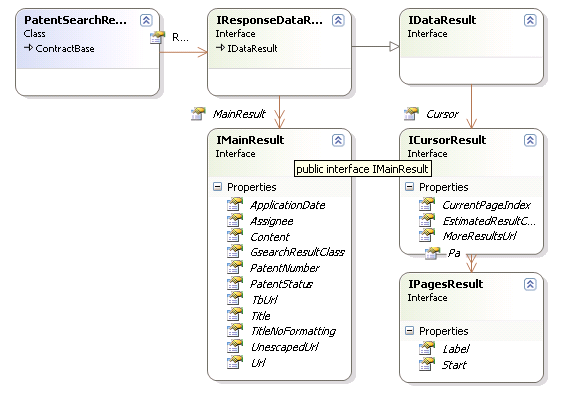
+ Domain Model's Patent Search:
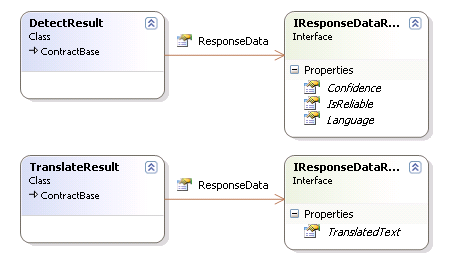
+ Domain Model's Language Translation:
And I used the Json.net library for convert the Json data to my entities. Please see my previous post about converting technical in Json.net library. In this post I only show some line of code in Web Search for saving space in this post. All of them was put at here. And this is a code for web search:
[JsonObject]
public class WebSearchResult : ContractBase
{
[JsonProperty("responseData")]
[JsonConverter(typeof(CustomObjectCreationConverter<IResponseDataResult, ResponseDataResult>))]
public IResponseDataResult ResponseData { get; set; }
}
    [JsonObject]
    public class ResponseDataResult : IResponseDataResult
    {
        [JsonProperty("cursor")]
        [JsonConverter(typeof(CustomObjectCreationConverter<ICursorResult, CursorResult>))]
        public ICursorResult Cursor { get; set; }

        [JsonProperty("results")]
        [JsonConverter(typeof(CustomArrayCreationConverter<IMainResult, MainResult>))]
        public IMainResult[] MainResult { get; set; }
    }
    [JsonObject]
    public class MainResult : IMainResult
    {
        [JsonProperty("GsearchResultClass")]
        public string GsearchResultClass { get; set; }

        [JsonProperty("cacheUrl")]
        public string CacheUrl { get; set; }

        [JsonProperty("content")]
        public string Content { get; set; }

        [JsonProperty("title")]
        public string Title { get; set; }

        [JsonProperty("titleNoFormatting")]
        public string TitleNoFormatting { get; set; }

        [JsonProperty("unescapedUrl")]
        public string UnescapedUrl { get; set; }

        [JsonProperty("url")]
        public string Url { get; set; }

        [JsonProperty("visibleUrl")]
        public string VisibleUrl { get; set; }
    }
Next post I will continue to analyze some of technical that I used in Gapi4net and a example write in ASP.NET MVC 3 Preview 1.
Good bye and see you next time!