As I observe the reactions across the Internets about the forthcoming ASP.NET MVC framework, there seem to be two general reactions: those that can't wait to get their hands on the MVC framework and see this release as long over due, and those that don't see the point of rocking the WebForms boat. When I first heard about the new framework, I must admit that I fell in to the later camp. What would a new MVC framework let me do that I can't do (with all my years of experience and 3rd party tools) faster with WebForms?
Not satisfied to ignore the issue, I dug deeper and tried to learn all there is to know about the yet to be released framework. Along the way I learned some very cool facts about ASP.NET MVC that have moved me from one camp to the other. I'm now very excited about trying ASP.NET MVC and looking forward to the first preview bits that should be available in a couple of weeks. But I know there are many of you out there that still don't see the point of ASP.NET MVC, so I decided to provide the answers to some the questions I had before doing my research to help you see why ASP.NET MVC might be worth adopting. My goal is not to convince you that ASP.NET MVC or WebForms is better, but simply to help you, the overloaded programmer that is still trying to fully grasp WPF, WF, WCF, XAML, and Silverlight, quickly understand some key facts about the new ASP.NET tool.
My personal FAQS
How hard is it going to be to learn ASP.NET MVC?
There is no two ways about this aspect of ASP.NET MVC: it will have a learning curve that will require some time to master. ASP.NET MVC is a radical shift from the "traditional" ASP.NET method of page programming, where code and markup are (relatively) tightly coupled. Instead, "controller" classes will handle all of the processing logic and be wired to any number of "views" that render markup. Gone are the concepts of page postback (to itself, at least), code behind/beside, and (this is a big one) the page lifecycle.
But before you think this is the end of world and abandon interest in ASP.NET MVC, remember back to the days when you transitioned from ASP classic to ASP.NET. At that time, the strange world of "WebForms" seemed bizarre, with "code behind" pages, this crazy thing called "ViewState", and a complex "page lifecycle" to learn. "How could I leave my inline coding and top-to-bottom page evaluation to learn this fancy ASP.NET?" we thought. It didn't take long, though, for ASP developers to quickly understand the benefits ASP.NET brings to the table and flock to the new technology. So it may be again with WebForms and ASP.NET MVC.
While a lot is changing on the processing end of ASP.NET, many familiar concepts will continue to exist in MVC. Things like masterpages, themes, UserControls, ServerControls, and services like Membership and Profile will all be present and accounted for. Even ASPX pages survive as a valid way to create MVC Views. Some changes will clearly be required for ServerContorls (especially complex ServerControls like those that Telerik makes) to work in the new page lifecycle-less environment, but for the programmer using the controls these changes should be relatively transparent. The key change in MVC vs. WebForms is where the framework processes its logic and renders its markup. Not how.
Besides bringing MVC to ASP.NET, what's so special about ASP.NET MVC?
One of the biggest advantages of the ASP.NET MVC framework is that it will make ASP.NET applications much easier to test. Unit testing ASP.NET applications today can be a challenge since many objects in an application require the HTTP context to function properly. You can get around that requirement by implementing mock objects, but that is especially difficult when the objects needing the mocking are not based on interfaces. In ASP.NET MVC, all core APIs and contracts are interfaced so you can easily build your mock objects and run fast tests against your ASP.NET code. Hopefully some of this benefit can be back-ported to WebForms in the future.
Also in the realm of testing, the ASP.NET MVC framework does a much better job of enforcing clean separation of processing logic from UI markup. This is an inherent benefit of most MVC frameworks, so it should go without saying for ASP.NET MVC. Nonetheless, it will take what "code behind/beside" tried to do for the separation of logic and markup in WebForms to the next level and help ASP.NET developers enforce clean separation.
Beyond testing improvements, the MVC framework is also introducing some very interesting URL processing models for ASP.NET developers. In the past, if you wanted to use a URL like "/products/beverages/beer" you would need a URL rewriter (at the IIS level, in fact) to make it happen. Under the hood, the URL would really be something like "/products/detail.aspx?cat=1&id=20" and you'd use Request.QueryString to extract the values. With ASP.NET MVC, clean URLs are the norm and they have tight integration with the MVC controllers. For example, if an ASP.NET MVC app has the URL "/Products/Details/5", it automatically execute the "Details" method in the "Products" controller and passes the value "5" to the method as an input parameter. Pretty cool stuff!
Is it an either or decision: WebForms or ASP.NET MVC?
No. You can have an application that uses both WebForms and ASP.NET MVC. ASP.NET MVC is not replacing WebForms; it is simply another tool in the ASP.NET developer's toolbox to help them develop (and test) quickly and efficiently. But remember the age old truth: just because you can doesn't mean you should. I'd suggest you avoid the Frankenstein blended apps (like mixed ASP classic/ASP.NET apps) if you can.
What about my 3rd party UI components? Are they still usable?
Maybe, but in most cases UI controls (like those that Telerik makes) will probably have to be "tweaked" for the MVC environment. Operations that currently postback to the page (like sorting a RadGrid, for instance) will not work in the lifecycle-less MVC approach. But have no fear, Telerik is eagerly awaiting the preview bits for ASP.NET MVC so we can run our tests and determine exactly what you'll need to have the same level of productivity in an MVC environment (as I am sure other component vendors are doing, too).
Okay, this MVC thing sounds interesting. Can I download some bits?
Not yet, but according to a recent statement from Scott Guthrie, the first preview bits for the MVC framework should be available within the next couple of weeks. That means by the week of December 10th, you should be able to download the ASP.NET MVC framework and get your hands dirty with the approach to ASP.NET. Consider it an early Christmas present. It's up to you whether you'll consider it a lump of coal or beautiful diamond.
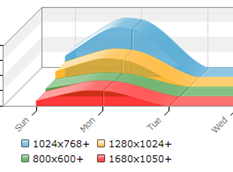
Microsoft recently opened-up the beta program for its new web analytics platform called "Gatineau". Gatineau is integrated in Microsoft adCenter and it can be accessed by logging-in to your adCenter account and clicking the Analytics tab. It provides basic web analytics data for any site that you add the tracking script to, including common metrics like visitors, page views, browsers, and screen resolutions. For months I've been using Google's free Analytics service to track visitors on my Telerik Watch blog, so I decided to install Gatineau alongside Google Analytics to see how they compare.
The bad news
The first thing you notice is that Gatineau is much slower than Analytics. While it uses Ajax pervasively to update the page as you navigate to different reports, the overall speed at which those updates occur is dramatically slower than Google's service. That's a major drag when you're trying to quickly view different reports to analyze your site's performance. Hopefully that's simply a symptom of being an early beta product that will be resolved down the road.
The other thing you quickly discover is that Gatineau does not offer nearly as many reports as Google Analytics. It offers the basic visitor and page view tracking, referral tracking, Microsoft adCenter ad tracking, and visitor information, but lacks some of the advanced reports in Analytics like maps showing the location of visitors across the globe, visitor loyalty, and time on site (just to name a few). The reports that Gatineau does have also lack Analytic's ability to overlay multiple date ranges for quick comparisons and lack export to PDF/CSV for easy sharing with co-workers (though export seems to be in the works).
The overall design of the Gatineau product also suffers, especially when compared to Google's recently updated Analytics interface. In Analytics, all important summary values are presented in large, easy to scan fonts and your dashboard can be completely customized to present the most important stats when you first login. In its current state, Gatineau lacks a customizable dashboard and already shows signs of conforming to adCenter's overall look and feel- an understandable choice given its location but a drawback compared to other free analytics tools. If Gatineau were competing with the old Google Analytics the comparison wouldn't be so bad, but Google really raised the bar for analytics UIs in their update earlier this year.
The good news
Not all is bad with the new Gatineau. In fact, there are some very interesting new features in Gatineau lacking in Analytics that offer a great deal of redeeming value. Chief among those improvements is the new "segmentation" data. For almost any report provided by Gatineau, you can filter the reported values by one of four key segmentation types: visitor age, gender, occupation, or geographical region. Clearly, the results aren't 100% perfect, but the new insight in to the age and occupation of your visitors is something Google has failed to offer. This feature alone almost makes it worth adding Gatineau tracking to your sites just to gain the extra insight in to your traffic.
To illustrate the "coolness" of this segmentation feature, here are few stats for my blog that I learned from Gatineau. For the short period that it has been collecting data, about 5% of the visitors to my site were classified as students; another 3% were IS/IT Management. Of the visitors that visited my site using FireFox, the majority were in the 18 to 24 age group. Finally, while most visitors' sex was unknown, at least 28% of my visitors were male and 6% were female. Pretty neat stuff.
It's a beta
My overall conclusion is that Gatineau is still a very beta product with some interesting signs of innovative thinking in the analytics space. In its current state performance is poor, reports are sparse, and features are lacking, but that should be expected for a beta product. I wouldn't recommend that you get rid of your free Google Analytics tracking for Gatineau at this point, but I do encourage you to try the beta if you're interested in the unique segmentation data. Otherwise, check back in about six months to see if the product has improved enough to be a direct replacement option for Analytics.