Accessing oData from Android using Restlet
Hi! In this post we will see how to consume oData from Android. oData is an open web protocol for querying and updating data that has become very popular lately due to it’s simplicity and availability of tools and libraries.
1. To consume oData from an Android application we will use a library called “Restlet”. It can be downloaded from here: http://www.restlet.org.
Note: We will use the JRE Restlet libraries and the Android Restlet libraries so you will have to download both.
2. Once you downloaded both libraries the first step is to create a Java program to auto-generate the entities and the proxy service that will be used to consume oData from our Android application. The Restlet libraries can automatically generate the entity classes to access the oData service but that functionality isn’t available in the Android Restlet libraries, so we first need to generate a Java project and use the JSE Restlet libraries to generate the entities.
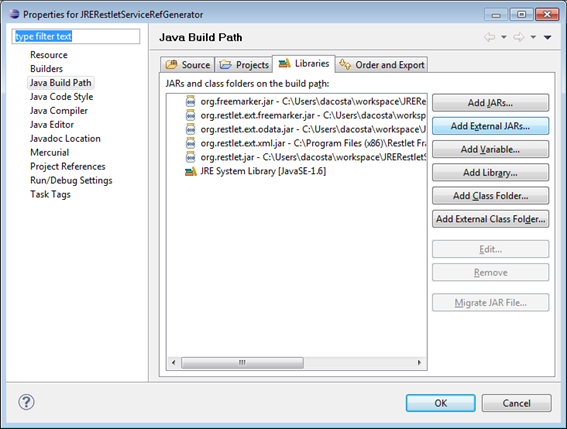
3. So, create a new Java project within Eclipse and add the external JSE jars.

This is done by right clicking on the project -> Build Path -> Configure Build Path. Click on Add External JARS.. and go to the folder where Restlet was installed (by default C:\Program Files (x86)\Restlet Framework\Edition Java SE\2.0.4\lib). Add the following libraries:
- org.restlet.jar
- org.restlet.ext.odata.jar
- org.restlet.ext.freemarker.jar
- org.restlet.ext.atom.jar
- org.restlet.ext.xml.jar
- org.freemarker_2.3\org.freemarker.jar
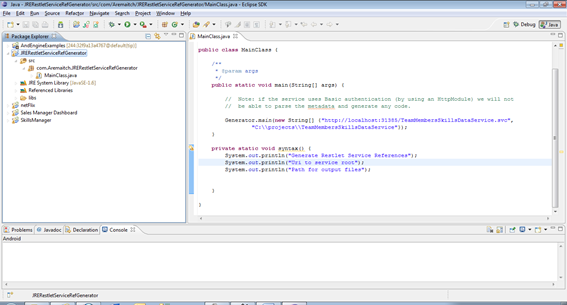
4. Then create a Main class and add the following code:
Generator.main(new String[] {
  "[service url]",
  "[folder path]"
});
- [service url] – Url of the oData service
- [folder path] – Folder path where the Generator will copy the auto-generated classes
5. Run the project and go to the [folder path], you will see a class in the root of the folder (this is the proxy service) and a folder in the root with all the entities of the service within.
6. After that we have the proxy and the entities ready to be used from our Android App.
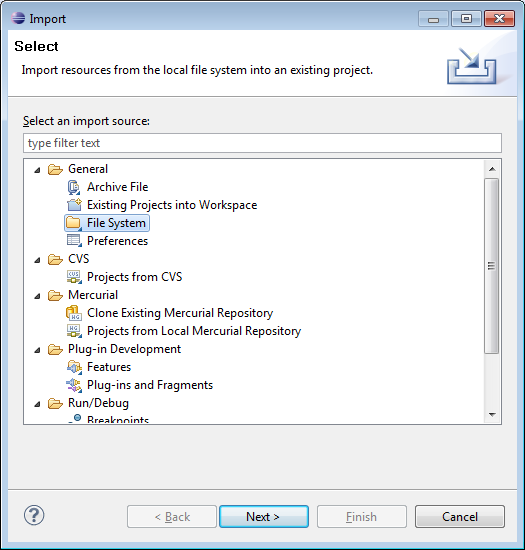
7. Import classes to our Android Project: Right click on the src folder, Import->File System and select the [folder path].
8. How to use the auto-generated classes?
a. First of all we need to reference the Android Restlet jars (by default C:\Program Files (x86)\Restlet Framework\Restlet Framework\Edition Android\2.0.4\lib). Add these libraries:
- org.restlet.jar
- org.restlet.ext.odata.jar
- org.restlet.ext.atom.jar
- org.restlet.ext.xml.jar
- org.restlet.ext.net.jar
b. After creating an instance of the proxy, you are ready to call any method you want:
IDataServiceProxy proxy = new DataServiceAtomPubProxyImpl(DataServiceClient.URL);
9. That’s it! Here is a screen capture of our Android App consuming oData:

Now we will see some examples that show how to work with the proxy we just created.
The following example gets all the café entities and displays some of their properties:
TestAssociationOneToOneService service = new TestAssociationOneToOneService();
Query<Cafe> query = service.createCafeQuery("/Cafes");
for (Cafe Cafe : query) {
  System.out.println(“id: ” + Cafe.getID());
  System.out.println(“name: ” + Cafe.getName());
}
The following example gets a single entity and displays some of its properties:
Query<Cafe> query = service.createCafeQuery("/Cafes('1')");
Cafe Cafe = query.iterator().next();
System.out.println(“id: ” + Cafe.getID());
System.out.println(“name: ” + Cafe.getName());
Add a new entity:
Cafe Cafe = new Cafe();
Cafe.setID("3");
Cafe.setZipCode(12345);
Cafe.setName("Bar des sports");
Cafe.setCity("Paris");
service.addEntity(Cafe);
Delete an Entity:
Query<Cafe> query = service.createCafeQuery("/Cafes('1')");
Cafe Cafe = query.iterator().next();
service.deleteEntity(Cafe);
Get a single Entity and its associated entities:
Query<Cafe> query = service.createCafeQuery("/Cafes('1')").expand("Item");
Conclusions
We saw that is relatively easy to query and update data exposed by oData using the Restlet library. This article together with Consuming OData from iPhone and Consuming OData from Windows Phone7 conform our series of articles on how to consume oData from mobile applications. oData is definitely an important tool to consider when architecting multi platform service oriented applications.
I hope you liked the article. Thanks for reading!
Diego Acosta