jQuery Mobile : Page pre-fetch
The latest release of jQuery Mobile beta 2 is characterized by a new added feature. This feature is called Page pre-fetch, which finds the links of the active pages and makes a lazy load for these pages into the DOM beyond the scene before the user clicks on it.
With this feature we don't need to add all pages on the same HTML documents. In the previous releases, this feature works automatically when the user adds the pages with the same file.
Let's start with a simple example to illustrate how it works.
The first page is:
Page1.html
<!DOCTYPE html >
<html xmlns="http://www.w3.org/1999/xhtml">
<head>
<title></title>
<link rel="stylesheet" href="http://code.jquery.com/mobile/1.0b2/jquery.mobile-1.0b2.min.css" />
<script src="http://code.jquery.com/jquery-1.6.2.min.js"></script>
<script src="http://code.jquery.com/mobile/1.0b2/jquery.mobile-1.0b2.min.js"></script>
</head>
<body>
<div id="page1" data-role="page">
<div data-role="content">
<a href="Page2.html" data-prefetch>Link</a>
</div>
</div>
</body>
</html>
And the second page is:
Page2.html
<!DOCTYPE html >
<html xmlns="http://www.w3.org/1999/xhtml">
<head>
<title></title>
</head>
<body>
<div id="page2" data-role="page">
<div data-role=" content">
This is page 2 loaded in the DOM by Page pre-fetch option</div>
</div>
</body>
</html>
Notice that the anchor of the first page has a data-prefetch option. Try to open "page1"; the DOM would be like this:
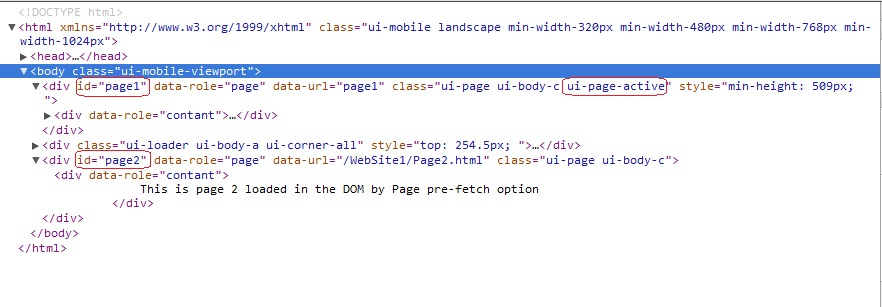
Here you can find that "page1" is active and the html of "page2" is added to the DOM, even though it is in separate HTML documents and it is not called before.
According to this feature, after clicking on the link "Page2" it will be displayed immediately without the Ajax loader.
Note: But it's so important to use this option only with highly likely that the link will be visited by users due to Pre-fetching increased bandwidth by using additional HTTP requests.
Add pre-fetch option programmatically:
In this case we can use $.mobile.loadPage method. This method loads the external page into DOM without any visual effect on the current active page.
Example:
<!DOCTYPE html >
<html xmlns="http://www.w3.org/1999/xhtml">
<head>
<title></title>
<link rel="stylesheet" href="http://code.jquery.com/mobile/1.0b2/jquery.mobile-1.0b2.min.css" />
<script src="http://code.jquery.com/jquery-1.6.2.min.js"></script>
<script src="http://code.jquery.com/mobile/1.0b2/jquery.mobile-1.0b2.min.js"></script>
<script type="text/javascript">
$(window).load(function () {
$.mobile.loadPage("Page2.html");
});</script>
</head>
<body>
<div id="page1" data-role="page">
<div data-role="content">
<a href="Page2.html" >Link</a>
</div>
</div>
</body>
</html>
$.mobile.loadPage method is the core of this feature which used by jQuery framework, here you can find how it works and how it finds the links in the active page:
//prefetch pages when anchors with data-prefetch are encountered$( ".ui-page" ).live( "pageshow.prefetch", function(){
var urls = [];
$( this ).find( "a:jqmData(prefetch)" ).each(function(){
var url = $( this ).attr( "href" );
if ( url && $.inArray( url, urls ) === -1 ) {
urls.push( url ); $.mobile.loadPage( url ); } }); } ); Hope that help.