DotNetStories

In this post I will show you how to use JQuery to scroll
through an HTML 5 page.I had to help a friend of mine to
implement this functionality and I thought it would be a
good idea to write a post.
I will not use any JQuery scrollbar plugin,I will just use the very popular JQuery Library. Please download the library (minified version) from http://jquery.com/download.
Please find here all my posts
regarding JQuery.Also have a look at my posts regarding
HTML 5.
In order to be absolutely clear this is not (and could not be) a detailed tutorial on HTML 5. There are other great resources for that.Navigate to the excellent interactive tutorials of W3School.
Another excellent resource is HTML 5 Doctor.
Two very nice sites that show you what features and specifications are implemented by various browsers and their versions are http://caniuse.com/ and http://html5test.com/. At this times Chrome seems to support most of HTML 5 specifications.Another excellent way to find out if the browser supports HTML 5 and CSS 3 features is to use the Javascript lightweight library Modernizr.
In this hands-on example I will be using Expression Web 4.0.This application is not a free application. You can use any HTML editor you like.You can use Visual Studio 2012 Express edition. You can download it here.
Let me move on to the actual example.
This is the sample HTML 5 page
<!DOCTYPE html>
<html lang="en">
<head>
<title>Liverpool
Legends</title>
<meta
http-equiv="Content-Type" content="text/html;charset=utf-8"
>
<link rel="stylesheet"
type="text/css" href="style.css">
<script type="text/javascript"
src="jquery-1.8.2.min.js"> </script>
<script type="text/javascript" src="scroll.js">
</script>
</head>
<body>
<header>
<h1>Liverpool Legends</h1>
</header>
<div id="main">
<table>
<caption>Liverpool Players</caption>
<thead>
<tr>
<th>Name</th>
<th>Photo</th>
<th>Position</th>
<th>Age</th>
<th>Scroll</th>
</tr>
</thead>
<tfoot
class="footnote">
<tr>
<td colspan="4">We will add more photos
soon</td>
</tr>
</tfoot>
<tbody>
<tr class="maintop">
<td>Alan
Hansen</td>
<td>
<figure>
<img
src="/dotnetstories/scrolling-an-html-5-page-using-jquery/images/Alan-hansen-large.jpg"
alt="Alan Hansen">
<figcaption>The
best Liverpool Defender <a
href="http://en.wikipedia.org/wiki/Alan_Hansen">Alan
Hansen</a></figcaption>
</figure>
</td>
<td>Defender</td>
<td>57</td>
<td
class="top">Middle</td>
</tr>
<tr>
<td>Graeme
Souness</td>
<td>
<figure>
<img
src="/dotnetstories/scrolling-an-html-5-page-using-jquery/images/graeme-souness-large.jpg"
alt="Graeme Souness">
<figcaption>Souness was the captain of the successful
Liverpool team of the early 1980s <a
href="http://en.wikipedia.org/wiki/Graeme_Souness">Graeme
Souness</a></figcaption>
</figure>
</td>
<td>MidFielder</td>
<td>59</td>
</tr>
<tr>
<td>Ian Rush</td>
<td>
<figure>
<img
src="/dotnetstories/scrolling-an-html-5-page-using-jquery/images/ian-rush-large.jpg"
alt="Ian Rush">
<figcaption>The
deadliest Liverpool Striker <a
href="http://it.wikipedia.org/wiki/Ian_Rush">Ian
Rush</a></figcaption>
</figure>
</td>
<td>Striker</td>
<td>51</td>
</tr>
<tr class="mainmiddle">
<td>John Barnes</td>
<td>
<figure>
<img
src="/dotnetstories/scrolling-an-html-5-page-using-jquery/images/john-barnes-large.jpg"
alt="John Barnes">
<figcaption>The
best Liverpool Defender <a
href="http://en.wikipedia.org/wiki/John_Barnes_(footballer)">John
Barnes</a></figcaption>
</figure>
</td>
<td>MidFielder</td>
<td>49</td>
<td
class="middle">Bottom</td>
</tr>
<tr>
<td>Kenny Dalglish</td>
<td>
<figure>
<img
src="/dotnetstories/scrolling-an-html-5-page-using-jquery/images/kenny-dalglish-large.jpg"
alt="Kenny Dalglish">
<figcaption>King Kenny <a
href="http://en.wikipedia.org/wiki/Kenny_Dalglish">Kenny
Dalglish</a></figcaption>
</figure>
</td>
<td>Midfielder</td>
<td>61</td>
</tr>
<tr>
<td>Michael
Owen</td>
<td>
<figure>
<img
src="/dotnetstories/scrolling-an-html-5-page-using-jquery/images/michael-owen-large.jpg"
alt="Michael Owen">
<figcaption>Michael was Liverpool's top goal scorer
from 1997–2004 <a
href="http://www.michaelowen.com/">Michael
Owen</a></figcaption>
</figure>
</td>
<td>Striker</td>
<td>33</td>
</tr>
<tr>
<td>Robbie
Fowler</td>
<td>
<figure>
<img
src="/dotnetstories/scrolling-an-html-5-page-using-jquery/images/robbie-fowler-large.jpg"
alt="Robbie Fowler">
<figcaption>Fowler scored 183 goals in total for
Liverpool <a
href="http://en.wikipedia.org/wiki/Robbie_Fowler">Robbie
Fowler</a></figcaption>
</figure>
</td>
<td>Striker</td>
<td>38</td>
</tr>
<tr class="mainbottom">
<td>Steven Gerrard</td>
<td>
<figure>
<img
src="/dotnetstories/scrolling-an-html-5-page-using-jquery/images/steven-gerrard-large.jpg"
alt="Steven Gerrard">
<figcaption>Liverpool's captain <a
href="http://en.wikipedia.org/wiki/Steven_Gerrard">Steven
Gerrard</a></figcaption>
</figure>
</td>
<td>Midfielder</td>
<td>32</td>
<td
class="bottom">Top</td>
</tr>
</tbody>
</table>
</div>
<footer>
<p>All Rights Reserved</p>
</footer>
</body>
</html>
The markup is very easy to follow and understand. You do not
have to type all the code,simply copy and paste it.For those
that you are not familiar with HTML 5, please take a closer
look at the new tags/elements introduced with HTML 5.
When I view the HTML 5 page with Firefox I see the following result.
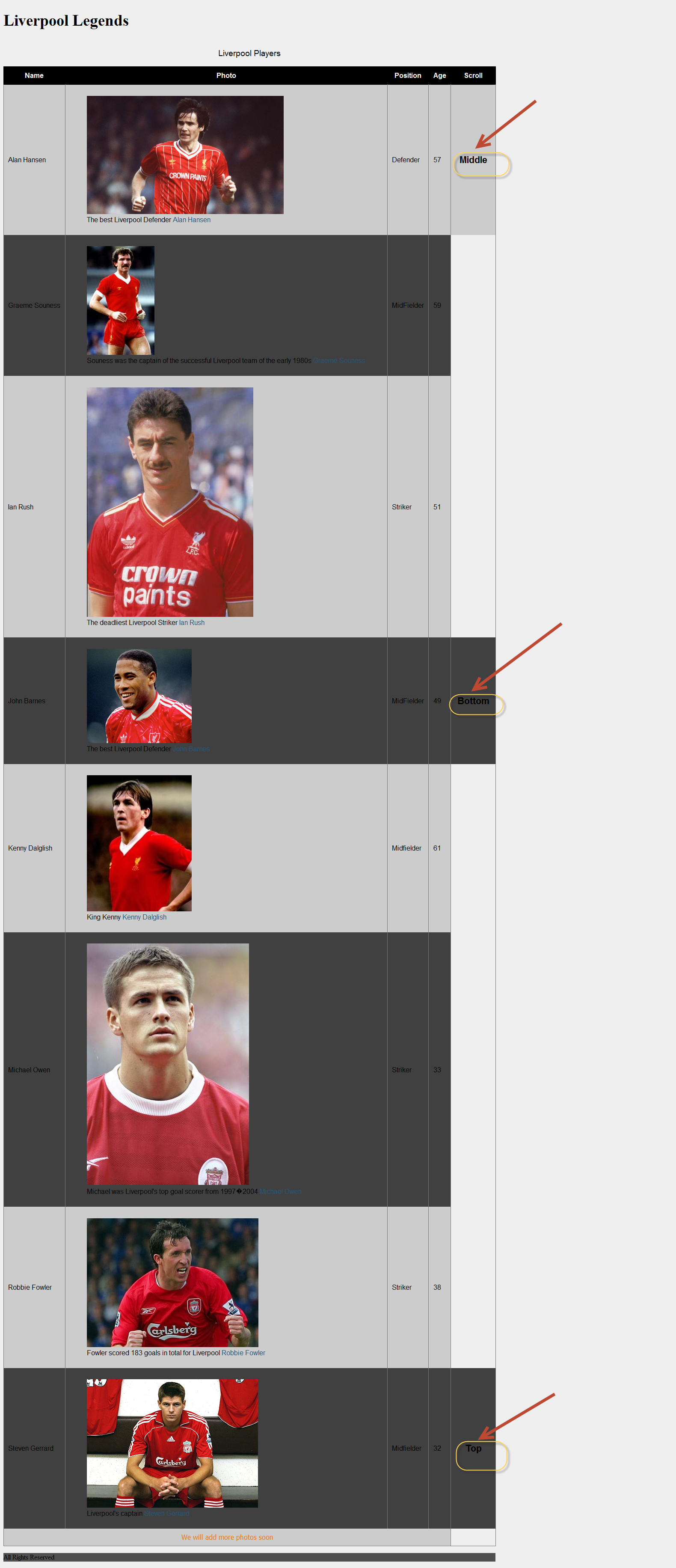
I have also an external stylesheet (style.css).
body{
background-color:#efefef;
}
h1{
font-size:2.3em;
}
table
{
border-collapse: collapse;
font-family:
Futura, Arial, sans-serif;
}
caption {
font-size: 1.2em;
margin: 1em auto;
}
th, td {
padding: .65em;
}
th, thead {
background:
#000;
color: #fff;
border: 1px solid #000;
}
tr:nth-child(odd)
{
background: #ccc;
}
tr:nth-child(even)
{
background: #404040;
}
td
{
border-right: 1px solid #777;
}
table
{
border: 1px solid #777;
}
.top, .middle, .bottom
{
cursor: pointer;
font-size: 22px;
font-weight: bold;
text-align: center;
}
.footnote
{
text-align:center;
font-family:Tahoma;
color:#EB7515;
}
a{color:#22577a;text-decoration:none;}
a:hover {color:#125949; text-decoration:none;}
footer
{
background-color:#505050;
width:1150px;
}
These
are just simple CSS Rules that style the various HTML 5
tags,classes.
The jQuery code that makes it all possible resides inside
the scroll.js file.Make sure you type everything
correctly.
$(document).ready(function() {
$('.top').click(function(){
$('html,
body').animate({
scrollTop: $(".mainmiddle").offset().top
},4000 );
});
$('.middle').click(function(){
$('html, body').animate({
scrollTop:
$(".mainbottom").offset().top
},4000);
});
$('.bottom').click(function(){
$('html, body').animate({
scrollTop:
$(".maintop").offset().top
},4000);
});
});
Let me explain what I am doing here.When I click on the Middle word ( $('.top').click(function(){ ) this relates to the top class that is clicked.
Then we declare the elements that we want to participate in
the scrolling. In this case is html,body ( $('html,
body').animate).These elements will be part of the vertical
scrolling.
In the next line of code we simply move (navigate) to the
element (class mainmiddle that is attached to a
tr element.)
scrollTop: $(".mainmiddle").offset().top
Make sure you type all the code correctly and try it for
yourself. I have tested this solution will all 4-5 major
browsers.
Hope it helps!!!