What’s new in version 2.5 of our email checker
Hello, fellow developers! 👋
We are thrilled to announce the release of Version 2.5 of our API, packed with powerful enhancements to elevate your experience with our bulk email checker: whether you're a seasoned developer or a non-technical user, these new features are designed to streamline and optimize your email verification process.
Ready? Let's dive into what's new.
AI-powered email typo detection and suggestions
Say goodbye to common typos! Our cutting-edge email typo detection now leverages machine learning to automatically fix most common errors and propose alternative spellings: by integrating this feature into our API, we ensure you receive accurate and improved email suggestions for each verification entry.
For instance, when faced with input data like
bat[man@gmael.con - with an invalid symbol
[ in the local part, an invalid
.con top-level domain and and a potential
misspelling gmael instead of
gmail - our AI model seamlessly corrects all
errors, offering batman@gmail.com as a possible
intended value suggestion:

Our email verification API has been enhanced to include an
additional suggestions field, with an array
containing potential corrections that are deemed more likely
to represent the correct email. For further information,
please refer to our
email verifier API.
Customizable classification scheme
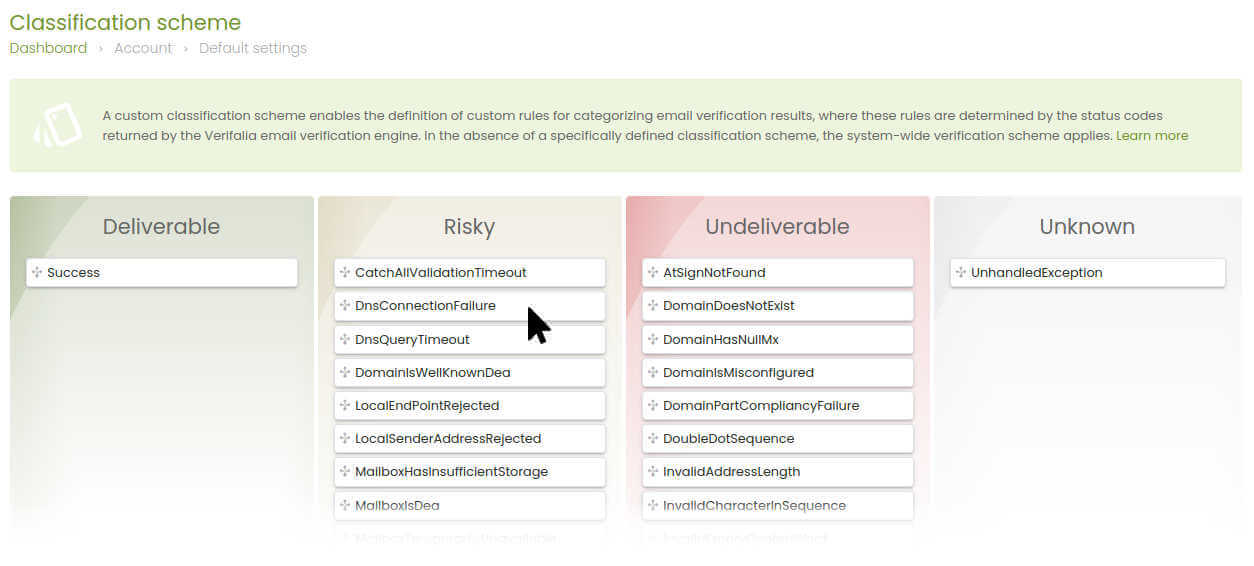
While our default classification of 40+
email validation status codes
into Deliverable, Undeliverable,
Risky, and Unknown is suitable for
most businesses, we're thrilled to introduce a game-changing
feature - the ability to customize the classification logic
according to your unique business needs. Now, you have the
power to
tailor the classification of status codes
to better align with your specific requirements: for
instance, you can now classify the status code
MailboxHasInsufficientStorage as
Deliverable instead of the default
Risky.
To customize your classification scheme, navigate to Email verifications ➤ Account defaults ➤ Classification scheme in your client area and drag the status codes labels into the intended classification containers.
Classification overrides
Take control of your classifications with override rules!
Define
custom rules based on wildcard expressions
to classify email addresses according to your specific
requirements: force Verifalia to classify emails from a
particular domain or those resembling a specific text
pattern as Deliverable,
Undeliverable, or any other classification,
regardless of the default classification. When a rule
matches the email address under test, it will be labeled
with a new status code: OverrideMatch.

In the example above, the wildcard expression
*@madrigal.com matches any email address that
ends with @madrigal.com.
To customize your classification overrides, navigate to Email verifications ➤ Account defaults ➤ Classification overrides in your client area.
Wrap-up
Experience these exciting features in the latest Verifalia API version, carefully designed to meet your needs: also don't forget to explore our updated embeddable email verification widget, enabling you to leverage the newest features seamlessly on your website without any coding required - check out the widget documentation for more details.
Additionally, our free and open-source SDKs have been updated: explore the developer documentation to learn more.