Team Foundation Server 2012 build notification using ASP.Net Web API Part 2
In my previous blog post I wrote about how to get information about a build, the problem with that code was that the code only returned the user who requested the build, not the user who had checked-in a changeset that failed the build. So this blog post will cover that part.
The
VersionControlServer
class in the assembly
Microsoft.TeamFoundation.VersionControl.Client can be used
to get Changesets from a specific branch. To get access to
the VersionControlServer I use the
TfsTeamPorjectCollection's
GetService<T>
method, where T is set to VersionControlServer. To query a
branch changeset history, the
QueryHistory
method of the VersionControlServer can be used. The
QueryHistory method needs the path to the branch and other
query parameters to get changessets. To get the path, I
created a helper method (GetFirstServerItemFromBuild, it
will get the path from the
BuildDefinition:
        private string GetFirstServerItemFromBuild(string buildName)
        {
            var buildService = _teamProjectCollection.GetService<IBuildServer>();
            var build = GetBuildDefinition(buildName, buildService);

            return build.Workspace.Mappings.First().ServerItem;
        }
When setting up a build in TFS, we need to
specify Working folders under the Workspace settings, in my
case the first working folder has the path to the branch.
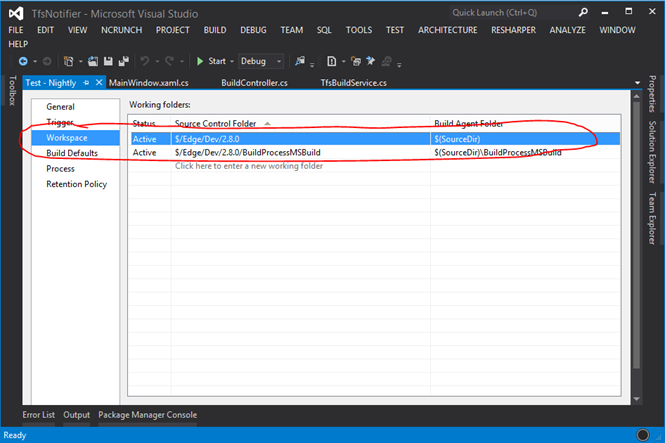
By using the BuildDefintion's Workspace and its Mappings property, I can get the first item from the Working folders. The ServerItem property will return the Source Control Folder.
To get the most possible ChangeSet that may cause the build
to fail I specify a "from date" (passed as an argument to a
helper method, more about that later) and a "to date" to the
QueryHistory method. The "from date" will be three weeks
back in time from when the latest build was started, and the
"to date" will be when the latest build was started. I will
then take the First
ChangeSet
from the QueryHistory's result. QueryHistory don't take a
DateTime as argument for the dates, instead a
VersionSpec
class, so I created a helper method that will parse a
DateTime to a VersionSpec.
        private static VersionSpec CreateDateVSpec(DateTime date)
        {
            //Format is:  D2009-11-16T14:32
            return VersionSpec.ParseSingleSpec(
                                               string.Format("D{0:yyy}-{0:MM}-{0:dd}T{0:HH}:{0:mm}", date),
                                               string.Empty);
        }
I created a helper method added to my
TfsBuidService class for helping me to get the latest change
set, here is the code for the helper method.
    public Changeset GetLatestChangeset(DateTime versionTodate, string buildName)
      {
            var path = this.GetFirstServerItemFromBuild(buildName);
            var vcs = _teamProjectCollection.GetService<VersionControlServer>();

            var versionFrom = CreateDateVSpec(versionTodate.AddDays(-21));
            var versionTo = CreateDateVSpec(versionTodate);

            var results = vcs.QueryHistory(path, VersionSpec.Latest, 0, RecursionType.Full, null, versionFrom, versionTo, int.MaxValue, false, true);

            return results.Cast<Changeset>().FirstOrDefault();
        }
I made some changes to my Web API, so it takes information from the latest change set:
    private static BuildDetail GetBuildDetail(string buildName)
      {
          var tfsBuildService = new TfsBuildService(
                                                    TFS_SERVER_COLLECTION_URI,
                                                    USER_DOMAIN,
                                                    USER_NAME,
                                                    USER_PASSWORD,
                                                    PROJECT_NAME);

           var lastBuild = tfsBuildService.GetLastBuildDetail(buildName);
           var changeSet = tfsBuildService.GetLatestChangeset(lastBuild.StartTime, buildName);

           return new BuildDetail
           {
               RequestedBy = lastBuild.RequestedBy,
               Status = lastBuild.Status.ToString(),
               FinishTime = lastBuild.FinishTime,
               StartTime = lastBuild.StartTime,
               LastCheckedInUser = changeSet != null ? changeSet.OwnerDisplayName : lastBuild.RequestedBy,
               ChangeSetComment = changeSet != null ? changeSet.Comment : string.Empty,
               ChangeSetId = changeSet != null ? changeSet.ChangesetId : -1,
               WorkItemTitle = tfsBuildService.GetLatestWorkItemTitle(changeSet)
           };
       }
The resource returned from the Web API will now
also include extra information, such as the last work item
associated to the last changeset, changeset's id,
changeset's comment by the user who check-in the code and
the last user who checked-in the code. To get the latest
changeset, the last build's StartTime is used to query the
build's branch for the latest changeset.
To get the latest work item associated to the changeset, I created a helper method that takes the ChangeSet as an argument, just to extract the Work item title:
      public string GetLatestWorkItemTitle(Changeset changeSet)
      {
          if (changeSet == null)
              return string.Empty;

          if (changeSet.AssociatedWorkItems == null || !changeSet.AssociatedWorkItems.Any())
              return string.Empty;

          return changeSet.AssociatedWorkItems[0].Title;
      }
Even if the TFS API for 2012 had lack of example on MSDN, it was quite easy to understand how to use them.
I hope some of you may found this blog post useful.
If you want to know when I have published a blog post, then feel free to follow me on twitter: @fredrikn