C# Custom LinkedList Main() method - Learning C# - Part 7
In this final article, we will look at our Main() program and how to use our new LinkedList class.
   class Program
   {
   static void Main(string[] args)
   {
   LinkedList ListItems = new LinkedList();
   ListItems.Push("Kitchen", "Dining Room Set");
   ListItems.Push("Living Category", "Sofa and Recliner");
   ListItems.Push("Living Category", "Stereo and Sound System");
   ListItems.Push("Electronics", "PS3");
   ListItems.Push("Electronics", "Wii");
   ListItems.Push("Electronics", "Nook");
   ListItems.Push("Electronics", "Big Screen TV");
   ListItems.PrintFifo();
   Console.WriteLine("Pop");
   ListItems.PopFifo();
   ListItems.PopLifo();
   ListItems.PrintLifo();
   ListItems.FindItems("Electronics");
   Console.ReadLine();
   }
   }
}
When we create a console application, our
Program class and Main() method are setup by default. Our
Main() method is defined as a static method. The "static"
keyword instructs the system to create only one instance of
the method regardless of how many instances of its class are
created.
In our Main() method, we create a new
LinkedList and name it ListItems. Rather than using this to
create nodes, as we did with the Head and Next nodes which
were also LinkedLists, we are going to use this to call the
methods defined in the LinkedList class. When we type
"ListItems." intellisense will kick in and display all
public methods defined in our LinkedList class. Now we can
use this to Push() inventory items to our list, PrintFifo()
or PrintLifo(), PopFifo() or PopLifo(), and FindItems(). We
want to follow up with Console.ReadLine(); to keep the text
from zooping off the screen and returning to the program.
Console.ReadLine(); will allows us to stop and wait for
input, thus allowing us to see our results.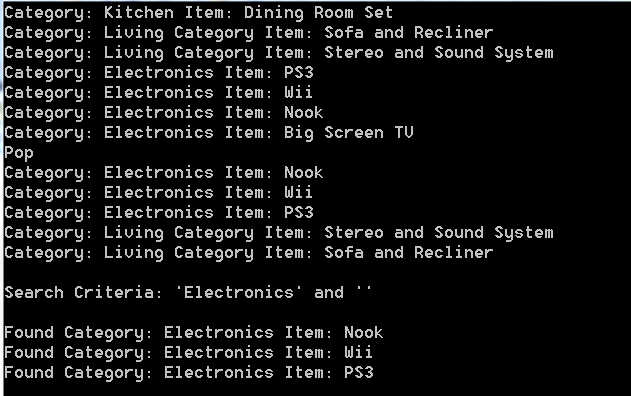
In our example above, we print our items in
LIFO order, then we remove the top and bottom nodes, then
print our remaining items in FIFO order. Then we search for
items in the "Electronics" category and display them to the
screen. Play around with it, put in break points and step
through the code and see what is happening.
- Download Source Code on CodePlex: CSLinkedList.zip
- C# Custom LinkedList Console Application and Abstract Base Class and Method - Learning C# - Part 1
- C# Custom LinkedList Derived Classes, Constructor Initializations - Learning C# - Part 2
- C# Custom LinkedList Push and Pop Methods - Learning C# - Part 3
- C# Custom LinkedList PrintLifo method and C# Operators - Learning C# - Part 4
- C# Custom LinkedList PrintFifo method and GetNode by Position - Learning C# - Part 5
- C# Custom LinkedList FindItems() method - Learning C# - Part 6
- C# Custom LinkedList Main() method - Learning C# - Part 7
[CSLINKEDLIST]