Impersonating Events

Azure Service Bus queues and subscriptions are an excellent
way to process messages using competing consumers. But it
can also get really tricky. Let's look at a scenario where a
single event needs to be processed by two services. For this
example, I'll use a process of an agent being assigned to a
case. The requirement is pretty straightforward. When an
agent is assigned to a case, we should send an email
notifying the agent. In my system, I've designed it the way
that when the event of assignment
(AgentAssigned) is taking place, there are two
event handlers that would react to it:
- Update the querying data store with the information about the assignment to be able to look up agent assignments, and
- Notify the agent about the assignment with some case details.
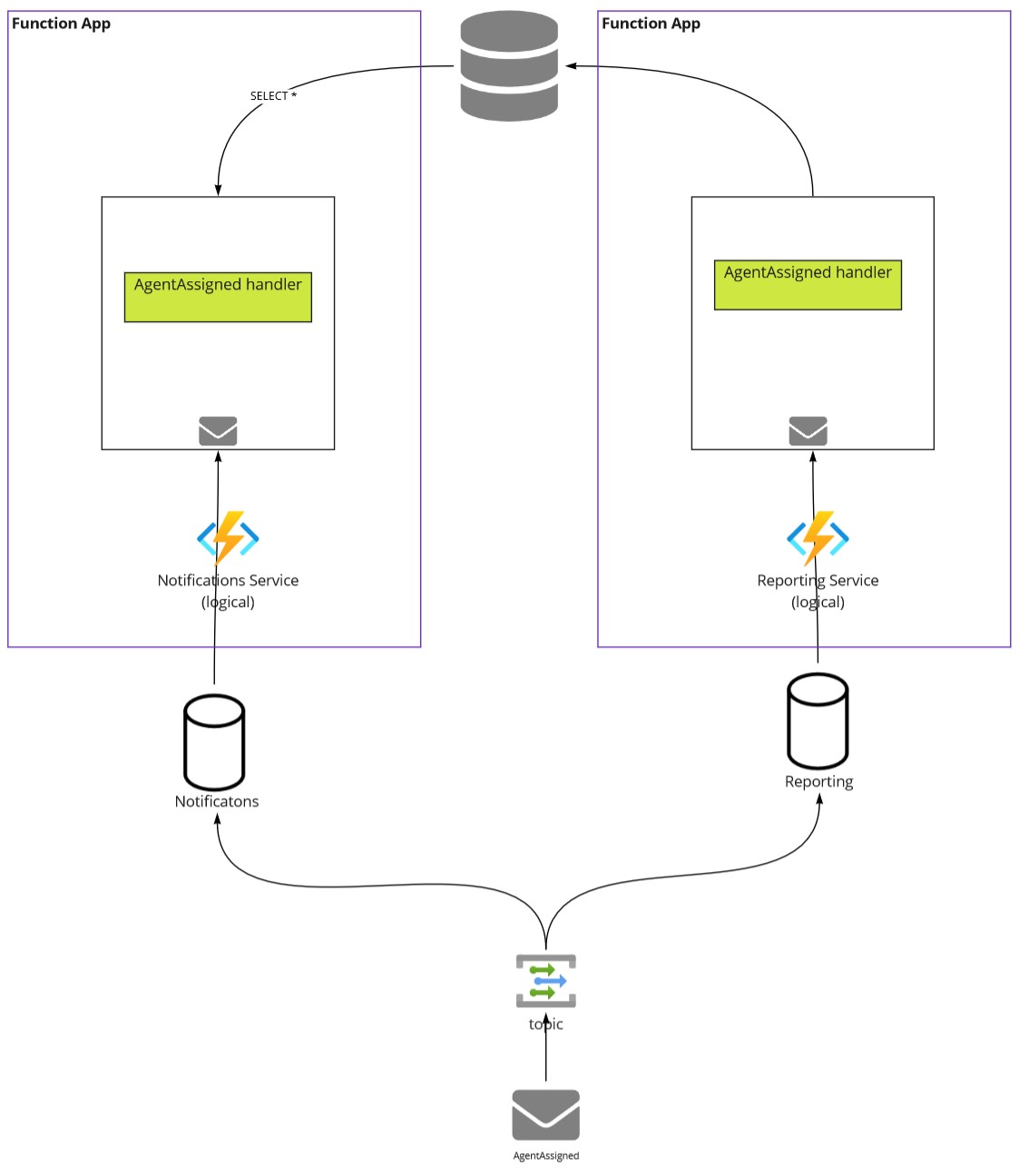
It's all great except for one problem. When the second
handler runs first, there's still no association between the
agent and the case. No email can go out as there's nothing
to notify about. Or worse, when another event,
AgentReassigned, took place but hasn't been
processed by the first handler. In this case, we'd be
sending an email notification to the original agent who's no
longer on the case. The problem is quite apparent - we can't
have competing consumers for the same event. And the order
of execution is clearly essential.
One of the solutions is to introduce an additional event,
AgentAssignedCompleted, which would be
triggered by the first handler when the querying data store
is updated with the information about the case and the
agent. And have the second handler subscribe to this new
event rather than the original one.
But what if I have more than one event to notify about where I shouldn't have competing consumers? And the original event would need to be duplicated as-is as the same information would be required. I really don't want to do that. The good news is there's no need. Azure Service Bus is robust enough to allow message impersonation. How does it work?
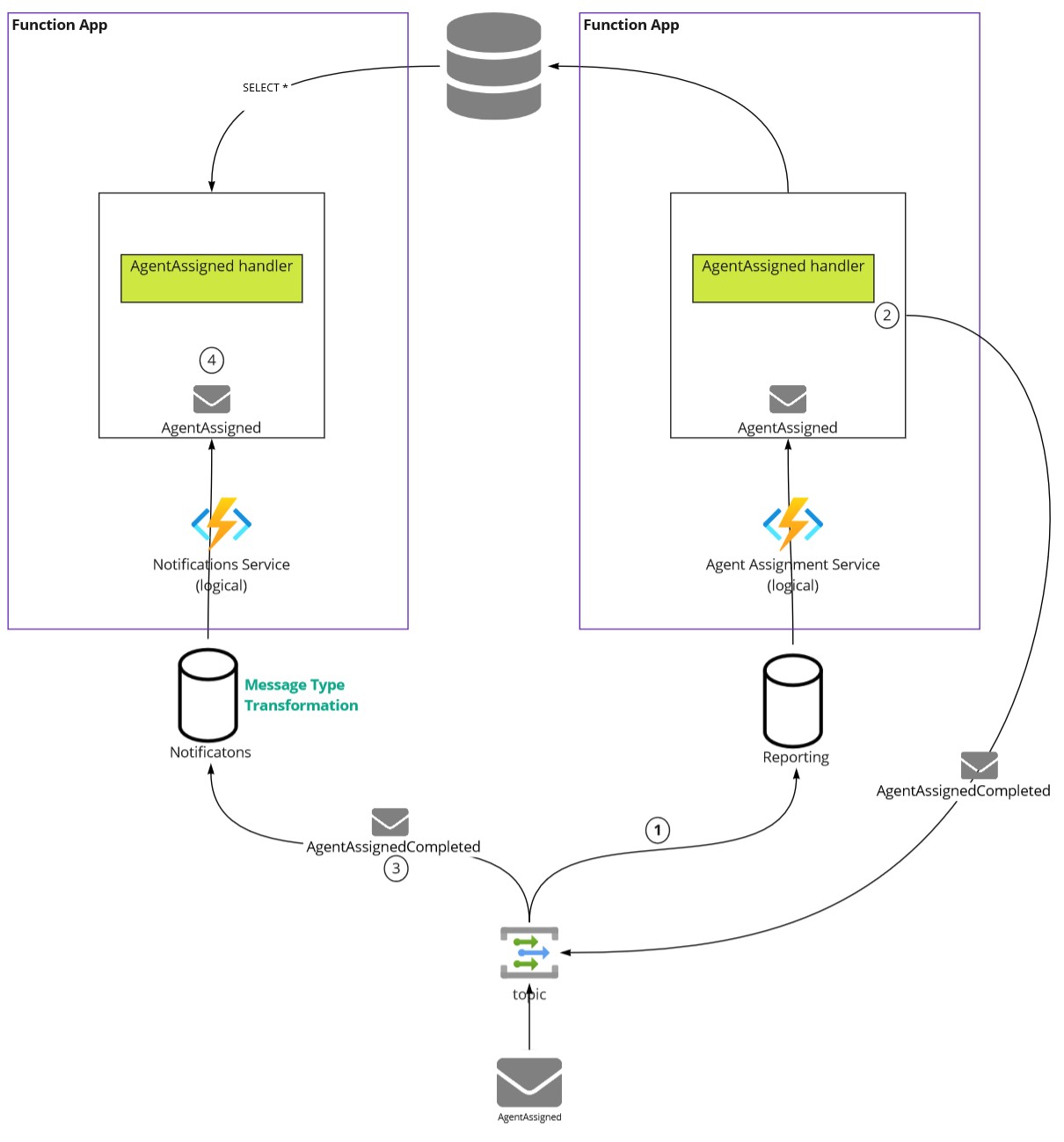
The first handler, upon its completion, will dispatch a new
event. We'll use a convention of
{OriginalMessageType}Completed. In the case of
AgentReassigned, the newly dispatched event
will be AgentAssignedCompleted. But what we'll
do is stamp the new message headers with the
original message type and set the payload to the
original message payload.
var outgoingMessage = new ServiceBusMessage(BinaryData.FromObjectAsJson(message))
{
	ApplicationProperties =
	{
		{ "EventType", $"{nameof(ConsultantReassigned)}Completed" },
		{ "OriginalEventType", typeof(ConsultantReassigned).FullName }
	}
};
await sender.SendMessageAsync(outgoingMessage);
The subscription we'll create for the 2nd handler will
subscribe to the AgentAssignedCompleted event
type, using SQL filter
EventType='ConsultantReassignedCompleted'. This
will ensure that copies of the messages of
ConsultantReassignedCompleted will be stored
under the subscription.
And here's the trick, we'll use SQL filter
actionto replace EventType of
the message that will be given to the subscription if it
matches the condition, back to the original message type
using the following instruction:
SET EventType=OriginalEventType; REMOVE
                      OriginalEventType;.
With this action, any message that has satisfied the SQL
filter will have its header EventType modified
to the header's value OriginalEventType,
removing the temporary OriginalEventType after
that.
When the 2nd handler receives messages from this
subscription, the type of the message indicated by
EventType will be the original
ConsultantReassigned event rather than the
modified ConsultantReassignedCompleted type.
And the payload will be the original
ConsultantReassigned payload.
Provisioning
There are several ways. Manually, using a tool such as ServiceBus Explorer, or scripted using Az CLI or Bicep. Bicep seems to have a bug, but Az CLI works great. This is what it would look like:
az servicebus topic subscription rule create --resource-group 'MyGroup' --namespace-name 'MyNamespace'
    --topic-name 'tva.events' --subscription-name 'Notifications' --name ConsultantReassignedCompleted
    --filter-sql-expression="EventType='ConsultantReassignedCompleted'"
    --action-sql-expression='SET EventType=OriginalEventType; REMOVE OriginalEventType;'
Is this necessary?
It really depends. You could create Additional
xxxxCompleted types and duplicate all the
properties from the original message types if you'd like. We
can skip that and keep only the original events that matter,
enabling ordered processing by tweaking the provisioned
topology with event impersonation.