Conflicts between ASP.NET AJAX UpdatePanels & jQuery functions

In one of my previous posts dealing with the jQuery DatePicker , a user commented reporting an issue where he uses the jQuery DatePicker and ASP.NET AJAX UpdatePanels.

He says: On the same control that I have the date picker, I also have an ajax update panel, with sync as well as asych triggers. The date pick works before I trigger any ajax, and doesn't work after. Any clue of a workaround here?

Only two hours after his comment, I’ve replied with solution that I’ve used previously in one of my testing projects since I already experienced the same issue with some JavaScript functions previously.

So, once you see the issue, you will think that ASP.NET AJAX UpdatePanels does not like the other jQuery functions within the page. Hmm… it seems true, because after partial post-back has been made by the ASP.NET AJAX UpdatePanel, the JavaScript event handlers are lost.

First of all, we should avoid mixing different JavaScript libraries or frameworks because we may always have some issues when they override some of the default functions they use or some other conflicts that even we cannot think of. Also, both jQuery and ASP.NET Ajax use the dollar ($) sign in different context, which might be an issue when mixing both of the technologies on a single page.

Well, in order to reproduce the problem, lets pass trough the following steps:

1. Add reference to the jQuery library. If you don’t have the library on your local machine, you can reference it from the Microsoft Content Delivery Network (CDN)

<script src="http://ajax.microsoft.com/ajax/jquery/jquery-1.4.2.min.js" type="text/javascript"></script>


2. The ASPX code - ScriptManager, UpdatePanel, Label and Button

<div>
    <asp:ScriptManager ID="ScriptManager1" runat="server">
    </asp:ScriptManager>
    <asp:UpdatePanel ID="UpdatePanel1" runat="server">
        <ContentTemplate>                
            <asp:Label runat="server" ID="lblText" />
            <br />
            <asp:Button ID="btnClick" runat="server" Text="Click Me" OnClick="btnClick_Click" />
        </ContentTemplate>            
    </asp:UpdatePanel>
    <br /><br />        
    <%= DateTime.Now %>
    <!-- the Date time won't change on button click since its outside of the update panel -->
</div>

3. The jQuery function that will show an Alert when clicking on the Button

<script language="javascript" type="text/javascript">
    $(function () {
        $("#btnClick").click(function () {
            //will run on btnClick, which is inside the UpdatePanel
            alert("Alert: Hello from jQuery!");
        });
    });
</script>

4. The server-side C# code that will run when the partial post back occurs, on button click event

protected void btnClick_Click(object s, EventArgs e)
{
    lblText.Text = "Hello from the Server! Current Date&Time: " + DateTime.Now;
}


As you can see, I have mixed both technologies, the ASP.NET AJAX UpdatePanels and the jQuery that has event bound to the button inside the UpdatePanel.

Once we run the website, here is what happens:

-  The website runs and the following screen will show up


- Click on the “Click Me” button and the following alert message will pop up (the jQuery function is called)
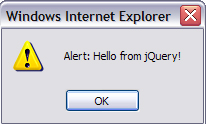

- Right after the client-side code is executed, the UpdatePanel will trigger partial postback event to the server and the result will be


- Now, we click the “Click Me” button again, but there is no Alert message anymore, even though we were expecting the alert. Partial postback has been done again and the server returns new message (see the date time difference)


The problem is reproduced, now lets explain what has happened.

After the page was loaded for first time, everything seems ok. The jQuery function waits till the DOM is fully loaded and then binds its event to the button click. However, the button is inside ASP.NET Ajax UpdatePanel which’s content will get reloaded once the partial post-back is triggered, which actually causes the event handlers to get lost.


I’ve seen few blogs where developers have posted some workarounds. I will post three different methods to resolve this so that you can use the one which seems more suitable for your application.


Method 1

The first method is by using the PageRequestManager. With the request manager, we can add an End Request event handler once the page has loaded after the partial post back is finished.

Here is how:

We need to write additional two JavaScript functions

- load() – which will add the End Request event using the Page Request Manager and will register the jsFunctions function

- jsFunctions() function which will reload the jQuery functions

<script language="javascript" type="text/javascript">
    function load() {
        Sys.WebForms.PageRequestManager.getInstance().add_endRequest(jsFunctions);
    }
    function jsFunctions() {            
            $("#btnClick").click(function () {                    
                alert("Alert: Hello from jQuery!");
        });
    }
</script>

and we need to add

<body onload="load()">

which will call the load() function once the onload event occurs.


Method 2

ASP.NET Ajax has one pageLoad() method which invokes the Sys.Application.load load event. Think of the pageLoad() event similar to the Page_Load server-side event that runs on code-behind in server. Only the pageLoad() event runs on client-side, everytime the page is reloaded (no matter if the reload is full or partial). If we put the script inside this event, it will avoid all the conflicts that happen between ASP.NET Ajax and the jQuery because it will rebind the scripts every time the page will do post-back.

<body>
    <script language="javascript" type="text/javascript">
        function pageLoad()
        {
            $(function () {
                $("#btnClick").click(function () {                    
                    alert("Alert: Hello from jQuery!");
                });
            });
        }
    </script>

This seems definitely better than the first method since its more clear, you don’t need to create additional functions that will run on end request and you don’t need to add onload event to the body element.


Method 3

I won’t show anything new in this third method, but, I will show a way how to register the script from method 2 on server-side.

protected void Page_Load(object sender, EventArgs e)
{
    //I've formatted the JS function to be more readable ;)
    string javaScriptFunction =
    "function pageLoad() {" +
        "$(function () {" +
            "$('#btnClick').click(function () {" +
                "alert('Alert: Hello from jQuery!');" +
            "});" +
        "});" +
    "}";
    ClientScript.RegisterStartupScript(this.GetType(), "myScript", javaScriptFunction, true);            
}

I have added the script in the javaScriptFunction string, but you can add your scripts in an external JavaScript (.js) file and reference it using ClientScript.RegisterClientScriptInclude() function, so in such case we will have:

protected void Page_Load(object sender, EventArgs e)
{
    ClientScript.RegisterClientScriptInclude(this.GetType(), "myScript", "Scripts/javaScriptFile.js");            
}

where the Scripts/javaScriptFile.js is the script file.

Note: There are some other methods too, such as using the jQuery live() function.


COMPLETE CODE

Here is the complete code implemented as in Method 2 with commented code lines for the last method with the server-side code.

<%@ Page Language="C#" %>

<!DOCTYPE html PUBLIC "-//W3C//DTD XHTML 1.0 Transitional//EN" "http://www.w3.org/TR/xhtml1/DTD/xhtml1-transitional.dtd">

<html xmlns="http://www.w3.org/1999/xhtml">
<head id="Head1" runat="server">
    <title>Conflicts between ASP.NET AJAX Update Panels & JavaScript/jQuery functions</title>
    <script src="http://ajax.microsoft.com/ajax/jquery/jquery-1.4.2.min.js" type="text/javascript"></script>
</head>
<body>
    <script language="javascript" type="text/javascript">
        function pageLoad() {
            $(function () {
                $("#btnClick").click(function () {                    
                    alert("Alert: Hello from jQuery!");
                });
            });
        }
    </script>    
    <form id="form1" runat="server">
    <div>
        <asp:ScriptManager ID="ScriptManager1" runat="server">
        </asp:ScriptManager>
        <asp:UpdatePanel ID="UpdatePanel1" runat="server">
            <ContentTemplate>                
                <asp:Label runat="server" ID="lblText" />
                <br />
                <asp:Button ID="btnClick" runat="server" Text="Click Me" OnClick="btnClick_Click" />
            </ContentTemplate>            
        </asp:UpdatePanel>
        <br /><br />        
        <%= DateTime.Now %>
        <!-- the Date time won't change on button click since its outside of the update panel -->
    </div>
    <script runat="server">
        protected void Page_Load(object sender, EventArgs e)
        {
            #region if you want to use your script in server side, uncomment the code inside this region
            /*
            string javaScriptFunction =
            "function pageLoad() {" +
                "$(function () {" +
                    "$('#btnClick').click(function () {" +
                        "alert('Alert: Hello from jQuery!');" +
                    "});" +
                "});" +
            "}";
           
            ClientScript.RegisterStartupScript(this.GetType(), "myScript", javaScriptFunction, true);
            */
            #endregion

            #region if you have your JS script in an external file and want to reference it, uncomment the following line
            //ClientScript.RegisterClientScriptInclude(this.GetType(), "myScript", "Scripts/javaScriptFile.js");
            #endregion
        }
        
        protected void btnClick_Click(object s, EventArgs e)
        {
            lblText.Text = "Hello from the Server! Current Date&Time: " + DateTime.Now;
        }
    </script>
    </form>
</body>
</html>

So, that’s it.

Even though the implementation is pretty simple, I made this blog post quite long in order to explain the details with trying not to get out of the problem boundaries.

I would like to note that I'm a big fun and I work a lot with both, the Microsoft ASP.NET Ajax and the jQuery library.

I hope this was helpful.

Kind Regards,
Hajan

Published Thursday, October 07, 2010 6:33 PM by hajan
Filed under: , , ,

Comments

# re: Conflicts between ASP.NET AJAX UpdatePanels & jQuery functions

Thursday, October 07, 2010 3:09 PM by Bruno

Great solution. Thanks for sharing.

# re: Conflicts between ASP.NET AJAX UpdatePanels & jQuery functions

Thursday, October 07, 2010 6:45 PM by Martyn McDonnell

Another, simpler way would be to use the jquery live() method instead of click() to bind the event.

The event binding line then becomes

$("#btnClick").live('click', function () { alert("Alert: Hello from jQuery!"); });

And it will ensure that the event will be bound even after a ajax partial update.

# re: Conflicts between ASP.NET AJAX UpdatePanels & jQuery functions

Thursday, October 07, 2010 6:59 PM by hajan

Hey guys, thanks for the comments.

@Martyn, I've already used that method previously and trust me, I often add some space for collaborations in my blog posts ;). Your remark is excellent!

However, I prefer the pageLoad() {} method because even if we use plain JavaScript (with no jQuery at all) we can put the code there and the problem will get resolved ;).

Thank you for your great comments.

# re: Conflicts between ASP.NET AJAX UpdatePanels & jQuery functions

Friday, October 08, 2010 9:51 AM by AndrewSeven

jQuery and the Asp.Net Ajax work quite well together, you should have look at the Open Ajax stuff.

The core issue is that most jQuery scripts are written so as to run based on a specific event which does not fire due to the update panel's update. The more complex event model of the asp.net ajax does have an event for it.

We us a condition to determine how to call init.

// Add a handler for the async request end event (launch each Sys.WebForms.PageRequestManager is called)

if (Sys != null && Sys.WebForms != null && Sys.WebForms.PageRequestManager != null) {

// Raised after all content on the page is refreshed as a result of either a synchronous or an asynchronous postback (after "Add to cart" action)

Sys.WebForms.PageRequestManager.getInstance().add_pageLoaded(this.DoInit);

} else {

this.DoInit();

}

# re: Conflicts between ASP.NET AJAX UpdatePanels & jQuery functions

Friday, October 08, 2010 10:28 AM by hajan

@Andrew, your workaround will also work nicely. I've been playing with the Sys.WebForms.PageRequestManager for a while and I think I've came across similar solution previously. However, for such case, I think the Method 2 from my post will serve better. We can also add some additional logic inside the pageLoad().

Thank you for the feedback.

# Twitter Trackbacks for Conflicts between ASP.NET AJAX Update Panels &amp; jQuery functions - Hajan's Blog [asp.net] on Topsy.com

Pingback from  Twitter Trackbacks for                 Conflicts between ASP.NET AJAX Update Panels &amp; jQuery functions - Hajan's Blog         [asp.net]        on Topsy.com

# Conflicts between ASP.NET AJAX UpdatePanels &amp; jQuery functions - Hajan's Blog

Pingback from  Conflicts between ASP.NET AJAX UpdatePanels &amp; jQuery functions - Hajan's Blog

# re: Conflicts between ASP.NET AJAX UpdatePanels & jQuery functions

Friday, October 15, 2010 11:58 AM by Joel

Excellent post. Thank you very much for taking the time to write this up and share with us.

# re: Conflicts between ASP.NET AJAX UpdatePanels & jQuery functions

Tuesday, October 19, 2010 9:38 AM by Matthew Jackson

I tend to use a little heavier weight solution when integrating jquery plugins with my asp.net update panels.

The general gist of my solution is to factor out the content of the update panel into a UserControl.  I have that control implement IScriptControl and ship down an asp.net ajax component.  I then attach my events in the init and detach my events in the dispose of the ajax component.

The ajax component integrates quite nicely with UpdatePanels (with the update panel calling dispose at the appropriate time so I won't have any memory leaks, and initializing the component when new content is shipped to the client).

This is probably overkill for the click example given, but I find this technique to be indispensable for complex plugins.

# re: Conflicts between ASP.NET AJAX UpdatePanels & jQuery functions

Thursday, January 06, 2011 3:09 PM by gnosys

Thanks again for the prompt response that day! You rock!

# re: Conflicts between ASP.NET AJAX UpdatePanels & jQuery functions

Tuesday, January 11, 2011 6:28 AM by Kenji

This post helped me !!!

in the beginning i was wondering to use the third way by myself, but i saw the secound way, much more easier.

NICE POST! Thx man!

# re: Conflicts between ASP.NET AJAX UpdatePanels & jQuery functions

Friday, January 21, 2011 8:14 AM by hajan

@Kenji, @gnosys... Thank you for the comments and I'm glad I've provided the help you need ;)

# re: Conflicts between ASP.NET AJAX UpdatePanels & jQuery functions

Tuesday, February 22, 2011 9:00 AM by Oberon

Thanks Hajan.

Very nice solutions.

# re: Conflicts between ASP.NET AJAX UpdatePanels & jQuery functions

Wednesday, March 02, 2011 4:39 AM by srinivasu dandamudi

Thanks Hajan.

I got solution for jquery datepicker,because of you.Once again Thanks Hajan

# Conflict between jQuery &amp; ASP.net AJAX &laquo; ???

Tuesday, March 22, 2011 5:19 AM by Conflict between jQuery & ASP.net AJAX « ???

Pingback from  Conflict between jQuery &amp; ASP.net AJAX &laquo; ???

# re: Conflicts between ASP.NET AJAX UpdatePanels & jQuery functions

Thursday, April 07, 2011 1:15 AM by anandakumar

Thanks Hajan.

good code.you did nice job.

http://www.inovvorx.com

# re: Conflicts between ASP.NET AJAX UpdatePanels & jQuery functions

Sunday, April 17, 2011 8:22 AM by aamir.ali

Hi Hajan,

Thanks, nice solution.

Moving forward from your post, I am trying to create an <a> tag dynamically on the click of the button and then call the click event of the <a> tag using jQuery to display an alert. How can I do that? I am having difficulties in programmatically calling the click of the dynamically created <a> tag.  

# JQuery effects on dynamically created controls inside ASP.NET AJAX update panel | Coding Answers

Pingback from  JQuery effects on dynamically created controls inside ASP.NET AJAX update panel | Coding Answers

# re: Conflicts between ASP.NET AJAX UpdatePanels & jQuery functions

Thursday, May 05, 2011 11:40 AM by Carlos

For me the Method 2 was the best solution.

Thank you!!!!!!

# re: Conflicts between ASP.NET AJAX UpdatePanels & jQuery functions

Friday, July 29, 2011 4:25 AM by Excellent Piece Of Work

Thanks for this wonderful code snippet, I even liked the 2nd option it saves lots of work and time

# re: Conflicts between ASP.NET AJAX UpdatePanels & jQuery functions

Tuesday, August 09, 2011 5:19 AM by GjorgjiP

Navistina dobar post. Posle 2 dena lupanje glava od tastatura konecno resenie :)

# re: Conflicts between ASP.NET AJAX UpdatePanels & jQuery functions

Tuesday, August 09, 2011 5:26 AM by hajan

Thanks everyone for the latest comments.

@GjorgjiP, milo mi e deka postot e od korist. Fala za komentarot!

# re: Conflicts between ASP.NET AJAX UpdatePanels & jQuery functions

Wednesday, August 17, 2011 4:19 AM by Sharath

I want to have a modal pop up with a text box to accept password and close popup when password is correct.Popup wil be a update panel. Please help me

# re: Conflicts between ASP.NET AJAX UpdatePanels & jQuery functions

Friday, August 26, 2011 8:08 AM by Hasantha Attidiya

Excellent post that solved our problem. thanking for maintaining such a site.

However I noticed in the above example Method 1 - jQuery function activates only after the secon click of the button.  

# re: Conflicts between ASP.NET AJAX UpdatePanels & jQuery functions

Wednesday, September 21, 2011 10:19 AM by Steven T.

Reading the comment I'm figuring out that there are so many people that still use update panel technology.

I don't understand, if they use jquery on the same project, what is the reason to include update panel too? Maybe the poor Microsoft version of ajax?

Please read something like this article to clean up your projects and let's make update panel disappear.

www.codeproject.com/.../AjaxAndAspNET.aspx

# re: Conflicts between ASP.NET AJAX UpdatePanels & jQuery functions

Wednesday, September 21, 2011 1:06 PM by hajan

Hi Steven... There are very big projects that are completely based on 'UpdatePanels approach' and works completely fine. Developers often try to put some jQuery to make the front-end more dynamic and then they get into such problems... For some guys, update panels are pretty nice if they don't need anything more and if these work fine... However, I do believe that its better to go with jQuery Ajax instead of UpdatePanels approach... I am one of the jQuery fans! ;)

As per the article you've provided, well, I have some small remarks regarding given statements in the first part, actually, I don't see why it's stated that UpdatePanel is Microsoft's main interpretation of Ajax. Nowadays, Microsoft supports and automatically includes jQuery with each project template as well...

# re: Conflicts between ASP.NET AJAX UpdatePanels & jQuery functions

Thursday, September 29, 2011 2:00 AM by Hashemi

Thanks.

# re: Conflicts between ASP.NET AJAX UpdatePanels & jQuery functions

Monday, October 31, 2011 6:44 AM by Shyam

Nice article helped me a lot.Thank You

# re: Conflicts between ASP.NET AJAX UpdatePanels & jQuery functions

Friday, November 25, 2011 8:01 PM by Ken Van Gilbergen

Thanks, by reading your article I only needed to add to lines of code and everything was working again.

# re: Conflicts between ASP.NET AJAX UpdatePanels & jQuery functions

Thursday, December 22, 2011 5:09 AM by miranova

thank you for the great post... it is very easy to understand..

i used the second method to fix the problem with my jquery datetimepicker but now i got an error message in the dynamic class of the datepicker: "This Method is not supported"...

it always stucks at the finally method of the datepicker.. may you got a suggestion...

thanks

# re: Conflicts between ASP.NET AJAX UpdatePanels & jQuery functions

Saturday, January 07, 2012 5:59 AM by hajan

Hi miranova, I am glad the post was helpful for you. As for your other question, if I understand it well, you should look at my other post: weblogs.asp.net/.../bind-jquery-ui-datepicker-on-dynamically-created-text-box-controls.aspx

Hope this is helpful.

# re: Conflicts between ASP.NET AJAX UpdatePanels & jQuery functions

Wednesday, February 01, 2012 6:52 AM by sumithxp1981

this is very important tricks ..thanks  

# re: Conflicts between ASP.NET AJAX UpdatePanels & jQuery functions

Tuesday, February 07, 2012 8:59 AM by ujjwal

Great job brother. I used pageLoad() and it worked.

Thanks and keep sharing.

# re: Conflicts between ASP.NET AJAX UpdatePanels & jQuery functions

Friday, February 17, 2012 11:06 AM by Bill

Very nice! Been fighting this for a little while and this is the silver bullet.

Thanks!

# re: Conflicts between ASP.NET AJAX UpdatePanels & jQuery functions

Friday, February 17, 2012 1:31 PM by hajan

Bill, sumithxp1981 & ujjwal, It is nice to hear the blog post was helpful...

# re: Conflicts between ASP.NET AJAX UpdatePanels & jQuery functions

Wednesday, April 04, 2012 1:16 PM by Stefan

Thanks for putting this solution up! #2 was the perfect fix.

# re: Conflicts between ASP.NET AJAX UpdatePanels & jQuery functions

Sunday, June 17, 2012 12:12 PM by Javier Cabrera

Excellent post man, you made my day!!!

# re: Conflicts between ASP.NET AJAX UpdatePanels & jQuery functions

Wednesday, June 27, 2012 11:57 AM by KJ

You rock! I was stupid enough to mix the two myself. I was also using the datepicker.

# re: Conflicts between ASP.NET AJAX UpdatePanels & jQuery functions

Thursday, July 26, 2012 8:10 AM by Pablo

Great! It worked!

my headache has gone after reading this post! Thank you so much!

# re: Conflicts between ASP.NET AJAX UpdatePanels & jQuery functions

Monday, August 13, 2012 12:22 PM by gigisector

Thanks after two day.

# re: Conflicts between ASP.NET AJAX UpdatePanels & jQuery functions

Saturday, September 22, 2012 7:23 PM by Krist

Thank you so much. Cool Guy

# re: Conflicts between ASP.NET AJAX UpdatePanels & jQuery functions

Monday, February 11, 2013 4:25 AM by ravindran

Thank u....

# re: Conflicts between ASP.NET AJAX UpdatePanels & jQuery functions

Saturday, February 23, 2013 3:29 AM by Tobbe

www.codeproject.com/.../AJAX-UpdatePanel-With-Inline-Client-Scripts-Parser

Leave a Comment

(required) 
(required) 
(optional)
(required)