jQuery UI Accordion in ASP.NET WebForms - feed with data from database (Part 2)

In the first part I’ve shown how to implement jQuery UI Accordion in an ASP.NET website in only few steps, without any server-side interaction. We’ve seen how easy is to setup the Accordion and to apply some theme to it.

Now, lets do some more with the ASP.NET framework. I will use ASP.NET Repeater (this example is using ASP.NET WebForms), and the ASP.NET Method to retrieve data from database.

Also in the next blog I will create the same example with ASP.NET MVC.

Lets start from the database.

I’ve created complete new database which contains only one table.

Here is the DB Script you need for this example:

CREATE DATABASE MyWebStore
go
use MyWebStore
go
CREATE TABLE Products
(
    id int not null primary key identity(1,1),    
    name nvarchar(100) not null,
    price decimal,
    picture nvarchar(200),
    [description] text    
)
go
INSERT INTO Products
VALUES ('Inspiron 15R Laptop', 600, 'Inspiron15RLaptop.png',
'The Inspiron™ laptop''s sleek new design is not only easy on the eyes, it seamlessly travels by your side without getting in your way.
Sleek details Upon opening the Inspiron, your eyes will be immediately drawn to the brushed metal appearance of the smudge-proof palm rest.
The keyboard''s 10-key numeric keypad makes it easy to work with applications that require data entry or directional moves.')
INSERT INTO Products
VALUES ('XPS 15 Laptop', 850, 'XPS15Laptop.png',
'Powerful graphics. Powerfully smart. The XPS™ 15 laptop has what it takes to take you to new levels of performance.
Comes with standard leading edge NVIDIA® performance graphics3 (available up to 2 GB) for powerful photo and video editing and high-resolution gaming with breathtaking detail.')
INSERT INTO Products
VALUES ('Inspiron Mini 10 (1018) Netbook', 430, 'InspironMini10Notebook.png',
'The Inspiron Mini 10 goes anywhere you go — and with ease.
With a slim profile for computing in compact spaces and a starting at weight of less than 3 lbs.6, you’ll want to bring the ultra-portable ')

select * from Products

If successful, you will automatically see the table with three records. I’ve also stored image names for each product which I have in my project on the images folder
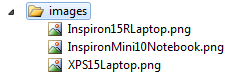

Now, we will create simple ASP.NET Method that will retrieve the data from database and will bind it to repeater on Page_Load

protected void Page_Load(object sender, EventArgs e)
{
    Repeater1.DataSource = GetProducts();
    Repeater1.DataBind();
}

public DataTable GetProducts()
{
    string query = "select * from products";
    SqlConnection con = new SqlConnection
        (WebConfigurationManager.ConnectionStrings["MyWebStoreConnectionString"].ConnectionString);
    SqlCommand cmd = new SqlCommand(query, con);
    DataTable data = new DataTable();
    SqlDataAdapter adapter = new SqlDataAdapter(cmd);
    using (con)
    {
        con.Open();
        adapter.Fill(data);
    }

    return data;
}

I have the connection string in Web.Config

<connectionStrings>
    <add name="MyWebStoreConnectionString"
         connectionString="Data Source=.;Initial Catalog=MyWebStore;Integrated Security=True"
         providerName="System.Data.SqlClient" />
</connectionStrings>


and the ASPX code is:

<!DOCTYPE html PUBLIC "-//W3C//DTD XHTML 1.0 Transitional//EN" "http://www.w3.org/TR/xhtml1/DTD/xhtml1-transitional.dtd">

<html xmlns="http://www.w3.org/1999/xhtml">
<head runat="server">
    <title>jQuery Accordion</title>
    <link type="text/css" href="http://ajax.microsoft.com/ajax/jquery.ui/1.8.5/themes/blitzer/jquery-ui.css" rel="Stylesheet" />
        
    <script type="text/javascript" src="http://ajax.aspnetcdn.com/ajax/jquery/jquery-1.4.4.js"></script>  
    <script type="text/javascript" src="http://ajax.aspnetcdn.com/ajax/jquery.ui/1.8.6/jquery-ui.js"></script>
        
    <script language="javascript" type="text/javascript">
        $(function () {
            $("#products").accordion();
        });
    </script>

</head>
<body>
    <form id="form1" runat="server">
    <div id="products" style="width:500px;">
        <asp:Repeater ID="Repeater1" runat="server">
            <ItemTemplate>
                <h3><a href="#"><%# DataBinder.Eval(Container.DataItem, "name") %></a></h3>
                <div>
                    <p>
                        <%# DataBinder.Eval(Container.DataItem, "description") %>
                    </p>
                </div>
            </ItemTemplate>
        </asp:Repeater>
    </div>
    </form>
</body>
</html>

We have less code from the previous blog since we have the Repeater which will do the job of repeating the data depending of how many records the DataTable has. So, if we add new records in database, the Repeater will take care of it to generate all the records with the same template defined inside ItemTemplate.

Now, if you run the website, you will see this:
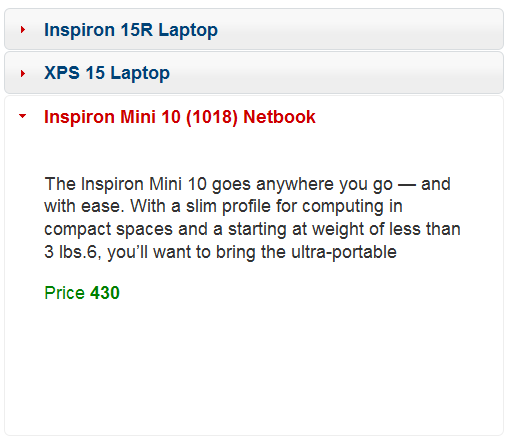

Great! We’ve successfully implemented it with connection to our server-side logic and data retrieved from database.

Now, lets do the same thing with ASP.NET MVC.

See the following blog.

Regards,
Hajan

Published Tuesday, November 23, 2010 10:30 PM by hajan

Comments

# jQuery UI Accordion во ASP.NET Website – Серија блогови

Tuesday, November 23, 2010 6:16 PM by Hajan's Blog - MKDOT.NET

Денес напишав серија од три блогови за имплементација на jQuery UI Accordion во ASP.NET Website. 1. jQuery

# Twitter Trackbacks for jQuery UI Accordion in ASP.NET WebForms - feed with data from database (Part 2) - Hajan's Blog [asp.net] on Topsy.com

Pingback from  Twitter Trackbacks for                 jQuery UI Accordion in ASP.NET WebForms - feed with data from database (Part 2) - Hajan's Blog         [asp.net]        on Topsy.com

# Dew Drop &ndash; November 23, 2010 | Alvin Ashcraft&#039;s Morning Dew

Pingback from  Dew Drop &ndash; November 23, 2010 | Alvin Ashcraft&#039;s Morning Dew

# jQuery UI Accordion in ASP.NET ??? Client side implementation (Part 1) - Hajan's Blog

Pingback from  jQuery UI Accordion in ASP.NET ??? Client side implementation (Part 1) - Hajan's Blog

# re: jQuery UI Accordion in ASP.NET WebForms - feed with data from database (Part 2)

Wednesday, November 24, 2010 4:55 AM by Jalpesh

HI Hajan,

Nice post. do you how we can use Jquery UI controls to save data in database.

Regards,

Jalpesh

# re: jQuery UI Accordion in ASP.NET WebForms - feed with data from database (Part 2)

Wednesday, November 24, 2010 5:59 AM by hajan

Hi @Jalpesh,

Thank you for your comment.

Emm... jQuery UI Plugins, Widgets and Effects are mostly used for the client-side presentation layer, presenting the data on a highly interactive, flexible and user-friendly style. For saving data to database using jQuery you will need to use jQuery's ajax methods so that you can make async. post to the server and call the server-side method that will get the data as input parameter and save it into database.

I will probably write an example in one of my next blog posts.

Regards,

Hajan

# jQuery UI Accordion in ASP.NET MVC - feed with data from database (Part 3) - Hajan's Blog

Pingback from  jQuery UI Accordion in ASP.NET MVC - feed with data from database (Part 3) - Hajan's Blog

# re: jQuery UI Accordion in ASP.NET WebForms - feed with data from database (Part 2)

Tuesday, April 05, 2011 6:45 AM by weblogs.asp.net

Jquery ui accordion in asp net feed with data from database part 2.. Great idea :)

# re: jQuery UI Accordion in ASP.NET WebForms - feed with data from database (Part 2)

Saturday, April 30, 2011 6:05 PM by weblogs.asp.net

Jquery ui accordion in asp net feed with data from database part 2.. OMG! :)

# 1600+ downloads of source code files

Saturday, June 04, 2011 5:28 PM by Hajan's Blog

For some of the blogs I have posted in the previous several months, I have included source code of the

# 1600+ downloads of source code files

Sunday, June 05, 2011 12:20 AM by 1600+ downloads of source code files

Pingback from  1600+ downloads of source code files

# re: jQuery UI Accordion in ASP.NET WebForms - feed with data from database (Part 2)

Tuesday, September 20, 2011 8:20 AM by netbooks

Hi all, i'm trying to display an ASP.NET site develeoped by me inside the SP.UI.ModalDialog. When i run the asp site directly without sharepoint it works ok but when i see inside the modaldialog the site dont stop loading. i see the green bar forever. i try showing a blank page from my site and i still see the same , its keep loading. Can u help me please Sorry my english. i'm chilean Thanks

# re: jQuery UI Accordion in ASP.NET WebForms - feed with data from database (Part 2)

Thursday, October 06, 2011 12:04 AM by srinivasu dandamudi

Nice article, how to expand all nodes when page load ? Thanks for article

# re: jQuery UI Accordion in ASP.NET WebForms - feed with data from database (Part 2)

Monday, November 21, 2011 8:53 PM by Ozz

Im just wondering if may be posible instead of having a description have a link to other .aspx page

# re: jQuery UI Accordion in ASP.NET WebForms - feed with data from database (Part 2)

Tuesday, November 22, 2011 3:56 PM by hajan

Ozz, yes, the jQuery Accordion is capable of loading content dynamically using jQuery Ajax... You can simply hrefs to the external ASPX page - Check the example here: jqueryui.com/.../tabs

# re: jQuery UI Accordion in ASP.NET WebForms - feed with data from database (Part 2)

Friday, January 06, 2012 4:26 AM by Priyanka

I want to add a button inside the accordion so that i can perform some action on each entry. but when the button is clicked the page reload even when the button UseSubmitBehavior is set to "False". I am new to javascript and jquery. please help ... I want that when the button is clicked the page should not reload n the according should have active pane on which i was working.

Thanks in advance.

Regards.

Leave a Comment

(required) 
(required) 
(optional)
(required)