Silverlight 2.0 Compression Rate

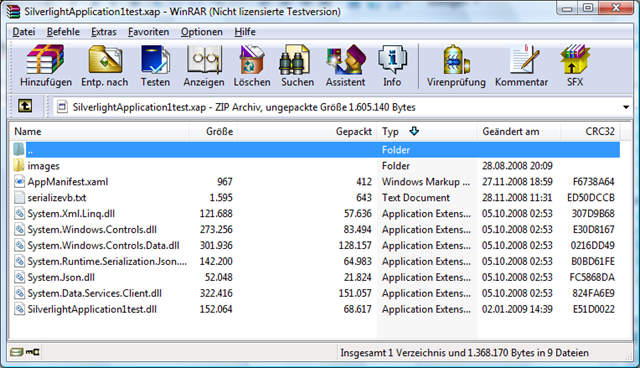
After a short discussion in silverlight forums with a guy who have only 19kb line, I checked out compression for XAP files. A XAP is a zipped package of DLL’s and resources. With winrar installed you can open by context menu from Visual Studio Explorer the xap (clientbin). It contains files like
image

The size of the package in this case is 750 KB. I unzipped the content and compressed it with Winrar again and- surprise- surprise, package size is now 547 KB. A reduction more than 35%. Only rename the zip back to xap.

I will investigate a little bit, how to automate that within the build process.

Published Friday, January 02, 2009 3:11 PM by preishuber
Filed under: ,

Comments

# re: Silverlight 2.0 Compression Rate

Friday, January 02, 2009 9:19 AM by hannes preishuber

i found a blog post handling same topic. Wirar seems to be more efficent

blogs.msdn.com/.../smaller-is-better-a-simple-step-to-shrink-the-download-size-of-silverlight-2-applications.aspx

# Silverlight 2.0 Compression Rate - Hannes Preishuber

Friday, January 02, 2009 10:01 AM by Silverlight 2.0 Compression Rate - Hannes Preishuber

Pingback from  Silverlight 2.0 Compression Rate - Hannes Preishuber

# re: Silverlight 2.0 Compression Rate

Friday, January 02, 2009 12:09 PM by Vitor Canova

You compressed files into xap file with Winrar and change the extension to xap and the Browser recognized? Witch Winrar extension did you use, *.rar or *.zip legacy?

# re: Silverlight 2.0 Compression Rate

Friday, January 02, 2009 7:28 PM by Miguel Madero

Delay from the SL Toolkit team posted something about this a while ago, I thought might be useful.

blogs.msdn.com/.../smaller-is-better-a-simple-step-to-shrink-the-download-size-of-silverlight-2-applications.aspx

blogs.msdn.com/.../smaller-is-still-better-a-simple-step-continues-to-shrink-the-download-size-of-silverlight-2-applications.aspx

# re: Silverlight 2.0 Compression Rate

Saturday, January 03, 2009 12:01 AM by Bob Baker

You might want to look at ReXapper, a free post-build event utility that does a really decent job every time you build your Silverlight app:

http://tinyurl.com/7ujwss

# Silverlight Cream for January 02, 2009 -- #474

Saturday, January 03, 2009 12:46 AM by Community Blogs

In this issue: Jesse Liberty, Terence Tsang, Hannes Preishuber, Tim Heuer, and Damon Payne. Shoutouts

# Interesting Post on SilverLight .XAP Compression Efficiency

Sunday, January 04, 2009 1:17 PM by The User Experience Blog

Interesting Post on SilverLight .XAP Compression Efficiency

# re: Silverlight 2.0 Compression Rate

Monday, January 05, 2009 1:59 AM by Jonathan van de Veen

Very interesting, but does this have an effect on decompression times? In that case a balance between bandwith and cpu speed becomes important.

# re: Silverlight 2.0 Compression Rate

Monday, January 05, 2009 8:31 PM by dealer inventory management guy

Yeah we use a simple batch file using 7zip to rezip the files.

# re: Silverlight 2.0 Compression Rate

Tuesday, February 03, 2009 3:53 PM by rfreire

You should take a look at ComponentOne's XapOptimizer. Not only it will do the same recompression work but it will also remove any unused type or xaml resource from the assemblies.

And it also supports obfuscation!!!!.

demo.componentone.com/.../XapOptimizer

Regards.

# Silverlight Travel » Silverlight Compression Rate

Wednesday, February 11, 2009 1:29 AM by Silverlight Travel » Silverlight Compression Rate

Pingback from  Silverlight Travel » Silverlight Compression Rate

Leave a Comment

(required) 
(required) 
(optional)
(required)