Free OCR software? You may already have it...

Summary

OCR (Optical Character Recognition) can really come in handy. For example, I previously wrote about how I use Timesnapper as a black box to recover work which would otherwise be lost. Since most of my work is text based (C#, SQL, HTML, documentation, communications, etc.), the obvious next step is to grab the code from a screenshot. Of course I can retype it, but OCR would be better. 

There are some great commercial OCR packages out there. My company recently used OmniPage Pro in a project which loaded data from hundreds of PowerPoint slides into SQL Server for reporting and analysis1OmniPage is great software, but it costs $149 for the basic version, which doesn't really make sense if you're just using it to avoid retyping a little text from a screenshot every now and then.

I looked around for free OCR software, and was a little bit surprised that there wasn't much out there. Here's a rundown of what I found, wrapping up with a program that wasn't technically free, but I already had it. There's a good chance you've got it, too. 

GOCR

I first tried out GOCR (a.k.a. JOCR). The easiest way to try it out is the GOCR Win Frontend, which installs GOCR as well. My opinion matched Pitor's:

To let things be clear - gocr is not ready, to say the least. Personally I'd even say the effect of trying to OCR a page is so crappy it is not even worth installing the gocr engine (seems like the total rewrite in 0.40 did not help much). And I am talking about an ascii black text on a white page, without other elements. Gocr seems to go all the way down here - error in 98% of recognized characters, randomly added spaces, etc. For example: content is C unrir in gocr, sounds like drunken elvish to me.

Tesseract OCR

Yeah, there's been some chatter in the blogospheres and internets about Tesseract since Google assisted in re-releasing it as an open source project. I have no doubts that the press alone (not to mention Google's involvement) will propel Tesseract towards OCR fame and fortune, but it sounds like it's not usable at this point:

It only is configured to build under MSVC++6 for Windows.
It only accepts uncompressed bitonal tiffs.
It's command-line only.
No GUI.
It performed abysmally on the provided testimage.tif
But it did build. :)

Microsoft Office Document Imaging

On accident, I stumbled across Microsoft Office Document Imaging. It's included Microsoft Office Tools ("Microsoft Office \ Microsoft Office Tools" folder in the start menu, default installation location is "C:\Program Files\Common Files\Microsoft Shared\MODI\11.0\"). The interface looks a "My First VB5 Application" reject, but it works great.

It handles scanned documents via TWAIN. The image import's a bit lame - it only handles TIF files. You can convert to TIF in just about any graphics application (e.g. MSPAINT - open the file, Save As TIF file). An easier method is to just copy the image to the clipboard and paste as a new page into MODI.

Here's a quick walkthrough of how I grabbed some text from a PDF2.

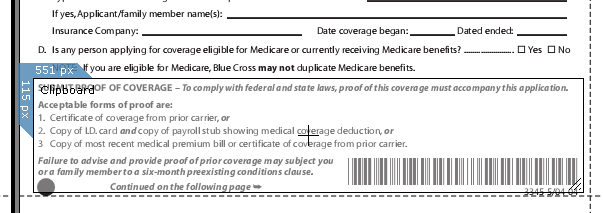
Step 1. I selected the text I wanted to OCR with Cropper (output set to Clipboard)
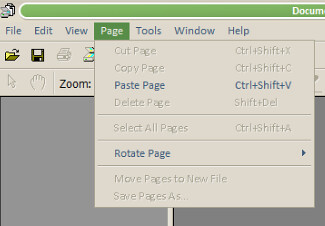
Step 2. I opened Microsoft Office Document Imaging and loaded my image with Page / Paste Page
Step 3. I ran the OCR process by clicking on the "funky eye" toolbar button (or in the Tools menu)
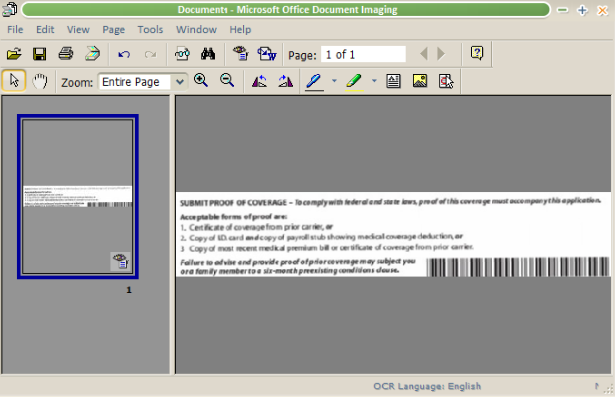
Step 4. Click the Export to Word toolbar button

Step 5. Copy the text and paste it where you want it

In this case, it was an e-mail. I've done the same thing to grab SQL or C# code which I then paste into the editor and compile (Ctrl-F5 for SQL, Ctrl-Shift-B for C#) to catch the things that didn't make it through the OCR cleanly.

I haven't tried it, but apparently you can automate MODI from .NET.


1 Yes, it sounds insane, but it actually worked, and the business value of the data more than justified it.
2 Yes, you can select and copy text in a PDF. This is just an example, but in this case the final result of the OCR'd text was a lot cleaner than the oddly mangled and mis-formatted text I got from the PDF select / copy approach.

Published Sunday, October 01, 2006 11:05 PM by Jon Galloway
Filed under: ,

Comments

# Optical Character Recognition On The Cheap

Jon Galloway combines Timesnapper (Tivo for geeks) with the OCR abilities of Microsoft Office Document

Monday, October 02, 2006 12:00 PM by Community Blogs

# re: Free OCR software? You may already have it...

Thanks alot...very handy!

Monday, October 02, 2006 3:44 PM by snarfy snarf

# re: Free OCR software? You may already have it...

Wow!  I can't believe that I didn't know about that before now.  That is going to be a huge time-saver.

Monday, October 02, 2006 7:06 PM by Ryan Smith

# re: Free OCR software? You may already have it...

Top stuff Jon.

Yeh I've been tinkering with that MODI codeproject sample for a while now.

Simple OCR is scheduled for TimeSnapper 2.2. Can't wait to have it in there.

Other features (including extensible callouts during archiving -- which you requested!) are going to be done first though. But OCR is my favourite feature, particularly for the 'don't lose my data' type usages that you've done so much.

thanks again for the support!

lb

Monday, October 02, 2006 10:41 PM by lb

# Free OCR software? You may already have it...

You've been kicked (a good thing) - Trackback from DotNetKicks.com

Tuesday, October 03, 2006 8:14 AM by DotNetKicks.com

# re: Free OCR software? You may already have it...

I've been using MS Office OneNote 2007 for a while, and it includes text recognition too. It's really cool: you rip a screen shot and have OneNote OCR it so you can copy and paste recognized text.

Thursday, October 05, 2006 9:52 AM by Milan Negovan

# re: Free OCR software? You may already have it...

Hi: I tried the "Microsoft Office Document Imaging" tool on what was essentially a spreadsheet.  Unfortunately, it lost the column positioning information.  So

a b c

a - d

a e -

(where the dashes represent blanks)

comes out like

a

a

a

b

e

c

d

Wednesday, October 18, 2006 2:20 PM by Kai Middleton

# re: Free OCR software? You may already have it...

¡Gracias Jon!

¡Un excelente aporte!

Tuesday, October 31, 2006 3:17 PM by Joaquín varela

# re: Free OCR software? You may already have it...

Great! Solved my OCR problems. Yes, the text wasn't perfect, but it works. thanks

Wednesday, November 29, 2006 7:39 AM by simone

# re: Free OCR software? You may already have it...

i need this software

Monday, December 04, 2006 1:24 AM by adel

# re: Free OCR software? You may already have it...

Tell you the truth, don't quite dig all the lingo. Just like to know if this "Microsoft Office Document Imaging" (or any other free OCR you could recommend) is useable in my old Win 98 SE puter. How to get it?

As there's no hint given, I imagine tho' that your solution is probably only OK in Win XP ( I mean, what idiot would still be tied to W98 in this day and age, right? Well, how about retired & broke and still on dial-up - occasionally?).

Thanks for your ear,

Jed...jedtimmer(remove this)@lycos.com

Thursday, January 25, 2007 2:27 AM by Jed Timmer

# re: Free OCR software? You may already have it...

Love it didnt know my lame computer had it.

Thursday, February 01, 2007 2:35 PM by D

# re: Free OCR software? You may already have it...

we want to ocr software

Thursday, February 08, 2007 11:47 AM by sakthivel

# re: Free OCR software? You may already have it...

Any chance to use MODI on a server for ASP.NET? E.g. through the new Office Server?

Saturday, February 24, 2007 8:57 AM by Uwe

# re: Free OCR software? You may already have it...

plse send the free OCR

ayyappan

Monday, February 26, 2007 8:04 AM by ayyappan

# re: Free OCR software? You may already have it...

Hei,

I have a PDF image file of documents on a couple of CD's of course notes.

Any idea of how I can convert the whole disc using OCR to make the file searchable. I know they sell the software but I would like it for free for a one off job.

regards

rn

Thursday, March 01, 2007 5:43 AM by rui.nuvo

# re: Free OCR software? You may already have it...

THANKS BRILLIANT STUFF JON.

Monday, March 12, 2007 12:03 PM by DE_MACS

# re: Free OCR software? You may already have it...

it is good software

Friday, March 16, 2007 3:38 AM by Muhammad Raheel

# re: Free OCR software? You may already have it...

Great tip on free OCR  Jon.  But I'm wondering if MODI works well for selections on multiple pages with images.  Whenever an image is included in a page, the copied sections look smudged.  Any idea why this happens?

Monday, March 19, 2007 12:28 AM by Arjuna

# re: Free OCR software? You may already have it...

I tried you directions leaning the Cropper out & it worked much better than my HP scanning ocr. Thanks for your advice!

Sunday, March 25, 2007 1:02 AM by Ron Manus

# re: Free OCR software? You may already have it...

Hi Jon.

Very good! Thanks for sharing it!

I've felt it strange that there was no 'poor mans' ocr among all the programs on the pc.

Wednesday, April 11, 2007 9:15 AM by Knut S.

# re: Free OCR software? You may already have it...

Yes Jon, this OCR worked better than GOCR (http://www.about280.com/gocr/setup.zip),

ScreenOCR (http://www.screenocr.com/screenocr.exe) and OCRTools_Utility.exe (http://www.ocrtools.com/downloads/OCRTools_Utility.exe).

Monday, April 16, 2007 5:28 AM by GRK

# re: Free OCR software? You may already have it...

Thanks jon. Very useful information. I did have it in my computer and I didnt know.

Tuesday, April 17, 2007 6:59 PM by miguel Trejo

# re: Free OCR software? You may already have it...

Thanks for the info...  Worked like a champ and didn't even need to download any shareware!

Sunday, April 22, 2007 5:21 PM by Joe

# re: Free OCR software? You may already have it...

Thanks!  This just made one of my users very happy.

One of those weird corners of the computer I never wander into...

Tuesday, April 24, 2007 8:50 PM by jimmy

# re: Free OCR software? You may already have it...

Excellent John,

This unsuspected windows OCR software saved my day !

Nicolas

Rio de Janeiro

Friday, May 04, 2007 8:19 PM by Nicolas Bourlon

# re: Free OCR software? You may already have it...

Yep - Great find.  You made my day and saved me tons of time & money!

Thanks

Balki

Monday, May 07, 2007 12:26 AM by Balki

# re: Free OCR software? You may already have it...

plse send the free OCR

Tuesday, May 08, 2007 11:45 AM by Thyagarajan

# re: Free OCR software? You may already have it...

The people who reply "send the free OCR" must not be that good with English, or else they didn't actually read the article.

He said, "You may already have it...". He did not say he could give it to you.

He also said, "It's included Microsoft Office Tools ("Microsoft Office \ Microsoft Office Tools" folder in the start menu, default installation location is "C:\Program Files\Common Files\Microsoft Shared\MODI\11.0\")."

It's included with Microsoft Office. It is not actually free, per se, but included with Office, which most people already have.

Thursday, May 24, 2007 1:36 PM by MichaelP

# re: Free OCR software? You may already have it...

Thanks alot for sharing...it works :D

Friday, May 25, 2007 7:34 AM by py

# re: Free OCR software? You may already have it...

urgent

Friday, May 25, 2007 12:12 PM by musa

# re: Free OCR software? You may already have it...

to help me in my work

Saturday, May 26, 2007 8:23 AM by Rene

# re: Free OCR software? You may already have it...

Believe it or not ,  the OCR from microsoft will not recognize handwriting . I have a hello word recognition to the software ( MS Document Imaging) and it failed miserably.

however it is fairky good enough when doing a screen shot " this is the output I got after I took a screen shot of the very same window

"Leave a Comment

Title (required)

Ire: Free OCR software? You may already have it..

Name (required)

Avi

Your URL (optional)

Comments (required)

Belive it or not , the OCR from microsoft will not recognize handwriting . I have a hello word recognition to the software ( MS Document Imaging) and it failed miserably.

F Remember Me?

Submit]

"

Saturday, May 26, 2007 1:16 PM by Avi

# re: Free OCR software? You may already have it...

hmmmm i'm getting install issues....apparently i don't have m4561414.cab. oh well! adobe acrobat pro 7~!

Sunday, May 27, 2007 8:37 PM by pomi

# re: Free OCR software? You may already have it...

This is without a doubt, the most outstanding info ever.....

I Love You Jon !!! :)

Wednesday, June 06, 2007 6:12 AM by Mo-T

# re: Free OCR software? You may already have it...

Thank you very much for this gift. You really made my day too.

Thursday, June 07, 2007 12:27 AM by Luis Rey

# re: Free OCR software? You may already have it...

Excellent guide.  Dont realise MS Office come with OCR with Imaging Viewer.  My job is done in 5 minutes Yeah!

Thursday, June 07, 2007 6:51 PM by Richard T

# re: Free OCR software? You may already have it...

Excellent stuff...thanks alot...it saves my lots and lots of time...

great

Monday, June 11, 2007 8:41 AM by Atif

# re: Free OCR software? You may already have it...

OCR software

Wednesday, June 13, 2007 4:50 AM by Hari Om

# re: Free OCR software? You may already have it...

Thanks this is a life saver!! See thats the problem with Microsoft, they don't really tell you about all the hidden extras in XP!

I am glad I am getting my moneys worth!!

Friday, June 15, 2007 12:04 PM by JimGoe

# re: Free OCR software? You may already have it...

I had a problem when I started using the program. It said the network source was unavailable. I put in the XP disk and tried several avenues to solve the problem but nothing worked. Any ideas to help me??? Apparently I need something that contains the pro11.msi installation package, which I thought I had, but it isn't working.

Monday, June 18, 2007 1:46 PM by Pat Wilson

# re: Free OCR software? You may already have it...

Where can I get this Office Document Imaging? Are you saying that it's in the installation software?? I have an image - jpg pasted on PDF that I need to scan, will it work for this thing?

Tuesday, June 19, 2007 7:56 AM by Warda

# re: Free OCR software? You may already have it...

Unfortunately it doesn't go back as far as my edition of ms office: 2000.

Tuesday, June 26, 2007 10:59 AM by MBD

# re: Free OCR software? You may already have it...

Jon,

Thanks so much for sharing your knowledge... it was extremely helpful, and I really appreciate it.

`Michael

Tuesday, June 26, 2007 2:15 PM by Michael McCarthy

# re: Free OCR software? You may already have it...

I want a ocr software

Thursday, June 28, 2007 7:37 AM by Mosharaf Hossain

# Free OCR Software « Thoughts From a Bot Named Flinch

Pingback from  Free OCR Software « Thoughts From a Bot Named Flinch

Thursday, June 28, 2007 4:01 PM by Free OCR Software « Thoughts From a Bot Named Flinch

# re: Free OCR software? You may already have it...

I really appreciated your detailed info. Thanks a million.

Friday, June 29, 2007 11:46 AM by Frank Sun

# re: Free OCR software? You may already have it...

Fantastic information. Your advice to use MODI was a God-send.  I thought I was going to have to dig in my pocket and buy OCR to use with MAC OS-X.  Instead, I was able to scan the document to a PDF on the MAC transfer it to my PC and used the MODI (once I found it on my system) and I am now editing the 15 page document, instead of re-typing it.

Thanks for the help.

Monday, July 09, 2007 2:36 PM by Joanne Plummer

# re: Free OCR software? You may already have it...

God bless ya, brother, for passing this on.  Huge help.

Wednesday, July 11, 2007 11:37 AM by Trey

# re: Free OCR software? You may already have it...

please send the free OCR

Friday, July 13, 2007 5:54 PM by André

# re: Free OCR software? You may already have it...

Awesome tip!  MS Office Document Scanning works too, and automatically runs the OCR conversion.

Tuesday, July 17, 2007 12:19 PM by Dale

# re: Free OCR software? You may already have it...

Thank you very much for this helpful page, MS Office Document Imaging did the job !!!

Thursday, July 19, 2007 8:23 AM by Nicolas

# re: Free OCR software? You may already have it...

You probably havent tried Tesseract lately. It has a Windows GUI and installer and V2 has just been released that supports different languages.

Its worth a look www.softi.co.uk/tess.htm

Sunday, July 22, 2007 7:48 PM by Jason Fuller

# re: Free OCR software? You may already have it...

I just did the following test: take a screenshot of Tesseract's download page and save as an image. Try using MS Office 2003 and try Tesseract to turn the screenshot into text. Terreract barely got 10 letters right. MS Office missed 1 letter on the whole page. I know which one I'm picking.

Monday, July 23, 2007 11:47 AM by Dinah

# re: Free OCR software? You may already have it...

Many thanks, my canon scanner 8000F wouldn't OCR (too old bundled software, Omnipage 2002 to be updated by miserly scansoft)Fortunately Office  2003 worked if you know how to find it

Tuesday, July 24, 2007 5:08 AM by Tonyc

# re: Free OCR software? You may already have it...

Thank you so much for posting this. The information you shared helped us out! Thanks again!

Tuesday, July 31, 2007 11:48 AM by Jacqie

# re: Free OCR software? You may already have it...

Thank you from me too! This has really been of assistance to me. At present I have a problem with my HP software, (or rather with my XP -The Win16 Subsystem was unable to enter Protected Mode, DOSX.EXE must be in your AUTOEXEC.NT and present in your PATH..is the error message when I try to load the scanjet software) which I can't solve, however, checked out and tried the MS MODI OCR last night and found it is excellent! Thanks VERY MUCH!

Wednesday, August 01, 2007 4:12 AM by B Collingwood

# re: Free OCR software? You may already have it...

Thanks a lot buddy

Wednesday, August 01, 2007 10:40 AM by rakesh

# re: Free OCR software? You may already have it...

We are on Office 2002 here at work and MODI does not have OCR capabilities.  Instead it offers you an upgrade "deal" to buy OmniPage OCR software.  The info offered thru the supplied links in the MODI help screens is stale; the current deal is for OmniPage Pro 16 (there is no "non-Pro" version, btw) offered thru Nuance for $100.

Wednesday, August 01, 2007 4:37 PM by Pete Beshuk

# re: Free OCR software? You may already have it...

I'm so glad I stumbled upon this after looking at various dodgy free downloads (I lost the disk with free OCR that came with my scanner). Sure enough, the funny little app was just where John said it was, and it works really well. Problem: wife with very old computer, no internet connection, no means of transferring files from it to my machine, wants to send an email. Solution: print the text, scan and OCR to Word on my computer, paste into email client and away we go. Brilliant!

Thursday, August 02, 2007 4:10 AM by Roger Bridgman

# re: Free OCR software? You may already have it...

Jon Galloway... THANK YOU SIR! Thats all I have to say.

Friday, August 03, 2007 2:22 AM by Victor

# re: Free OCR software? You may already have it...

This is not free though, deceptive. The price for Office was in your computer. Many cheaper models come without it.

Friday, August 03, 2007 4:12 PM by dh

# re: Free OCR software? You may already have it...

For me it didn't work. The scanner scanned the document MFC 210C and then I got the message:

The scan failed because of a scanner hardware error. Feeder may be jammed. Please correct the error and scan again.

Ray

Wednesday, August 08, 2007 2:09 AM by Ray Van Raamsdonk

# re: Free OCR software? You may already have it...

incredible, incredible, incredible!!! Thank you so much!!!

Wednesday, August 08, 2007 2:42 AM by aaron mclean

# re: Free OCR software? You may already have it...

Thanks a ton for the posting Jon. Its a revelation worth commendation.

Wednesday, August 08, 2007 9:18 PM by Ravinder

# re: Free OCR software? You may already have it...

You have saved me hours of work. So much quicker than text bridge. Thanks so much

Saturday, August 11, 2007 12:45 PM by Styn

# re: Free OCR software? You may already have it...

How do I look for "free OCR software" on my computer if I have it.

Sunday, August 12, 2007 1:22 PM by Barney

# re: Free OCR software? You may already have it...

Hi Jon, Thanks. I looked yesterday for hours to find a simple and a good one and was already to pay. And it was on my computer! Just what I needed. Thanks again.

Pierre-Antoine

Monday, August 13, 2007 2:59 AM by Pierre-Antoine

# re: Free OCR software? You may already have it...

hi, i really want to have it in order to complete my final project of BSCS. Thanks!!!

Monday, August 13, 2007 7:15 AM by Fahad Shahzad

# re: Free OCR software? You may already have it...

Thanks Jon, I downloaded some free software which was not very good and then I found this link and discovered it was on my machine the whole time.

You are a star

thank you

Angi Wren

Monday, August 13, 2007 8:55 AM by Angi Wren

# re: Free OCR software? You may already have it...

I use my MODI to scan documents, mag articles, etc.  I scan from MODI instead of my HP's scanning program because of the ease of transferring to Word.

One important point that you did not mention for people scanning files instead of pasting them is the .mdi extension.  Use this for ease of transfer of text to MS applications.

Unfortunately, either way you export to Word, the accuracy is still not that great.  It's good enough for home use with some corrections that need to be made, but if you need to edit a document while keeping the document intact, then you'll have to buy a retail version.  PLEASE let me know otherwise because I would greatly appreciate it.

Monday, August 13, 2007 7:05 PM by RS Metz

# re: Free OCR software? You may already have it...

Jon, You Da Man!!

Thanks for what was under my nose all the time.

Ed

Monday, August 13, 2007 10:13 PM by Ed Mazzilli

# re: Free OCR software? You may already have it...

Man you saved my weekend!  I had to transcribe a report made on a typewritter...

Thanks alot

Friday, August 17, 2007 10:58 PM by Rob M

# re: Free OCR software? You may already have it...

That's brilliant.  Thanks a lot.

Sunday, August 19, 2007 11:46 PM by JR

# re: Free OCR software? You may already have it...

It doesn't do well on columns of numbers.

Friday, August 24, 2007 12:03 AM by Boris

# re: Free OCR software? You may already have it...

Thanks for the help

Saturday, August 25, 2007 5:42 PM by chris perez

# re: Free OCR software? You may already have it...

i want to scan spanish and english image files and text files also and i need to return text using ocr

Wednesday, August 29, 2007 7:56 AM by sk.razia

# re: Free OCR software? You may already have it...

Hi Jon!

Thanks a lot for your tip. I was looking for free OCR software and didn't find one that would work but MODI did. I just tried it out with a spanish text ant it worked good. Not perfect and the page format was lost, but with a little editing it was done ... in much lesser time than retyping the whole.

Wednesday, August 29, 2007 10:05 AM by Hellmut Brinkmann

# re: Free OCR software? You may already have it...

cheers mate - ur a legend bro

Thursday, August 30, 2007 8:52 AM by lilsick

# re: Free OCR software? You may already have it...

PARA ESTUDIANTE DE NIVEL MEDIO BACHILLER MEXICO

Thursday, August 30, 2007 10:34 PM by JOSE CHUC

# re: Free OCR software? You may already have it...

Just tried the Microsoft Office 2003 package as described above for OCR.  When I loaded my scanned document in TIF and clicked on the eye button to OCR it, the software said that i needed to install another part of the software for that function.  Unfortunately I do not have the CD for the software so that is a no go for me.  I found some programs i did not know I had though.

Sunday, September 02, 2007 6:41 PM by Steve

# Tip de productividad: Microsoft Office y OCR

¿A qué no sabían que Microsoft Office incluye una solución relativamente buena de OCR, Optical Character

Tuesday, September 04, 2007 9:46 PM by Guillermo Taylor @ Microsoft

# re: Free OCR software? You may already have it...

It scans well.  However you have to select the twain option on your printer in the options box or you will get the error message.

Also, IT WILL ALIGN ALL OF YOUR TEXT LEFT AND YOU CANNOT CHANGE IT WITHOUT CHANGING THE WHOLE DOCUMENT. So if you're document is all aligned left, then it works great.

Wednesday, September 05, 2007 5:01 PM by Derrick

# re: Free OCR software? You may already have it...

Thursday, September 06, 2007 9:34 AM by Sergey

# re: Free OCR software? You may already have it...

Thanks so much for sharing this information! I'm in the same boat you were in. You've saved me so much time!

Friday, September 07, 2007 5:56 PM by Bethany

# re: Free OCR software? You may already have it...

I used it with XP, but now have Vista.  I appears that it is not possible with this OS.  I have MS Office Word, Publisher, Excel, Powerpoint...but it appears no OCR.  Did Microsoft eliminate it in the newest version for Vista?

Saturday, September 08, 2007 6:37 PM by Linda

# re: Free OCR software? You may already have it...

Thank-you very much for sharing this helpful information!  Your time posting these details has saved your readers so much more of their time.  

Monday, September 10, 2007 10:47 AM by Chris

# re: Free OCR software? You may already have it...

Thank you, thank you, thank you.

Saved me hours.

Monday, September 10, 2007 3:42 PM by Hank

# re: Free OCR software? You may already have it...

Do you think you'll ever stop getting kudos on this one?!?? I don't think you should - THANKS HEAPS

Friday, September 14, 2007 1:36 PM by Cynthia

# re: Free OCR software? You may already have it...

I need the ocr software if possible. My email is sidik928@gmail.com

Saturday, September 22, 2007 12:36 PM by sidiki

# re: Free OCR software? You may already have it...

I need OCR Software freeware

Sunday, September 23, 2007 9:17 PM by Junaedi Tanuwijaya

# re: Free OCR software? You may already have it...

You are my hero!!!

Sunday, September 23, 2007 11:43 PM by Dalit

# re: Free OCR software? You may already have it...

I just need a trail version of OCR.

Monday, September 24, 2007 5:03 AM by John

# re: Free OCR software? You may already have it...

There it was under my nose all this time, as you say it works brilliantly, thanks.

Thursday, September 27, 2007 5:12 AM by Patrick

# re: Free OCR software? You may already have it...

I LOVE you!!! Sharing this knowledge has saved me hours of work.

Monday, October 01, 2007 11:57 PM by HKH

# re: Free OCR software? You may already have it...

Hi Jon,

  Please check out TopOCR, at www.topocr.com.  This is free OCR for your digital camera, it works quite well, and let's you use your cameras on your cellphone as a scanner.  You can save to PDF or other formats, even text to speech and MP3

Thursday, October 04, 2007 8:34 PM by Lazlo Jamf

# avery office supplies

It can on occasion get formidable to divide the reliable used office supplies data from the abominable.

Friday, October 05, 2007 12:19 PM by avery office supplies

# re: Free OCR software? You may already have it...

I don't have it... why??? :(

Saturday, October 06, 2007 8:42 AM by Spam Banjo

# re: Free OCR software? You may already have it...

Brilliant. Omnipage doesn't document its OLE interface since its version 14 and all the good OCR SDK versions (Omnipage, ABBYY, etc) can cost into the 1000's to automate OCR for your own needs.

Saturday, October 06, 2007 10:36 PM by Greg

# re: Free OCR software? You may already have it...

Worked a treat. Thanks!

Monday, October 08, 2007 11:24 AM by Michael

# microsoft » Free OCR software? You may already have it… - Jon Galloway

Pingback from  microsoft » Free OCR software? You may already have it… - Jon Galloway

# re: Free OCR software? You may already have it...

This is fantastic.  Thanks!

Tuesday, October 09, 2007 2:28 PM by HELL YEAH

# re: Free OCR software? You may already have it...

Worked great except I can't figure out how to get the output back into the rows and columns it was in.

Wednesday, October 10, 2007 2:59 PM by angeluski

# re: Free OCR software? You may already have it...

I just used tesseract, through a frontend, called gscan2pdf, see gscan2pdf.sourceforge.net

I am very impressed by the results. Ok, the page layout has not been preserved, but the percentage of wrong characters was very low. I feel this program would come in handy to fill a gap which still exists in the Unix world.

At the same time, I concur, that gocr is mostly useles.

Wednesday, October 10, 2007 3:43 PM by yahya

# re: Free OCR software? You may already have it...

Just a tip, if you have Office 2007, it isn't installed by default and you have to add it through add/remove programs and change Microsoft Office.

Tuesday, October 16, 2007 12:46 PM by wedwards

# re: Free OCR software? You may already have it...

MS Office tip worked ABSOLUTELY FANTASTICALLY! Thanks for being my life-saver today!

Wednesday, October 17, 2007 3:29 AM by anissat

# re: Free OCR software? You may already have it...

Thanks for this - saved a lot of time

Friday, October 19, 2007 1:15 AM by Jo Blo

# re: Free OCR software? You may already have it...

Note that in OFFICE 2007 (aka OFFICE 12) you must install this sub component.

Go to add/remove programs, change install, then look under..

- Office Tools

- Microsoft Office Document Imaging.

You *MUST* enable all the subcomponents to get MODI. Change them all to "Run From My Computer". The executable you want end sup in..

C:\Program Files\Common Files\microsoft shared\MODI\12.0

Friday, October 19, 2007 7:25 PM by Jeff Atwood

# re: Free OCR software? You may already have it...

Brilliant!  Tried SimpleOCR to extract text from a PDF screenshot - terrible results! The Office XP software works flawlessly and it was there on my machine all along.  Huge timesaver.  Thank you.

Wednesday, October 24, 2007 12:35 PM by durutti

# re: Free OCR software? You may already have it...

To recap much from the previous posts:

1) This is a sub-program of MS Office 2003+; you must own MS Office; it must be installed via advanced options, it is not part of the default install.  You have to have the program discs to do this.  [Don't have them?  Hmmm... yours is a pirated copy, perhaps?]

2) It does not retain columns.  Lots of other stuff it won't do; remember, MS doesn't even advertise that it is part of Office, so don't expect Nuance