Getting JavaScript and ASP.NET talking (outside of AJAX)

Passing values between ASP.NET and JavaScript code is messy

A lot of effort has gone into simplifying the AJAX pattern, in which your JavaScript code calls methods on the server without requiring a full page post. You don't hear much about the synchronous case (SJAX?), though - how does your server-side code set values in JavaScript, and how do you set values in JavaScript and pass them back to the server when the page is submitted? In the diagram below - we've got AJAX covered pretty well, but what about the Rendered JavaScript case?
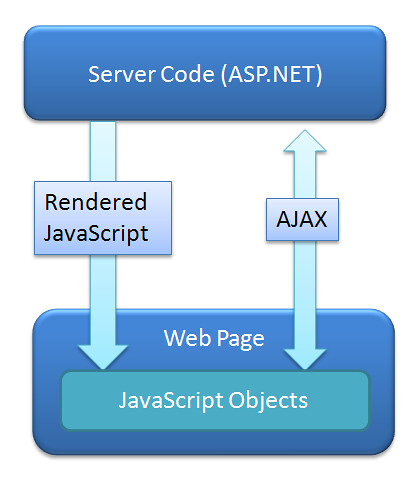
Server to JavaScript Communication

Parade of the Ugly Hacks

Until recently, if you had some settings in your server side code that you needed to act on in JavaScript code, you ended up using ugly hacks.

Ugly Hack #1 - Emit JavaScript strings

Emitting JavaScript code with global variables in a startup script. This requires writing out JavaScript as strings in your server-side code, which is ugly as hell.

string primateVariables = string.Format(
    "<script type='text/JavaScript>" +
        "var primateAddress='{0}';" +
        "var primateCreditRating='{1}';" +
    "</script>",
    SelectedPrimate.PrimateAddress,
    SelectedPrimate.PrimateRating
    );

Ugly Hack #2 - Make Unnecessary AJAX Calls

Using unnecessary client callbacks (a.k.a. AJAX webservices calls). The code may look clean, and it's the path of least resistance, but it's a very lazy and inefficient solution to the problem. There's no reason for your client-side code to get a value from the server via a webservice call when the value is known at the time the page is rendered. AJAX calls should be made when a user's interaction with the webpage requires you to communicate with the server. If there's information that's known when you're writing out the page, you shouldn't be making another call back to the server just because the code's easier.

Ugly Hack #3 - Muck Around With Hidden Form Fields

The idea here is that you stash values in hidden form fields which are read via JavaScript. This is probably the least ugly of the above, as it does allow for a two-way communication mechanism (as the JavaScript can modify the form value to pass it back to the server. First, we'll set the field value in our server-side code:

ClientScriptManager.RegisterHiddenField("primateViews", PrimateViews.ToString());
 
Now we can read and update the value from JavaScript:
var primateViews;
if($get("primateViews") && $get("primateViews").value != ""){
    $get("primateViews").value = parseInt($get("primateViews").value) + 1;
}
else {
    $get("primateViews").value = 1;
}
 
Back on the server, after the postback, we can check Request.Form("primateViews") to get any client-side updates. So, it all does work, but it does have some downsides, though - it's offers no type checking, and it's the equivalent of a global variable.
 
Note that Ugly Hacks 1 and 3 both are essentially setting global variables in the HTML DOM. That's not just ugly, it doesn't scale well. Say, for instance, that we want to set a PrimateCreditRating value for our control, and we choose to handle it by stashing it in a hidden form field (i.e. <input type="hidden" id="PrimateCreditRating">). Fine, now what happens when we want to drop two of these controls on a page? How about if we want to show a list of 50 primates, and use our AJAX-ified Primate Control on each? We could make our ugly hack even uglier with a naming convention (PrimateCreditRating1, PrimateCreditRating2, etc.), but this is just getting out of hand. We need to to encapsulate our settings, and we need to formalize our communications from server to client. Fortunately, someone's already got that covered...

A Better Solution - IScriptControl

ASP.NET AJAX solves this problem with the IScriptControl interface. This solution cleans up the code on both the client and server. Rather than injecting values into JavaScript strings on the server, the IScriptControl.ScriptDescriptor mechanism gives you a simple way to pass information to the client as properties of a custom JavaScript object. Now that you're able to do that, there's not reason to modify your JavaScript code at runtime, so your script can be a static file - essentially a resource. I was deep into figuring this out on my own when I got the January edition of MSDN Magazine, which included Fritz Onion's article titled Encapsulate Silverlight with ASP.NET Controls. It's a great article (although you need keep in mind that he's building on the Silverlight controls included in the ASP.NET Futures release which has since been replaced by the controls in the ASP.NET 3.5 Extensions Preview). It helped quite a a bit, but I still had to bang on it for a while to get it working. In my experience, the IScriptControl interface works well when it's working, but it's a little tough to set up.

Works on both Server Controls and User Controls

While the common usage is to create or extend a WebControl (a.k.a. a Server Control), you can also implement the IScriptControl interface on a UserControl. Don't just take my word for it, though - take a look at the ScriptUserControl, a part of the AjaxControlToolkit. Here's the class signature:

public class ScriptUserControl : UserControl, IScriptControl, IControlResolver, IPostBackDataHandler, ICallbackEventHandler, IClientStateManager

About The Sample Code

My project extends the ASP.NET Silverlight controls, which are some of the extra-special goodness that is the ASP.NET 3.5 Extensions Preview. I'm going to base my sample code on the MSDN walkthrough on Adding ASP.NET AJAX Client Capabilities to a Web Server Control, though, to keep it simple. I'm going to change a few things in the MSDN walkthrough, but it's pretty similar.

Using ScriptDescriptor

First, you'll need to do some work on the server side to implement the ScriptDescriptor interface. That's done by implementing (or overriding, if you're inheriting from a base control) the IScriptControl.GetScriptDescriptors() method, which returns an IEnumerable<ScriptDescriptor>. The simple case to demonstrate is implementing (rather than extending) a control. For this sample, let's assume we're going to extend a WebControl with a loading image, so we'll be including three control properties which will be utilized in our client-side JavaScript: ShowLoadingImage (boolean), LoadingImage (string), and DisplayTime (int). So, first, we'll set up those control properties:

[Category("Behavior"), DefaultValue(true), Browsable(true)]
public virtual bool ShowLoadingImage
{
    get { return (bool)(ViewState["ShowLoadingImage"] ?? true); }
    set { this.ViewState["ShowLoadingImage"] = value; }
}

[Category("Behavior"), DefaultValue(true), Browsable(true)]
public virtual string LoadingImage
{
    get { return (string)(ViewState["LoadingImage"] ?? string.Empty); }
    set { this.ViewState["LoadingImage"] = value; }
}

[Category("Behavior"), Browsable(true), DefaultValue((int)5)]
public virtual int DisplayTime
{
    get
    {
        object DisplayTimeSetting = this.ViewState["DisplayTime"];
        if (DisplayTimeSetting != null)
        { return (int)DisplayTimeSetting; }
        return 5;
    }
    set
    {
        if (value < 1)
        { throw new ArgumentOutOfRangeException("value", value, "DisplayTime must a positive integer representing the time duration in seconds."); }
        this.ViewState["DisplayTime"] = value;
    }
}

Great, now we need to tell the ScriptControl that the values of the above properties will need to be exposed to our JavaScript object. We'll do that by implementing IScriptControl.GetScriptDescriptors():

protected virtual IEnumerable<ScriptDescriptor> GetScriptDescriptors()
{
    ScriptControlDescriptor descriptor = new ScriptControlDescriptor("SampleCode.SampleScriptControl", this.ClientID);
    descriptor.AddProperty("loadingImage", this.LoadingImage);
    descriptor.AddProperty("showLoadingImage", this.ShowLoadingImage);
    descriptor.AddProperty("displayTime", this.DisplayTime);

    return new ScriptDescriptor[] { descriptor };
}

IEnumerable<ScriptDescriptor> IScriptControl.GetScriptDescriptors()
{
    return GetScriptDescriptors();
}

The when the ScriptControl is rendered, it writes out JavaScript call to $create(), and if the ScriptControl includes any ScriptDescriptors, those are included in the $create call. Here's how that looks in action:

  1. ScriptControl renders a JavaScript call to Sys$Component$create(type, properties, events, references, element), passing all your setting in the properties parameter in JSON syntax. Here's how that JavaScript would look if we'd added an instance of the control to our page, named it MySampleControl1, and set some property values
    Sys.Application.add_init(function() {
        $create(SampleCode.SampleScriptControl, {
            "showLoadingImage":        true,
            "loadingImage":            "http://s3.amazonaws.com/sample/load.png",
            "displayTime":            5
            }, 
            null, null, $get("MySampleControl1"));
    });
    It's important to keep in mind that you're not writing the above JavaScript; it's being rendered by the ScriptControl.
  2. $create() instantiates your object and calls _setProperties() which calls the setters for all properties which were passed in during the $create() call.

ScriptReference just loads JavaScript files

Since the ScriptDescriptors are doing the work of passing the property values to your JavaScript controls, the ScriptReference mechanism has a pretty simple job - load JavaScript files. Since we don't have to generate any JavaScript at runtime, we're free to treat our scripts as an embedded resources.

IEnumerable<ScriptReference> IScriptControl.GetScriptReferences()
{
    return GetScriptReferences();
}

protected virtual IEnumerable<ScriptReference> GetScriptReferences()
{
    ScriptReference reference = new ScriptReference();
    reference.Path = ResolveClientUrl("SampleScriptControl.js");
    return new ScriptReference[] { reference };
}

The Last Mile - How Does That JavaScript Look?

Since the ScriptDescriptors are doing the work of passing the property values to your JavaScript controls, the ScriptReference mechanism has a pretty simple job - load JavaScript files. Here's a stripped down sample - it's pretty repetitive, so don't get worried by the length:

Type.registerNamespace('SampleCode');

SampleCode.SampleScriptControl = function(element) { 
    SampleCode.SampleScriptControl.initializeBase(this, [element]);

    this._showLoadingImage = null;
    this._loadingImage = null;
    this._displayTime = null;
}

SampleCode.SampleScriptControl.prototype = {

    initialize : function() {
        //Your initialize code here - wire up event delegates
    },

    dispose : function() {
        $clearHandlers(this.get_element());
        //Your dispose code here
    },

    //Property accessors
    get_showLoadingImage : function() {
        return this._showLoadingImage;
    },
    set_showLoadingImage : function(value) {
        if (this._showLoadingImage !== value)
            this._showLoadingImage = value;            
    },    
    get_loadingImage : function() {
        return this._loadingImage;
    },
    set_loadingImage : function(value) {
        if (this._loadingImage !== value)
            this._loadingImage = value;            
    },    
    get__displayTime : function() {
        return this._displayTime;
    },
    set_displayTime : function(value) {
        if (this._displayTime !== value)
            this._displayTime = value;            
    },    
    // Your event and control code here...
}

SampleCode.SampleScriptControl.registerClass('SampleCode.SampleScriptControl', Sys.UI.Control);
if (typeof(Sys) !== 'undefined') Sys.Application.notifyScriptLoaded();

The important things to notice here is that we're declaring our class with properties which match our script descriptors. The ASP.NET AJAX $create() method will call the appropriate property setters for each matching script descriptor, so our $create() call sample above will result in the following property setter calls:

set_showLoadingImage(true);
set_loadingImage("http://s3.amazonaws.com/sample/load.png");
set_displayTime(5);

Putting It All Together
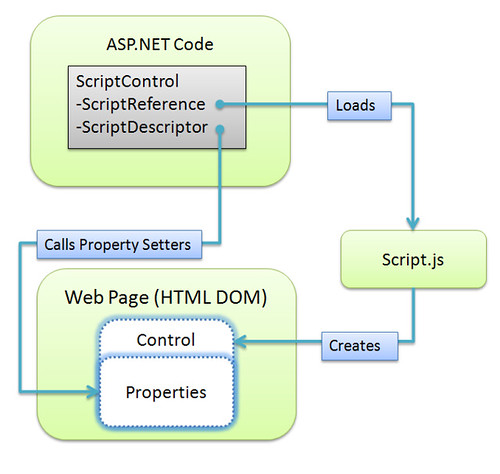
ScriptControl in ASP.NET AJAX

We started with a problem - it's hard to get property values from server-side code to JavaScript objects. Then we looked at the ScriptControl / IScriptControl solution, which does the following things for us:

  • Provides a way to keep our settings on a per-component level, so we don't run into the problems our global variable solutions hit.
  • Provides a way to wire our server-side properties to client-side properties in a way that's clearly spelled out, and easy for others to extend or maintain.
  • We're never treating JavaScript as strings. We reference our JavaScript as a file, declare how our server-side properties map to client-side properties, and the wiring up is done for us.

There's more to the subject:

Published Sunday, February 10, 2008 10:19 PM by Jon Galloway

Comments

# Getting JavaScript and ASP.NET talking (outisde of AJAX)

You've been kicked (a good thing) - Trackback from DotNetKicks.com

Monday, February 11, 2008 1:33 AM by DotNetKicks.com

# Getting JavaScript and ASP.NET talking (outside of AJAX) &laquo; Java Net

Pingback from  Getting JavaScript and ASP.NET talking (outside of AJAX) &laquo; Java Net

# re: Getting JavaScript and ASP.NET talking (outside of AJAX)

This is how we do all of our templates and client controls in our sites (http://channel8.msdn.com | http://on10.net | http://visitmix.com | http://edge.technet.com).

I wrote something up about this a while back, but your explaination is much better than mine.  Very nice, Jon!  :)

Monday, February 11, 2008 2:37 AM by Erik Porter

# re: Getting JavaScript and ASP.NET talking (outside of AJAX)

One more thing I didn't see in your article.  Since you're implementing the interface, you also have to register the control and scriptdescriptors with the scriptmanager like so...

protected override void OnPreRender(EventArgs e)

{

   if (!this.DesignMode)

   {

       ScriptManager sm = ScriptManager.GetCurrent(this.Page);

       if (sm == null)

           throw new Exception("Page must have a ScriptManager on it");

       sm.RegisterScriptControl(this);

   }

   base.OnPreRender(e);

}

protected override void Render(HtmlTextWriter w)

{

   base.Render(w);

   ScriptManager.GetCurrent(this.Page).RegisterScriptDescriptors(this);

}

If you inherit from ScriptControl instead of implementing IScriptControl (not always possible) you don't have to include the above code.

Monday, February 11, 2008 2:44 AM by Erik Porter

# AJAX coding school &raquo; Blog Archive &raquo; AJAX Code [2008-02-11 07:55:54]

Pingback from  AJAX coding school  &raquo; Blog Archive   &raquo; AJAX Code [2008-02-11 07:55:54]

# re: Getting JavaScript and ASP.NET talking (outside of AJAX)

Jon,

> In my experience, the IScriptControl interface works well when it's working, but it's a little tough to set up.

Isn't that the case with just about anything in ASP.NET AJAX that relates to client side programming?  It's pretty telling that you need to use a diagram to explain how this works. <g>

Essentially this is still a code generator (ie. very similar to #1 except that you had to do a lot more work), but seriously since this is supposed to be static data why does this thing have to go about:

* using the Ajax client library

* requiring script descriptor interfaces

This would be much better off as a standalone control,  extender or a ClientScript/ScriptManager feature in the runtime that's available both to controls and pages.

Monday, February 11, 2008 4:19 AM by Rick Strahl

# re: Getting JavaScript and ASP.NET talking (outside of AJAX)

@Rick Strahl

Yes, I agree, it's a complicated flow. I read several articles and posts on this, and still struggled to get it working. Hopefully the diagrams and walkthrough help someone get it a little more easily.

Code is being generated, but it's being generated by the runtime, and it's generated in such a way that it's well encapsulated and manageable.

I'm not sure I follow your second question, though. Are you saying that the script and property managment features in IScriptControl would be better off as a standalone control or feature which is shared by all controls on the page? A big feature here of IScriptControl is that it's namespaced and contained so that you can include several instances of a control in one page, which would be tricky if you tried to handle this at the page level. This is also nice because it allows you to bundle up your script as an embedded resource with a server control.

Maybe I did a bad job of explaining my sample? The idea is that I'm building a control (server conttrol or extender control) which allows setting the properties at either design time or runtime on the server, and passing those values to the client. For instance, we might pull the LoadingImage from a configuration file or database, so it's not really a static resource.

Monday, February 11, 2008 4:58 AM by Jon Galloway

# re: Getting JavaScript and ASP.NET talking (outside of AJAX)

I'm with Rick on this one - your method is basically the same as #1, with additional encapsulation, isolation, etc. that are certainly cool.  Unfortunately, the question is: which one is "ugly as hell"er, 4 lines of hardcoded javascript with escaped values, or multiple pages of required interface implementations & property attributes & dynamically emitted Javascript property wrappers?  If the case #1 were better supported by the platform, developers could make their own choice, and your code could still leverage it to provide the additional functionality for those who needed it.

In general I've found this to be a consistent problem with MS's web-app offerings (both ASP.NET and ASP.NET AJAX).  Sure, problems do get solved "correctly", with an eye on the component ecosystem.  But the resulting solutions are complicated and abstracted from what's really happening, to the point that it is impossible for an average developer to deviate 1% from the recommended method of expression.  This solution feels like another in that same vein: it's quite an accomplishment, but does programming _need_ to be this hard?  (No, it doesn't, report the legions of web app developers on non-MS stacks)

That said, I've been a long-time subscriber to your blog and always find it interesting.  Thanks!

Monday, February 11, 2008 9:48 AM by Steve

# re: Getting JavaScript and ASP.NET talking (outside of AJAX)

I have to agree with Steve.  As an ex-Java architect, I migrated to .NET after the J2EE and especially Java Bean fiasco back in 2000. Not to mention that Symantec had completely screwed up a perfectly good IDE in the process.

Now I have to say the same thing about .NET.  The only port in the storm is Scott Guthrie (witness MVC.NET), and unfortunately, Scott is only one spec in the Microsoft ocean of mediocrity.

VS 2005 is a disaster IDE.  The product manager for MSDN has yet again created a cauldron of options, none of them compatible w/previous MSDN subscriptions, thus the reason why I have an MSDN Pro 2008, Vista Ultimate 2007, 2 copies of a non-working OS (Vista Business and Vista Ultimate)...I could go on.

And of course, Microsoft has just recently come to the 'browser compatibility' party w/2008.  Try debugging Javascript in 2005.  Not much fun, though Web 2.0 is *based* on Javascript capabilities.

I could go on.  This is a great article, don't get me wrong, but it's missing the point.  IMO, from a maintainability standpoint and a readability standpoint, dynamically outputting the javascript variables, while ugly is a solution that would be easier to maintain and for future programmers to understand, than the current miasma of spaghetti code that is MS AJAX.

Don't shoot the messenger!  Lots of other people agree with me.  I'm just waiting for the whole thing to blow up, because of the frustration of Microsofts' core evengelists--the front line architects and bleeding edge programmers.

Monday, February 11, 2008 11:00 AM by Alan Avante

# re: Getting JavaScript and ASP.NET talking (outside of AJAX)

And no Jon, you did a fine job explaining this...that's just the problem, that you had to spend so much time to make this understandable...and just look at the lines of code required to replace the 'ugly' dynamic js output?

This is better?  This is really the question we need to ask, not just accept this as our lot.  Microsoft needs to do much better.

Heck, the MSAJAX team *still* insists on referring to Javascript as JScript.  That right there tells us there's a disconnect between those 'inside the wall' and the many times more realistic view of the world of those of us *outside* the Microsoft wall.

Alan.

Monday, February 11, 2008 11:04 AM by Alan Avante

# re: Getting JavaScript and ASP.NET talking (outside of AJAX)

@Rick, @Steve, @Alan

Just to make sure it's clear, this isn't a solution I came up with, it's how ASP.NET AJAX works.

I don't think you guys are thinking this through. If you're just dealing with one JavaScript variable on a page, any of the first three "hacks" works, and this post doesn't apply to what you're doing.

All those hacks break down with scale, though. You can't include multiple instances on a page without using a long list of global variables and managing some sort of naming convention to keep them straight. You can't package or reuse a control which emits global variables without... I don't even know what you'd do - use randomized name on the server and hope that no client-side code is using the same name?

The point there is that JavaScript allows for object encapsulation, and the "right" way to solve the problem of setting property values is to set properties on object instances, not to just use a bunch of global variables.

Monday, February 11, 2008 11:32 AM by Jon Galloway

# re: Getting JavaScript and ASP.NET talking (outside of AJAX)

@Alan I'm going to ignore the complaints about an old version of Visual Studio - we could complain about Word 97, too, but it doesn't really fit in here. ;-)

As for ASP.NET AJAX, it's solving things the same way that the advanced JavaScript frameworks (Prototype, Dojo, etc.) do - it's using prototypes to build and manipulate objects. Microsoft's solution includes a server-side component, which makes sense given the problem they're trying to solve (evident in the title - ASP.NET AJAX). None of the advanced JavaScript frameworks are based on emitting global variables.

As for JScript / JavaScript, they're two different things, and I think the Microsoft teams are usually pretty careful in using the correct names. They use "JavaScript" to refer to the implementation of ECMAScript on all platforms in general. JScript is the (lame, poorly maintained) implementation of JavaScript that's specific to Microsoft, most commonly found in Internet Explorer. You'll notice, for instance, that all the VS 2008 references to JavaScript debugging say "JavaScript". Can you give me an example of where the ASP.NET AJAX documentation refers to JScript and isn't specific to IE?

Monday, February 11, 2008 11:45 AM by Jon Galloway

# re: Getting JavaScript and ASP.NET talking (outside of AJAX)

So I'm missing something, how is this better than using the alligator tags to write out the value?

var foo = <%=blah.property.foosValue%>;

This seems like an awful lot of complexity for very little benefit.

Monday, February 11, 2008 11:56 AM by Scott

# re: Getting JavaScript and ASP.NET talking (outside of AJAX)

Jon is on point with his solution, and I've used the same solution before to manage JavaScript from the server side.

In the same breath, I totally agree with Rick, Steve, and Alan in that Microsoft's solution is typically to throw more at the problem than is necessary. PARTS of the MS Ajax library are great, parts are not. It does seem like overkill to have to implement an interface on the server side just to facilitate communication with client side code.

Monday, February 11, 2008 12:01 PM by Steve Calvert

# re: Getting JavaScript and ASP.NET talking (outside of AJAX)

While I agree with other people that this is an awful lot of work compared to the "ugly hacks", I  do see value in a formalized approach like this. Dealing with name collision issues with multiple control instances is a huge pain.

There's one thing I don't understand: how do you obtain a reference to this custom object from JavaScript? Am I missing something obvious?

Monday, February 11, 2008 12:51 PM by Seth Petry-Johnson

# re: Getting JavaScript and ASP.NET talking (outside of AJAX)

Scott - that's identical to Jon's code #1 and is just fine at "small scale", except both examples are failing to escape the Javascript (in case it has a single quote, for instance.)

Jon - Like I said, I think MS has come up with a great solution with an eye on the component ecology (& thankfully you're documenting it.)  Because of its complexity, I doubt it will see much use.  It's probably appreciated by component vendors, though :)

My own solution to this has been to create a mechanism by which AJAX callbacks can be pre-cached.  So I write the general component code as your #2 case would, but the call avoids a trip back to the server if the result was already calculated.  Server-side pre-caching can be done by the page (because it's aware of what components are on the page) or by a component itself.  It's all tucked into a single library (client AJAX callback w/ server JSON [de]serialization & RPC.)  This has the benefit of being smaller code and using a consistent, well-understood format (method call w/ JSON-serialized results) for all server->client data transfer.  This is done in ASP.NET so I'm not just commenting from the sidelines ;)

Monday, February 11, 2008 2:57 PM by Steve

# re: Getting JavaScript and ASP.NET talking (outside of AJAX)

Jon,

I am sure that what you have described is the right way to do it.

FYI, for the scenario you descibed, we have been using a variant of #3 using the HiddenField WebControl to avoid naming collisions.

Raj Kaimal

Monday, February 11, 2008 3:19 PM by rajbk

# re: Getting JavaScript and ASP.NET talking (outside of AJAX)

@Seth Petry-Johnson

$find('MYCONTROL.CLIENTID') will return you a reference to the component.

@All

Couldn't agree with Jon more.  You're really not thinking this through.  This is all about encapsulation.  Sure it adds some bloat, but it is well worth it if you're doing complex AJAX on your site with lots of controls and pieces that interact with each other.  We use this method for all our AJAX (screw the UpdatePanel) and it is fantastic.  It made it so easy for one of our other developers to jump right in and build new controls (and he's never really done much javascript before).

@Steve

You are definitely right about it being complex and therefore won't get much usage, but if you take the time to structure your controls correctly and use this method, the payoff is huge.  That can be said for many development techniques (unit testing comes to mind).

Monday, February 11, 2008 6:08 PM by Erik Porter

# re: Getting JavaScript and ASP.NET talking (outside of AJAX)

I think setting the value of Hidden Fields to some JSON representation of a data structure is a good compromise when working with trickier situations.  

It lets your js files remain static whilst giving you the flexibility to handle the dynamic aspect of your situation through a JSON representation that is easy to work with in JavaScript.

Monday, February 11, 2008 10:37 PM by Adam Webber

# Caminews &raquo; http://weblogs.asp.net/jgalloway/archive/2008/02/10/getting-javascript-and-asp-net-talking-outside-of-ajax.aspx

# re: Getting JavaScript and ASP.NET talking (outside of AJAX)

Jon,

I disagree <g>. After I read your post, I created a class that does most of what you're doing here short of the namespace wrappering:

www.west-wind.com/.../252178.aspx

The advantage is IMHO: It's way easier, it's generic and doesn't require implementation of a freaking interface.

The namespace wrappering could be done with pre and post code potentially, but I haven't thought this through yet (i just put this together quickly).

I think this is something that belongs into the core of ASP.NET and not buried in some obscure control interfaces that aren't accessible except through subclassing. This is useful in a lot of different scenarios.

Tuesday, February 12, 2008 5:40 AM by Rick Strahl

# re: Getting JavaScript and ASP.NET talking (outside of AJAX)

@Rick - How could that possibly work? No diagrams?

I think that looks like a great solution, and I like what you're doing with the ClientID's. Still not sure how you're handling encapsulation so this would be useful from inside a control, though. More comments on your blog.

Tuesday, February 12, 2008 11:12 AM by Jon Galloway

# re: Getting JavaScript and ASP.NET talking (outside of AJAX)

Jon and Rick (www.west-wind.com/.../ShowPost.aspx),

I am missing the point with both your methods. I do not see the code where modified javascript variables are sent back to the server.

Regards,

Ronald

Tuesday, February 12, 2008 11:13 AM by Ron K

# Daily Find #30 | TechToolBlog

Pingback from  Daily Find #30 | TechToolBlog

Tuesday, February 12, 2008 1:19 PM by Daily Find #30 | TechToolBlog

# re: Getting JavaScript and ASP.NET talking (outside of AJAX)

Hi, mister,

I'm confuse about it.

Which the best way ? Rick's method or Jon's method ??

Please, I would like a clear solution for me, thanks in advance. Great job.

Wednesday, February 13, 2008 10:17 AM by espinete

# re: Getting JavaScript and ASP.NET talking (outside of AJAX)

@espinete Both solutions will work, so it's up to you to pick the one that fits your needs.

This post describes how you'd build an AJAX enabled component, using the featured included in ASP.NET AJAX. It works, but it's a little hard to understand. It's more complicated because it's built to support redistributable components.

Rick's solution is more lightweight. It's easier to set up and use, and it might be a better solution for you if you're not worried about redistributing components. The only potential downside I can see is that you're relying on some code posted by an individual rather than the "official" ASP.NET AJAX framework. It's up to you if that makes a difference.

Friday, February 15, 2008 12:42 AM by Jon Galloway

# .NET Web Monthly Review - February 2008

.NET Web Monthly Review - February 2008

Sunday, March 02, 2008 9:18 PM by Page Brooks

# re: Getting JavaScript and ASP.NET talking (outside of AJAX)

I did a little of this to simply get an 'object orientate' approach to coding my javscript code.  I didn't actually want to do anything on 'events', I just wanted to have objects setup on the client side that I could access.  

Where I fell short and maybe I was missing something what how to access the javascript object if you didn't hook up any events on the control (i.e. I was doing some custom coding on validation controls)...given a DomElement is there a way to get a reference to a generated class?  

In your sample code I didn't see you set up any event handlers, but I see your call to $clearhandlers.  If sample code is available, I didnt' download that so maybe that's different than the code displayed for this post.

So bottom line, if you render objects in javascript via IScriptControl but then don't hook up any 'events', is it possible to get a hold of those objects some how?

Monday, March 10, 2008 4:34 AM by Terry

# webcontrol

Pingback from  webcontrol

Tuesday, April 29, 2008 2:01 AM by webcontrol

# javascript in asp net

Pingback from  javascript in asp net

Monday, May 19, 2008 1:47 PM by javascript in asp net

# Katod&#8217;un Seyir Defteri - 28.05.2008 at katodivaihe

Pingback from  Katod&#8217;un Seyir Defteri - 28.05.2008 at katodivaihe

Wednesday, May 28, 2008 12:37 PM by Katod’un Seyir Defteri - 28.05.2008 at katodivaihe

# re: Getting JavaScript and ASP.NET talking (outside of AJAX)

kjlkjlkjljl

kjljkjl

jjlkjjkjklj

jnkjnkjjk

jkjjkjjlkjklj

Tuesday, September 16, 2008 7:07 AM by lk;l;

# re: Getting JavaScript and ASP.NET talking (outside of AJAX)

IScriptControl is a very cool and important interface. It let's you mirror the server side class to a client side class.

For those people who complain about implementing the interface and overiding onprerender and render to register the control: just make your own control, which serves as a base class and implement that stuff their, so that you only have to define the ScriptControlDescriptor.

Having all with ugly hacks and global variables is sooooooo unmaintainable.

But another important question:

IScriptControl does not work with System.Web.UI.Page.

Any ideas on that? (How do I get Page properties, to a nicely defined namespaced prototyped JavaScript class?)

Tuesday, October 21, 2008 12:03 PM by ChrisS

# re: Getting JavaScript and ASP.NET talking (outside of AJAX)

ccccxcccxcccccczxxxxxxxxxxxxxxzzzzzzzzzzzzzzzzzzz

Tuesday, August 18, 2009 6:28 AM by sxz

# Getting JavaScript and ASP.NET talking (outside of AJAX) - Affordable Web Developer - Just another WordPress weblog on Affordable open source web development.

Pingback from  Getting JavaScript and ASP.NET talking (outside of AJAX) - Affordable Web Developer - Just another WordPress weblog on Affordable open source web development.

Leave a Comment

(required) 
(required) 
(optional)
(required)