Opening Adobe Illustrator (AI) files when you don't have Adobe Illustrator

You've been waiting for the design firm to send final artwork. The e-mail finally arrives...
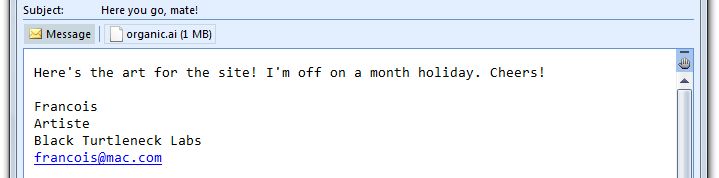
Here's the art! Goodbye!

Uh, oh. That organic.ai file is an Adobe Illustrator Artwork file. Since I'm not a full time designer, I haven't gotten around to spending $600 for Illustrator, and I need PNG's for my website. What to do?

The AI / PDF Connection

We'll take advantage of a little trick: you can rename an AI file from SampleArtFile.ai to SampleArtFile.pdf and open it in the PDF viewer of your choice - like, say, Foxit Reader. How could that work? Let's ask old man wikipedia:

Adobe Illustrator Artwork (AI) is a proprietary file format developed by Adobe Systems for representing single-page vector-based drawings in either the EPS or PDF formats. The .ai filename extension is used by Adobe Illustrator.

[...]

Recent versions of the AI file format, including the PDF-based formats and recent EPS formats, are based on a native format called PGF that is unrelated to both EPS and PDF. PDF compatibility is achieved not by extending the PDF format, but by embedding a complete copy of the native PGF data within the PDF file. The same kind of “dual path” approach is also used when recent versions of Illustrator are saving EPS-compatible files.

So every AI file is really a valid PDF, and you can view it just by changing the file extension.

Okay, great, we can view the art. What if we want to make changes, or export at a specific size or resolution?

Options For Importing or Converting AI / PDF Files

Importing AI and PDF Files In Inkscape

I'm sure I'm tilting at windmills here, but I really like the idea of an open standard vector format, for that same reason it's good that HTML is an open standard. That makes SVG my vector format of choice, and you already know that I love Inkscape (free, open source) so much I want to marry it. Inkscape's recent builds can import and export a large variety of vector and bitmap formats, including AI and PDF.

So we can easily open the file in Inkscape, make any edits, and save it as an appropriately sized PNG or other bitmap file. Since a lot of my readers are in the .NET camp, I'll remind you that it can import and export XAML as well, so Inkscape can take us from AI to XAML really quickly.
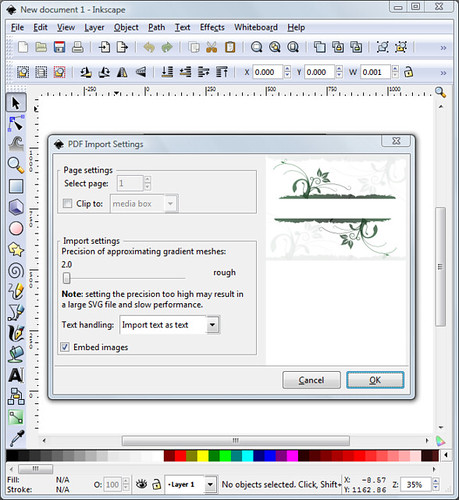
Inkscape AI PDF Import

Note - the organic.ai artwork pictured above is available under Creative Commons license from Vecteezy.com.

Online Conversion from PDF or AI to SVG With FreeSVG

Before Inkscape added PDF and AI import, I used to use the FreeSVG service at freesvg.texterity.com. It's really simple - upload a PDF, get e-mailed an SVG file:
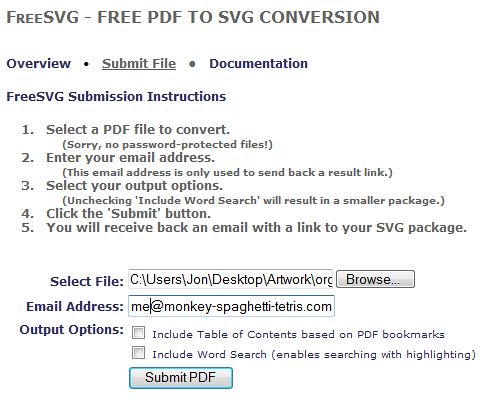
FreeSVG

And it's smart enough to know that AI files can be opened as PDF's, so I when I uploaded organic.ai, it automatically renamed it to organic.ai.pdf:

Thank you for uploading your file to FreeSVG. We will convert your file into an SVG file set, and return a link to you shortly.
Here is a recap of what you've submitted:  organic.ai.pdf

Expression Design

Expression Design can import a variety of vector formats, including PDF compatible AI files), and it can export to bitmaps as well as XAML. Expression Design isn't free, so if you just need to import and export I think Inkscape's a smarter choice. That's not to say Expression Design isn't worth the money - it's got some cool features that Inkscape doesn't, like the nice brushes that Microsoft picked up through the Creature House Expression acquisition. Plus, if you're a Microsoft shop you might have access to Expression Design through an MSDN subscription.
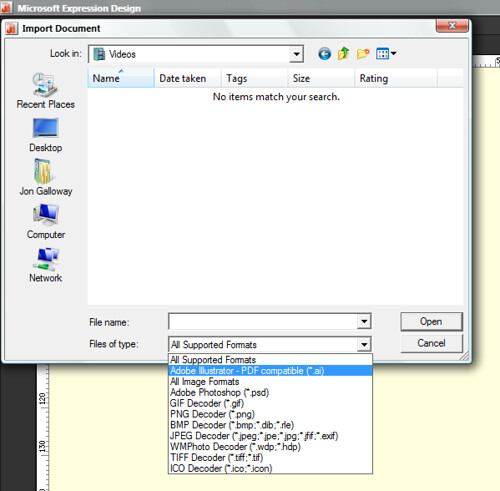
Expression - Import File Formats

Epilogue

Enjoy your vacation, François. We've got it covered.

Published Sunday, February 24, 2008 1:46 AM by Jon Galloway

Comments

# re: Opening Adobe Illustrator (AI) files when you don't have Adobe Illustrator

Nice article Jon, thanks.

Note: I use VS with Expression Studio but have been using Corel PSP Photo X2 for AI files. (Also have Fireworks but haven't touched it since switching to Expression.)

Friday, February 29, 2008 7:51 PM by Mark Wisecarver

# Opening Illustrator (AI) files when you don't have Adobe Illustrator

You've been kicked (a good thing) - Trackback from DotNetKicks.com

Friday, February 29, 2008 7:54 PM by DotNetKicks.com

# re: Opening Adobe Illustrator (AI) files when you don't have Adobe Illustrator

Slight snag I cam across an Ai file that was not PDF compatible any idea how to view them?

Wednesday, March 26, 2008 7:19 AM by aUser

# re: Opening Adobe Illustrator (AI) files when you don't have Adobe Illustrator

Great info. Thanks!  Got me out of a bind.

Wednesday, March 26, 2008 11:42 AM by Yorgi

# A Silverlight Beginning - The Verdict

A Silverlight Beginning - The Verdict

Sunday, May 11, 2008 8:34 PM by CodersBarn.com

# re: Opening Adobe Illustrator (AI) files when you don't have Adobe Illustrator

I have a weird problem: I have icons displayed as thumbnails in WinXP. One AI file I downloaded from the net seems to display an A4 page with some vector drawings.

When I rename the extension to PDF, the drawings in the bottom part of the AI file disappear and the thumbnail displays the rest of the upper part as a square image.

It seems if you rename the extension to PDF, it shows another embedded image than the one with AI-extension.

Does anybody know how I can display the full image as PDF?

Thursday, May 22, 2008 4:11 PM by Notyu

# re: Opening Adobe Illustrator (AI) files when you don't have Adobe Illustrator

I have created a design in several layers with microsoft digital image pro using photography and text boxes. (i do a lot of photography, which i then edit and create designs with). I need to send this to someone in .ai format....i.e., they want to be able to manipulate my files, if necessary. I have downloaded inkscape, but the person on the other end couldn't open that although i saved it under regular .svg not inkscape svg, thinking this was more universal. They only have adobe illustrator cs2. I'm not that tech savvy so I'm having a bit of an issue here. Your advice is greatly appreciated.

Bottom line, I need to save .png to .ai..retain the layers.

Monday, June 02, 2008 1:11 PM by Barbara

# re: Opening Adobe Illustrator (AI) files when you don't have Adobe Illustrator

Hi,

Its' really great!! you have helped me finding out the option of opening of ai files in a very very very easy way!!! am greatful!!! i dont know how to thank you!!

But it has saved in my work so much!!

Thanks

Usha

Monday, July 07, 2008 2:11 AM by Usha

# re: Opening Adobe Illustrator (AI) files when you don't have Adobe Illustrator

To open .AI files when you don't have adobe illustrator just right click the file and choose open with from the menu choose adobe.

This works

Wednesday, July 16, 2008 12:41 PM by Fanwood

# re: Opening Adobe Illustrator (AI) files when you don't have Adobe Illustrator

Wow!!!  Great information. It helps a lot and it is really amazing to be honest...

Wednesday, August 06, 2008 11:49 AM by George

# re: Opening Adobe Illustrator (AI) files when you don't have Adobe Illustrator

Thanks for that little tidbit! It solved a nagging problem getting AI files from designer.

Thursday, August 14, 2008 12:15 PM by Mike

# re: Opening Adobe Illustrator (AI) files when you don't have Adobe Illustrator

Thanks for the tip!  It worked like a charm.  I will definitely file this one away.

Tuesday, September 02, 2008 1:45 PM by roger

# links for 2008-10-03 (Jarrett House North)

Pingback from  links for 2008-10-03 (Jarrett House North)

Friday, October 03, 2008 7:07 AM by links for 2008-10-03 (Jarrett House North)

# re: Opening Adobe Illustrator (AI) files when you don't have Adobe Illustrator

Awesome bit of information I just saved as a PDF and it opened perfect. Thank you!

Thursday, October 09, 2008 5:53 PM by Jeff

# re: Opening Adobe Illustrator (AI) files when you don't have Adobe Illustrator

What about the reverse? We're working w/ a publisher (Oxford U Press) that really wants graphs/charts in *.ai format.  I'm assuming they can actually handle any vector format - *.ps/eps/pdf - but we haven't heard back from the editor..for a project that's due by January...

Any suggestions...is it too much to hope i could....rename a pdf file w/ an ai extension?

bobmcconn at gmail com

Thursday, October 16, 2008 4:51 PM by bob mcconnaughey

# re: Opening Adobe Illustrator (AI) files when you don't have Adobe Illustrator

simply awesome. such a simple and effective solution

Saturday, December 06, 2008 3:02 AM by rashmi

# re: Opening Adobe Illustrator (AI) files when you don't have Adobe Illustrator

Hi,

I tried saving the .ai extension as .pdf and it still doesnt open? when it opens it says 'This is an Adobe Illustrator file that was saved without PDF content. To place or open this file in other applications, it should be re-saved from Adobe Illustrator with the 'Create PDF Compatible file' option turned on'.

Now I'm dealing with someone overseas and its a headache to ask them to send the artwork again... (yes they've sent it twice)

Please help me open this stupid file. BTW i've tried opening in photoshop too... still doesnt work!

Monday, January 12, 2009 3:07 AM by Jacky

# re: Opening Adobe Illustrator (AI) files when you don't have Adobe Illustrator

Tired of finding the file through enormous amount of searchers? 1 center- 1 enter for Megaupload files downloading at http://megaupload.name/  

Monday, February 02, 2009 9:22 AM by brown

# re: Opening Adobe Illustrator (AI) files when you don't have Adobe Illustrator

Many thanks for the tip.. five years I've been asking people for pdf versions of files so I could view them!! it is even easier if you just right click and open with adobe reader (works with version 8.1). No need to change the extension.

Friday, February 13, 2009 5:04 AM by Richard

# re: Opening Adobe Illustrator (AI) files when you don't have Adobe Illustrator

Thanks - saved me hours

Monday, March 23, 2009 11:13 AM by macPerl

# re: Opening Adobe Illustrator (AI) files when you don't have Adobe Illustrator

Fanwood pointed out:

To open .AI files when you don't have adobe illustrator just right click the file and choose open with from the menu choose adobe.

This works

Wednesday, July 16, 2008 12:41 PM by Fanwood

Not only does this work, but you can save the file as any standard graphic format and use it in any program that you choose, this works great.  The only thing is you need to have an adobe program ie: Photoshop or Elements, on your computer.

Monday, March 30, 2009 8:58 PM by pennytrue

# re: Opening Adobe Illustrator (AI) files when you don't have Adobe Illustrator

Perhaps they changed something, but this will not work for me.

Tuesday, May 05, 2009 8:47 PM by Darlene

# re: Opening Adobe Illustrator (AI) files when you don't have Adobe Illustrator

Thanx for the excellent tip.

Thursday, May 28, 2009 4:28 AM by Devin Chopra

# re: Opening Adobe Illustrator (AI) files when you don't have Adobe Illustrator

Your article above is not true. I have a LOGO DVD with lots of ai-files.

NONE of them work (renamed) with Acrobat 5.0 editor (or destiller), Nitro PDF pro, etc...

See the header below - these are all AI originals.

%!PS-Adobe-3.0

%%Creator: Adobe Illustrator(TM) 6.0

%%AI8_CreatorVersion: 10.0

you should delete this article.

lou

Sunday, June 07, 2009 6:00 AM by lou

# re: Opening Adobe Illustrator (AI) files when you don't have Adobe Illustrator

This works splendidly still! You may have to right click on the file to rename the actual extension and it will not work if it is Read Only. At least thats what I've encountered.

Monday, July 27, 2009 4:30 PM by Alex

# re: Opening Adobe Illustrator (AI) files when you don't have Adobe Illustrator

Nothing worked for me either....renaming wouldn't open them, using Adobe reader wouldn't open them.....bad article.

Thursday, July 30, 2009 7:24 AM by Jeff

# re: Opening Adobe Illustrator (AI) files when you don't have Adobe Illustrator

Hi, i need a small amount of help

I have a band see, and have just designed the logo on illustrator, having no access to photoshop of which i am fairly literate

now i need the .ai file to be converted to a JPEG simple enough except the converter hasnt got a full image on the image in the very farthest front shows, so this group shows but not the 2 underlying images, ive tryed grouping evering and the use of layers but nothing seems to help

forgive the noobishness of the question but this is not my area of computers

^^ any help i would be grateful for

Sunday, August 09, 2009 8:14 PM by Fraser

# re: Opening Adobe Illustrator (AI) files when you don't have Adobe Illustrator

Hi have tries to convert the AI file on the above mentioned webpage. But it did not work.

I really need some help here!

Thnx for your kind support!

P.S. Using AI CS3 format on Windows XP.

Monday, August 10, 2009 10:54 AM by Asma

# re: Opening Adobe Illustrator (AI) files when you don’t have Adobe Illustrator | Adobe Tutorials

Pingback from  re: Opening Adobe Illustrator (AI) files when you don’t have Adobe Illustrator | Adobe Tutorials

# re: Opening Adobe Illustrator (AI) files when you don't have Adobe Illustrator

I just wanted to say I love the intro in this article. The screenshot looks EXACTLY like what I always receive from graphic artists.

Thursday, September 10, 2009 3:24 PM by Bart

# re: Opening Adobe Illustrator (AI) files when you don't have Adobe Illustrator

Great task.. and helped me at critical situation....

long life for u!!!!

Thursday, October 15, 2009 7:10 AM by Saran

# re: Opening Adobe Illustrator (AI) files when you don't have Adobe Illustrator

once again... after almost 2 years, this posting rocks! thanks a lot

Friday, November 20, 2009 2:46 PM by george

Leave a Comment

(required) 
(required) 
(optional)
(required)