Travel

Today I’m leaving for South Africa where I’ll spend 2.5 months with my family. If you have any questions about Window Clippings or my articles please be patient as I may not be able to get online to check my email as regularly.

Any suggestions for affordable mobile broadband in South Africa would be welcome!

Posted by KennyKerr with 1 comment(s)

Windows Web Services versus ATL SOAP

After publishing the WWS article I received some questions about how this compares to ATL’s SOAP stack. I’m certainly not trying to convince anyone to switch over to WWS but it has some benefits that may be useful in some scenarios. I also haven’t used the ATL/ServerXMLHTTP stack much so I’m probably not the best person to do a comparison. From what I can tell however it uses either WinHTTP or WinInet and MSXML. Given that there are some things I can point out

1. WWS is not limited to SOAP over HTTP and provides first-class support for TCP and UDP bindings. It’s also not limited to text encoding and can provide a considerable performance boost with binary encoding when applicable. It is possible for developers to modify the ATL source code to use a different transport and encoding as several teams at Microsoft have done in the past but you are on your own when doing this whereas WWS can handle this for you.

2. The XML layer in WWS, which includes serialization for C data types and structures, is much faster than XmlLite which in turn is much faster than MSXML. In some scenarios that can make a big difference. Control over memory management and reduced working set is also critical for many customers (many of whom live within Windows core). This also has a big impact on throughput which is critical in scenarios like financial services.

3. I didn’t touch on this in the article but there’s a very nice (and efficient) asynchronous programming and cancellation model that works with completion ports making it really scalable.

4. ATL SOAP is no longer in active development and Microsoft only supports the version of ATL SOAP that shipped with Visual Studio 2005. Of course if this works for you that’s great.

The list can go on.  One of the biggest reasons for using WWS that I’ve heard from Microsoft and others is the interoperability with modern SOAP stacks like WCF, WebSphere, Weblogic, and others. With ATL SOAP it is only possible to build clients for services that use the basic SOAP services specs that fall under the Basic Profile 1.0. If a service uses any of the WS-* standards released past 2002, ATL SOAP just doesn’t support it out of the box.

Concerns over platform support are warranted although a lightweight redistributable for WWS is available going back to Windows XP.

Posted by KennyKerr with no comments
Filed under: , ,

Windows with C++: Windows Web Services
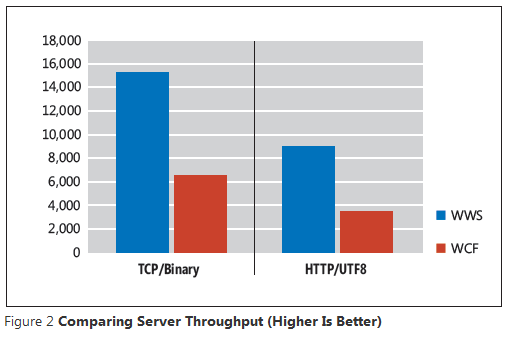
My latest Windows with C++ column, Windows Web Services, just went live on the MSDN Magazine website. Here I’m taking a break from Direct2D to highlight the new SOAP stack introduced with Windows 7 for building both clients and servers. It’s completely native, has minimal overhead, and is incredibly fast. From the article:

One of the main reasons many developers flocked to the Microsoft .NET Framework, and Java to a lesser degree, was the fact that it made it much easier to write software for the Internet. Whether you were writing an HTTP client or server application, the .NET Framework had you covered with classes for making HTTP requests and processing XML easily. You could even generate SOAP clients from WSDL documents and implement SOAP servers with ASP.NET. As the standards around Web services matured, Microsoft developed the Windows Communications Foundation (WCF), also built on the .NET Framework, to make it easier to use the increasingly complex Web standards for handling different transports, such as TCP and UDP, and provide more versatile security options.

C++ developers, however, were left wondering whether it was even practical to use C++ to write Web applications. Microsoft had provided a couple of temporary solutions in the form of ATL classes and a COM-based toolkit, but in the end these couldn’t keep up with the progress that the managed SOAP stacks had made and thus were largely abandoned.

I hope you enjoy it.

Here are links to some of the most recent Windows with C++ columns:

September 2009 –  Drawing with Direct2D

June 2009 – Introducing Direct2D

April 2009 – The Virtual Disk API in Windows 7

February 2009 – Visual C++ 2010 and the Parallel Patterns Library

December 2008 – x64 Debugging With Pseudo Variables and Format Specifiers

October 2008 – Exploring High-Performance Algorithms

August 2008 – Asynchronous WinHTTP

And here is a complete list.

Posted by KennyKerr with 3 comment(s)
Filed under: , ,

October 2009 issue of MSDN Magazine

Those of you expecting my Windows with C++ column about Windows Web Services to appear in the October issue will have to wait another month as the article was bumped due to space constraints. I just found out yesterday myself. In the mean time you should read Rick Molloy’s latest article on the Concurrency Runtime.

Posted by KennyKerr with no comments
Filed under:

Zune Fail

The Zune hardware products are fantastic. The new Zune HD is particularly impressive. The Zune software is a joy to use when compared to that other product that controls 99% of the market. But until Microsoft figures out how to make the Zune Marketplace and the Zune Pass subscription service available in the rest of the world (outside of the USA) this isn’t going to go anywhere.

With the Zune 3.0 I could at least browse the marketplace even if I couldn’t purchase anything. I could for example use it to search for podcasts. That doesn’t even seem to work anymore with Zune 4.0.

Make it happen. Pretty please.

Posted by KennyKerr with 3 comment(s)

Direct2D and the Desktop Window Manager
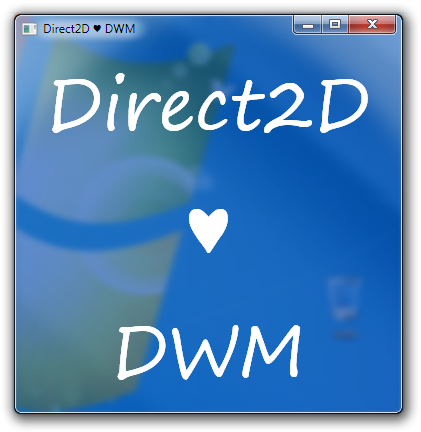
Many moons ago, when Windows Vista was still in beta, I wrote an article showing readers how to program with the Desktop Window Manager (DWM). I also followed up with another article showing readers how to display controls on glass. Both articles focused on User32/GDI which at the time was still the way to go for native application developers.

With the introduction of Windows 7 comes a brand new graphics platform for the application developer and that of course is Direct2D. So far MSDN Magazine has published two introductory articles I wrote about Direct2D. If you haven’t already done so please read Introducing Direct2D and Drawing with Direct2D. I’ll wait.

The upcoming December issue of the magazine will feature the next installment which covers some more advanced topics related to interoperability, but for now I thought I’d update the DWM saga for Direct2D as it’s just so simple. Whereas GDI barely tolerated the DWM, Direct2D just loves it.

Let’s say you just want to render the entire client and non-client area as a seamless sheet of glass and then use Direct2D to draw on top. Start by instructing the DWM to extend the frame into the client area as follows:

MARGINS margins = { -1 };

Verify(DwmExtendFrameIntoClientArea(windowHandle,
                                    &margins));

Now all you need to do is instruct Direct2D to use the same pixel format used when alpha blending with GDI, namely pre-multiplied BGRA:

const D2D1_PIXEL_FORMAT format =
    D2D1::PixelFormat(DXGI_FORMAT_B8G8R8A8_UNORM,
                      D2D1_ALPHA_MODE_PREMULTIPLIED);

The format is used when initializing the render target properties:

const D2D1_RENDER_TARGET_PROPERTIES targetProperties =
    D2D1::RenderTargetProperties(D2D1_RENDER_TARGET_TYPE_DEFAULT,
                                 format);

The render target properties are then provided to the Direct2D factory object to create the render target as usual:

Verify(m_d2dFactory->CreateHwndRenderTarget(targetProperties,
                                            windowProperties,
                                            &m_target));

And that’s all there is to it. You can now render portions of your window with glass simply by using a brush or bitmap’s alpha channel. You might for example clear the render target before drawing as follows:

m_target->Clear(D2D1::ColorF(0.0f, 0.0f, 0.0f, 0.0f));

Hope that helps.

Posted by KennyKerr with no comments
Filed under: , ,

WinUnit is Now on CodePlex

I’m totally hooked on WinUnit. As someone who writes a lot of native code it’s just absolutely essential. Up until now the only place to get it was via the download for the article that Maria wrote for MSDN Magazine.

Well I just found out via John Robbins that Maria finally got around to making a permanent home for WinUnit over on CodePlex.

http://winunit.codeplex.com/

Thanks Maria!

Posted by KennyKerr with no comments
Filed under: ,

Windows with C++: Drawing with Direct2D

My latest Windows with C++ column, "Drawing with Direct2D", just went live on the redesigned MSDN Magazine website. This is really a continuation of my previous column where I introduced Direct2D. From the article:

It is helpful to think about Direct2D as a hardware-accelerated 2-D rendering API. Of course, it supports software fallback, but the point here is that Direct2D is about rendering. Unlike other graphics APIs on Windows, Direct2D takes a componentized approach to graphics. It does not provide its own APIs for encoding and decoding bitmaps, text layout, font management, animation, 3-D and so on. Rather, it focuses on rendering and control over the graphics processing unit (GPU) while providing first class hooks to other APIs that focus on things like text layout and imaging. Direct2D does, however, provide primitives for representing different types of brushes as well as simple and complex shapes, the building blocks for any 2-D graphics application.

In this article, I'm going to show you how to draw with Direct2D. I'll begin by introducing Direct2D's color structure and then
show you how to create various types of brushes. Unlike most of the other graphics APIs on Windows, Direct2D doesn't provide a "pen" primitive, so brushes are pretty important as they're used for all outline and filling tasks. With that out of the way, I'll show you how to draw primitive shapes.

I hope you enjoy it. Right now I’m finishing up the December issue of Windows with C++ where I dive into Direct2D interoperability.

Here are links to some of the most recent Windows with C++ columns:

June 2009 – Introducing Direct2D

April 2009 – The Virtual Disk API in Windows 7

February 2009 – Visual C++ 2010 and the Parallel Patterns Library

December 2008 – x64 Debugging With Pseudo Variables and Format Specifiers

October 2008 – Exploring High-Performance Algorithms

August 2008 – Asynchronous WinHTTP

And here is a complete list.

Posted by KennyKerr with no comments
Filed under: , ,

I just don’t get twitter

I think I’m with Mickey on this one and may never post anything more, but to ensure that nobody confuses me with a few other notorious Kenny Kerr’s out there my twitter account is “kennykerr”.


Posted by KennyKerr with no comments

Window Clippings loves Windows 7

I received a few queries about this so I thought I better just make a quick statement: Window Clippings 2.1 works great on Windows 7.


I’ve also updated the website to point this out.

Posted by KennyKerr with 8 comment(s)
Filed under:
More Posts Next page »