Sync your Visual Studio settings with Live Mesh!
Did you know that you can use Live Mesh to share and sync your Visual Studio settings between computers ?
Here is how to do this in Vista (with Live Mesh client installed):
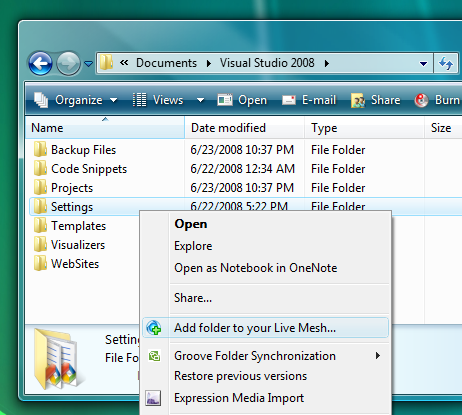
- Go to your VS2008 folder (usually C:\Users\YourUserName\Documents\Visual Studio 2008), right-click on Settings folder and select “Add folder to your Live Mesh…”
- On each of your Mesh Windows devices you’ll end up with a Settings shortcut on the desktop (Mesh folders are not sync by default).
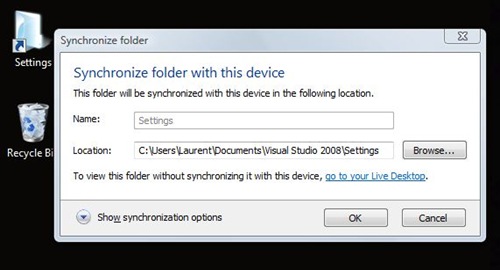
- Double-click the shortcut to set your local VS settings folder (usually C:\Users\YourUserName\Documents\Visual Studio 2008\Settings).
The “Show synchronization options” allows you to define sync rules for each device.
Pros:
- Automatically sync your VS settings between your computers without the need to export/import from a USB key.
- The beauty of Live Mesh is you can sync your folder whatever its location on your devices file system, so you do not need to have the same Win account (which is part of the VS settings folder path) to share your settings.
- Share with friends or your dev team! From the Live Mesh pane you can add members to your folder, set role and send an invitation email.
Cons:
- When you change settings on a computer, other device get a “Visual Studio 2008 is configuring the environment for first time use”
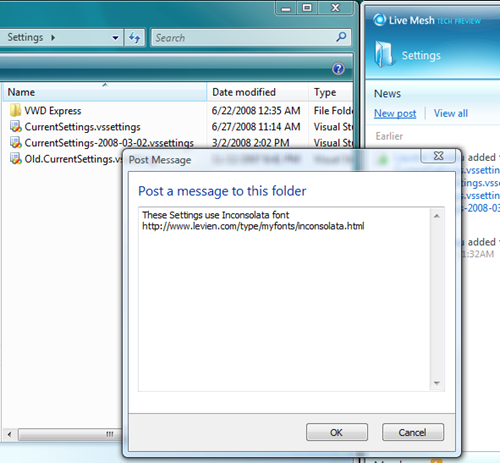
- If you use custom font in Visual Studio, it won’t be shared with your xml settings file, but you could sync your Windows/Fonts folder with….. Live Mesh! And you can also specify a note with the “New post” link:
Need a Live Mesh invitation? Try www.sharemesh.com
Technorati Tags: Visual Studio,Live Mesh