Customizing ASP.NET Dynamic Data
From Wikipedia: “ASP.NET Dynamic Data is a web application scaffolding framework from Microsoft, shipped as an extension to ASP.NET, that can be used to build data driven web applications.”
So if you use VS2008 and .NET 3.5 SP1 you can take advantage of ASP.NET Dynamic Data to quickly create a full administration website (UI and CRUD) over a model (LINQ To SQL or better Entity Framework) on top of some db tables, and all this in about 3 minutes!
Furthermore the system is very flexible and you can customize the look and feel of the generated web pages through a set of pages and user controls available on the DynamicData folder.
But the default “3 minutes” experience create a web app that exposes CRUD operations on every tables/every columns…
Default screen while editing the products table:
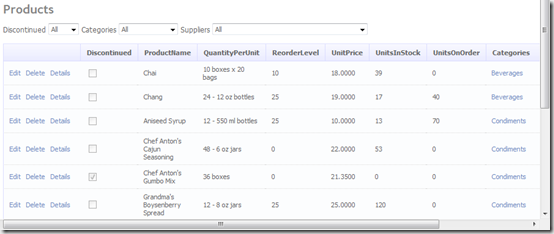
What you may want to customize:
- Prevent some tables to be “scaffolded”
- Change table display name
- Format columns data
- Hide some columns (like Ids)
This is the part where you’ll need to write a bit of code. In App_Code folder create new file that will hold several partial class to provides metadata information. You need to add 2 class for each entities in your model, one partial class with the name of the entity, and one sub-class to set metadata. The second one is “attached” to your entity class with the MetadataType attribute.
C# snippet for Products entity:
[MetadataType(typeof(Products_Metadata))]
public partial class Products
{
[TableName("Company products")]
public class Products_Metadata
{
[ScaffoldColumn(false)]
public object ProductID { get; set; }
[DisplayName("Name")]
public object ProductName { get; set; }
[DisplayName("Price"),DisplayFormat(DataFormatString = "{0:c}")]
public object UnitPrice { get; set; }
[DisplayName("Stock")]
public object UnitsInStock { get; set; }
[ScaffoldColumn(false)]
public object ReorderLevel { get; set; }
[ScaffoldColumn(false)]
public object Discontinued { get; set; }
[ScaffoldColumn(false)]
public object QuantityPerUnit { get; set; }
[ScaffoldColumn(false)]
public object UnitsOnOrder { get; set; }
[ScaffoldColumn(false)]
public object Suppliers { get; set; }
[ScaffoldColumn(false)]
public object Order_Details { get; set; }
}
}
To remove a table, use the ScaffoldTable(false) attribute.
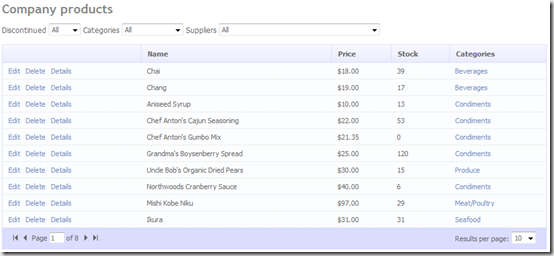
Products table will now appear as “Company products” (TableName attribute).
I keep only 4 columns and rename them (ScaffoldColumn and DisplayName attributes).
Price column is formatted as currency (DisplayFormat attribute).
See the result: