Blend SketchFlow project: from prototype to real screens?

I have been doing many demos of Blend SketchFlow, but never tried the process to go from sketch to real screens when prototyping is finished.
After MIX09, my first understanding was that one of the goals of SketchFlow was being able to easily switch from prototype to "real" app. But I was wrong and I found that many people are.

Maybe the confusion comes from what is written on the site:
http://www.microsoft.com/expression/products/Sketchflow_Overview.aspx

"Traditional prototypes are generally redundant after the concept phase and discarded. SketchFlow enables you to leverage all the previous conceptual work, every asset and component created is reusable in your production project – nothing goes to waste."

I think many people (like me) incorrectly understood that we could simply switch from prototype to real screens, which is not really the case.

On the Blend documentation (Hit F1, select SketchFlow and click on “Convert a prototype”) you can find the official procedure to “convert your SketchFlow prototype into a production-ready project”. Have a look at it and you’ll see the process is long and really painful… far from a “convert to production” button that would remove the Sketch style from every control and clean the solution.
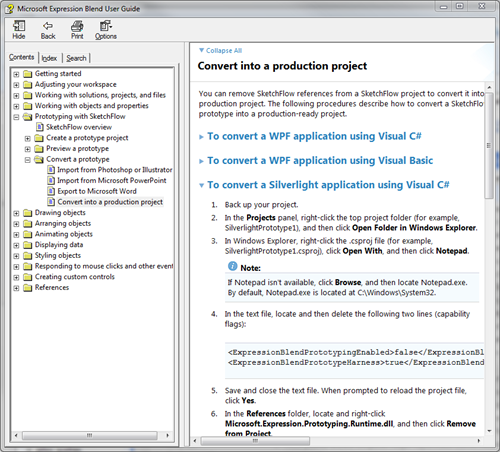
In fact the point is that you generally wouldn’t want to do that, and someone from the Blend Team confirmed this. You should build your prototype without production consideration in mind. The structure of a SketchFlow prototype itself is not done as a typical well-architected production solution would be. SketchFlow is very good to help you build mock-ups in a RAD-style development, then for production you have to start a clean new project and reuse some of the assets you created during the prototype. But no “convert project to production” button here, and no plan to have one as I heard (for the reasons described above).

Note: I am not trying to minimize the benefits of this tool, just pointing out the “switch to production” might be surprising at first.


Technorati Tags: ,
Published Thursday, November 12, 2009 2:34 PM by pluginbaby
Filed under: ,

Comments

# Blend SketchFlow project: from prototype to real screens? - Laurent Duveau

Pingback from  Blend SketchFlow project: from prototype to real screens? - Laurent Duveau

Thursday, November 12, 2009 5:14 PM by Justin

# re: Blend SketchFlow project: from prototype to real screens?

Thanks for the nice post. Not knowing too much about SketchFlow, but having used Blend quite a lot, I've suspected this was probably the case. It's nice to see your post, complete with a reference to the process involved. This will help us decide how our developers and designers will work together using this tool.

# Blend SketchFlow project: from prototype to real screens? Silverlight Web

Pingback from  Blend SketchFlow project: from prototype to real screens? Silverlight Web

Thursday, November 12, 2009 7:06 PM by Links (11/12/2009) « Steve Pietrek – Everything SharePoint

# Links (11/12/2009) « Steve Pietrek – Everything SharePoint

Pingback from  Links (11/12/2009) « Steve Pietrek – Everything SharePoint

Thursday, November 12, 2009 7:59 PM by Fabrice Marguerie

# re: Blend SketchFlow project: from prototype to real screens?

Thanks for pointing this out.

It really sounds like false advertising.

Friday, November 13, 2009 2:39 AM by Nick Harewood

# re: Blend SketchFlow project: from prototype to real screens?

I can see the reasoning that a SketchFlow project may not be as well architected from the start as you would want a full production version to be... You wouldn't invest time implementing MVVM in SketchFlow, for example.

But I'm yet to actually build a whole solution in SketchFlow anyway.  Enough to develop and test-drive some initial concepts, but (perhaps because of this limitation) I will quite quickly want to move on to the solution proper.

But for me it isn't so much about taking the whole project forward, but about ditching the Sketchflow styles and the rest of the stuff that comes extra in a SketchFlow project, and easily being able to transfer the stuff I HAVE spent time on - the XAML structure and layout, different UserControls that still offer a good starting point for the project.

I didn't know the process was detailed in the Help files (who RTFM anyway?!) but am disappointed to find there are no plans to streamline it.  It tends to be one of the sticking points when demoing Sketchflow - that the process doesn't really have a satisfactory end point

Friday, November 13, 2009 12:07 PM by PaulW

# re: Blend SketchFlow project: from prototype to real screens?

Thought this was going to tell me how to do it!

As an analyst not developer would like a simple framework (MVVM/Prism) project can open in Blend could then start to reuse controls

# Twitter Trackbacks for Blend SketchFlow project: from prototype to real screens? - Laurent Duveau [asp.net] on Topsy.com

Pingback from  Twitter Trackbacks for                 Blend SketchFlow project: from prototype to real screens? - Laurent Duveau         [asp.net]        on Topsy.com

Friday, November 13, 2009 6:49 PM by Jon Harris

# re: Blend SketchFlow project: from prototype to real screens?

I think the important aspect to keep in mind about SketchFlow is that it is your choice how you move forward.

The intent of SketchFlow is to let you create, evolve and present prototypes quickly and cost-effectively. Prototyping in the design process sense is about generating, communicating and validating ideas, not so much about rapid application development (RAD). As a result, you often want to invest little thought about architecture or structure during the prototype stage as this allows you to explore an idea with the minimal possible investment, and to not get too attached to it :)

However, we also recognize that there are scenarios where it is useful and productive to either re-use parts of a prototype or even the entire prototype as part of a production effort. Some people do use SketchFlow facilities more in a RAD mode, and some prototypes naturally are structured just right for the app that follows (especially for simple app structures).

As you move from prototype to production you have a reflection point where you decide which of several routes you'd like to take. The route that you take will vary depending not only on the type of project but also how you tackled the prototype phase of the project.

You could think of these as broadly:

1: Use SketchFlow to create throwaway prototypes. Work quickly on your ideas in a very iterative way and once the client signs off simply throw the prototype away and carry forward the ideas from the prototype rather than any physical assets.

2: As you are working on your prototype you create Behaviors, color swatches, styles, custom controls etc that you want to carry forward into the production phase and of course you can do this. It is up to you how much of the project you want to carry forward.

3: You've iterate on the structure of your prototype or the structure is relevant for the production project and you carry forward the whole project, assets and structure by following the steps outlined here: msdn.microsoft.com/.../ee371158(Expression.30).aspx) and in the Expression Blend help system.

We're trying not to be prescriptive about which is the right direction that you should take - so we leave that up to you.

In terms of the future we are always listening to feedback so please keep letting us know what is working for you and what isn't.

I hope this helps clarify!

==============================

Jon Harris

Senior Product Manager

Expression Blend, SketchFlow and Design

jon.harris@microsoft.com

Friday, November 13, 2009 7:22 PM by pluginbaby

# re: Blend SketchFlow project: from prototype to real screens?

Thanks for the comment Jon!

Friday, November 13, 2009 8:46 PM by Jon Harris

# re: Blend SketchFlow project: from prototype to real screens?

Sorry - I messed up the URL in my post above it should read:

"msdn.microsoft.com/.../ee371158(Expression.30).aspx"

Apologies for that !

Cheers, Jon

Friday, November 13, 2009 9:38 PM by pluginbaby

# re: Blend SketchFlow project: from prototype to real screens?

Sorry links in comments are a mess, try this:

http://tinyurl.com/yasnfq5