Silverlight 4 Mouse Wheel support
 MouseWheel event was available in Silverlight 3 but you had to manage it yourself.
Silverlight 4 has built-in Mouse Wheel support for TextBox, ComboBox, Calendar, DatePicker and ScrollViewer (so DataGrid and ListBox as well).
Now you can navigate months/years in a Calendar with your mouse wheel!
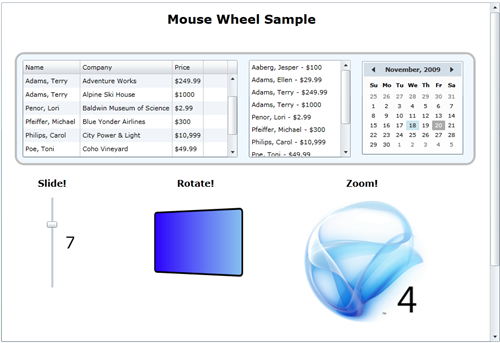
I created a sample to try mouse wheel on some common controls (DataGrid, ListBox, Calendar and ScrollViewer) as well as using the API (which you could do in Silverlight 3). I take advantage of the MouseWheel event to:
- Move a Slider
- Rotate a Rectangle
- Zoom an Image
The MouseWheel eventArgs has a Delta property (Double) that represents the “amount” of scroll.
// MouseWheel on the Slider
private void slider1_MouseWheel(object sender, MouseWheelEventArgs e)
{
    if (e.Delta > 0)
        slider1.Value += 1;
    else
        slider1.Value -= 1;

    // Handle the event so that it doesn't get to the ScrollViewer
    e.Handled = true;
}
Notice the e.Handled property set to true: as you may know in Silverlight events bubble in the controls hierarchy, so if we don’t handle it, using the mouse wheel over the Slider would also scroll the ScrollViewer.
I do pretty much the same for the Rectangle and the Image.
Here is the code to Zoom the Image (Scale transformation):
private void image1_MouseWheel(object sender, MouseWheelEventArgs e)
{
    imageScale.ScaleX = e.Delta > 0 ? imageScale.ScaleX * 1.1 : imageScale.ScaleX * 0.9;
    imageScale.ScaleY = e.Delta > 0 ? imageScale.ScaleY * 1.1 : imageScale.ScaleY * 0.9;

    e.Handled = true;
}
And the XAML markup:
<Image Stretch="Uniform" Source="/sl4bloglogo.png" MouseWheel="image1_MouseWheel">
    <Image.RenderTransform>
        <ScaleTransform x:Name="imageScale"></ScaleTransform>
    </Image.RenderTransform>
</Image>
Download the source code
(requires Silverlight 4 beta)