Getting Started with the Speech Server 2007 API
Speech Server 2007 has a really cool Windows Workflow based programming model that lets you quickly build interactive voice response applications. For many applications it is all you will ever need.
Sometimes however you find the workflow model just isn't the right fit. If you're looking for really fine-grained control over the application, or you simply prefer to work in code, then the Core API is what you need.
Unfortunately figuring out you want to use the API is a lot easier than figuring out how to start using it. There is very little documentation and no Visual Studio project templates or samples included with Speech Server.
I'll do my best to give a brick-simple explanation of how to get your first core API project started. You can also download the zipped project files.
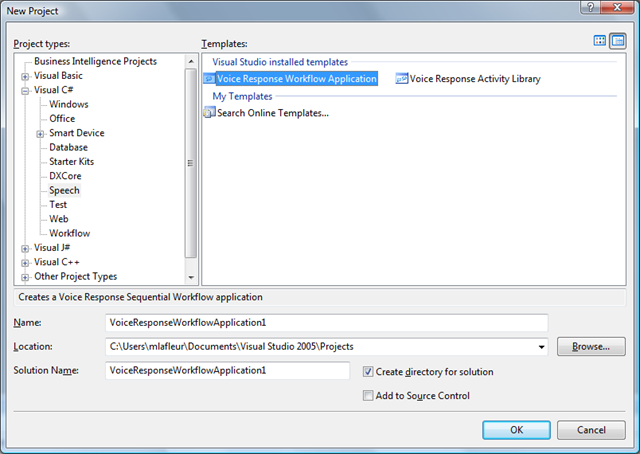
1) First you'll need to create a new Voice Response Workflow Application. We'll use the project that gets generated as our foundation.
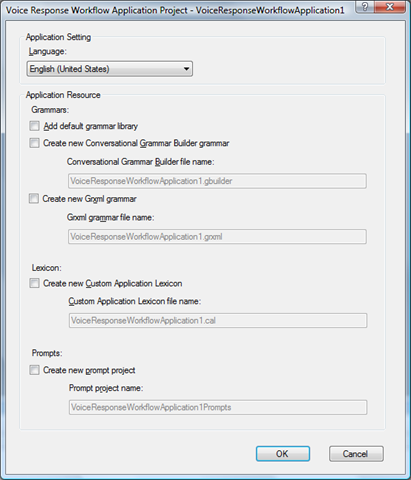
2) When asked for the application resources you'll want to uncheck everything.
3) Open up the Class1.cs file and remove all of the references to the VoiceResponseWorkflow1 class. The resulting class should look like the following (I removed the comments in the code for brevity):
using System;
using System.Collections.Generic;
using System.Text;
using Microsoft.SpeechServer ;
using Microsoft.SpeechServer.Dialog;
namespace VoiceResponseWorkflowApplication1
{
public class Class1 : IHostedSpeechApplication
{
private IApplicationHost _host;
public void Start(IApplicationHost host)
{
if (host != null)
{
_host = host;
_host.TelephonySession.CurrentUICulture = System.Globalization.CultureInfo.GetCultureInfo("en-US");
}
else
{
throw new ArgumentNullException("host");
}
}
public void Stop(bool immediate)
{
}
public void OnUnhandledException(Exception exception)
{
if (exception != null)
{
_host.TelephonySession.LoggingManager.LogApplicationError(100, "An unexpected exception occurred: {0}", exception.Message);
}
else
{
_host.TelephonySession.LoggingManager.LogApplicationError(100, "An unknown exception occurred: {0}", System.Environment.StackTrace);
}
_host.OnCompleted();
}
}
}
That's all folks. Class1.cs is now the starting point of your Core API application. As a further example, lets take the project and add some code to turn it into an outbound dialing "Hello World" application.
using System;
using System.Collections.Generic;
using System.Text;
using Microsoft.SpeechServer ;
using Microsoft.SpeechServer.Dialog;
namespace VoiceResponseWorkflowApplication1
{
public class Class1 : IHostedSpeechApplication
{
private IApplicationHost _host;
public void Start(IApplicationHost host)
{
if (host != null)
{
_host = host;
_host.TelephonySession.CurrentUICulture = System.Globalization.CultureInfo.GetCultureInfo("en-US");
// Dial and outbound call (make sure you change these numbers :-)
_host.TelephonySession.OpenCompleted += new EventHandler<AsyncCompletedEventArgs>(TelephonySession_OpenCompleted);
_host.TelephonySession.OpenAsync("7813062200", "8887006263");
}
else
{
throw new ArgumentNullException("host");
}
}
void TelephonySession_OpenCompleted(object sender, AsyncCompletedEventArgs e)
{
if (e.Error != null)
{
_host.TelephonySession.Close();
}
else
{
_host.TelephonySession.Synthesizer.SpeakCompleted += new EventHandler<Microsoft.SpeechServer.Synthesis.SpeakCompletedEventArgs>(Synthesizer_SpeakCompleted);
_host.TelephonySession.Synthesizer.SpeakAsync("Hello World", Microsoft.SpeechServer.Synthesis.SynthesisTextFormat.PlainText);
}
}
void Synthesizer_SpeakCompleted(object sender, Microsoft.SpeechServer.Synthesis.SpeakCompletedEventArgs e)
{
_host.TelephonySession.Close();
}
public void Stop(bool immediate)
{
}
public void OnUnhandledException(Exception exception)
{
if (exception != null)
{
_host.TelephonySession.LoggingManager.LogApplicationError(100, "An unexpected exception occurred: {0}", exception.Message);
}
else
{
_host.TelephonySession.LoggingManager.LogApplicationError(100, "An unknown exception occurred: {0}", System.Environment.StackTrace);
}
_host.OnCompleted();
}
}
}