Creating a Visual Studio Solution and Web Site
A reader has asked me to explain how to create a Visual Studio solution with a Web Site. So in the next 4 posts, I will demonstrate:
1) How to Create a Visual Studio Solution.
2) How to add a RadControl and register the Telerik.Web.UI.WebResource.axd
3) How to create a Heatmap using the Telerik RadChart -- in C#
4) How to create a Heatmap using the Telerik RadChart -- in VB.NET
Creating a project is quite simple. From within Visual Studio, simply select to create a new project. Scroll down to "Other Project Types" and select "Visual Studio Solutions."
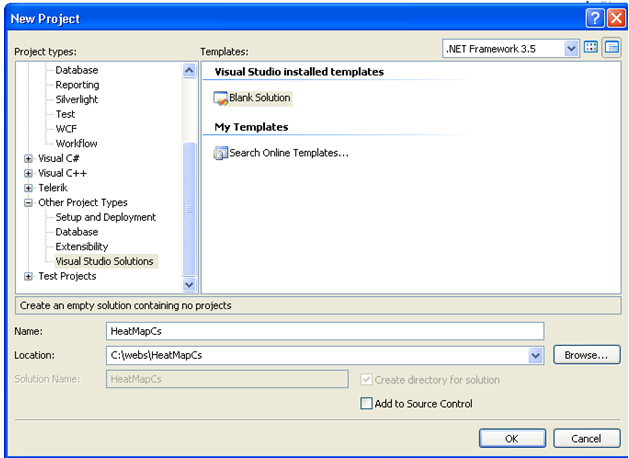
Give your project a name and location and select OK. This is where the clickable Visual Studio solution will be saved.
Now we want to create the website to store the project source code.
From the File menu, select to Add and select "New Web Site."
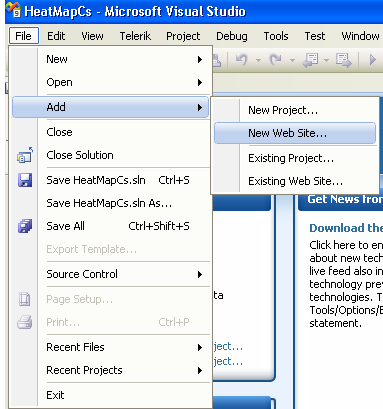
Select an "ASP.NET Web Site." Select the Location on the File System where you wish to have the files located. And select the Language desired.

Select OK. Now your project is created and ready to go!
I told you it was easy! :)
In my next post, I'll show how to register the Telerik.Web.UI.WebResource within the web project.
[SIGNATURE]