Steve Wellens

Programming in the .Net environment

Sponsors

Links

Speed Up the Visual Studio Toolbox

There are plenty of tips out on the web that I see no need to repeat here. But this one made such a remarkable difference on my box that I had to post it….

I use the Auto-Hide property on the Toolbox to preserve screen real-estate. After adding the Ajax control toolkit to my environment, the Visual Studio Toolbox started to really drag. Instead of popping up quickly, the hard disk would churn for several seconds and the Toolbox would struggle, agonizingly and with apparently great reluctance, to appear.

When it did eventually appear, random sections of the Toolbox would be open. It didn't remember which tab was last used. Assuming the logic is in a background thread, I can only assume the thread was poorly written. If it was tested, the test results were ignored.

Thank goodness for the TooboxAutoPopulate setting.

Tools->Options->Windows Forms Designer->General
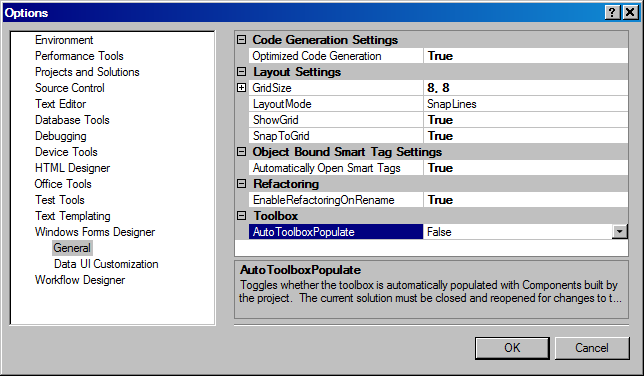
Setting AutoToolboxPopulate to False brought my machine back from the abyss of lost productivity caused by slow, clunky, energy-sapping GUI delays. Although the setting is under Windows Forms Designer, it is just as effective for ASP.Net developers (it's the same Toolbox).

I hope someone finds this helpful.

Steve Wellens

Comments

eric.castoldi said:

oh god, thanks a lot man. this just freaked me out for a looooong time.

# July 23, 2009 9:58 AM

Jose Rolando Guay Paz said:

Very nice! Thanks!!

# July 23, 2009 10:54 AM

Nam said:

This auto toolbox population is really annoying. Thank you for showing me how to disable it.

# July 23, 2009 1:08 PM

Dave said:

OK. So what is the drawback? I don't see newly available controls?

# July 23, 2009 3:21 PM

SGWellens said:

Drawbacks?

If you include a custom built control in your project, it will not show up automatically on the toolbox (as least that's what the documenation says).

msdn.microsoft.com/.../fw694kde(VS.80).aspx

# July 23, 2009 4:23 PM

Reflective Perspective - Chris Alcock » The Morning Brew #397 said:

Pingback from  Reflective Perspective - Chris Alcock  » The Morning Brew #397

# July 24, 2009 3:41 AM

http://www.notechsoft.com said:

Thank you for the tip :).

# July 25, 2009 6:42 AM

Zeeshan Umar said:

Really cool trick , it added some speed to my Slow PC :)

# September 9, 2009 2:41 AM

Santhosh from Agile virtual said:

My visual studio was dead slow and I was searching tips to make it faster. A million thanks for sharing this.

# October 11, 2010 11:50 PM

Riedoh Salie said:

I had an issue when switching to Design View, VS was hanging. This did the trick.

Thanks.

# August 5, 2011 5:56 AM
Leave a Comment

(required) 

(required) 

(optional)

(required)