ÜberUtils - Part 1 : Cryptography
ÜberUtils Series posts so far :
- Part 1 : Cryptography - Hashing
-
Part 2 : Cryptography (Continued)
- Encryption
- Part 3 : Strings
- Part 4 : Collections
If you read my
previous post, you would know that it is my time to give back to the
community. So where should you start when creating the
ULTIMATE REUSABLE UTILS CLASS LIBRARY? (from now on
called
ÜberUtils)? Good question, and thats the reason why its taken me a
while to start this series, cause I had to start it at
exactly the right point. I thought back to the first utils
class I wrote back in 2003 in .NET 1.1. It was a
cryptography class that wrapped existing functionality that
exists in the system.security.cryptography namespace.
So I figure thats a good place to start again. But
first I wanna note a few things :
-
This code will be written for .NET 3.5 framework (this is
to take advantage of the newer features)
- I will be using VS2008 beta 2 which, which at this point in time (Oct 2007), you can download for free. (I want to utilise some of the new features available e.g. Unit Testing)
-
The namespaces I use will be as simple and generic as
possible, meaning that it will be simple to incorporate
into any number of companies / projects / systems /
architectures etc. I hate having weird long namespaces
when I use other developers libraries. I would prefer a
namespace like "Utils" rather than "BradVin.Core.Utils".
Wouldnt you agree? (I was also thinking about using
"System.Utils")
- The project files and code can be downloaded from codeplex at the ÜberUtils project page.
-
Code license :
public domain. This means that all the code in this series is
absolutely free, and by definition : the code
may be freely reproduced, distributed, transmitted,
used, modified, built upon, or otherwise exploited by
anyone for any purpose, commercial or non-commercial,
and in any way, including by methods that have not yet
been invented or conceived. So rip it to pieces, pull out what you like - I DONT
CARE! My only stipulation is this :
IF YOU ADD SOMETHING USEFUL PLEASE SHARE IT WITH
US!!!!! (you can do this by commenting on this blog or on
discussing it at code plex)
I'm gonna start with a Hashing class which is
extremely simple to use. This class makes it easy to hash a
byte array or a string e.g.
string strHash = Hashing.Hash("test");
You can also use different hashing algorithms e.g.
string strHash = Hashing.Hash("test", Hashing.HashingTypes.SHA512);
Internally, the different hashing algorithm classes used are : SHA1CryptoServiceProvider, SHA256Managed, SHA384Managed, SHA512Managed and the default MD5CryptoServiceProvider.
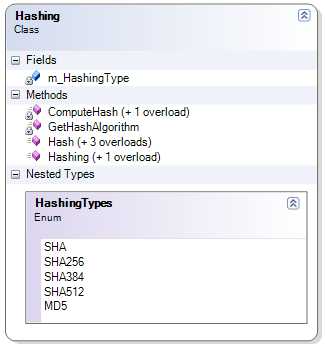
Very simple isn't it?. Here is the class diagram :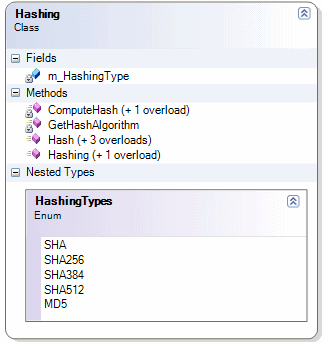
If you have a look at the code, you would have noticed some
strange new methods on both string and byte array. This is
using a new .NET 3.5 feature called
extension methods. If you've not heard of it yet, the
best explanation is by ScottGu
here. Infinities Loop also talks about it
here
and ScottGu again
here
. So let's see how I implement my extension methods. Check
this code out :
private string ComputeHash(string inputText)You'll see a string has a new method called ToByteArray. Also note that the ComputeHash method returns a byte array, and this means that a byte array now has a new method too : ToHexString. Here is the code for these 2 extension methods :
{
//convert output byte array to a string
return ComputeHash(inputText.ToByteArray()).ToHexString().ToUpper();
}
namespace Utils.Extensions
{
    public static class ByteArrays
    {
        public static string ToHexString(this byte[] data)
        {
            StringBuilder sb = new StringBuilder(data.Length * 2);
            foreach (byte b in data)
            {
                sb.AppendFormat("{0:x2}", b);
            }
            return sb.ToString();
        }
        public static byte[] ToByteArray(this string str)
        {
            return ASCIIEncoding.ASCII.GetBytes(str);
        }
    }
}
Now all I had to do to use these methods was add a using at the top of my class :
using Utils.Extensions;
But I didn't want to just stop here. I've had a scenario in the past when I needed to compute a MD5 hash of a string. I also found this blog post on the subject and decided I can now use extension methods to add this functionality to every string. So heres the code :
namespace Utils.Extensions
{
    public static class Cryptography
    {
        public static string GetMD5HashCode(this string str)
        {
            return Utils.Cryptography.Hashing.Hash(str);
        }
    }
}
So now I can use it on any string e.g.
string actual = "test".GetMD5HashCode();So thats the Hashing class. This post ended up a lot longer than I expected, so in my next post Im going to add an encryption class. Please check out the code (Download here or get it from my CodePlex project page). Included in the source are unit tests that check the hashing is doing its job correctly. (I used the System.Web.Security.FormsAuthentication.HashPasswordForStoringInConfigFile method to make sure the tests are valid and double checked the results against other non-C# hashing algorithms e.g. http://pajhome.org.uk/crypt/md5/ )