DotNetStories
I have decided to write a series of posts on how to write a small ASP.Net MVC 4.0 application.I will develop this application step by step and I will explain everything that you need to know in order to develop ASP.Net MVC 4.0 applications. This is the fourth post in this series. You can find the first one here , the second one here and the third one here. Make sure you read and understand those posts.
I am building an ASP.Net MVC application where users can enter movies and rate them. As we develop our application I will change the requirements and add more features. My goal is to have a working application and at the same time show you the building blocks of ASP.Net MVC. In the last post we have created the entities needed in order to store and retrieve data (models,views and the database).
Now I would like to talk about Code Blocks and Code Expressions in Razor Views.
1) Launch Visual Studio and open the ASP.Net MVC application
2) Open the Index.cshtml from the Views/Movie folder.These are the contents of the view
@model IEnumerable<MovieReviews.Models.Μovie>
@{
ViewBag.Title = "Index";
var reviewscount =
Model.Count();
}
<h2>Index</h2>
<h3>the
number of the reviews so far is : @reviewscount
</h3>
<p>
@Html.ActionLink("Create New", "Create")
</p>
<table>
<tr>
<th>
@Html.DisplayNameFor(model => model.Name)
</th>
<th>
@Html.DisplayNameFor(model => model.Director)
</th>
<th>
@Html.DisplayNameFor(model => model.YearReleased)
</th>
<th></th>
</tr>
@foreach (var item in Model) {
<tr>
<td>
@Html.DisplayFor(modelItem => item.Name)
</td>
<td>
@Html.DisplayFor(modelItem => item.Director)
</td>
<td>
@Html.DisplayFor(modelItem => item.YearReleased)
</td>
<td>
@Html.ActionLink("Edit", "Edit", new { id=item.Id }) |
@Html.ActionLink("Details", "Details", new { id=item.Id })
|
@Html.ActionLink("Delete", "Delete", new
{ id=item.Id })
</td>
</tr>
}
</table>
The responsibility of this view is to take the model passed
by the controller and present the data to the users through
the template. The View is nothing more than a template where
the data passed from the model is presented.We combine
literal text (e.g <h2></h2>) with pieces
of data from the model through C# code (@).
Code Expressions
An example of code expressions from the view above
<td>
@Html.DisplayFor(modelItem => item.Name)
</td>
The code in bold is a code expression.The code expression
will be evaluated by the Razor engine and the output (which
will be displayed in a column of an html table) will be
presented to the client.
Code blocks
An example of code block from the view above
@
{
ViewBag.Title = "Index";
}
Between the curly braces we can add as much C# code as we want.Let me modify a little bit the View above
@{
ViewBag.Title = "Index";
var reviewscount = Model.Count();
}
<h2>Index</h2>
<h3> the number of the reviews so far is :
@reviewscount </h3>
The code I changed is in bold.Run your application again http://localhost:59871/movie (http://localhost:yourport/movie) in your case.
I added a new variable inside the code block and then used the variable (reviewscount) in a place I wanted inside the view as a code expression. Hope all makes sense so far.
3) Now I would like to point out at this point are HTML
Helpers that are part of any View in the ASP.Net MVC
applications.Their purpose is to create small blocks of
HTML.There are helpers like to create
links,inputs,labels,forms,validation messages and much more.
Think of them like traditional ASP.NET Web Form controls.
We use HTML helpers are used to modify HTML. HTML helpers do not have an event model and a view state.
In most cases, an HTML helper is just a method that returns a string.
Let's have a look at the
@Html.ActionLink("Edit", "Edit", new { id=item.Id }) |
This is the easiest way to render an HTML link
The Html.ActionLink() does not link to a view. It creates a link to a controller action.
You also can see more HTML Helpers in the View
There are more HTML helpers can be used to render (modify and output) HTML form elements:
We will see more of those as we move on.
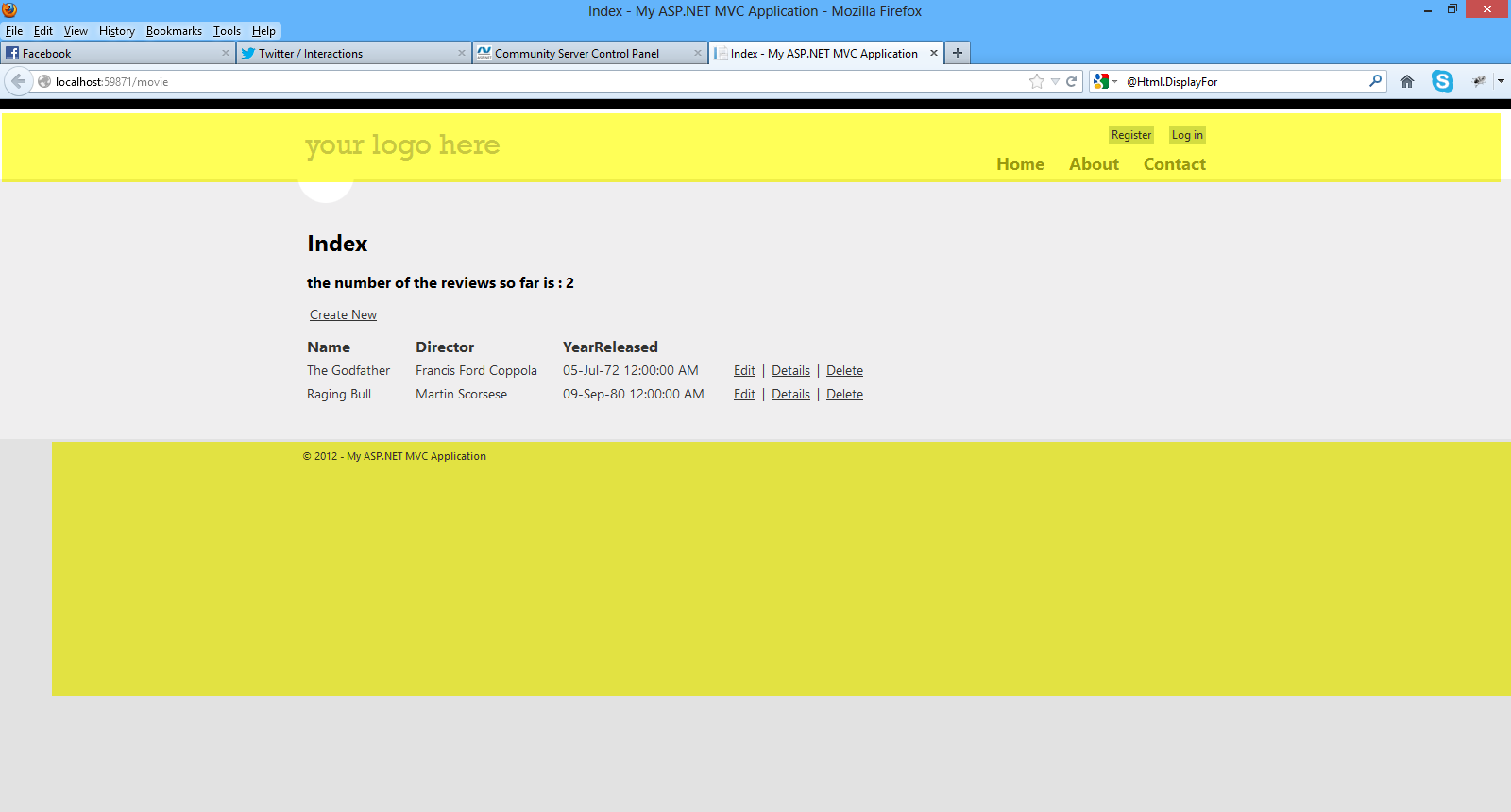
3) When you run your application and navigate to the http://localhost:59871/movie you see HTML elements that are not in the current view (Index view).
I mean the navigation system (menu) the header,logo and the footer.Where does this markup come from? It comes form the Layout View.Υοu can think of this as the master pages in web forms applications.
Have a look at the picture below to see what I mean
Have a look in the Shared folder in the Solution Explorer. You will see the_Layout.cshtml.
<!DOCTYPE html>
<html lang="en">
<head>
<meta charset="utf-8" />
<title>@ViewBag.Title - My ASP.NET MVC
Application</title>
<link
href="~/favicon.ico" rel="shortcut icon" type="image/x-icon"
/>
<meta name="viewport"
content="width=device-width" />
@Styles.Render("~/Content/css")
@Scripts.Render("~/bundles/modernizr")
</head>
<body>
<header>
<div
class="content-wrapper">
<div
class="float-left">
<p
class="site-title">@Html.ActionLink("your logo here",
"Index", "Home")</p>
</div>
<div
class="float-right">
<section
id="login">
@Html.Partial("_LoginPartial")
</section>
<nav>
<ul id="menu">
<li>@Html.ActionLink("Home", "Index",
"Home")</li>
<li>@Html.ActionLink("About", "About",
"Home")</li>
<li>@Html.ActionLink("Contact", "Contact",
"Home")</li>
</ul>
</nav>
</div>
</div>
</header>
<div id="body">
@RenderSection("featured", required: false)
<section class="content-wrapper main-content
clear-fix">
@RenderBody()
</section>
</div>
<footer>
<div
class="content-wrapper">
<div
class="float-left">
<p>© @DateTime.Now.Year - My ASP.NET MVC
Application</p>
</div>
</div>
</footer>
@Scripts.Render("~/bundles/jquery")
@RenderSection("scripts", required: false)
</body>
</html>
We have the head section that will be present in all
pages
<head>
<meta charset="utf-8"
/>
<title>@ViewBag.Title - My
ASP.NET MVC Application</title>
<link href="~/favicon.ico" rel="shortcut icon"
type="image/x-icon" />
<meta
name="viewport" content="width=device-width" />
@Styles.Render("~/Content/css")
@Scripts.Render("~/bundles/modernizr")
</head>
Then you have the header section that will appear in all pages
<header>
<div
class="content-wrapper">
<div
class="float-left">
<p
class="site-title">@Html.ActionLink("your logo here",
"Index", "Home")</p>
</div>
<div
class="float-right">
<section id="login">
@Html.Partial("_LoginPartial")
</section>
<nav>
<ul id="menu">
<li>@Html.ActionLink("Home", "Index",
"Home")</li>
<li>@Html.ActionLink("About", "About",
"Home")</li>
<li>@Html.ActionLink("Contact", "Contact",
"Home")</li>
</ul>
</nav>
</div>
</div>
</header>
Then you have the header section that will appear in
all pages
<footer>
<div
class="content-wrapper">
<div
class="float-left">
<p>© @DateTime.Now.Year - My ASP.NET MVC
Application</p>
</div>
</div>
</footer>
At one point we see a call to the RenderBody()
<div id="body">
@RenderSection("featured", required: false)
<section class="content-wrapper main-content
clear-fix">
@RenderBody()
</section>
When the Layout View calls RenderBody(), that is when the content View (index.cshtml) will be inserted and rendered at this exact point in the HTML markup.
How does ASP.Net MVC to call the Layout View before our content View? It is because of this file _ViewStart.cshtml
The contents of the _ViewStart.cshtml follow
@{
Layout = "~/Views/Shared/_Layout.cshtml";
}
ASP.Net MVC runtime knows to render first the
Layout View (because the _ViewStart.cshtml runs first before any other view
)
and then the Content View.
4) Another important topic in ASP.Net MVC applications are
Partial Views.At some point in the
_Layout.cshtml view there is a call to the
_LoginPartial partial view.
<section id="login">
@Html.Partial("_LoginPartial")
</section>
A partial view is a view that we place code (HTML & C#) that we will often reuse in other views..
Have a look at the contents of the _LoginPartial.cshtml
@if (Request.IsAuthenticated) {
<text>
Hello, @Html.ActionLink(User.Identity.Name, "Manage",
"Account", routeValues: null, htmlAttributes: new { @class
= "username", title = "Manage" })!
@using
(Html.BeginForm("LogOff", "Account", FormMethod.Post, new
{ id = "logoutForm" })) {
@Html.AntiForgeryToken()
<a
href="javascript:document.getElementById('logoutForm').submit()">Log
off</a>
}
</text>
}
else {
<ul>
<li>@Html.ActionLink("Register", "Register",
"Account", routeValues: null, htmlAttributes: new { id =
"registerLink" })</li>
<li>@Html.ActionLink("Log in", "Login", "Account",
routeValues: null, htmlAttributes: new { id = "loginLink"
})</li>
</ul>
}
So this is a type of special View that we must know and use
so we make our application easier to maintain.
5) Now it is time to have a look at some important topics
that are related with Controllers.Open the
MovieController.cs file.
I would like to talk a bit about ActionResults and
what thet are
The ActionResult is an abstract base class for other types of actions.
Other classes inheriting from the
ActionResult :
The ViewResult renders a specifed view to the client.
The RedirectResult performs an HTTP redirection to a specified URLThe ContentResult writes content to the client without requiring a view.
In this method Index() the result of this method is ActionResult , which means we will call the Index.cshtml (passing the model to it) in the Views/Movie folder.
So the results of this view will be displayed to the client.
private MovieDBContext db = new MovieDBContext();
//
// GET: /Movie/
public
ActionResult Index()
{
return View(db.Movies.ToList());
}
Another very important topic is Action Selectors.Some of them are ActionName, AcceptVerbs.
An ActionSelector dictates which action method is
triggered.They come with the form of attributes.
Have a look at the MovieController.cs file and the
Delete method
[HttpPost, ActionName("Delete")]
public ActionResult DeleteConfirmed(int id)
{
Μovie μovie = db.Movies.Find(id);
db.Movies.Remove(μovie);
db.SaveChanges();
return
RedirectToAction("Index");
}
ActionName will specify the name of this method. It can be reached by Delete and not DeleteConfirmed
AcceptVerbs (HttpPost,HttpGet) represent attributes that specify which HTTP verbs (Get , Post) an action method will respond to.
In the example above we have an HTTP Post - [HttpPost, ActionName("Delete")]
The final topic I would like to talk about is Action Filters. They are applied to methods and classes in the form of attributes.An ActionFilter provides some methods that are run before and after request and response processing.
Some of them are
If I open the MovieController.cs file and then apply
the [Authorize] (see below) to the
Index() method
private MovieDBContext db = new MovieDBContext();
//
// GET: /Movie/
[Authorize]
public ActionResult Index()
{
return View(db.Movies.ToList());
}
and then navigate to the
http://localhost:59871/movie, this is what I will get
the following as a result (redirect to the login page)

The ASP.Net MVC runtime will pick up the
[Authorize] attribute and redirect me to the
Login page.
Hope you have followed along and mastered the topics
presented here as they are absolutely necessary for building
ASP.Net MVC applications.
In the next post we will continue building our application.
Hope it helps!!!
Comments have been disabled for this content.