A quick getting started guide to SubSonic
This is a post originally published on my previous blog over on Blogger. I have copied it here as I very rarely go to my old blog anymore and this info may be of some use to someone out there.
Subsonic; an ORM which just works. I cannot believe how simple this was to set up.
1. Download it from
CodePlex
and run the executable.
2. Once it has installed create a link to the command
in Visual Studio by going to Tools>>External
Tools>>Add
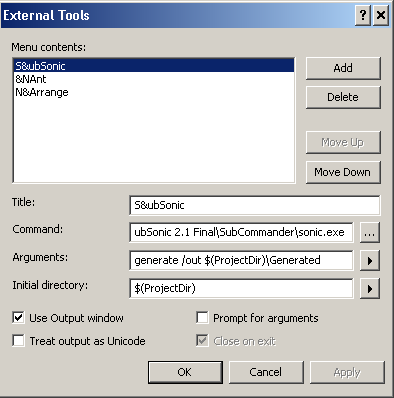
This will generate the code for the DAL based on your
settings in the web.config file.
3. Speaking of which here is a sample of the important
parts of the web.config
1: <configSections>
2: <section name="SubSonicService" type="SubSonic.SubSonicSection, SubSonic" requirePermission="false" />
3:
4: <connectionStrings>
5: <add name="connectionname" connectionString="Data Source=servername; Database=databasename; Integrated Security=true;" />
6: </connectionStrings>
7:
8: <SubSonicService defaultProvider="providername">
9: <providers>
10: <clear/>
11: <add name="providername" type="SubSonic.SqlDataProvider, SubSonic" connectionStringName="connectionname" generatedNamespace="yournamespace"/>
12: </providers>
13: </SubSonicService>
14: </configuration>
Just swap out connectionname, databasename, providername and
yournamespace with your values.
4. Now the fun bit. Run Tools>>SubSonic. This
will automatically generate the code for your ORM classes in
a directory called Generated within your VS project. That is
all you need to get up and running.
References:-
Getting started with SubSonic
For Web Sites - Using the BuildProvider
Video on getting started with SubSonic
Setting up SubSonic