Contents tagged with Visual Basic
-
VB.NET IF() Coalesce and “Expression Expected” Error
I am trying to use the equivalent of the C# “??” operator in some VB.NET code that I am working in.
This StackOverflow article for “Is there a VB.NET equivalent for C#'s ?? operator?” explains the VB.NET IF() statement syntax which is exactly what I am looking for... and I thought I was going to be done pretty quickly and could move on.
But after implementing the IF() statement in my code I started to receive this error:
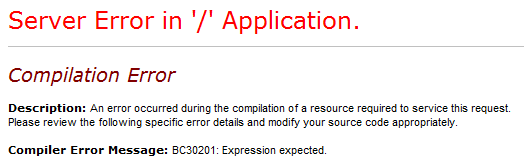
Compiler Error Message: BC30201: Expression expected.
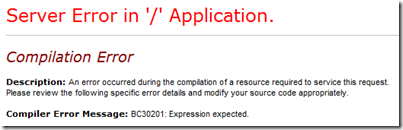
And no matter how I tried using the “IF()” statement, whenever I tried to visit the aspx page that I was working on I received the same error.
This other StackOverflow article Using VB.NET If vs. IIf in binding/rendering expression indicated that the VB.NET IF() operator was not available until VS2008 or .NET Framework 3.5. So I checked the Web Application project properties but it was targeting the .NET Framework 3.5:

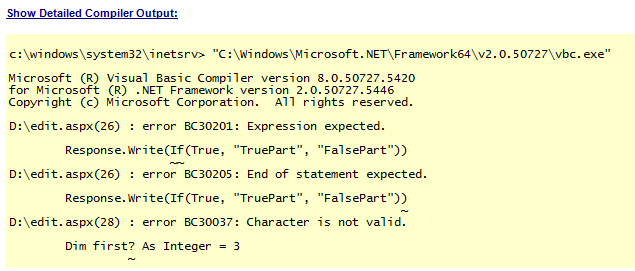
So I was still not understanding what was going on, but then I noticed the version information in the detailed compiler output of the error page:
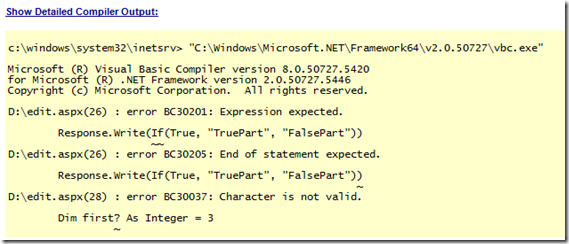
This happened to be a C# project, but with an ASPX page with inline VB.NET code (yes, it is strange to have that but that is the project I am working on). So even though the project file was targeting the .NET Framework 3.5, the ASPX page was being compiled using the .NET Framework 2.0. But why? Where does this get set? How does ASP.NET know which version of the compiler to use for the inline code?
For this I turned to the web.config. Here is the system.codedom/compilers section that was in the web.config for this project:
<system.codedom>
<compilers>
<compiler language="c#;cs;csharp" extension=".cs" warningLevel="4" type="Microsoft.CSharp.CSharpCodeProvider, System, Version=2.0.0.0, Culture=neutral, PublicKeyToken=b77a5c561934e089">
<providerOption name="CompilerVersion" value="v3.5" />
<providerOption name="WarnAsError" value="false" />
</compiler>
</compilers>
</system.codedom>Keep in mind that this is a C# web application project file but my aspx file has inline VB.NET code. The web.config does not have any information for how to compile for VB.NET so it defaults to .NET 2.0 (instead of 3.5 which is what I need).
So the web.config needed to include the VB.NET compiler option. Here it is with both the C# and VB.NET options (I copied the VB.NET config from a new VB.NET Web Application project file).
<system.codedom>
<compilers>
<compiler language="c#;cs;csharp" extension=".cs" warningLevel="4" type="Microsoft.CSharp.CSharpCodeProvider, System, Version=2.0.0.0, Culture=neutral, PublicKeyToken=b77a5c561934e089">
<providerOption name="CompilerVersion" value="v3.5" />
<providerOption name="WarnAsError" value="false" />
</compiler>
<compiler language="vb;vbs;visualbasic;vbscript" extension=".vb" warningLevel="4" type="Microsoft.VisualBasic.VBCodeProvider, System, Version=2.0.0.0, Culture=neutral, PublicKeyToken=b77a5c561934e089">
<providerOption name="CompilerVersion" value="v3.5"/>
<providerOption name="OptionInfer" value="true"/>
<providerOption name="WarnAsError" value="false"/>
</compiler>
</compilers>
</system.codedom>So the inline VB.NET code on my aspx page was being compiled using the .NET Framework 2.0 when it really needed to be compiled with the .NET Framework 3.5 compiler in order to take advantage of the VB.NET IF() coalesce statement. Without the VB.NET web.config compiler option, the default is to compile using the .NET Framework 2.0 and the VB.NET IF() coalesce statement does not exist (at least in the form that I want it in). FYI, there is an older IF statement in VB.NET 2.0 compiler which is why it is giving me the unusual “Expression Expected” error message – see this article for when VB.NET got the new updated version.
EDIT (2011-06-20): I had made a wrong assumption in the first version of this blog post. After a little more research and investigation I was able to figure out that the issue was in the web.config and not with the IIS App Pool. Thanks to the comment from James which forced me to look into this again.
-
How to change the Target Framework Version for a Visual Basic Project
Today I received the following warning message from Visual Studio while adding a reference in a Visual Basic project:

The Target Framework version for the project ‘XXXX’ is higher than the current Target Framework version.
Would you like to add this reference to your project anyway?This warning message makes complete sense since the Visual Basic project I was working on is targeting the .NET Framework 2.0 and the project that was being referenced targeted the .NET Framework 3.5. The only issue was that I was not able to figure out how to change the Target Framework Version in a Visual Basic project.
In a C# project it is pretty easy; right-click on the project and choose properties and in the Application tab (vertical tab) you will see the Target Framework dropdown box:

But in Visual Basic it is hidden. Here is where I found how to change the Target Framework version after searching for a bit:
Right-click on the project and choose properties and then select the Compile tab (vertical tab).

At the bottom of the Project > Compile tab you will find an Advanced Compile Options… button.

In this dialog called the Advanced Compiler Settings is where you will find how to change the Target Framework version for Visual Basic.

-
nvarchar(max) parameters need the size set to -1
SQL Server 2005 supports a new data type nvarchar(max). This is one of the new max datatypes that are to replace ntext, text, and image in a future version of SQL Server (according to SQL Server Books Online) but you should start using them now.
I recently used the nvarchar(max) data type for the first time in a stored procedure and I had some difficulty setting the parameter size in my C# code. I tried leaving off the size or setting it to the size of the string that was being passed to the stored procedure but none of these worked. Eventually I figured out that you have to set the size to -1 to get it to work.
Here is an example of how to create the SqlClient.SqlParameter:
System.Data.SqlClient.SqlParameter param;
param = new System.Data.SqlClient.SqlParameter();
param.ParameterName = "@Message";
param.SqlDbType = System.Data.SqlDbType.NVarChar;
param.Size = -1;
cmd.Parameters.Add(param);