Start/Stop Window Service from ASP.NET page
Update: The article has been selected as "Article of the day" on 30th April 2011 at official asp.net (http://www.asp.net) site
Last week, I needed to complete one task on which I am going
to blog about in this entry. The task is "Create a control
panel like webpage to control (Start/Stop) Window Services
which are part of my solution installed on computer where
the main application is hosted".
Here are the
important points to accomplish:
[1] You need to add
System.ServiceProcess
reference in your application. This namespace holds
ServiceController Class
to access the window service.
[2] You need to
check the status of the window services before you
explicitly start or stop it.
[3] By default, IIS
application runs under ASP.NET account which doesn't have
access rights permission to window service. So, Very
Important part of the solution is:
Impersonation. You need to impersonate the application/part of the code
with the User Credentials which is having proper rights and
permission to access the window service.
If you
try to access window service it will generate "access
denied"
error.
The alternatives are: You can either
impersonate whole application by adding Identity tag in
web.cofig as:
<identity impersonate="true"
userName="" password=""/>
This tag will be
under System.Web section. the "userName" and "password" will
be the credentials of the user which is having rights to
access the window service. But, this would not be a wise and
good solution; because you may not impersonate whole website
like this just to have access window service (which is going
to be a small part of code).
Second alternative
is: Only impersonate part of code where you need to access
the window service to start or stop it. I opted this one.
But, to be fair; I am really unaware of the code part for
impersonation. So, I just googled it and injected the code
in my solution in a separate class file named as
"Impersonate" with required static methods. In Impersonate
class; impersonateValidUser() is the method to impersonate a
part of code and undoImpersonation() is the method to undo
the impersonation. Below is one example:
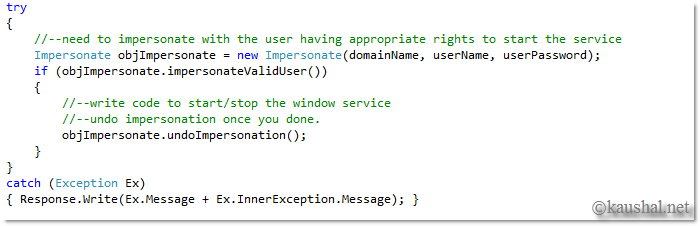
You need to provide domain name (which is "." if you are
working on your home computer), username and password of
appropriate user to impersonate.
[4] Here, it is
very important to note that: You need to have to store the
Access Credentials (username and password) which you are
going to user for impersonation; to some secured and
encrypted format. I have used Machinekey Encryption to store
the value encrypted value inside database.
[5] So
now; The real part is to start or stop a window service. You
are almost done; because ServiceController class has simple
Start() and Stop() methods to start or stop a window
service. A ServiceController class has parametrized
constructor that takes name of the service as parameter.
Code
to Start the window service:

Code to Stop the window service:
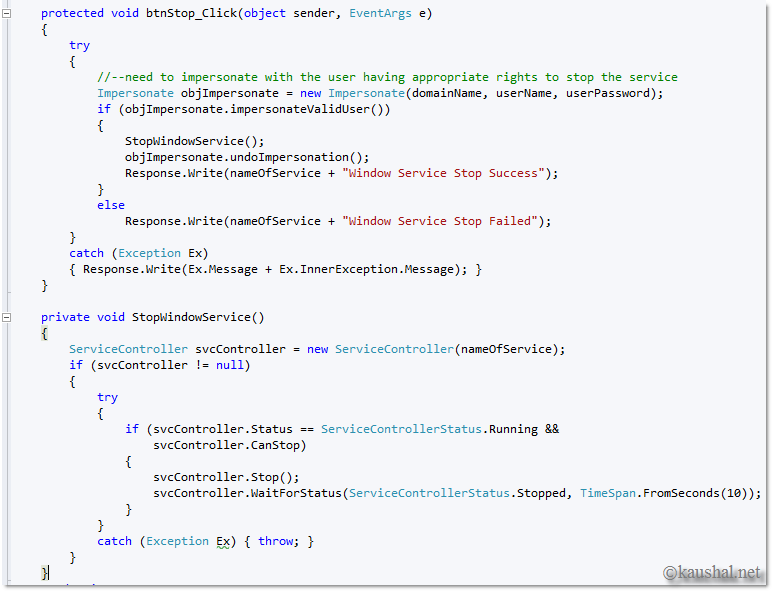
Isn't that too easy! ServiceController made it easy :) I have attached a working example with this post here to start/stop "SQLBrowser" service where you need to provide proper credentials who have permission to access to window service.

hope it would helps./.