The approach to managing persistent data has been
a key design decision in every software project
we’ve worked on. Given that persistent data isn’t
a new or unusual requirement for .NET
applications, you’d expect to be able to make a
simple choice among similar, well-established
persistence solutions. Each of the competing
solutions has various advantages and
disadvantages, but they all share the same scope
and overall approach.
Having said that, making the right decision
requires a fairly good knowledge of the ORM
solutions currently available for .NET. In other
words, if all you know is one ORM and one only,
then you won't have much of a choice in there, you
always have to go with the only framework
that you know of and sometimes it might
not be the best solution for your specific
project. Entity Framework could be a viable
option, an approach to persistence, proposes to
provide a ORM solution with the full commercial
support and backing of Microsoft. But is that
really enough reason for us to simply ignore just
about everything else?
|
What is NHibernate and Why Should You
Care?
|

|
|
|
NHibernate
is an ambitious open source project that aims to
be a complete solution to the problem of managing
persistent data in .NET. NHibernate is a .NET port
of the very popular and successful Java
Hibernate
library and is one of the most mature, powerful
ORM frameworks available in .NET today, an
important option and one that you shouldn't
ignore.
|
What is the Goal of This Post?
From my experience with the .NET user community, I
know that the first thing many developers
(especially those with a history of using MS tools
and frameworks like EF) say when it comes to
NHibernate is that it's a sophisticated framework
and has a steep learning curve. In this series of
posts I'll walk you through the process of
building a project with NHibernate and will show
how you can leverage your EF knowledge to get up
and running with NH as quickly and easily as
possible.
This writing is not a debate on EF vs.
NHibernate, nor is a comparison to show which one
is better than the other. I'll just present the
advantages and drawbacks of the two approaches to
you and will show their solutions for various
persistence problems. My hope is that at the end
it gives you an insight to conclude which one is
a better persistence solution for your specific
project.
A Note For Those Who Never Worked with Any ORM
Before
Keep reading! The title of this series might be a
bit misleading as I don't assume any knowledge of
EF when explaining NHibernate, of course being
familiar with one ORM solution like EF would help
but is absolutely not a requirement so with a
little extra effort, you can learn NHibernate just
like the EF developers.
Your First NHibernate Project
Open your Visual Studio and create a new Console
Application project. Before you can start coding
your first NHibernate application, you need to
reference NHibernate binaries. NHibernate 3.1.0.GA
can be downloaded from
here. Download and extract the zip file to some
location on your drive. The next step is to
reference the required binaries in your new
project. To do this, follow these steps:
-
Right-click the project and select
Add Reference...
-
Click the Browse... button and navigate
to the folder where NHibernate binaries are
extracted.
-
Open Required_Bins folder and select
NHibernate.dll. Click OK to add this
reference to your project.
-
Right-click again on the the project and
select Add Reference... and navigate to
the folder where NHibernate binaries are
extracted.
-
This time open
Required_For_LazyLoading folder and
then Castle folder.
-
Add a reference to
NHibernate.ByteCode.Castle.dll.
Now that your solution is set up, you’re ready to
start coding your first NHibernate application!
|
|
Creating a Domain Model
Just like my other posts on EF Code First, this
post takes a top-down approach; it assumes that
you’re starting with a domain model and trying to
derive a new SQL schema but this time with
NHibernate. When you’re using NHibernate, entities
are implemented as POCOs, a back-to-basics
approach that essentially consists of using
unbound classes in the business layer which leads
to the notion of persistence ignorance in our
applications. This results in entities with less
coupling that are easier to modify, test, and
reuse. EF also supports this pattern starting from
its second version (aka EF 4.0).
|
|
|
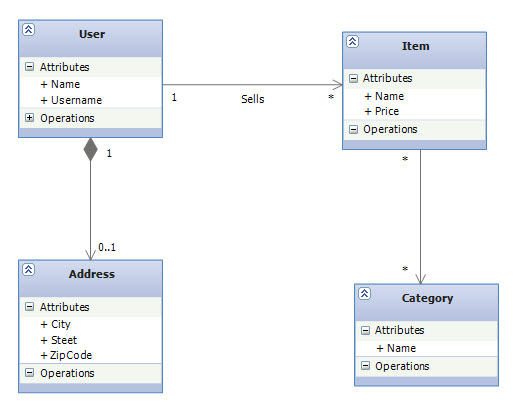
The following shows the POCO classes that form the
object model for this domain:
|
public class User
{
    public User()
    {
        Items = new List<Item>();
    }

    public virtual int UserId { get; private set; }
    public virtual string Name { get; set; }
    public virtual string Username { get; set; }

    public virtual Address Address { get; set; }
    public virtual IList<Item> Items { get; set; }

    public virtual void AddItem(Item item)
    {
        item.Seller = this;
        Items.Add(item);
    }
}

public class Address
{
    public virtual string Steet { get; set; }
    public virtual string City { get; set; }
    public virtual string ZipCode { get; set; }
}

public class Item
{
    public Item()
    {
        Categories = new List<Category>();
    }

    public virtual int ItemId { get; private set; }
    public virtual string Name { get; set; }
    public virtual double Price { get; set; }

    public virtual User Seller { get; set; }
    public virtual IList<Category> Categories { get; set; }
}

public class Category
{
    public Category()
    {
        Items = new List<Item>();
    }

    public virtual int CategoryId { get; private set; }
    public virtual string Name { get; set; }

    public virtual IList<Item> Items { get; set; }

    public virtual void AddItem(Item item)
    {
        item.Categories.Add(this);
        Items.Add(item);
    }
}
|
The POCO classes are pretty straight forward,
except you might wondering what the AddItem
methods are for in there, for now, think of the
code in the AddItem (a convenience method) as
implementing a strong bidirectional association in
the object model.
How Mappings are Specified in NHibernate?
Just like EF, NHibernate gives you different ways
to specify mappings for your persistent classes.
You can use XML files, CLR attributes or Fluent
API.
-
Mapping using XML
The ability of mapping classes with XML is what
NHibernate inherits from Hibernate, where
usually each persistent class has an XML mapping
file ends with the .hbm.xml extension and is
embedded in the same assembly as the mapped
class file. This is analogous to an EF's Edmx
file but unlike Edmx files, these HBM mapping
documents are lightweight, human readable,
easily hand-editable and can be easily
manipulated by version-control systems. Although
Visual Studio comes with a designer support for
Edmx files, but the problem is that this support
is somewhat limited and you sometimes have to
drill down to the underlying XML file to define
your desired mapping or behavior, examples like
creating a
TPC
mapping or defining
QueryViews. I personally didn't find editing the raw XMLs
in Edmx files (and dealing with an Edmx file in
general) a fun practice and I think this is a
common feeling throughout the community as we
see more and more developers are leaning toward
Code First development
to keep their projects away from an Edmx file.
- Attribute-oriented Mapping
Alternatively, you can use CLR attributes
defined in the
NHibernate.Mapping.Attributes
library to provide all the information
NHibernate needs to map your classes. This is
comparable to the new attributes that the latest
release of EF (EF 4.1) provides in
System.ComponentModel.DataAnnotations
namespace which you can use to map your classes
when doing EF Code First development except that
EF annotations are not complete and you often
have to resort to fluent API to do the mappings
(Examples like creating a
TPC
mapping, customizing a
TPH
mapping, specifying cascade deletes on
associations or customizing the mapping for a
many-to-many association.).
- Fluent Mapping
Fluent mapping is based on a
Fluent Interface
that allows you to map your entities completely
in code, with all the compile-time safety and
refactorability that it brings. Just like the
fluent API in EF Code First,
Fluent NHibernate
project provides an alternative to NHibernate's
standard XML mapping files. As a result, rather
than writing XML documents, you write mappings
in strongly typed C# (or VB) code. It's even has
a concept called
Auto Mapping
which is a mechanism for automatically mapping
all your entities based on a set of conventions.
This is very similar to the EF Code First as
they both follow the
convention over configuration
principle. In this post we use Fluent NHibernate
to map our persistent classes since this allows
for easy refactoring, improved readability and
more concise and elegant code. More importantly,
if you used Code First fluent API before, you'll
find this approach very familiar.
|
Adding Fluent NHibernate to the Project
|

|
|
|
Fluent NHibernate is a separate open source
project that needs to be referenced in your
project before you can start using its fluent
interfaces to map your persistent classes. You can
download the binaries from
here. Once you've got a copy on your local machine,
right-click the project and select
Add Reference... and then reference the
FluentNHibernate.dll
assembly which is inside the extracted folder from
the zip file you downloaded.
|
Mapping Entities and Components
In EF Code First, we use
EntityTypeConfiguration
class to define a mapping for an entity. We derive
from this class to create a mapping, and use its
constructor to control how our entity is
persisted. Fluent NHibernate has the same approach
except that it differs between an entity and a
value object
in essence that if you are mapping an entity you'd
use
ClassMap
and if you are mapping a value object you'd use
ComponentMap
class. The reason for this naming is because
NHibernate uses the term component for a
user-defined class that is persisted to the same
table as the owning entity. A Component is the
exact same concept as a
Complex Type
in EF: an object that has no individual identity.
The following code shows how to register the
Address class as a component as well as how to
specify UserId as the object identifier:
|
class UserMap : ClassMap<User>
{
    public UserMap()
    {
        Id(u => u.UserId);
        Component(u => u.Address);
    }
}
|
Associations in Entity Framework and NHibernate
As you may know, foreign keys in the first release
of EF were not exposed on entities, something we
know by the the name of
independent associations. These
associations were managed which means they had
their own independent entry in the
ObjectStateManager where each entry (of course)
has its own EntityState. These independent
associations make a few things such as N-Tier and
concurrency really difficult. For example,
concurrency checks were performed on relationships
independently of the concurrency checks performed
on entities, and there was no way to opt out of
these relationship concurrency checks. The result
was that your services must carry the original
values of relationships and set them on the
context before changing relationships. Because of
this and a few other problems, these associations
eventually became deprecated in the second release
of EF and a new type of association called
foreign key associations
has been introduced where foreign keys were
exposed in the persistent classes along with their
related object references (aka navigation
properties). The concurrency problem has been
solved because now the relationship is simply a
property of the entity, and if the entity passes
its concurrency check, no further check is needed.
Now you can change a relationship just by changing
the foreign key value.
I have mixed feelings about these foreign key
associations. On the one hand, it's not managed
anymore and doesn’t expose us to all the problems
of independent associations but on the other hand,
foreign keys are part of the
impedance mismatch
problem and should not be in the object model.
They add noise to the persistence classes and they
even introduce some new problems. For example,
having foreign keys as well as object references
for relationship navigation presents the problem
of two different artifacts representing one
relationship – this introduces complexity and now
you have to make sure that you keep these two in
sync.
On the other hand, the NHibernate association
model is interesting. Foreign keys correctly don't
need to be part of the entities but at the same
time NHibernate doesn’t "manage" persistent
associations. It's kind of the best of two worlds
approach. In NHibernate, if you want to manipulate
an association, you must write exactly the same
code you would write without NHibernate. If an
association is bidirectional, both sides of the
relationship must be considered. As you can see in
the model, the Employee class, for example,
doesn't reflect the ProductId foreign key from the
database. Next, you'll see how associations are
mapped in NHibernate.
|
Associations in NHibernate are Directional
It’s important to understand that NHibernate
associations are all inherently unidirectional. As
far as NHibernate is concerned, the association
from Item to User is a different association than
the association from User to Item. To EF
developers, this might seems strange; I’ll merely
observe that this decision was made because unlike
EF, NHibernate objects aren’t bound to any
context. In NHibernate applications, the behavior
of a nonpersistent instance is the same as the
behavior of a persistent instance.
Because associations in NHibernate are
directional, we call the association from Item to
User a many-to-one association (many Items
sold by one user, hence many-to-one). You can now
conclude that the inverse association from User to
Item is a one-to-many association. The
following shows the mapping code with Fluent
NHibrenate for the Item entity:
|
public class ItemMap : ClassMap<Item>
{
    public ItemMap()
    {
        Id(i => i.ItemId);
        Map(i => i.Name);
        Map(i => i.Price);

        References(i => i.Seller)
            .Column("UserId")
            .Not.Nullable();
    }
}
|
|
The
References
method creates a many-to-one relationship between
two entities. So far we have created a
unidirectional many-to-one association. The
column UserId in the Item table is a
foreign key to the primary key of the User table.
|
Making the Association Bidirectional
Now let's have a look at the mapping for the User
entity as the other end of the User-Item
association. Here we use the
HasMany
method to create a one-to-many association from
User to Item:
|
public class UserMap : ClassMap<User>
{
    public UserMap()
    {
        Id(u => u.UserId);
        Map(u => u.FullName).Length(50);
        Map(u => u.UserName).Not.Nullable().Unique();

        Component(u => u.Address);

        HasMany(u => u.Items)
            .Cascade.All()
            .Inverse()
            .KeyColumn("UserId");
    }
}
|
The mapping defined by the KeyColumn method
is a foreign-key column of the associated Item
table. Note that we specified the same foreign-key
column name in this collection mapping as we
specified in the mapping for the many-to-one
association. Now we have two different
unidirectional associations mapped to the same
foreign key. At this point, all we need to do is
to tell NHibernate to treat this as a
bidirectional association. The
Inverse method tells NHibernate that the
collection is a mirror image of the many-to-one
association on the other side and we are done.
Mapping a Many-to-Many Association
HasManyToMany
method creates a many-to-many relationship and we
use it to map the association between Item and
Category entities. In NHiberbate, a bidirectional
association always requires that you set both ends
of the association and a many-to-many association
is not an exception:
|
public class CategoryMap : ClassMap<Category>
{
    public CategoryMap()
    {
        Id(c => c.CategoryId);
        Map(c => c.Name);

        HasManyToMany(c => c.Items)
            .Cascade.All()
            .Table("ItemCategory");
    }
}
|
public class ItemMap : ClassMap<Item>
{
    public ItemMap()
    {
        Id(i => i.ItemId);
        Map(p => p.Name);
        Map(i => i.Price);

        References(i => i.Seller)
            .Column("UserId")
            .Not.Nullable();

        HasManyToMany(i => i.Categories)
            .Cascade.All()
            .Inverse()
            .Table("ItemCategory");
    }
}
|
|
When you map a bidirectional many-to-many
association, you must declare one end of the
association using Inverse method to define
which side’s state is used to update the link
table. I chose the Item entity to be the inversed
end of this many-to-many association. This setting
tells NHibernate to ignore changes made to the
Categories collection and use the other end of the
association— the items collection —as the
representation that should be synchronized with
the database.
|
NHibernate Configuration and Schema Generation
The object model and its mappings are ready and
now all we need to do is to wire them to
NHibernate. Fluent NH can help us with this as
well since it provides an API for completely
configuring NHibernate for use with your
application, all in code. The following shows how:
|
ISessionFactory factory = Fluently.Configure()
        .Database(MsSqlConfiguration.MsSql2008
                .ConnectionString(c =>
                        c.FromConnectionStringWithKey("SQLExpress")))
        .Mappings(m => m.FluentMappings.AddFromAssemblyOf<Program>())
        .ExposeConfiguration(config =>
        {
            SchemaExport schemaExport = new SchemaExport(config);
            schemaExport.Drop(true, true);
            schemaExport.Create(true, true);
        })
        .BuildSessionFactory();
|
Fluently.Configure starts the configuration
process. The Database method is where you
specify your database configuration using the
database configuration API. ExposeConfiguration is optional, but
allows you to alter the raw Configuration object.
BuildSessionFactory is the final call, and
it creates the NHibernate
SessionFactory instance from your
configuration. We'll take a closer look at
ISessionFactory and other NHibernate's core
interfaces in the next post.
As you may have noticed, this code also generates
the DDL from the object model and executes it
against the target database but with one caveat:
You need to manually create the database yourself
before running this code since NHibernate will
not create the database for you. Like the
class name suggests (SchemaExport), it only
creates the schemas in the database. After
creating the database, you can run this code as
many times as you want, as it is designed just
like EF Code First's
DropCreateDatabaseAlways
strategy.
SQL Schema
|
|
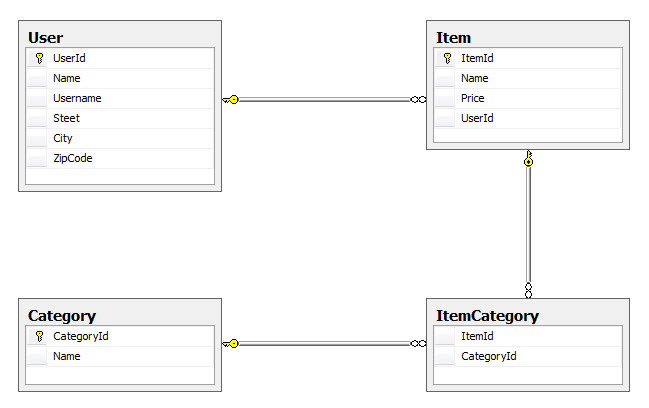
The presented object model will result in the
creation of the following schema in the database:
|
|
Source Code
Click
here
to download the source code for the project that
we have built in this post.
|
Summary
In this post, we take a high-level look at
NHibernate and its mapping system by running a
simple example. We also saw how to configure
NHibernate with Fluent NHibernate, a technique
similar to EF Fluent API which saves us from
dealing with XML mapping files. This post sets the
basis for the next part where we will focus more
on the dynamic behavioral aspects of NHibernate,
something that comes into play at runtime and
we'll see how it differs from EF in that area.
|