A simple strategy for mapping classes to database
tables might be “one table for every entity persistent
class.” This approach sounds simple enough and,
indeed, works well until we encounter inheritance.
Inheritance is such a visible structural mismatch
between the object-oriented and relational worlds
because object-oriented systems model both “is a” and “has a” relationships. SQL-based models
provide only "has a" relationships between entities;
SQL database management systems don’t support type
inheritance—and even when it’s available, it’s usually
proprietary or incomplete.
There are three
different approaches to representing an inheritance
hierarchy:
-
Table per Hierarchy (TPH): Enable
polymorphism by denormalizing the SQL schema, and
utilize a type discriminator column that holds
type information.
-
Table per Type (TPT):
Represent "is a" (inheritance) relationships as
"has a" (foreign key) relationships.
-
Table per Concrete class (TPC):
Discard polymorphism and inheritance relationships
completely from the SQL schema.
I will explain each of these strategies in a series of
posts and this one is dedicated to TPH. In this series
we'll deeply dig into each of these strategies and
will learn about "why" to choose them as well as "how"
to implement them. Hopefully it will give you a better
idea about which strategy to choose in a particular
scenario.
Inheritance Mapping with Entity Framework Code First
All of the inheritance mapping strategies that we
discuss in this series will be implemented by EF Code
First CTP5. The CTP5 build of the new EF Code First
library has been
released
by ADO.NET team earlier this month. EF Code-First
enables a pretty powerful code-centric development
workflow for working with data. I’m a big fan of the
EF Code First approach, and I’m pretty excited about a
lot of productivity and power that it brings. When it
comes to inheritance mapping, not only Code First
fully supports all the strategies but also gives you
ultimate flexibility to work with domain models that
involves inheritance. The fluent API for inheritance
mapping in CTP5 has been improved a lot and now it's
more intuitive and concise in compare to CTP4.
A Note For Those Who Follow Other Entity Framework
Approaches
If you are following EF's "Database First" or "Model
First" approaches, I still recommend to read this
series since although the implementation is Code First
specific but the explanations around each of the
strategies is perfectly applied to all approaches be
it Code First or others.
A Note For Those Who are New to Entity Framework and
Code-First
If you choose to learn EF you've chosen well. If you
choose to learn EF with Code First you've done even
better. To get started, you can find a great
walkthrough by Scott Guthrie
here
and another one by ADO.NET team
here. In this post, I assume you already setup your
machine to do Code First development and also that you
are familiar with Code First fundamentals and basic
concepts. You might also want to check out my other
posts on EF Code First like
Complex Types
and
Shared Primary Key Associations.
A Top Down Development Scenario
These posts take a top-down approach; it
assumes that you’re starting with a domain model and
trying to derive a new SQL schema. Therefore, we start
with an existing domain model, implement it in C# and
then let Code First create the database schema for us.
However, the mapping strategies described are just as
relevant if you’re working bottom up, starting with
existing database tables. I’ll show some tricks along
the way that help you dealing with nonperfect table
layouts.
The Domain Model
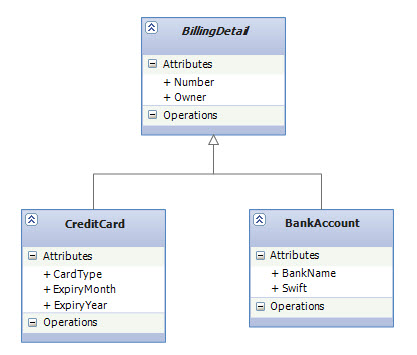
In our domain model, we have a
BillingDetail base class which is abstract
(note the italic font on the UML class diagram below).
We do allow various billing types and represent them
as subclasses of BillingDetail class. As for now, we
support CreditCard and BankAccount:
|
|
Implement the Object Model with Code First
As always, we start with the POCO classes. Note that
in our DbContext, I only define one
DbSet for the base class
which is BillingDetail. Code First will find the other
classes in the hierarchy based on
Reachability Convention.
|
public abstract class BillingDetail
{
    public int BillingDetailId { get; set; }
    public string Owner { get; set; }
    public string Number { get; set; }
}

public class BankAccount : BillingDetail
{
    public string BankName { get; set; }
    public string Swift { get; set; }
}

public class CreditCard : BillingDetail
{
    public int CardType { get; set; }
    public string ExpiryMonth { get; set; }
    public string ExpiryYear { get; set; }
}

public class InheritanceMappingContext : DbContext
{
    public DbSet<BillingDetail> BillingDetails { get; set; }
}
|
|
This object model is all that is needed to enable
inheritance with Code First. If you put this in your
application you would be able to immediately start
working with the database and do CRUD operations.
Before going into details about how EF Code First maps
this object model to the database, we need to learn
about one of the core concepts of inheritance mapping:
polymorphic and non-polymorphic queries.
|
Polymorphic Queries
LINQ to Entities and EntitySQL, as object-oriented
query languages, both support
polymorphic queries—that is, queries for
instances of a class and all instances of its
subclasses, respectively. For example, consider the
following query:
|
IQueryable<BillingDetail> linqQuery = from b in context.BillingDetails select b;
List<BillingDetail> billingDetails = linqQuery.ToList();
|
| Or the same query in EntitySQL: |
string eSqlQuery = @"SELECT VAlUE b FROM BillingDetails AS b";
ObjectContext objectContext = ((IObjectContextAdapter)context).ObjectContext;
ObjectQuery<BillingDetail> objectQuery = objectContext.CreateQuery<BillingDetail>(eSqlQuery);
List<BillingDetail> billingDetails = objectQuery.ToList();
|
linqQuery and
eSqlQuery are both
polymorphic and return a list of objects of the
type BillingDetail, which is an abstract class
but the actual concrete objects in the list are of the
subtypes of BillingDetail: CreditCard and BankAccount.
Non-polymorphic Queries
All LINQ to Entities and EntitySQL queries are
polymorphic which return not only instances of the
specific entity class to which it refers, but all
subclasses of that class as well. On the other hand,
Non-polymorphic queries are queries whose
polymorphism is restricted and only returns instances
of a particular subclass. In LINQ to Entities, this
can be specified by using
OfType<T>()
Method. For example, the following query returns only
instances of BankAccount:
|
IQueryable<BankAccount> query = from b in context.BillingDetails.OfType<BankAccount>()
                                select b;
|
|
EntitySQL has
OFTYPE
operator that does the same thing:
|
string eSqlQuery = @"SELECT VAlUE b FROM OFTYPE(BillingDetails, Model.BankAccount) AS b";
|
|
In fact, the above query with
OFTYPE operator is a short
form of the following query expression that uses
TREAT
and
IS OF
operators:
|
string eSqlQuery = @"SELECT VAlUE TREAT(b as Model.BankAccount)
                     FROM BillingDetails AS b
                     WHERE b IS OF(Model.BankAccount)";
|
|
(Note that in the above query,
Model.BankAccount is the fully qualified name
for BankAccount class. You need to change "Model" with
your own namespace name.)
|
Table per Hierarchy (TPH)
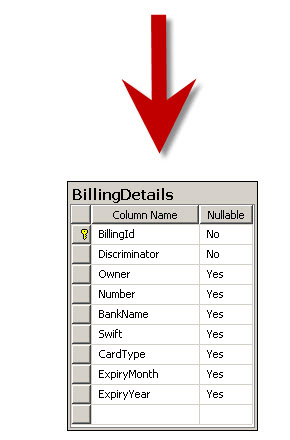
An entire class hierarchy can be mapped to a single
table. This table includes columns for
all properties of all classes in the
hierarchy. The concrete subclass represented by a
particular row is identified by the value of a
type discriminator column. You don’t have to do
anything special in Code First to enable TPH. It's the
default inheritance mapping strategy:
|
|
|
|
|
This mapping strategy is a winner in terms of both
performance and simplicity. It’s the
best-performing way to represent polymorphism—both
polymorphic and nonpolymorphic queries perform
well—and it’s even easy to implement by hand. Ad-hoc
reporting is possible without complex joins or unions.
Schema evolution is straightforward.
|
Discriminator Column
As you can see in the DB schema above, Code First has
to add a special column to distinguish between
persistent classes: the discriminator. This isn’t a
property of the persistent class in our object model;
it’s used internally by EF Code First. By default, the
column name is "Discriminator", and its type is
string. The values defaults to the persistent class
names —in this case, “BankAccount” or “CreditCard”. EF
Code First automatically sets and retrieves the
discriminator values.
|
TPH Requires Properties in SubClasses to be Nullable
in the Database
TPH has one major problem: Columns for properties
declared by subclasses will be nullable in the
database. For example, Code First created an (INT,
NULL) column to map CardType property in CreditCard
class. However, in a typical mapping scenario, Code
First always creates an (INT, NOT NULL) column in the
database for an int property
in persistent class. But in this case, since
BankAccount instance won’t have a CardType property,
the CardType field must be NULL for that row so Code
First creates an (INT, NULL) instead. If your
subclasses each define several non-nullable
properties, the loss of NOT NULL constraints may be a
serious problem from the point of view of data
integrity.
TPH Violates the Third Normal Form
Another important issue is normalization. We’ve
created
functional dependencies between nonkey columns, violating the
third normal form. Basically, the value of Discriminator column
determines the corresponding values of the columns
that belong to the subclasses (e.g. BankName) but
Discriminator is not part of the primary key
for the table. As always, denormalization for
performance can be misleading, because it sacrifices
long-term stability, maintainability, and the
integrity of data for immediate gains that may be also
achieved by proper optimization of the SQL execution
plans (in other words, ask your DBA).
|
Generated SQL Query
Let's take a look at the SQL statements that EF Code
First sends to the database when we write queries in
LINQ to Entities or EntitySQL. For example, the
polymorphic query for BillingDetails that you saw,
generates the following SQL statement:
|
SELECT
[Extent1].[Discriminator] AS [Discriminator],
[Extent1].[BillingDetailId] AS [BillingDetailId],
[Extent1].[Owner] AS [Owner],
[Extent1].[Number] AS [Number],
[Extent1].[BankName] AS [BankName],
[Extent1].[Swift] AS [Swift],
[Extent1].[CardType] AS [CardType],
[Extent1].[ExpiryMonth] AS [ExpiryMonth],
[Extent1].[ExpiryYear] AS [ExpiryYear]
FROM [dbo].[BillingDetails] AS [Extent1]
WHERE [Extent1].[Discriminator] IN ('BankAccount','CreditCard')
|
|
|
Or the non-polymorphic query for the BankAccount
subclass generates this SQL statement:
|
SELECT
[Extent1].[BillingDetailId] AS [BillingDetailId],
[Extent1].[Owner] AS [Owner],
[Extent1].[Number] AS [Number],
[Extent1].[BankName] AS [BankName],
[Extent1].[Swift] AS [Swift]
FROM [dbo].[BillingDetails] AS [Extent1]
WHERE [Extent1].[Discriminator] = 'BankAccount'
|
|
Note how Code First adds a restriction on the
discriminator column and also how it only selects
those columns that belong to BankAccount entity.
Change Discriminator Column Data Type and Values
With Fluent API
Sometimes, especially in legacy schemas, you need to
override the conventions for the discriminator column
so that Code First can work with the schema. The
following fluent API code will change the
discriminator column name to "BillingDetailType" and
the values to "BA" and "CC" for BankAccount and
CreditCard respectively:
|
protected override void OnModelCreating(DbModelBuilder modelBuilder)
{
    modelBuilder.Entity<BillingDetail>()
                .Map<BankAccount>(m => m.Requires("BillingDetailType").HasValue("BA"))
                .Map<CreditCard>(m => m.Requires("BillingDetailType").HasValue("CC"));
}
|
|
Also, changing the data type of discriminator column
is interesting. In the above code, we passed strings
to HasValue method but this
method has been defined to accepts a type of
object:
|
public void HasValue(object value);
|
|
Therefore, if for example we pass a value of type
int to it then Code First
not only use our desired values (i.e. 1 & 2) in
the discriminator column but also changes the column
type to be (INT, NOT NULL):
|
modelBuilder.Entity<BillingDetail>()
            .Map<BankAccount>(m => m.Requires("BillingDetailType").HasValue(1))
            .Map<CreditCard>(m => m.Requires("BillingDetailType").HasValue(2));
|
Summary
In this post we learned about Table per Hierarchy as
the default mapping strategy in Code First. The
disadvantages of the TPH strategy may be too serious
for your design—after all, denormalized schemas can
become a major burden in the long run. Your DBA may
not like it at all. In the next post, we will learn
about Table per Type (TPT) strategy that doesn’t
expose you to this problem.
References
|