Inheritance with EF Code First: Part 3 – Table per Concrete Type (TPC)
This is the third (and last) post in a series that
explains different approaches to map an inheritance
hierarchy with EF Code First. I've described these
strategies in previous posts:
In today’s blog post I am going to discuss Table per
Concrete Type (TPC) which completes the inheritance
mapping strategies supported by EF Code First. At the
end of this post I will provide some guidelines to
choose an inheritance strategy mainly based on what
we've learned in this series.
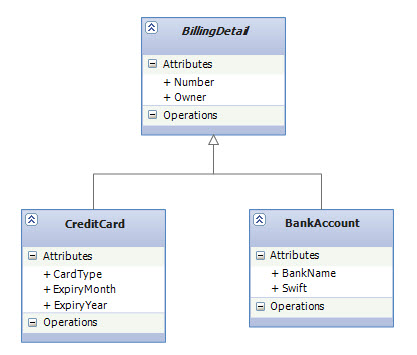
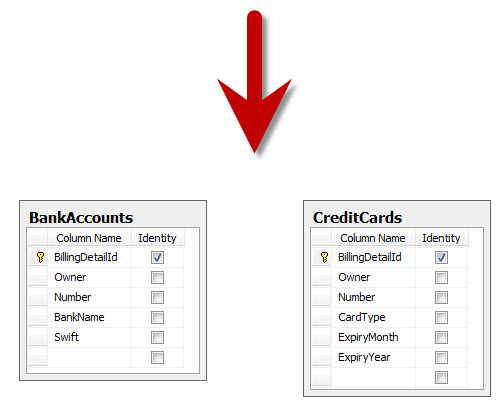
TPC and Entity Framework in the PastTable per Concrete type is somehow the simplest approach suggested, yet using TPC with EF is one of those concepts that has not been covered very well so far and I've seen in some resources that it was even discouraged. The reason for that is just because Entity Data Model Designer in VS2010 doesn't support TPC (even though the EF runtime does). That basically means if you are following EF's Database-First or Model-First approaches then configuring TPC requires manually writing XML in the EDMX file which is not considered to be a fun practice. Well, no more. You'll see that with Code First, creating TPC is perfectly possible with fluent API just like other strategies and you don't need to avoid TPC due to the lack of designer support as you would probably do in other EF approaches.Table per Concrete Type (TPC)In Table per Concrete type (aka Table per Concrete class) we use exactly one table for each (nonabstract) class. All properties of a class, including inherited properties, can be mapped to columns of this table, as shown in the following figure: |
||||
|
||||
|
||||
As you can see, the SQL schema is not aware of
the inheritance; effectively, we’ve mapped two
unrelated tables to a more expressive class
structure. If the base class was concrete, then an
additional table would be needed to hold
instances of that class. I have to emphasize that
there is no relationship between the database
tables, except for the fact that they share some
similar columns.
TPC Implementation in Code FirstJust like the TPT implementation, we need to specify a separate table for each of the subclasses. We also need to tell Code First that we want all of the inherited properties to be mapped as part of this table. In CTP5, there is a new helper method on EntityMappingConfiguration class called MapInheritedProperties that exactly does this for us. Here is the complete object model as well as the fluent API to create a TPC mapping: |
||||
public abstract class BillingDetail { public int BillingDetailId { get; set; } public string Owner { get; set; } public string Number { get; set; } } public class BankAccount : BillingDetail { public string BankName { get; set; } public string Swift { get; set; } } public class CreditCard : BillingDetail { public int CardType { get; set; } public string ExpiryMonth { get; set; } public string ExpiryYear { get; set; } } public class InheritanceMappingContext : DbContext { public DbSet<BillingDetail> BillingDetails { get; set; } protected override void OnModelCreating(DbModelBuilder modelBuilder) { modelBuilder.Entity<BankAccount>().Map(m => { m.MapInheritedProperties(); m.ToTable("BankAccounts"); }); modelBuilder.Entity<CreditCard>().Map(m => { m.MapInheritedProperties(); m.ToTable("CreditCards"); }); } } |
||||
|
||||
TPC Configuration is Not Done Yet!We are not quite done with our TPC configuration and there is more into this story even though the fluent API we saw perfectly created a TPC mapping for us in the database. To see why, let's start working with our object model. For example, the following code creates two new objects of BankAccount and CreditCard types and tries to add them to the database: |
||||
using (var context = new InheritanceMappingContext()) { BankAccount bankAccount = new BankAccount(); CreditCard creditCard = new CreditCard() { CardType = 1 }; context.BillingDetails.Add(bankAccount); context.BillingDetails.Add(creditCard); context.SaveChanges(); } |
||||
| Running this code throws an InvalidOperationException with this message: | ||||
|
The changes to the database were committed
successfully, but an error occurred while updating
the object context. The ObjectContext might be in an
inconsistent state. Inner exception message:
AcceptChanges cannot continue because the object's
key values conflict with another object in the
ObjectStateManager. Make sure that the key values
are unique before calling AcceptChanges.
|
||||
The reason we got this exception is because
DbContext.SaveChanges()
internally invokes
SaveChanges
method of its internal
ObjectContext. ObjectContext's SaveChanges method on its turn by
default calls
AcceptAllChanges
after it has performed the database modifications.
AcceptAllChanges method
merely iterates over all entries in
ObjectStateManager
and invokes
AcceptChanges
on each of them. Since the entities are in
Added
state, AcceptChanges method replaces their temporary
EntityKey
with a regular EntityKey based on the primary key
values (i.e. BillingDetailId) that come back from the
database and that's where the problem occurs since
both the entities have been assigned the same value
for their primary key by the database (i.e. on both
BillingDetailId = 1) and the problem is that
ObjectStateManager cannot
track objects of the same type (i.e. BillingDetail)
with the same EntityKey value hence it throws. If you
take a closer look at the TPC's SQL schema above,
you'll see why the database generated the same values
for the primary keys: the BillingDetailId column in
both BankAccounts and CreditCards table has been
marked as identity.
How to Solve The Identity Problem in TPCAs you saw, using SQL Server’s int identity columns doesn't work very well together with TPC since there will be duplicate entity keys when inserting in subclasses tables with all having the same identity seed. Therefore, to solve this, either a spread seed (where each table has its own initial seed value) will be needed, or a mechanism other than SQL Server’s int identity should be used. Some other RDBMSes have other mechanisms allowing a sequence (identity) to be shared by multiple tables, and something similar can be achieved with GUID keys in SQL Server. While using GUID keys, or int identity keys with different starting seeds will solve the problem but yet another solution would be to completely switch off identity on the primary key property. As a result, we need to take the responsibility of providing unique keys when inserting records to the database. We will go with this solution since it works regardless of which database engine is used.Switching Off Identity in Code FirstWe can switch off identity simply by placing DatabaseGenerated attribute on the primary key property and pass DatabaseGenerationOption.None to its constructor. DatabaseGenerated attribute is a new data annotation which has been added to System.ComponentModel.DataAnnotations namespace in CTP5: |
||||
public abstract class BillingDetail { [DatabaseGenerated(DatabaseGenerationOption.None)] public int BillingDetailId { get; set; } public string Owner { get; set; } public string Number { get; set; } } |
||||
| As always, we can achieve the same result by using fluent API, if you prefer that: | ||||
modelBuilder.Entity<BillingDetail>() .Property(p => p.BillingDetailId) .HasDatabaseGenerationOption(DatabaseGenerationOption.None); |
||||
Working With The Object ModelOur TPC mapping is ready and we can try adding new records to the database. But, like I said, now we need to take care of providing unique keys when creating new objects: |
||||
using (var context = new InheritanceMappingContext()) { BankAccount bankAccount = new BankAccount() { BillingDetailId = 1 }; CreditCard creditCard = new CreditCard() { BillingDetailId = 2, CardType = 1 }; context.BillingDetails.Add(bankAccount); context.BillingDetails.Add(creditCard); context.SaveChanges(); } |
||||
Polymorphic Associations with TPC is ProblematicThe main problem with this approach is that it doesn’t support Polymorphic Associations very well. After all, in the database, associations are represented as foreign key relationships and in TPC, the subclasses are all mapped to different tables so a polymorphic association to their base class (abstract BillingDetail in our example) cannot be represented as a simple foreign key relationship. For example, consider the domain model we introduced here where User has a polymorphic association with BillingDetail. This would be problematic in our TPC Schema, because if User has a many-to-one relationship with BillingDetail, the Users table would need a single foreign key column, which would have to refer both concrete subclass tables. This isn’t possible with regular foreign key constraints.Schema Evolution with TPC is ComplexA further conceptual problem with this mapping strategy is that several different columns, of different tables, share exactly the same semantics. This makes schema evolution more complex. For example, a change to a base class property results in changes to multiple columns. It also makes it much more difficult to implement database integrity constraints that apply to all subclasses. |
||||
Generated SQLLet's examine SQL output for polymorphic queries in TPC mapping. For example, consider this polymorphic query for all BillingDetails and the resulting SQL statements that being executed in the database: |
||||
var query = from b in context.BillingDetails select b; |
||||

|
||||
Just like the
SQL query generated by TPT mapping, the
CASE
statements that you see in the beginning of the query
is merely to ensure columns that are irrelevant for a
particular row have NULL values in the returning
flattened table. (e.g. BankName for a row that
represents a CreditCard type).
TPC's SQL Queries are Union BasedAs you can see in the above screenshot, the first SELECT uses a FROM-clause subquery (which is selected with a red rectangle) to retrieve all instances of BillingDetails from all concrete class tables. The tables are combined with a UNION operator, and a literal (in this case, 0 and 1) is inserted into the intermediate result; (look at the lines highlighted in yellow.) EF reads this to instantiate the correct class given the data from a particular row. A union requires that the queries that are combined, project over the same columns; hence, EF has to pad and fill up nonexistent columns with NULL. This query will really perform well since here we can let the database optimizer find the best execution plan to combine rows from several tables. There is also no Joins involved so it has a better performance than the SQL queries generated by TPT where a Join is required between the base and subclasses tables.Choosing Strategy GuidelinesBefore we get into this discussion, I want to emphasize that there is no one single "best strategy fits all scenarios" exists. As you saw, each of the approaches have their own advantages and drawbacks. Here are some rules of thumb to identify the best strategy in a particular scenario:
|
||||
SummaryIn this series, we focused on one of the main structural aspect of the object/relational paradigm mismatch which is inheritance and discussed how EF solve this problem as an ORM solution. We learned about the three well-known inheritance mapping strategies and their implementations in EF Code First. Hopefully it gives you a better insight about the mapping of inheritance hierarchies as well as choosing the best strategy for your particular scenario.Happy New Year and Happy Code-Firsting! References |