Obtaining screen resolution scale details in Windows 8 Metro Style App
If you want to know the current screen resolution and the pixels per inch (PPI) scale that your app is having to deal with on any device, use ResolutionScale.

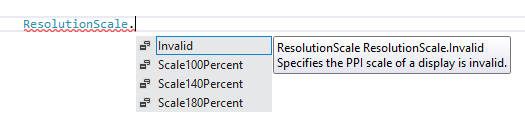
This is an enum with the following values:
For C#:
I have named the grid as BaseGrid and I can use the code below.
1: double height = BaseGrid.ActualHeight;
2: double width = BaseGrid.ActualWidth;
3: // using Windows.Graphics.Display;
4: ResolutionScale resolutionScale = DisplayProperties.ResolutionScale;
5: Display.Text = string.Format("Height: {0} Width: {1} ResolutionScale: {2}", height, width, resolutionScale);
For JavaScript:
1: var resolutionScale = Windows.Graphics.Display.DisplayProperties.resolutionScale;
2: var height = $('#bodyTag').outerHeight(true);
3: var width = $('#bodyTag').outerWidth(true);
4: $('#resolution').text('Height: ' + height + ' Width: ' + width + ' ResolutionScale: ' + resolutionScale);
The functions outerHeight() has the following description:
“Get the current computed height for the first element in the set of matched elements, including padding, border and optionally margin. Returns an integer (without 'px') representation of the value of null if called on an empty set of elements.”
Passing true to the outer* functions includes the margin in the computation as well.
You can see different values for resolution scale if you run the app in simulator mode and change the resolution. Just make sure to rerun the app after changing the resolution.
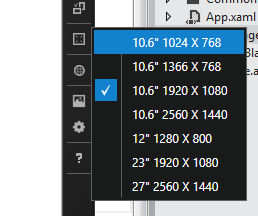
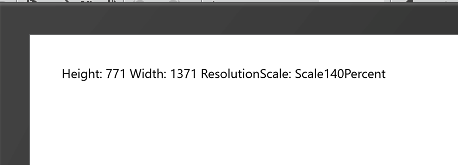
I did do the calculation. 771 x 1.4 is pretty close to 1080.
One thing I found a bit weird was that the resolution scale values get displayed differently in both C# and JavaScript apps. The above screenshot is from C# where it shows the complete enum ‘Scale140Percent’, the below screenshot is from JavaScript app.

I have raised this as a concern on the Connect Microsoft site. Will update this article when I hear from them.
UPDATE: According to the update from Microsoft, the both JavaScript and C# versions will show the values of ResolutionScale differently. This seems to be by design.
UPDATE2: Here's another update I got on the
concern:
"The JavaScript debugger is designed to inspect
objects and accurately represent the values as they appear
to user code. There are no special visualizers to show other
representations of the underlying objects. In this case the
value for the resolution scale is literally 140. In C# the
CLR has chosen to special case the values an expose them
differently.
In JavaScript, however, the value is
simply a number with no special meaning. While the debugger
could show something else for this specific case we decided
that consistency with what was exposed to user code over
consistency with C# is the better choice.
I’ll pass on
the feedback to the JavaScript projection team but due to
the design of the JavaScript language many concepts, such as
enums, cannot always be expressed consistently across
languages."